Category: Blog

  • Updating Teslamate to the Latest Version

    I noticed Teslamate wasn’t updated. In fact, I hadn’t had any data captured in nearly a month and I’ve been too busy to notice. I was concerned something had happened, but I wasn’t sure what.

    This is part of a series that covers my experience with a Tesla Model Y.

    Troubleshooting

    I saw a few notes online that said to restart things, which I did. When I went to the home page of my installation, everything looked fine, but not data for the last 20 something days. On the settings page, I saw a message that I needed to include an encryption key as an environment variable, nothing else.

    One post said that I should delete the entry in the tokens table in the database to force a new login. So, I did that. I connected to the container with:

    docker compose exec database psql teslamate teslamate

    Then I ran a delete statement.

    2023-12-19 15_39_30-cmd

    When I went back to the home page, I did see a login page. Fortunately, I had the Tesla Tokens app on my phone and it generated new API keys for me. If you don’t have this, you need it.

    I still had the encryption key message and I didn’t have any data, so I decided to upgrade.

    Adding an Encryption Key

    In my Docker Compose file, I decided to add the encryption key. In the old file, I didn’t have the encryption key, so I copied the environment variable from the docs and added this in my file.

    ENCRYPTION_KEY=somekeyvalueImadeup

    No, that isn’t my password, but you can see the file below.

    2023-12-19 15_41_44-docker-compose.yml - PublicDocuments - Visual Studio Code

    Once this was done, I checked the update page and it said to be sure you were on docker compose v2. I wasn’t sure where I was, but I know I hadn’t updated Docker Desktop in awhile, so I went to that app, downloaded the update and applied it.

    Now I was ready.

    Upgrading Teslamate

    This is really easy. This is on the docs page. First, stop your containers with this:

    docker-compose down

    Next, run this

    docker compose pull

    As you can see, it started the update and had to pull down new images.

    2023-12-19 15_45_41-cmd

    Once this was done, I ran docker compose up and things were running. I got to the teslamate page, where it wanted me to log in again. Fortunately, I’d saved my API tokens. I entered them and I was in:

    2023-12-19 15_46_43-Overview - TeslaMate - Dashboards - Grafana — Mozilla Firefox

    Before this, the “Tina” in the upper left dropdown was nul and none of the temp values were populated.

    Hopefully I’ll have this working for some time, but I’ll set a reminder to upgrade things a couple times a year.

  • Friday Flyway Tips–The Version Control Blade

    The Flyway Desktop Version Control tab is gone and a new blade has appeared in its place. This post looks at the changes and what that means for a developer.

    I’ve been working with Flyway Desktop for work more and more as we transition from older SSMS plugins to the standalone tool. This series looks at some tips I’ve gotten along the way.

    The Version Control Tab

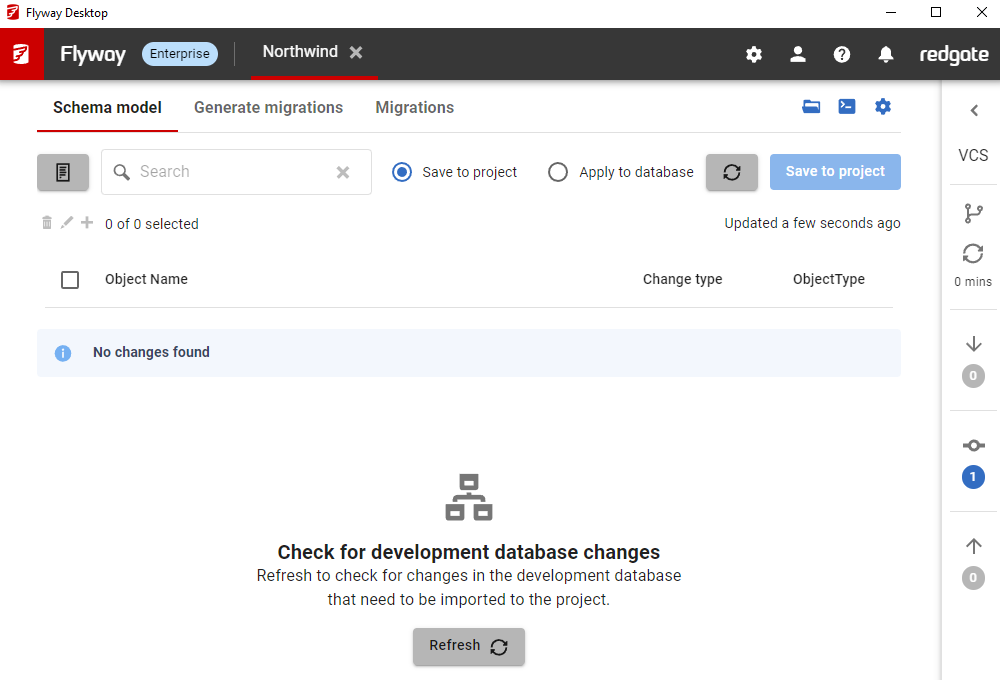
    It’s gone. Here’s an old screenshot of what this looked like. It was one of four tabs across the top of a project. Note that this just had the title, with no information.

    2023-12-13 18_01_48-Flyway Desktop

    That’s unlike most other tools that provide VCS features, in that there usually is some status. On the tab, you can see the files to be committed, and push/pull/etc., but you have to select the tab.

    2023-12-13 18_02_45-Flyway Desktop

    We wanted to do better.

    A Version Control Blade and Status Bar

    We realized that version control isn’t really part of the workflow of Flyway Desktop; it’s a separate function. We also had lots of requests to help developers know there are changes in the repo to commit, push, etc.

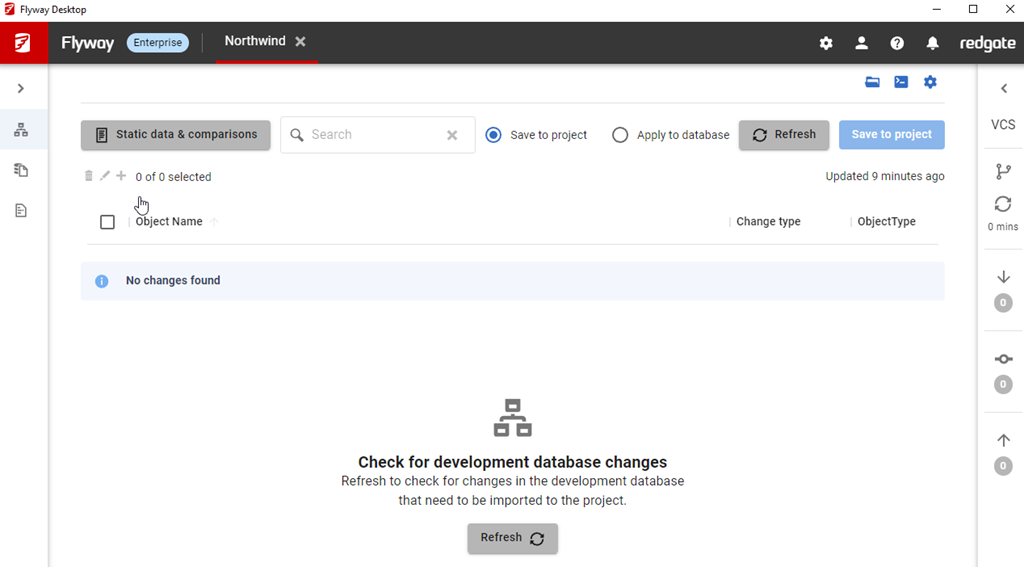
    We’ve been testing this for some time as a feature flag, which was annoying because I’d see the tab and the blade, but it released recently. I’m not sure which version got this, but it is in 7.0.3.

    You can see it below, on the right side. Note that we have an arrow at the top to expand this. We also have a branch icon, a refresh, which tells you the last time something push/pull/fetch’d, and then there are down arrow (remote commits not pulled), a circle with a line (uncommitted changes), and an up arrow (commits to push).

    2024-01-05 16_39_26-Flyway Desktop

    If I select the object listed, and click Save, I’ll see this after the operation completes I have an uncommitted change. Notice the “1” in the middle of the blade.

    2024-01-05 16_41_53-Flyway Desktop

    I can expand the blade, but I can just click the one (or icon) and I see the blade expand. From here, I can add a commit message and commit this change (if I select it).

    2024-01-05 16_42_01-Flyway Desktop

    I’ll make another change, generating a migration script. Now my expansion shows 3 changes, the schema file, the migration script and the undo script.

    2024-01-05 16_44_44-Flyway Desktop

    I’ll commit these three as one item. My blade closes after this and I see a committed change to push.

    2024-01-05 16_45_40-advocates - Redgate - Slack

    I’ll generate another migration script. In this case, I now see multiple changes. I see my two new migration scripts added, and I still have a commit to push.

    2024-01-05 16_48_43-Flyway Desktop

    If I expand the blade, I can see the details. For example, on the push tab, I can see the commit and files included. For a small screen, or small window, I get a tooltip if I hover and can see the full file name and path.

    Screenshot 2024-01-05 165157

    If I make a change in the remote, likewise, I’ll also see a commit to pull.

    2024-01-05 16_53_57-Flyway Desktop

    I’ll push and pull (and commit) and then I’ll see a clean list nothing in my VCS blade.

    Summary

    This isn’t a big change, and I’d argue this makes FWD much easier to use and more comfortable for many people. Developers are less likely to have their local repo out of synch with a remote.

    Try Flyway Desktop out today. If you haven’t worked with Flyway Desktop, download it today. There is a free version that organizes migrations and paid versions with many more features.

    Video Walkthrough

    I made a quick video showing this as well. You can watch it below, or check out all the Flyway videos I’ve added:

  • A New Word: Candling

    candling – v. intr. the habit of taking stock of your life on the occasion of your birthday, letting it serve as a kind of internal referendum on all your goals and qualities and relationships and accomplishments so far – which makes you want to dress a little nicer that day, as if you’re standing before a parole board that convenes once a year to adjudicate your release from childhood.

    Such an interesting and contradictory definition, at least to me. I like the first part, taking stock, but it’s not as though I’m being judged by others. Of course, this is a dictionary of obscure sorrows.

    Maybe even the “dress nicer” part makes sense to me, as that’s sorrow for me. I like to dress like a bum, or wear wild shirts, and just be comfortable. One of my bucket list items used to be to not wear ties anymore. However, as I age, and I see funerals, I accept it’s important to others I do so at times.

    Enough sorry.

    I used to do this, even in my 20s. I didn’t love attention or celebrations of me, especially on my birthday. They’ve always made me a little uncomfortable, which sounds funny coming from someone that does enjoy presenting and teaching people from a stage. However when I do that, I think it’s about others, and what I can do to help them.

    Many birthdays I went off by myself, at least for part of a day. Biking or on a kayak/sailboard on the water earlier in life, hiking or skiing later, to take stock of where I was and what I wanted to do in life. What direction? I didn’t do a life quest, but I did try to think about the direction in which I wanted to move.

    After getting married, I often used my birthday as a marker to decide if I was happy with my career and if I’d want to do something else. That’s helped me to decide when to continue on with a position and when to move.

    I still do a bit of that, but my candling has become a more regular thing, often when I hear of someone having success in some way, or making a change, or sadly, when someone has passed. And I know often do so with my wife, discussing where I am and what life would be like if I changed something.

    From the Dictionary of Obscure Sorrows

  • Quick AI Help from Bing

    I needed to run a few commands recently and I decided to use the Bing Copilot AI to help me. Here are a few examples of what happened.

    This is part of a series of experiments with the ChatGPT and other AI systems. Lots of Copilot lately.

    Finding Sample Data

    I was trying to replicate an issue from a client and needed to bcp in a lot of data. First, I asked about data sets. I got this response.

    2023-12-21 11_52_48-Microsoft Edge _ What's New and 23 more pages - Personal - Microsoft​ Edge

    This looks good, but if I click on any of these three links, I don’t get datasets. The first two go to questions on importing datasets, but not links to data. The third goes to an aritcle on importing data.

    Is that better than asking this question of a someone who might not be paying and gives me these links? Maybe.

    Rephrasings was better, as I clicked the first link and was able to get a site with data.

    2023-12-21 11_57_02-Download Sample CSV Files for free - Datablist and 27 more pages - Personal - Mi

    Both of these were less helpful than a Google search for “sample large csv”. The NZ site below had some very large 6mm plus rows.

    2023-12-21 11_58_43-sample large csv - Google Search

    Note for the record, I went back and tried this phrase in Bing and got the same datablist site above.

    Creating a bcp Command

    Next I needed the bcp to import a file. I used this prompt, and this worked well.

    2023-12-21 11_36_40-Microsoft Edge _ What's New and 23 more pages - Personal - Microsoft​ Edge

    The only change I needed was to change the path, since my file was on d:. My account defaulted to the right db, so this worked.

    Removing ScheduleID from an Agent Job

    One of the things I was discussing with a friend was the way SSMS scripts jobs. If I alter a job on my dev instance and script it, the jobid and the scheduleid are included. Since the creation of the returns a different GUID for each, I don’t want to use these if I update jobs. I just want the name.

    I asked Copilot to help.

    2023-12-22 14_09_11-Copilot and 27 more pages - Personal - Microsoft​ Edge

    If I follow this advice, then I would first script out the job from SSMS. In my case, I’ll grab a sample backup job and get this code:

    USE [msdb]
    GO

    /****** Object:  Job [Daily Backup]    Script Date: 12/22/2023 2:11:43 PM ******/
    BEGIN TRANSACTION
    DECLARE @ReturnCode INT
    SELECT @ReturnCode = 0
    /****** Object:  JobCategory [[Uncategorized (Local)]]    Script Date: 12/22/2023 2:11:44 PM ******/
    IF NOT EXISTS (SELECT name FROM msdb.dbo.syscategories WHERE name=N'[Uncategorized (Local)]’ AND category_class=1)
    BEGIN
    EXEC @ReturnCode = msdb.dbo.sp_add_category @class=N’JOB’, @type=N’LOCAL’, @name=N'[Uncategorized (Local)]’
    IF (@@ERROR <> 0 OR @ReturnCode <> 0) GOTO QuitWithRollback

    END

    DECLARE @jobId BINARY(16)
    EXEC @ReturnCode =  msdb.dbo.sp_add_job @job_name=N’Daily Backup’,
             @enabled=1,
             @notify_level_eventlog=0,
             @notify_level_email=0,
             @notify_level_netsend=0,
             @notify_level_page=0,
             @delete_level=0,
             @description=N’No description available.’,
             @category_name=N'[Uncategorized (Local)]’,
             @owner_login_name=N’ARISTOTLE\Steve’, @job_id = @jobId OUTPUT
    IF (@@ERROR <> 0 OR @ReturnCode <> 0) GOTO QuitWithRollback
    /****** Object:  Step [Ola Backup User DB]    Script Date: 12/22/2023 2:11:44 PM ******/
    EXEC @ReturnCode = msdb.dbo.sp_add_jobstep @job_id=@jobId, @step_name=N’Ola Backup User DB’,
             @step_id=1,
             @cmdexec_success_code=0,
             @on_success_action=1,
             @on_success_step_id=0,
             @on_fail_action=2,
             @on_fail_step_id=0,
             @retry_attempts=0,
             @retry_interval=0,
             @os_run_priority=0, @subsystem=N’TSQL’,
             @command=N’EXECUTE dbo.DatabaseBackup
    @Databases = ”USER_DATABASES”,
    @Directory = ”C:\Program Files\Microsoft SQL Server\MSSQL16.SQL2022\MSSQL\Backup”,
    @BackupType = ”FULL”,
    @Verify = ”Y”,
    @Compress = ”Y”,
    @CheckSum = ”Y”,
    @CleanupTime = 24′,
             @database_name=N’master’,
             @flags=0
    IF (@@ERROR <> 0 OR @ReturnCode <> 0) GOTO QuitWithRollback
    EXEC @ReturnCode = msdb.dbo.sp_update_job @job_id = @jobId, @start_step_id = 1
    IF (@@ERROR <> 0 OR @ReturnCode <> 0) GOTO QuitWithRollback
    EXEC @ReturnCode = msdb.dbo.sp_add_jobschedule @job_id=@jobId, @name=N’Daily 0200′,
             @enabled=1,
             @freq_type=4,
             @freq_interval=1,
             @freq_subday_type=1,
             @freq_subday_interval=0,
             @freq_relative_interval=0,
             @freq_recurrence_factor=0,
             @active_start_date=20230103,
             @active_end_date=99991231,
             @active_start_time=20000,
             @active_end_time=235959,
             @schedule_uid=N’03d00e19-863e-497f-94a6-42a244f219a2′
    IF (@@ERROR <> 0 OR @ReturnCode <> 0) GOTO QuitWithRollback
    EXEC @ReturnCode = msdb.dbo.sp_add_jobserver @job_id = @jobId, @server_name = N'(local)’
    IF (@@ERROR <> 0 OR @ReturnCode <> 0) GOTO QuitWithRollback
    COMMIT TRANSACTION
    GOTO EndSave
    QuitWithRollback:
         IF (@@TRANCOUNT > 0) ROLLBACK TRANSACTION
    EndSave:
    GO

    Now, if I delete the line with EXEC @ReturnCode, I get this script:

    USE [msdb]
    GO

    /****** Object:  Job [Daily Backup]    Script Date: 12/22/2023 2:11:43 PM ******/
    BEGIN TRANSACTION
    DECLARE @ReturnCode INT
    SELECT @ReturnCode = 0
    /****** Object:  JobCategory [[Uncategorized (Local)]]    Script Date: 12/22/2023 2:11:44 PM ******/
    IF NOT EXISTS (SELECT name FROM msdb.dbo.syscategories WHERE name=N'[Uncategorized (Local)]’ AND category_class=1)
    BEGIN
    EXEC @ReturnCode = msdb.dbo.sp_add_category @class=N’JOB’, @type=N’LOCAL’, @name=N'[Uncategorized (Local)]’
    IF (@@ERROR <> 0 OR @ReturnCode <> 0) GOTO QuitWithRollback

    END

    DECLARE @jobId BINARY(16)
    IF (@@ERROR <> 0 OR @ReturnCode <> 0) GOTO QuitWithRollback
    /****** Object:  Step [Ola Backup User DB]    Script Date: 12/22/2023 2:11:44 PM ******/
    EXEC @ReturnCode = msdb.dbo.sp_add_jobstep @job_id=@jobId, @step_name=N’Ola Backup User DB’,
             @step_id=1,
             @cmdexec_success_code=0,
             @on_success_action=1,
             @on_success_step_id=0,
             @on_fail_action=2,
             @on_fail_step_id=0,
             @retry_attempts=0,
             @retry_interval=0,
             @os_run_priority=0, @subsystem=N’TSQL’,
             @command=N’EXECUTE dbo.DatabaseBackup
    @Databases = ”USER_DATABASES”,
    @Directory = ”C:\Program Files\Microsoft SQL Server\MSSQL16.SQL2022\MSSQL\Backup”,
    @BackupType = ”FULL”,
    @Verify = ”Y”,
    @Compress = ”Y”,
    @CheckSum = ”Y”,
    @CleanupTime = 24′,
             @database_name=N’master’,
             @flags=0
    IF (@@ERROR <> 0 OR @ReturnCode <> 0) GOTO QuitWithRollback
    EXEC @ReturnCode = msdb.dbo.sp_update_job @job_id = @jobId, @start_step_id = 1
    IF (@@ERROR <> 0 OR @ReturnCode <> 0) GOTO QuitWithRollback
    IF (@@ERROR <> 0 OR @ReturnCode <> 0) GOTO QuitWithRollback
    EXEC @ReturnCode = msdb.dbo.sp_add_jobserver @job_id = @jobId, @server_name = N'(local)’
    IF (@@ERROR <> 0 OR @ReturnCode <> 0) GOTO QuitWithRollback
    COMMIT TRANSACTION
    GOTO EndSave
    QuitWithRollback:
         IF (@@TRANCOUNT > 0) ROLLBACK TRANSACTION
    EndSave:
    GO

    I don’t think that will work.

    Perhaps I didn’t describe this well. I’ll keep working on my prompting.

    A Little Fun

    I decided to try Dall-E for an image. I asked this: the view from the South Island of New Zealand, looking South to Antarctica with a sailing vessel moving away from you. I got these:

    2024-01-05 17_58_00-the view from the South Island of New Zealand, looking South to Antarctica with

    2024-01-05 17_57_53-the view from the South Island of New Zealand, looking South to Antarctica with

    2024-01-05 17_57_44-the view from the South Island of New Zealand, looking South to Antarctica with

    2024-01-05 17_57_35-the view from the South Island of New Zealand, looking South to Antarctica with

    The sailing vessels in a few of these are weird, but none are right. From the South Island, there’s nothing for hundreds (thousands?) of miles. You can’t see Antarctica. I’ve been to NZ and it’s a great view, but of ocean. And family if they get in the way.

    2024-01-05 17_59_35-Photo - Google Photos