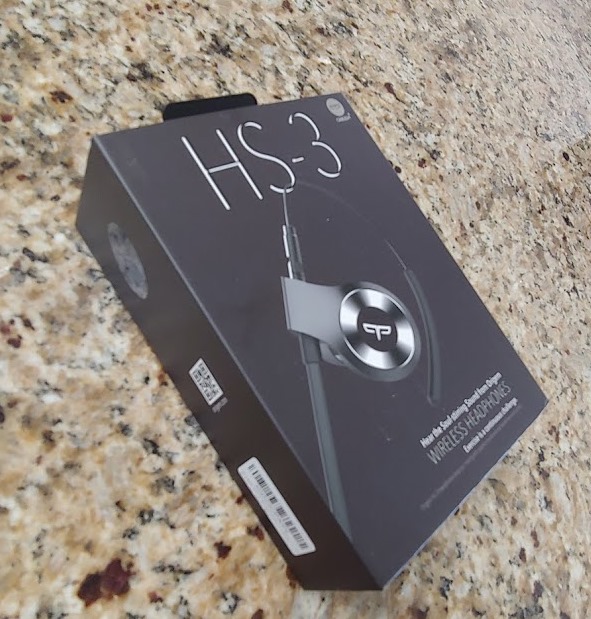
I’m a big fan of music when I’m moving through life, and I use a lot of headphones. Between the gym, travel, and downtime between volleyball matches, I often have a pair with me. Actually, I often have a few pairs. In general I have tended to stick with wired models, but I do have a couple pairs of bluetooth models. I was contacted by Origem recently and asked if I would be interested in reviewing a pair of their HS-3 model. I agreed.
The Pros: Great sound, physical control to easily pause/play, change volume, and change tracks. Lightweight and good battery life.
The Cons: Bulky drivers noticeable and volume doesn’t quite get loud enough.
Bottom Line: A good set of headphones, great connectivity, and waterproof. They seem durable across a few weeks, though time will tell if the headphones are worth the price.
Initial Testing
The headphones arrived charged. I powered them on and immediately they were looking to pair. I had my Garmin Forerunner 645 watch handy, and the pairing was smooth and quick. I know Bluetooth is getting better, and this was an example of how smooth the process was. I opened the settings on my phone, and with a long press on the volume, paired to that device as well.
I found it very easy to move between devices, though I did need to disconnect the headphones from the device. My phone had priority when connecting, but I think that’s likely because the watch doesn’t automatically connect to anything.
The headphones come with 4 different earpieces. I haven’t ever seen that, as most models seem to come with three. In this case, I had to try both the middle sizes to find the one that works best. It was a little hard for me to get the earpieces on the plastic bolt, but that’s likely me struggling to keep hold of the small rubber buds.
There is a cord connecting the two headphones, which has a physical set of controls on the right ear. This is a long inline control pod on the wire. There is a center button that powers on/off (and pairs), we well as a button on each end that control volume (short press) or change tracks (long press). I found this to be easy to use throughout my testing and handy when at the gym and wanting to change a setting. It’s also nice to be able to pause quickly when someone tries to talk to me.
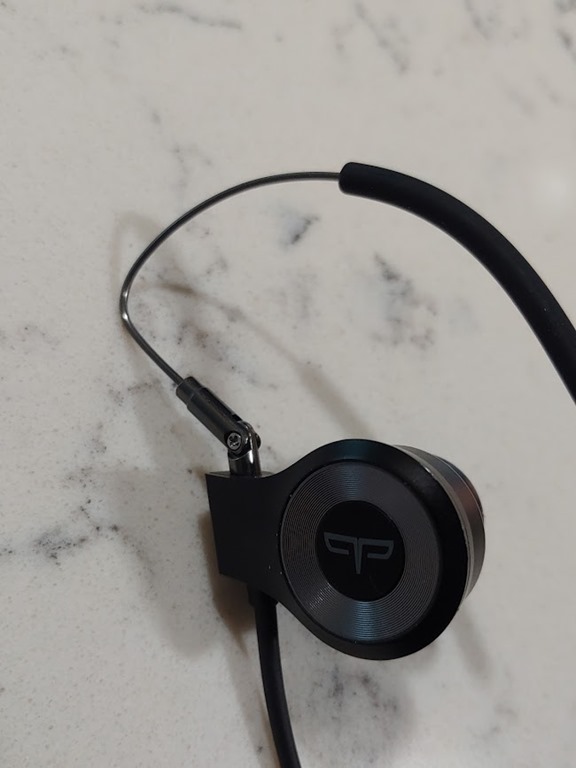
The earpieces are different than anything I’ve seen. I do prefer those that hook over the year for security. I sweat a lot at the gym, and I never really have a great fit from the rubber inserts. I’m afraid of the Bluetooth separate buds that are all the rage as I have enough trouble with earbuds falling out while weightlifting or using the elliptical machine.
In this case, there are wire over ear hooks, but they are on a swivel that allows me to put the rubber piece in my ear canal and swivel the hook down. I can also pop out the bud to hear better, and the hook allows the headphone to swing away, but remain secure.
The back of the wire has a rubber cover to reduce irritation, but the top loop is metal. I wish the rubber went a little higher, but I didn’t really have the irritation I’ve had with other Bluetooth mobile earpieces or even the other in-ear headphones I’ve tried. In fact, these have the most comfortable fit or the top/back of my ear.
There is a small rubber fitting for the wire that allows you to shorten the wire and tighten the wire against your head. I found if I kept this tight for vigorous exercise, it worked great. If I had it at the loosest setting, when I turned my head, I felt a the wires pulling across the back of my neck. This has been a problem with quite a few pairs I’ve tried. These days I tend to keep the wire in front of my neck for general use.
I listened to the headphones for about 2 hours on a gym trip, and they felt fine. The sound was good, and the headphones were comfortable. I was enjoying them for the first day.
Longer Tests
I decided to try these on a few longer outings and see how they worked. My family went to the mountains for the July 4 weekend, and I took these along, fully charged. I wore them during the two hour car trip up and they performed well. I left them in my bag July 4, but pulled them out for a longer test the next day. I was working from our vacation rental and planned to spent 6-7 hours that day listening to music.
The headphones worked great for about 3 hours. Just before lunch, I’d get a slight dip in sound as a quiet voice let me know the battery was low. I let this continue for about 12 minutes before they cut off. A full charge, 2 hours in the car, a day+ in a bag, and then 3 more hours was pretty good.
In other tests, it appears that a full charge is quick. I haven’t watched the charge indicator, but it does seem that about 30 minutes gets these charged. Six hours is what is claimed, and I have no reason to doubt these. I know I’ve used them close to six hours and they’ve worked well.
The charging port on the inline control means I could actually charge these while listening to them, but it’s not comfortable (I tried). The charging cord weight will pull on one ear.
Sounds Quality
I’m not an audiophile, but I think these headphones sound great. There are large drivers that create deep, pleasant bass. Everything I hear is clear and crisp. I even had my kids and wife try this, and they all loved the sound.
They also all noted that the headphones don’t get loud enough. No complaint about sound, just volume.
Voice Control
One of the features of the headphones is voice control. This is available to allow the user to perform the following functions:
- pause
- tracks
- google assistant integration
The FAQ says there is a caveat to this. If listening to music, the music must be stopped before using voice control. That means if I want to change the volume, I have to reach up and stop the music, putting by hand on the inline control. Right next to the volume control for the headphones.
In some sense, this reduces the value of the voice control for me. In practicality, I have been able to say “Hey, VoiceIQ, Pause” while music is playing and it works. What I haven’t been able to get working is the restart of music. I also haven’t been able to easily get this to change tracks, or even launch the google assistant. It appears to sometimes work, sometimes not. Some of this might be dependent on whether the phone is unlocked or not, but I haven’t found a consistent method to the use of the feature.
To be fair, I don’t love voice control of anything. It’s always weird to me, and in moving from Siri to Google, I find it to be less useful. Siri is fairly rigid in how it works, which I like, because I know what’s happening. Google I find more flexible, but also in that sense, less useful. This also might be the problem with music, in that iOS has tight integration with the music app. On Android, it’s a little looser.
Conclusion
These are nice headphones. They are very secure, a problem I’ve had with numerous pairs over the years. The sound is great, and they charge quickly. The downsides are the volume, the large drivers, and the cost. I don’t use the voice control much, and I think it’s a strange feature in many places, but you might feel differently.
I’m not sure I’d pay $99 for these with all the other options out there, but I also wouldn’t rule it out. They are certainly cheaper than many of the other high end pairs, and they have stood up well across a month of use and travel for me. I’ll continue to use them over the next few months, with a few longer trips, and I’m looking forward to seeing how they perform.
If you’d like to give these a try, Origem has a 30% off coupon. Use “L4IJLJPX” when you checkout.