Category: Blog

  • Monday Night Networking at Summit 2017

    Next week is the PASS Summit in Seattle. Thousands of SQL Server professionals are going, many coming Sunday or Monday for a pre-conference session before the main event. For a number of years, Andy Warren and I have run a networking dinner on Monday night, but we’re stepping back this year because of scheduling.

    Luckily, Lisa Bohm has taken over the Monday Night Networking dinner, and you can RSVP for the event from her blog. Andy and I are thrilled that Lisa is managing this, and we’d ask for a couple things from you:

    • Pass the word to others, especially first timers. Blog, tweet, post on LinkedIn and Facebook. Let people know.
    • It would be nice if a few of you would volunteer an hour of your time to help Lisa greet people and introduce first timers to others.

    I’m sorry that I won’t be there. I’m coming late to the Summit, as is Andy, so please help a little and make this a success.

  • VS Live 2017 Anaheim Slides and Code

    The slides and code from my talks at VS Live 2017  Anaheim are now available on Github. Thanks to everyone that attended:

    A Tour of SQL Server Security Features – https://github.com/way0utwest/EndtoEndEncryptedSQL2016

    Unit Testing T-SQL Code – https://github.com/way0utwest/UnitTestingTSQL/tree/vs2017Anaheim

  • SQL Data Generator–Getting a value based on another column

    This is a series on SQL Data Generator, covering some interesting scenarios I’ve run into. If you’ve never tried it, SQL Data Generator is a part of the SQL Toolbelt. Give it a try today with an evaluation today.

    One of the things that people often want to do is generate data, but limit the generation to some data in another column. Here’s a good example. Let’s suppose I have some data that represents a balance in an account. That’s in a column we’ll call Balance. In another column, I have a status that is either OK or Overdrawn, depending on whether the Balance column is positive or negative.

    If I perform a random generation on these columns, I’ll get some strange data. Sometimes the data below matches up, sometimes it doesn’t. I have positive numbers as Overdrawn and negatives as OK

    2017-10-05 10_51_08-SQL Data Generator - New project _

    Let’s fix that.

    In Data Generator, I have a variety of choices for the generators. Let’s look at what I can do for the Status column.

    2017-10-05 10_52_27-SQL Data Generator - New project _

    Certainly there are RegEx and Python scripts, but there’s a nice “Cross Column” section with some examples. In this case, let’s look at the Age in Years generator. The definition is:

    2017-10-05 10_53_11-SQL Data Generator - New project _

    In this case, it’s a simple .NET date function and some math. I can do that. Most importantly, I can see the “Insert Column Name”, which lets me pick another column in my table.

    Python

    The language of choice in SQL Data Generator is Python, specifically Iron Python. Outside of C# Datatime values, Python is needed. If you examine any of the other cross column items, you’ll see we need a main() function that returns something.

    In this case, it’s a simple expression. I’ll use an If statement to check if the Balance is >= 0. Here’s a Python construct.

    def main(config):
         if Balance >= 0:
             return “OK”
         else:
             return “Overdrawn”

    Whitespace matters, as does indentation. If I put this in like so:

    2017-10-05 10_57_57-SQL Data Generator - New project _

    I’ll get this. Notice that the status is correct.
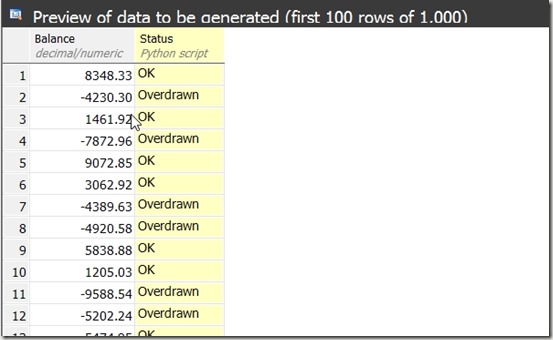
    2017-10-05 10_58_05-SQL Data Generator - New project _

    In a real project, you may have more complicated logic, or more likely, status values. One way to handle those is to use a Python function and return the appropriate values for your system.

    You can build some complex and interesting data generation projects with SQL Data Generator. Give it a try today.

  • Unit Testing T-SQL Code

    Abstract

    Unit testing has become an integrated, expected part of most software development teams. Many database developers have yet to implement unit testing as a regular habit. This session will look at two-unit testing frameworks and show how to implement tests for common types of non-trivial T-SQL queries. You’ll examine the tSQLt framework as well as the Microsoft Unit Testing framework for SQL Server.

    You will learn:

    • How to structure and build unit tests for database code with tSQLt
    • How to structure and build unit tests for database code with database projects
    • Understand the challenges of test data and how to solve them

    Level: 200

    Demos

    These are the testing demos for this talk:

    • Loading and reloading test data
    • Checking standards
    • Checking joins, specifically outer join refactoring
    • Checking function calculations
    • Checking boundary conditions
    • Using the 0-1-Some pattern
    • Checking NULLs

    PPTX and code on github:

    Data Platform Summit – https://github.com/way0utwest/UnitTestingTSQL/tree/master

    VS Live 2017 – Anaheim – https://github.com/way0utwest/UnitTestingTSQL/tree/vs2017Anaheim