Category: Blog

  • Experimenting with VSCode instead of the ISE

    I’ve been playing with PowerShell here and there, learning a few things. As I use the dbatools project, or

    I saw a tweet from Rob Sewell on using VS Code for PoSh, which I’ve tried, but it felt cumbersome and hard. I didn’t spend much time on it before dropping back to the ISE, which I was comfortable in.

    However, Rob’s tweet mentioned a post from Mike Robbins on configuring VSCode, so I decided to give it another try. It’s not that the ISE doesn’t work well, but I keep hearing people talking about VSCode, which has git support, and so I thought this might be worth trying.

    I won’t talk about anything in Mike’s post. You can try that out. I already at the PoSh extension, but it was upgraded since I first used it, and now pops the integrated console when I open a .ps1, which makes it like the ISE.

    2017-09-12 08_27_56-newdetachall.ps1 — Visual Studio Code

    I don’t remember that from before, and I certainly like that. I also skipped the VSCode-icons in place of VSCode Great Icons. I mean, I want to be great at this stuff.

    The one thing I did do was change the settings from Mike to set a new zoom level. Zero is a little low for my old eyes, and 2 (where I’ve been working) is too big here. I chose 1.

    vscode_ise

    Using VSCode

    The main thing you want to do with an editor is write code. So, I decided to write some simple code. I have a few things to do, but I decided to start with something simple. I wrote a few lines of PoSh. This isn’t terribly useful, but I wanted to play with the editor and the debugger.

    2017-09-12 08_56_19-newdetachall.ps1 — Visual Studio Code

    Now, in the ISE, I do get some intellisense and parameters. The parameters look better, but the screen capture ghosted them out a bit.

    2017-09-12 08_57_07-Windows PowerShell ISE

    In VSCode, this actually looks better. First, I enter a cmdlet name and see some basics.

    2017-09-12 08_58_08-● newdetachall.ps1 — Visual Studio Code

    After I’ve entered it, I see more details as I work with it.

    2017-09-12 08_58_13-● newdetachall.ps1 — Visual Studio Code

    Running code works OK. I can hit F5 and the code runs. Not ideal, as the function keys make my hands move off the keyboard. That isn’t different from the ISE. I definitely wish we had shortcuts, and I know there are extensions to help with this. I need to play with some.

    The debugging, however, is much easier. More in line with VS and other debuggers. Set a breakpoint, F5, and I have real debugger controls if I want them (as well as F10, F11).

    2017-09-12 09_03_32-newdetachall.ps1 — Visual Studio Code

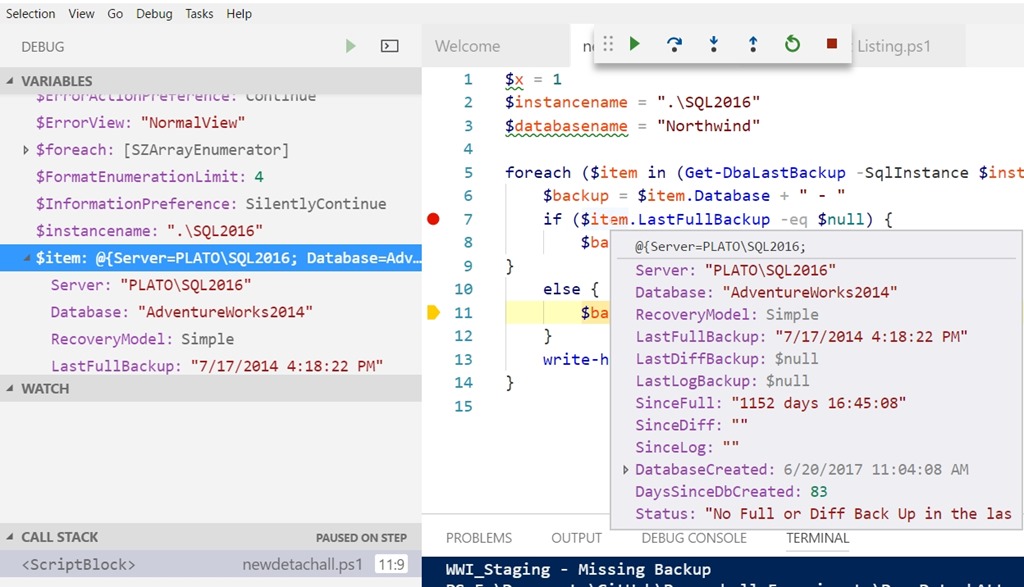
    I can see variables in the debug window, or in the main window if I hover. This feels a bit cleaner than the ISE.
    2017-09-12 09_05_24-newdetachall.ps1 — Visual Studio Code

    There still are some issues. F10 seems to disappear sometime. I’ve tried to remove breakpoints and they don’t always remove. However, those are pretty minor items in the scheme of things.

    Overall, I’ve changed a bit of my view of VS Code here. It does seem to have improved since the last time I tried PoSh in here. Maybe I’ll give it another chance with other languages as well.

  • I want a new gadget with less features

    Years ago I bought a Pebble smartwatch. I didn’t back the Kickstarter, but a few friends did and I liked the product. I wore mine for almost two years before it started to die. I can be rough on gadgets, so it’s possible I banged it and caused my own damage. I tried a Fitbit (original) briefly, but really liked having time on my wrist.

    I got a Pebble 2, which I really like, but I’m losing it. I got my son a Pebble 2 as well, but recently he fell and cracked the screen on his. He’s in college, but since I’ve had the use of his motorcycle, I decided to give him mine.

    That means I need a new watch. Since the Pebble watches aren’t being updated and maintained anymore (no thanks to Fitbit), I wasn’t sure I wanted to get another one. I could, as they are still for sale at various places. I decided to look at other devices, perhaps some that might have better data options.

    I put a few queries out to friends, but I’m not quite sure that I have a better choice. As I think about it, there are only a few things that I really use.

    • Clock/time – Especially important as I end up speaking in different time zones
    • Vibrating alarm – This is my alarm clock and allows me to wake up easily, without disturbing my wife.
    • Waterproof – I do not want to take this off for a shower or when I swim. So, most Fitbits are out.
    • Steps – I like step tracking. It’s a nice metric that I like to watch periodically.
    • Heart rate – I don’t check this too often, but it’s a good metric that I do want to watch as I get older.

    Some devices have these features (and many more), but many are also in the $200 range, which seems like a lot to me. Especially in this age of powerful, commodity hardware. The Pebble 2 did these things well, in a simple way.

    I’m looking at reviews and comparing items based on recommendations, but more and more, it seems like another Pebble 2 might be the best choice. Maybe I should just buy 2, in anticipation of the future.

  • The Code Coverage Report

    I had someone that told me recently that they needed to find a way to get code coverage in T-SQL. Not for them, not to improve quality, but because their manager wanted a report.

    OK, here it is.

    First, build a nice SSRS report that displays your company logo, a header, the current date, and a pie chart. Yes, I know pie charts are bad, but they’re good for managers that want something like code coverage.

    Now, for the data source of the report, here’s your query:

    SELECT 90 + ((RAND() * 8)-2)

    Now, you won’t always get over 90%, which is what some people want, but you’ll get over 90 eventually.

  • Multi Script Removes 25 Database Limit

    I woke up to a Slack message that alerted me to a post in one of our channels. An engineer noted that SQL Multi Script was being upgraded today, releasing to all channels with v 1.3.3. The post alerted me to not the release, but the fact that the 25 database limit (for parallel execution) has been removed.

    Woot!!!

    That’s one I’ve been asking for across quite a few years. We don’t have a lot of Multi Script customers, but there are still quite a few and across time, I’ve had many of them ask me to remove the limit.

    Some have 30, 40, 50, 100 separate servers on which they want to run a query. Some have hundreds of databases on which they need to deploy the same code. All of them have struggled a bit with the need to run Multi Script many times to reach all their databases, with no good reason as hardware has improved and many of them have 16 GB of RAM. Back in 2007, when Multi Script was first released, most people likely had 2 or 4GB, and much slower CPUs.

    With my advocacy, and a few salespeople, plus some reorganization internally, we were finally able to press the engineers to dig into this code and remove the limit. This is good news for customers. It’s also good to have

    If you’ve never tried SQL Multi Script, give it a go. It’s a handy tool that I think is much better than a CMS. If you own a SQL Toolbelt license, you have Multi Script. If you don’t, grab a trial and see how this might help you.