Announced today at Microsoft Ignite, the general availability date is Oct 2, for Windows, Linux, and Docker. Time to get ready to upgrade.
Category: Blog
-
Sign up for Game Night
This year PASS is hosting Game Night as an official event, providing the room and support. Kevin Hill (b | t) is going to lead the event, and everyone should thank him for stepping up. If you’re willing to volunteer and help organize, let Kevin know.
Game Night tickets are available now, for $12, which will cover admission and an alcoholic (or 2 non-alcoholic) drinks. I expect space will be limited, so sign up today if you want a quieter, fun time Thursday night competing with other attendees.
If this is your thing, and you’d like to help out in 2018, let me know. I’d like PASS to run this every night and get multiple volunteers to help keep things organized. I think plenty of you would love a space to compete for fun instead of searching for something else.
-
SQL Grouping on Sums (with testing)
I ran across a post recently that I thought was an interesting T-SQL problem. The user wanted to group values into a running total, but the groups would reset based on a sum.
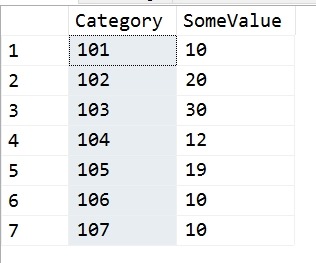
In this case, the user had this set of data:
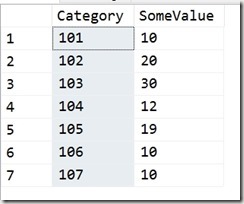
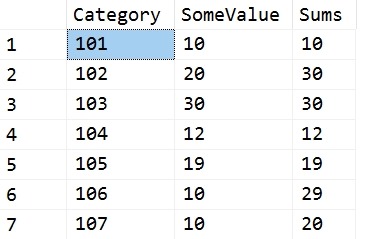
Their goal was to run through these values, in Category order, and whenever the running total sum of SomeValue exceeded 30, reset the sum. Their requirement was that this could only be a single value or two values, which boxes in the problem nicely. In other words, they wanted these results:
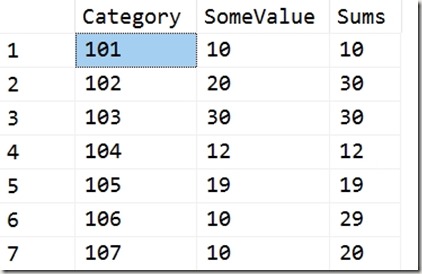
The first two rows equal 30, so we reset for the third row. The third row is 30, so we reset for the fourth. The fourth and fifth would exceed 30, so each gets a reset. Five and six give 29, so we stop there.
I don’t know what the use case is here, but it’s an interesting problem.
My Solution
I had a quick solution using Lag. I created a quick query that looked back 1 and 2 rows. I could have stopped with one, but originally I thought that the poster might go to three rows if the 30 value wasn’t met. I use a CTE to get the current row and previous values, then a simple CASE to sum values or return the current row.
WITH lagCTE
AS (SELECT
          Category,
          SomeValue,
          LagValue1 = LAG(SomeValue, 1, 0) OVER (ORDER BY Category),
          LagValue2 = LAG(SomeValue, 2, 0) OVER (ORDER BY Category)
     FROM Source
    )
SELECT
      lagCTE.Category,
      lagCTE.SomeValue,
      Sums = CASE
                 WHEN lagCTE.SomeValue + lagCTE.LagValue1 > 30 THEN
                     lagCTE.SomeValue
                 ELSE
                     lagCTE.SomeValue + lagCTE.LagValue1
             END
FROM lagCTE;
I also created a test, because, why do the math. Once I’ve done this, I want to ensure any code changes, any logic changes will still pass the same test. Here’s my test code:
EXEC tsqlt.NewTestClass @ClassName = N'tTSQLTests'
GO
CREATE PROCEDURE tTSQLTests.[test running total reset]
AS
-----------------------------------
-------   Assemble
-----------------------------------
EXEC tsqlt.FakeTable
     @TableName = N'RTSource'

INSERT RTSource
VALUES ('101', 10),
        ('102', 20),
        ('103', 30),
        ('104', 12),
        ('105', 19),
        ('106', 10),
        ('107', 10);

CREATE TABLE tTSQLTests.Expected
(   Category     VARCHAR(5),
     SomeValue    INT,
     RunningTotal INT
);
INSERT INTO tTSQLTests.Expected
VALUES
       ('101', 10, 10),
       ('102', 20, 30),
       ('103', 30, 30),
       ('104', 12, 12),
       ('105', 19, 19),
       ('106', 10, 29),
       ('107', 10, 10);
SELECT
       Category,
       SomeValue,
       RunningTotal
INTO  tTSQLTests.Actual
FROM  tTSQLTests.Expected
WHERE 1 = 0;

-----------------------------------
-------   Act
-----------------------------------
INSERT tTSQLTests.Actual EXEC RunningTotalQueries

-----------------------------------
-------   Assert
-----------------------------------
EXEC tsqlt.AssertEqualsTable
     @Expected = N'tTSQLTests.Expected',
     @Actual = N'tTSQLTests.Actual',
     @Message = N'incorrect query'
GO
Adding Counters
The poster then asked for a group counter, which becomes much harder. I was about to try for another CTE that would give me some counter I could work with when Jeff Moden used the quirky update to build a better script. You can read his code here.
-
Cookie Consent
More of an FYI, but the EU Cookie Consent law goes into effect on Oct 1. Maybe this matters to you, maybe not. In my case, I may be in limbo as I work for a UK company even though I live in the US. Certainly I want EU visitors to my sites, so I decided to go ahead and comply.
For tsqltuesday.com, I went into the Plugins section of the site and clicked “Add New”. Then I had a list of plugins, but I entered “Cookie”” and searched. I got this:
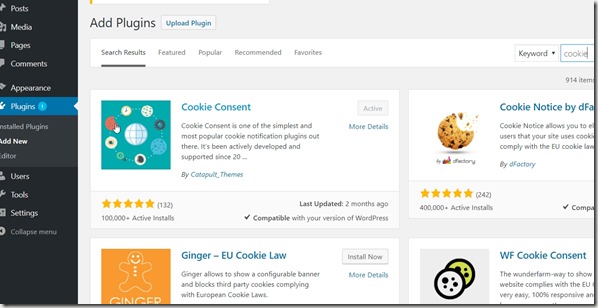
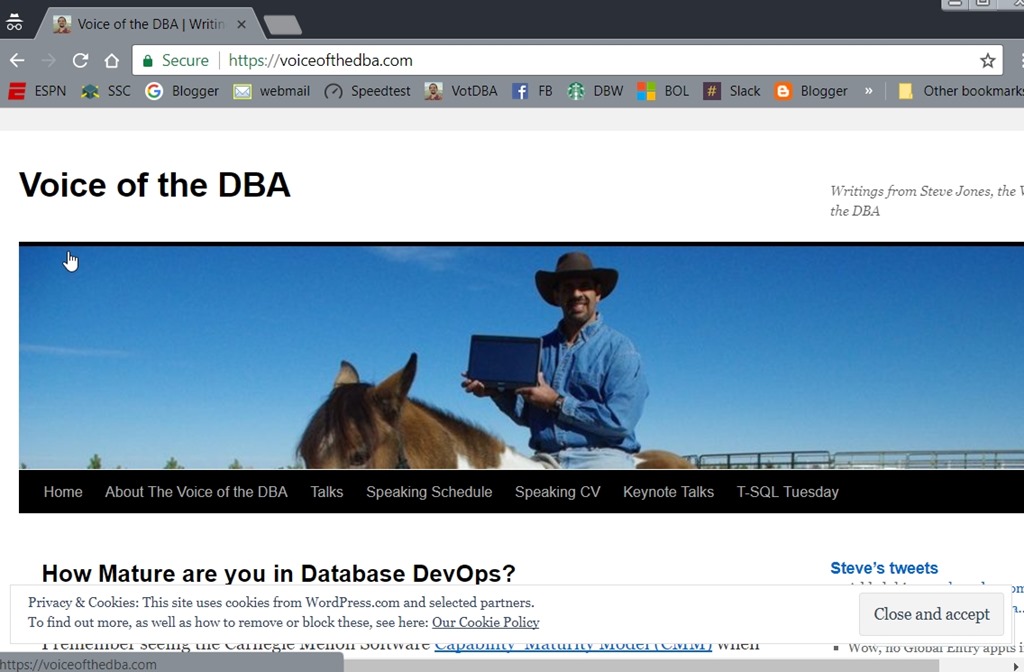
I choose Cookie Consent and added it to the site. The default activation is at the top of the site, and that’s fine. I tested this with a Private browser window and I see the notice. I’m not going to mess with options here, just let you know there are cookies.
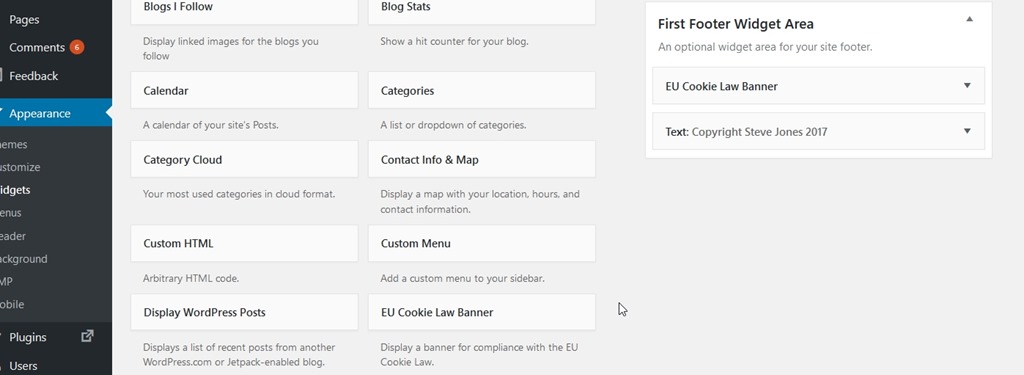
For voiceofthedba.com, this is hosted by wordpress.org. I did that since it was easy and I don’t need to manage WP for the blog. Here, I went to the Appearance menu and then Widgets. In this section, WordPress have provided the EU Cookie Law Banner. That’s fine with me, and I added it to the First Footer Widget area.
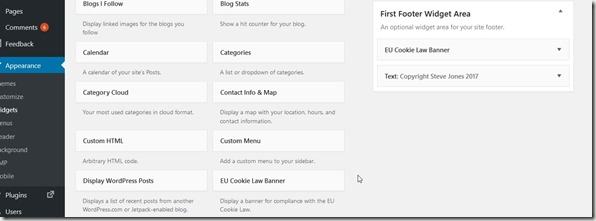
Again, not messing with settings, and I confirm this is at the bottom of the page.
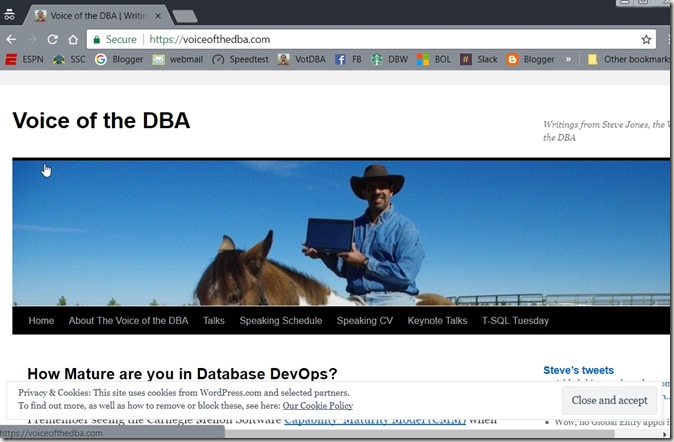
Whatever you think of this law, I decided compliance was easy and not a big deal. I’ve been seeing this on more and more sites, so it may be just something to get used to. Up to you, but I’d add this to my blogs if I were you.