Category: Blog

  • Creating a Logon Trigger–#SQLNewBlogger

    Another post for me that is simple and hopefully serves as an example for people trying to get blogging as #SQLNewBloggers.

    Suppose you want to audit logins for your SQL Server instance. There are multiple ways to do this, but Logon Triggers have a few advantages. First, they get data into a table that most of us are familiar with, SQL Server. Second, they guarantee that the event is captured on the instance if the trigger is enabled.

    There are plenty of other uses for these triggers, but beware that you can cause problems if your code doesn’t execute flawlessly.

    I’ll show you how to create a basic logon trigger here. Note, these are server level items, and you’ll need to be able to create the trigger in the master database.

    The structure of this code is similar to other triggers. We’ll use the CREATE TRIGGER DDL. Where this differs from DML triggers is that we use the ON ALL SERVER command. For auditing, I tend to set this as an EXECUTE AS ‘sa’, but you may choose a different type of account.

    Here’s my basic code:

    CREATE TRIGGER LogonTrigger
    --ALTER TRIGGER LogonTrigger
    ON ALL SERVER
    WITH EXECUTE AS 'sa'
    FOR LOGON
    AS
    BEGIN
        INSERT DBAAdmin.dbo.LoginAuditing
        SELECT SYSDATETIMEOFFSET(),
            ORIGINAL_LOGIN(),
            HOST_NAME(),
            APP_NAME();
    END;
    GO
    Note in this code  I’m specifying a specific table to store data in. This has to exist.

    I also use the FOR LOGON event. You can scope triggers for other events, at the server or database levels, and read more about DDL triggers in BOL.

    Once a user attempts to logon, the trigger fires and a simple insert takes place. If there are errors in inserting this data, the user may not be able to logon.

    There is a lot to write about logon triggers, but for this short piece, I’m just showing hot to get started. Please, please, please, be careful with these and read the documentation carefully. Be sure you understand how they work and how to disable them. If you implement one, test it extensively.

    SQLNewBlogger

    I had a small issue building a logon trigger, and thought I’d get a few posts written on the topic. This was 5 minutes work since I had the code and just wanted to describe things, but I’ve got a few more posts sketched on this topics  as I’ve learned more.

    Learning something, solving a problem, writing about it. This is a good way to show someone you are learning about a topic and developing some skill.
  • Fun and Contests at Summit 2016

    I’ll be attending the 2016 Pass Summit as a part of the Redgate Software crew. I’m not speaking this year, so most of my time will be at the Redgate booth, showing you a few tricks and tips with products and maybe convincing you that we can help your company produce software just a little bit better.

    As a part of the Redgate experience this year, we have a few fun contests for you, an amazing new product, and a party as well. First, the contests.

    Win Coffee

    Many of us like coffee. Even if you don’t, I bet someone in your life does. Redgate is giving you that chance to win Death Wish Coffee. In fact, you can win a year’s supply. Just the thing to help you get through those longs weeks at work.

    Come by the Redgate booth and learn the answers to a few questions. Then enter online.

    Oh year, you’ll also win a SQL Toolbelt + support.

    Win a GoPro Hero 5 Session

    We have a difference flyer that you can fill out and return to win a GoPro Hero 5 Session. That’s a neat little camera that looks like a lot of fun. In fact, maybe I need to get one of these for some mini movies in my life.

    SQL Clone

    I’m excited about SQL Clone. In fact, I saw a demo, using mocked up basic PoSh over a year ago and I knew this was a great idea. It’s finally coming to fruition, with a beta release next month (Nov 2016).

    However, Grant is presenting a session SQL Clone on Thursday, Oct 27, at 3:15pm. Come see this talk and learn why I think this will really help with database development (and other tasks).

    Redgate Rocks

    Thursday night, Oct 27,  Redgate Software is hosting a party. This will be from 7:30-10:30 at 1927 Events on 3rd Ave. With drinks and snacks, this will be a fun time and  a good chance to unwind and chat with colleagues.

    You’ll need a wristband to attend, so be sure to stop by the Redgate booth and pick one up.

    Follow @redgate

    We’re on twitter as @redgate, and we’ll be posting updates during the week, so keep in touch with us and hope to see you next week.

  • DB CI: Getting Test Results in VSTS

    One of the things I struggled with a bit was getting test results to appear in VSTS from my builds.

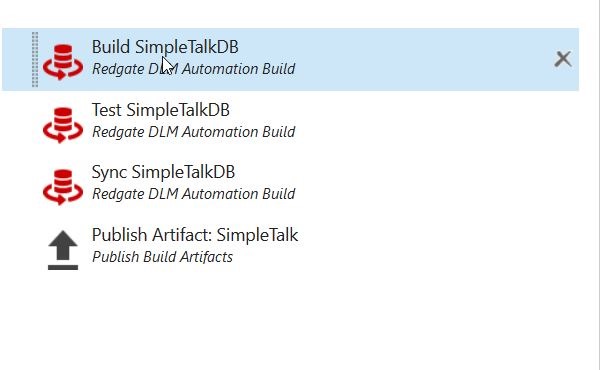
    Here’s my original Build flow:

    2016-10-07 10_50_32-Microsoft Visual Studio Team Services

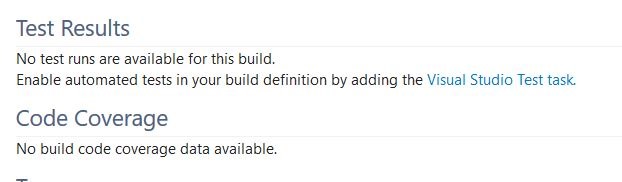
    However, when I’d run a build, I got this in the Build summary:

    2016-10-07 10_51_43-Microsoft Visual Studio Team Services

    That’s not great, and I knew this could work better, so I started to look at where my test results were. Here’s what I did to get the results to appear.

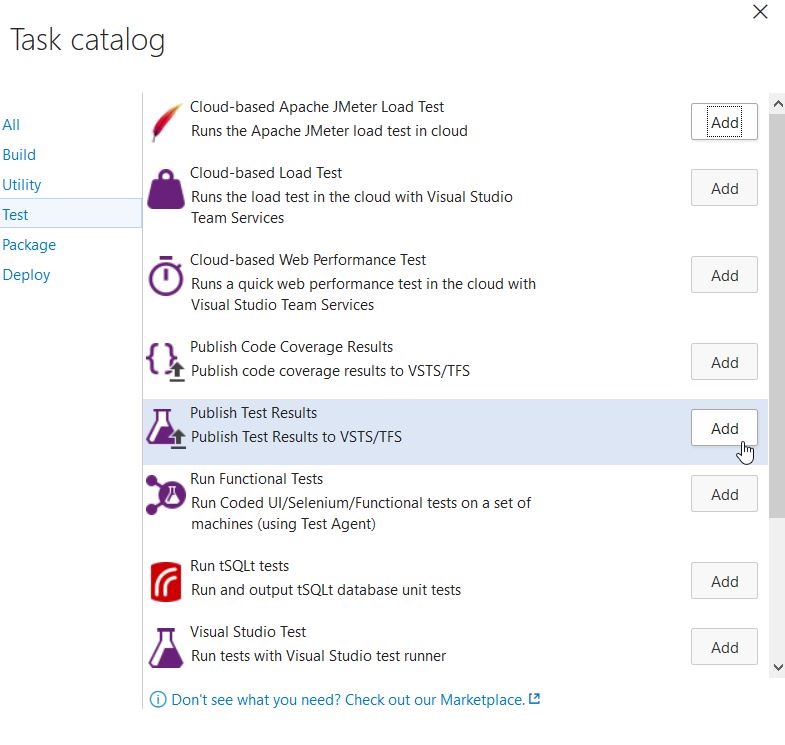
    I added a Publish Test Results task to the end. This is in the “Test” section of the Task catalog.

    2016-10-07 10_39_11-Microsoft Visual Studio Team Services

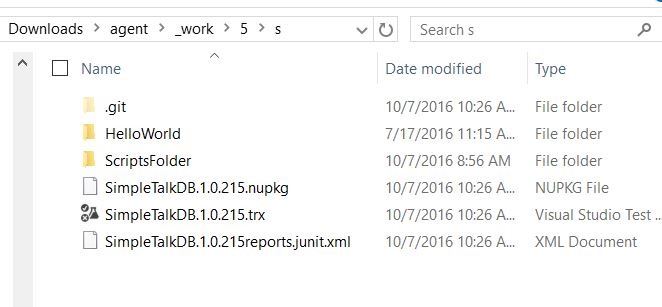
    When I looked in the output of the build tasks, I found these files:

    2016-10-07 10_31_41-s

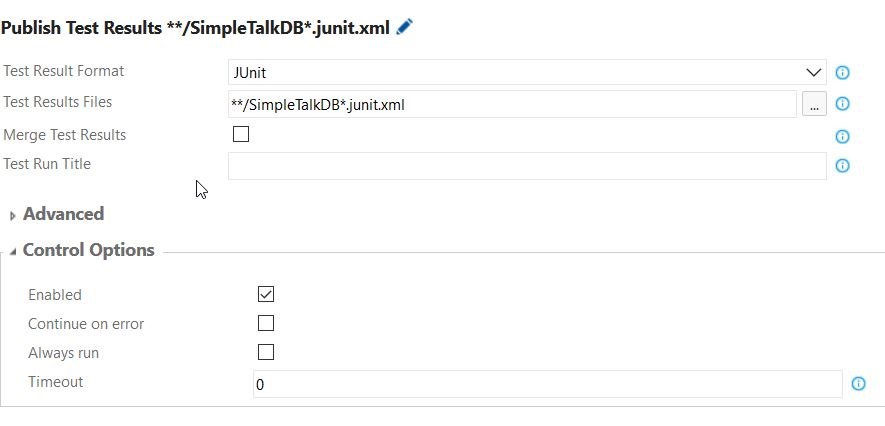
    I kept thinking I needed to get the .trx file to load, but that wasn’t correct. I really wanted the “*reports.junit.xml” file. After a little experimenting, I configured the task like this:

    2016-10-07 10_40_33-Microsoft Visual Studio Team Services

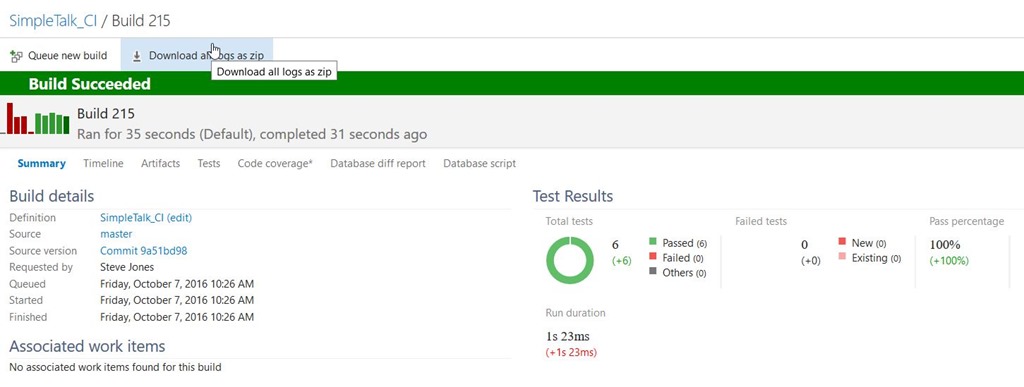
    Once I saved this (with a comment), and ran a new build, I could see test results.

    2016-10-07 10_31_50-Microsoft Visual Studio Team Services

    I could have just read the XML file in my build result folder, but that’s a pain. Typically we don’t care unless there is a failed test, but when there is, it’s nice to see what actually failed.

    Plus, having the results in the console means I can show the other developers and management that tests are being run and are checking code.

  • Webinar: Database Deployment with Git, Jenkins, and Octopus Deploy

    I’ve got a webinar later today that looks at how Redgate Software’s DLM Automation and other SQL Toolbelt tools can be used to smoothly move development changes from one database to another.

    Sign up and spend an hour with me this morning.

    This is part of a monthly series that Redgate is running, where we’re changing the platform out every month. In this case, I’m going to use a git as my VCS, storing changes in there as I make them to a database.

    From there, I will push the changes to a remote git repo and have Jenkins automatically pick up the changes and build, test, and deploy the changes to another database. I’ll make table changes, data changes, proc changes, anything you want. Just ask.

    However, that’s not all. From there, we’ll see Octopus Deploy take a package of changes and deploy them out to other environments, letting my manage and track the process with the click of a button.

    I’ve been doing this demos for a few years, across multiple platforms, but never on Jenkins. However, I’m amazed that things work as smoothly here as they do with TeamCity or VSTS.

    Building software is building software, including database software.

    If you’ve got some time today, join me and see how easy this can be.

    Sign up and see database changes made live.