I’ve got a demo for one of my talks that really highlights some issues we have with SQL Injection. It’s part of my encryption talk, and it goes like this.
NOTE: I am showing a simple example here, not one that I would deploy into production. The concepts are similar, but this specific code is not designed or applicable for cut/paste into a production system.
Imagine I have a simple table of users and passwords.
go
create table UserTest
( firstname varchar(50)
, passwordhash varbinary(max)
);
go
-- insert passwords
insert usertest select 'Steve', HASHBYTES('SHA2_512', 'AP@sswordUCan!tGuess');
insert usertest select 'Andy', HASHBYTES('SHA2_512', 'ADiffP@sswordUCan!tGuess');
go
I’ve got two users and a fairly strong hash of their passwords. I’m using the SHA2 algorithm, at 512 bits, and complex passwords. I’m showing this in T-SQL, though you could easily hash these passwords in the application layer and just store the values in the database.
I create a simple proc that takes a username and a password as parameters.
create procedure CheckPassword
   @user varchar(200)
 , @password varchar(200)
as
if hashbytes('SHA2_512', @password) = (select passwordhash
                                 from UserTest
                                 where firstname = @user
                                )
  select 'Password Match'
else
  select 'Password Fail'
  ;
return
go
NOTE: This is shown at the DB layer for simplicity, but having a user’s password transit the network in plaintext and be passed to a proc is a poor practice. It would be better to hash this and only send the hash to SQL Server.
If I want to verity a user, I can do this:
declare @p varchar(200);
select @p = 'AP@sswordUCan!tGuess';
exec CheckPassword 'Steve', @p;
go
The result of this call is the password matches.

If I try a different password, say the one for the other user, it will fail.

That’s good. This is very similar to how many applications, including AD and SQL Server, validate users. However, here’s one problem with a simplistic implementation like this.
Imagine that through SQLInjection, someone learns the structure of the table. Not hard to do. Now the data in the table is hashed, and there are lots of hashing algorithms. Certainly it’s a lot of work to try all different combinations of possible passwords, and algorithms to find a match. It’s possible and it’s a brute force attack.
Here’s the data in the table.
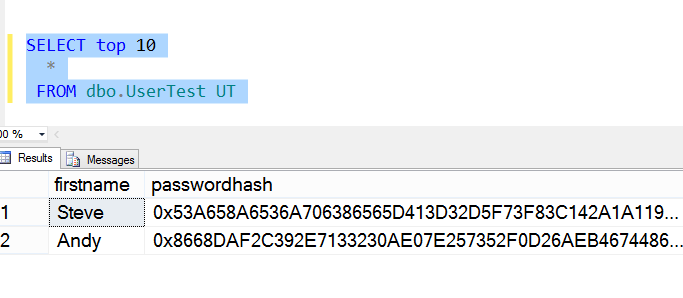
However, the hacker, Andy, doesn’t need to decode the password. Imagine that the hacker creates his own account, which is probably a low level account. However the hacker runs code like this, substituting different accounts for “Steve” until a privileged account is found.

Now the attacker does this. They use my (Steve’s) privileged account, with their password:
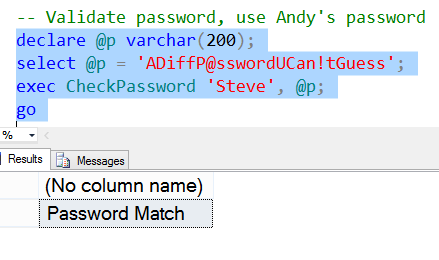
The hacker (Andy), can now log in as Steve using his password. Any rights that are assigned to Steve are available for Andy.
We have an attack without decryption.
This is one reason that SQL Injection is a big problem in applications, especially those that implement some type of their own security. Solving this is slightly tricky, and I’ll talk about it in another post.
One side note, the only way this is usually detected is if Steve logs in with his password. He’ll see this:

Even then, unless Steve suspects an attack, he might write this off to a mistyped password, try multiple times and eventually reset his password without a second thought.


