Category: Blog

  • T-SQL Tricks – Custom Templates

    I wrote about the Template Explorer, which comes with the SQL Server tools and is visible in Management Studio (SSMS). It’s handy, but there are limited code items in there. What if I want more?

    That’s easy. Suppose I decide that I often need to create procedures with the EXECUTE AS clause. I usually do this:

    CREATE PROCEDURE MyProc
       @id INT
    WITH EXECUTE AS OWNER
    AS
    BEGIN
    
    -- do work
    BEGIN TRY
    
      COMMIT
    END TRY
    BEGIN CATCH
      ROLLBACK
      EXEC uspErrorHandler;
    END CATCH
    
    END

    It’s a basic template of stuff I do. Let’s stick this in our Template Explorer.

    The first thing I do is go to the Stored Procedure folder. I can right click it and I’ll see this:

    templates12

    I choose template and a new one is created. I enter a name and I have a template. The first 6 templates here are defaults. The last one, highlighted below, is the one I created.

    templates13

    Now I right click it again and select Edit. At this point, it will open in a query window. This is just a file in my file system (under ), and like any other query, I can edit it. I paste in my script from above, and change a few items to parameters.

    templates14

    Now I can save this, and the next time I need this, just drag it into the main window and customize it.

    templates15

  • Use -eq in Powershell

    I was writing a quick script to work with files and I only wanted to process one file for each execution of a loop. I could have done this multiple ways, but I threw this together:

    $fileEntries = [IO.Directory]::GetFiles(“d:\placeholder”);
    $delete = 1;
    foreach($fileName in $fileEntries)
    {
    if ($delete = 1)
    {
    # do something
    $delete = 0;
    }
    }

    When I ran it, it kept deleting everything in the folder. That was really annoying, and it took me a few minutes to spot the problem. I kept thinking my variable wasn’t getting set to a new value, but it was. The problem was it kept getting reset.

    I first changed to this, but that produced a PoSh error. That’s because I’m working in PoSh and not C.

    $fileEntries = [IO.Directory]::GetFiles(“d:\placeholder”);
    $delete = 1;
    foreach($fileName in $fileEntries)
    {
    if ($delete == 1)
    {
    # do something
    $delete = 0;
    }
    }

    Eventually I remembered that I need to compare things with -eq, so I ended up with this, which worked perfectly.

    $fileEntries = [IO.Directory]::GetFiles(“d:\placeholder”);
    $delete = 1;
    foreach($fileName in $fileEntries)
    {
    if ($delete -eq 1)
    {
         # do something
    $delete = 0;
    }
    }

  • T-SQL Tricks – Templates in SSMS

    There are lots of little tricks that you can use to become more proficient, and efficient, at writing T-SQL. Here’s a short one that might be more for administrators, but I think for developers it’s very handy as well.

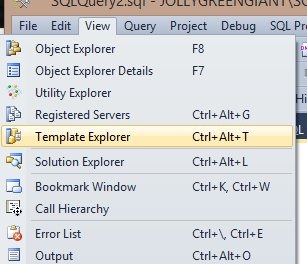
    SQL Server tools have included templates for years. I first started using them in Query Analyzer with SQL Server 2000. The tools have changed, but we still have templates in Management Studio (SSMS). We can access the templates by exposing the Template Browser from the View menu (as shown below).

    templates1

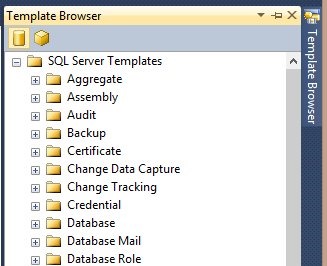
    We can also use the CTRL+ALT+T shortcut. Either of these will give us a tab on the right side of our SSMS main window, opposite the Object Explorer, as shown below.

    templates2

    Like all the windows in SSMS, I can detach this, move it, auto hide, etc.

    Each of these folders contains a series of default scripts that are installed with the tools. For example, I can look at the Backup folder and see three scripts in there. I can grab one of them with a left click and "drag" it to the query window and the script will appear in the query window as I’ve shown here.

    templates3

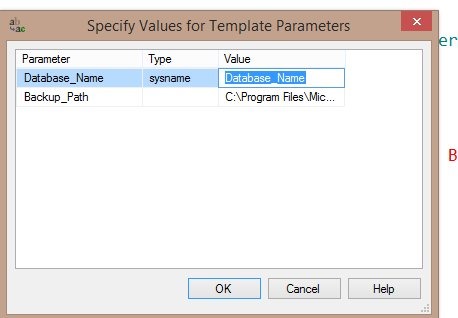
    A CTRL+Shift+M will give me the parameters in the script, which I can replace with my own values (or accept the defaults).

    templates4

    Many of these are generic, but they are useful. I’d encourage you to take a look at them and use them when you can.

    You can customize these, but that’s for another post.

  • T-SQL Tuesday #60 – Something New Learned

    tsqltuesdayIt’s been five years, and that’s amazing. Not many things last for a year, much less five, but the T-SQL Tuesday party, started by Adam Machanic (B|T)., has been amazing and lots of fun for me.

    This month, Chris Yates hosts and his theme is Something New Learned. It’s a great topic, especially given the aims of T-SQL Tuesday to spread knowledge out in the world and share it with others.

    AlwaysOn

    This is good timing for me as I took a one day class last week. At the PASS Summit, I spent Tuesday in Allan Hirt’s A to Z of Availability Groups, which tries to help you understand AlwaysOn and the Availability Group portion of the technology. It was a great experience, and Allan did a fantastic job of walking through an overview, and then details. BTW, I can see how this would be amazing, and while I haven’t been, I’m sure that Allan’s Mission Critical SQL Server classes are valuable ways to learn this stuff in a hands on environment in a way that should help you be productive quickly on your own systems.

    The most interesting part for me is that this wasn’t an all day class where I listen to lectures, follow along in a workbook, and then move on. There were actual labs, and not labs that meant I downloaded scripts onto my machine and worked on them. Actually 3 node labs, dedicated to me, with instructions on how things were configured.

    What did I learn? Quite a bit, but for me the big mysteries that I’ve struggled with on AlwaysOn setups have been some of the permissions. Going through the labs, and getting the permissions necessary in the AD domain. The few places I had issues in the lab exercises were almost all related to a permissions issue I missed or had set incorrectly.

    I also went through the advanced versions of the labs, specifically to practice using Powershell for some config items. This was the chance to practice some skills and try to learn a bit more about how I can use PoSh for real world tasks. While the GUI might work well, I know that if I wanted to ensure I could build and create a lab in short order, or on demand, I’d really need PoSh scripting to ensure it was done correctly, and repeatedly. The lab reinforced that.

    I also learned a bit about a better way to teach. I’ve been in a few classes and lots of sessions across the last few years, but this dedicated lab environment really made things much easier for me. The hands on work was valuable in actually working through the concepts. In fact, I’ll be going through it again today as I have access to the labs for 10 days, and the workbook, so I can set up another Availability Group today and see the things I’ve done wrong in my own lab setup.