Category: Blog

  • Sabbatical Day 3 – Cutting and Measuring

    My company, Red Gate software, has given me a 6 week sabbatical. I’m documenting the time with all the posts under a tag if you want to follow along.

    A late start yesterday, and not a ton getting done. I can see that with late nights at class that I’ll be posting a day late most of the time.

    My knee ached a bit yesterday, so I iced it when I got up. While that was going on, I re-watched part of the DVD to get prepped for what I needed to do. I realized that I needed at least 3, and perhaps 4 sawhorses. With the plans in hand, I went downstairs and got started.

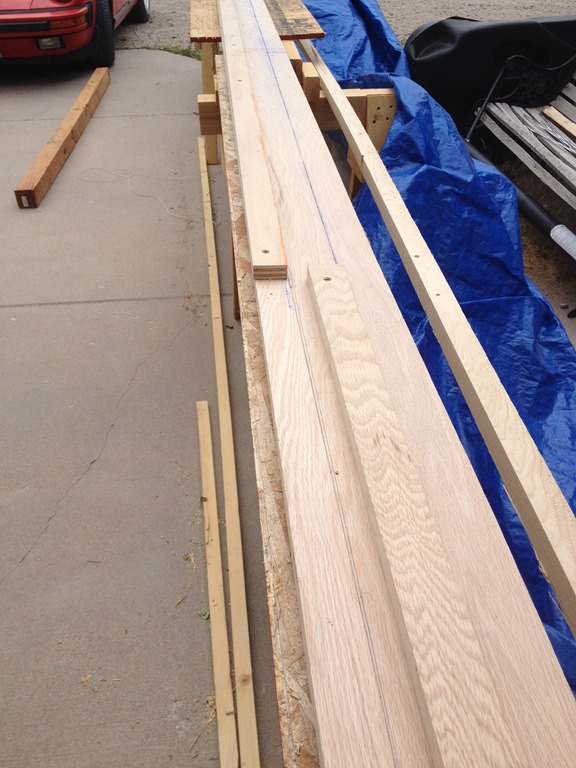
    The first thing was to clear a little space. Some of the horse projects were in the way, so I moved things around and got the base on the teeter totter so I could work. That done, I then cut the ends and trimmed the 2x3s to get them ready for more sawhorses. I think I ended up using a piece for something else because I got 6 legs done. Not quite what I needed for 2 more sawhorses.

    Photo Jun 04, 1 03 00 PM

    With those six done, I worked on the stretchers next, using the spare 2x3s and also a spare 2×4. Cut and glued up.

    Photo Jun 04, 1 03 05 PM

    At this point, I was waiting a bit for glue, so I looked at the plans and then measured a spot in front of the garage. I hope to work next to the garage on most of this, and I can just do 22ft on the cement. I’m thinking the top will hang off the edge a touch, but I can put 4 sawhorses there to support the flagpole and also let me work at a reasonable  height. The idea of working on the ground, with my knee, does not appeal to me.

    Then a break. My oldest, Kyle, coming back from China and the little kids and I picked him up.

    Photo Jun 04, 3 04 31 PM

    After that, rain and wind. Too windy to do much and rainy outside.

    I did move one of the horse projects with the tractor so the space is clear. I also decided to do some measuring for the jig I’ll cut tomorrow. The jog is basically three pieces of plywood cut at 8ft and then some strips that screw on top. I had a space piece of 4×8 3/4” wood, so I measured the 3 8 ft strips. I dind’t have the space to move it with cars in the garage, but I did get the 3 strips marked along half the plywood.

    My plan today is to continue marking the strips and cut them out. I’ll have, when I’m done:

    • 3 8ft 8” strips for the base of the jog
    • 3 8 ft 1 1/2”  strips for the guides.

    These I’ll biscuit together and have a jig. I’ll also finish a sawhorse (or maybe two) and then I’ll have things relatively set up to start work.

    I’ve been wondering about support, and I think I’ll also cut some spare OSB and use a few 2x4s to support the jig on the plywood. That should prevent bowing and give me a decent quick “workbench” about 3ft in the air.

  • Sabbatical Day 2- Red Rocks

    My company, Red Gate software, has given me a 6 week sabbatical. I’m documenting the time with all the posts under a tag if you want to follow along.

    Day 2 of the sabbatical was the opposite of day 1. Instead of an early start, it was a late one. I was up early, with PT and some chores, but the sabbatical portion of this was at night. I had a 6pm class at Red Rocks community college.

    I left early, needing a student ID and wanting to get oriented. However traffic was a mess and my 45 min drive to the other side of town ended up taking more like 70 and I was too late to get an ID. I’m not sure how often traffic is like that, but part of today and tomorrow needs to be finding a better route to that side of town. A few accidents, and the radio said traffic was worse than normal, but I’m still concerned.

    Red Rocks Community College is nestled in the foothills just a little SE of Golden. It’s a beautiful spot, looking out over the mountains. I should have taken pictures, but I was a bit frazzled when I got there and it was confusing as to where the classroom was. I ended up driving around campus a bit before I found the location.

    Apparently the Fine Woodworking program at Red Rocks is very well known. It was one of the few I’d seen nationwide that offered regular programs. However the instructor polled people since he regularly gets people driving from Wyoming, down South, even out west near Glenwood Springs for classes.

    There’s a nice shop and I’ll get some pictures next time I go. It’s large and there were actually two classes in there at the same time. A turning class and my intro to woodworking. However noise wasn’t an issue last night since things are spread out.

    Our class project is to build a small and table. The sample he showed was nice, tapered legs, beveled top, held together with mortise and tenon joinery. However we’re not using power tools, but hand tools. Slightly disappointing to me as I wanted to help get some skill with other items, but not too bad. It will be good practice since I’ve not really built anything that didn’t require glue or screws and this won’t. Pinned dowels to hold the tenons in there.

    It doesn’t sound like a lot, but I’m sure it will be. We have roughly eight weeks to learn how to flatten a board with a hand plane (our first project), then sharpen tools, then build mortise and tenons, and finally the table. It’s an interesting class, and while I don’t worry too much about the grade, I do want to do well and go on to other classes.

    Last night we learned about planes, took one apart, learned how it works and then started seeing how to sharpen the iron. It was mostly listening and watching, which made for a long night on hard shop stools. By the end, I was exhausted and I’ll certainly keep that in mind for the future. I might need to stick with classes that are one night a week if I continue.

    Still, it’s exciting, and somewhat amazing to see how flat and smooth the instructor got a piece of wood with a plane. No power tools, no sandpaper. Hoping I learn how to do that.

  • Is PowerShell worth the time?

    This is a good question for me to ask. I’ve been learning it, and working through examples in my PowerShell Challenge, but it wasn’t until months later that I found a real reason to try PowerShell.

    When I realized I had lost 12 databases, I could have spent around 10 minutes attaching them all manually. That felt like a pain, and a waste of time. I could have probably scripted something in T-SQL, specific to this situation, in about 15-20 minutes tops.

    However scripting something general, like an attach T-SQL script that figures out which databases to attach based on a path, would have taken me an hour, perhaps more. It would have been a bit of a chore to test and debug, and I’d worry it wasn’t rock solid because I’d be trying to work inside, and outside, of T-SQL.

    Powershell felt like a better fit, and this seemed like something built for PowerShell and SMO. I spent around 3 hours one night searching around and writing the script. This included some false starts, and some experimenting with things. I spent at least 30 minutes trying to restore the mdf before I realized that I should be attaching it. Then it took me a bit to work through some examples I’d seen about attaching that didn’t make sense. Part of it was my unfamiliarity with PoSh.

    However at the end, 3 hours+ in, I had a script that attached databases quickly. I tried it on a few VMs and it worked great. I dropped it on GitHub, so it’s always available to me on multiple machines, and I can clean it up over time.

    I can also share it. When I googled around, I didn’t find a good, generic script like this. I also had to compile information from multiple places. Writing this series of posts allows me to potentially help others, but also it allows me to showcase a bit of knowledge and double check myself. As I broke the main script down, I also rewrote pieces, cleaned it up, practiced a bit of programming, and learned more about PoSh. I bet if I had to re-write this script, it would take me an hour to 90 minutes, tops.

    Was it worth it? If I never run this again, that’s debatable. However if I ever need it again, I think it’s easily worth it. Especially with the knowledge gained.

  • Attaching All Databases with PowerShell–Attaching Missing Databases

    I wrote a PowerShell script recently to actually accomplish a task I that I needed. What’s more, this was the first time I thought that Powershell might prove more useful than other methods. This series looks at my script, and this part examines the first part that I wrote.

    In the last post, I had a script that matched up databases with the mdf files in a folder. That’s good, but that’s actually the opposite if what I want to return. I want to return the files that aren’t matched up.

    To do this, I add a few variable to my script, re-setting it for each loop of a file in my folder. I do this inside my test for the extension (shown), so I’m not executing this if I don’t need to.

    if ($file.Extension -eq ‘.mdf’)
    {
    if ($debug -eq 1)
    {
    write-host “MDF Files: ”  $file.name
    #end debug
    }

        # Reset our flag for each file
    $found = 0

    The last two lines are what I added. We set this to 0, or false, because we assume we haven’t found a database that matches this file by default. That way when we do find a file, we can trip the flag.

    The next step is to set that tripwire. Inside the loop, where we check for the file matching a database file, we add a reset of this flag.

    if ($file.FullName -eq $dbfile.FileName)
    {
    $found = 1

    Since we will check this file against every database, this logic allows the flag to be set, and it doesn’t get reset for this physical file. Any databases we check that don’t match this file won’t reach this point.

    The last step is the other end of the file loop. After we’ve left the database loop, we check to see if our file was found. If it’s not ($found is still 0), then we can do work. I’ve included the end of the foreach and the end of the mdf test for reference.

        # end foreach
    }

    if ($found -eq 0)
    {
    # attach this file
    if ($debug = 7)
    {
    Write-Host $file.Name “not found”
    #end if debug
    }

    #end if found = 0
    }

    There’s a comment placeholder in there to show the action we need to take, and there’s a debug to print things. Let’s set debug to 7 and run this.

    attach_n

    That’s bad. Certainly I noted that my test databases (db1, db2, db3) were detected. These I detached manually to play in a test environment. However why are my system objects there?

    I looked through the code and realized it’s because I had this line:

    | Where-Object {$_.ISSystemObject -eq $false}

    I’m ignoring system objects in my scan, but I don’t want to do that. I actually have these databases, so I removed that Where-Object call. Then I get this:

    attach_o

    That’s what I want to see. Now I have a list of files to attach, let’s work inside SQL Server.

    Attaching Database Files

    I have my .mdf files, but I also want my ldf files. I know these fit a pattern from looking at the files. Since I haven’t changed anything from the defaults, I can exploit that pattern. If you change things on your systems, make sure you keep a pattern.

    I did some googling, and found that the AttachDatabase method takes a few parameters. However one of them is a StringCollection so I need to create that.

    $dbfiles = New-Object System.Collections.Specialized.StringCollection

    Once I have this variable, I can then add my mdf file. The FullName property includes the path, and I call the Add() method.

    $dbfiles.Add($file.FullName) | Out-Null

    Now, I need a few more things. I need the log file and the database name. The database name is first, mostly because I thought of it first.  The BaseName is just the name of the file. I found that out by using my debug clause and writing out the various properties until I got the one I wanted.

    #get database name
    $dbname = $file.BaseName

    The next step is to get my log file. I can use the basename, along with my folder path, and include my log pattern. Once I build this file, I add it to the collection.

    # get log file, assuming same basename as mdf
    $logfile = $folder + “\” + $file.BaseName + “_log.ldf”
    $dbfiles.Add($logfile) | Out-Null

    I added a logging item, which will always run, to my script as this is output I’d want to see.

    “Attaching as database (” + $dbname + “) from mdf (” + $file.FullName + “) and ldf (” + $logfile + “)”

    Now we attach the database. I’ve seen some code that had other parameters, but this worked well for me. I captured this in a try..catch block, mostly because it failed early on and this allowed me to see the whole exception. Some of what was shown from PoSh was truncated, so this helped me to realize I needed to add the “_log” to my filename.

    try
    {
    $server.AttachDatabase($dbname, $dbfiles)
    #end try
    }
    catch
    {
    Write-Host $_.exception;
    #end catch
    }

    That’s it. I run it and get some output.

    attach_q

    A slight issue in my debug code. I had $debug = 7 and needed $debug –eq 7. Still, it records each database as being attached, with the catch block not executing. If I check SSMS.

    attach_p

    My databases are back.

    It’s not a perfect script, and there are probably improvements, but it does get me my databases back easily.