Category: Blog
-
Windows 8 First Impressions
I haven’t worked with Window 8 at all. I’m not a big beta tester, and it’s been a busy few months for me, so I haven’t bothered to mess with any of the previews. My Win 7 desktop works well for me, and I haven’t bothered to think about doing anything different.
Today I was at Best Buy, needing to get a new UPS for my computer since I had a power outage and a failure of the battery in my existing system. I grabbed two, but as I was walking by, I saw laptops with Windows 8 on them. It isn’t supposed to release until Friday, and perhaps these were just setup since there weren’t prices, but I stopped to look at them.
The first one was a Lenovo Yoga. It’s interesting, and I was reading about it recently in that it has a cover that folds completely over. It can become a tablet, but the keyboard is exposed.

The other was a Toshiba Satellite S4310. Nothing fancy here, but definitely a more reasonable cost. I checked later and found it at $900 for a nice setup.
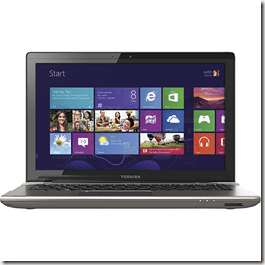
In both machines the start menu was up, and it’s obvious you pick one of the tiles to get to the app. However getting back to the start menu wasn’t obvious. I hit the Windows key, which brought it up, but I couldn’t figure out a swipe method to get it back. I’m sure there’s a shortcut, but in 4-5 minutes of trying stuff, I couldn’t figure it out.
I did get to swipe over from the left and change applications. That was interesting, and it worked fine. It was smooth and while I only ran 3 things, this hardware performed fine. The placement of the title bar and the view was different, but the applications are the applications. They work fine.
I will say the response to touching the screen was fast and quick, almost too quick. In trying to scroll, two fingered, OSX style, I found it trying to zoom in or out as I moved. More me than the system, and I’m sure it’s something I’d get used to quickly.
I like the idea of having this start screen with some information on it, but that’s more for a tablet. I can’t imagine seeing this much in my work, and wouldn’t even want to bring it up as a screen saver.
Using a few apps, browsing, typing, it just works. I’m not sure how much of the “Windows 8” experience, I’d even bother with in daily life if I didn’t have a tablet. As it is on the iPad, I mostly live in apps. The OS isn’t really important.
Not sure if I’ll upgrade or get anything for me, but my wife needs a new laptop, and a few of these look nice. Not sure if she’d like the tablet interface, and the Yoga seems weird, but I’ll ask her and see.
-
Trace Flag 2371 and Statistics
One of the issues that I see published often on forums like SQLServerCentral is the advice to update statistics on your tables if you have strange performance issues, or sudden changes in performance. Statistics are important for the query optimizer, and you should understand the basics of how they work.
However there’s a problem with statistics. They get out of date. SQL Server will automatically update statistics, but it doesn’t do this constantly. It does it after 20% of the table changes (by default). If you have 1000 rows, that means 200 rows changed (or added) can trigger the update. If your table has 50 changes every couple days, you’ll get statistics updated every week.
If you have 1mm rows (think large, historical data here), then those same 50 changes won’t trigger statistics updates for a long time. 200,000 changes will be needed then.
There’s a trace flag, 2371, that can help with the minimum needed to trigger a stats update (or you can do this with your own jobs). By choosing this, you can lower the minimum for triggering an update.
What you do really depends on your issues. If you find poor performance in queries, look for wildly incorrect estimates of rows in your query plans. If you find that your statistics aren’t being updated, or not updated enough, you might enable the trace flag, or create your own job to update statistics manually.
Note that if you are rebuilding indexes, you don’t need to also update statistics on the columns in the index. They are done as part of the index rebuild.
-
On Source Control
A mention today from Jamie Thomson in his blog on source control. I left a comment, but it was long, so I thought I’d repost it here.
My comment
Thanks for the note, Jamie, and it’s interesting, but I don’t see any respondents that aren’t using VSC. I’m guessing many people don’t want to admit that.
I use source control, sort of. I don’t have a lot of production code, mostly demo stuff, which doesn’t change so much as gets scrapped and restarted. However I am using Subversion (Turtle interface) with Red Gate’s SQL Source Control (of course).
Why? Well, since I have a 1:1 with my boss today, I should mention Red Gate makes a fantastic product that I couldn’t do without. Actually I think I’m bound to use it since I work for Red gate, but even if I didn’t, it makes things easier.
I built this habit at a startup, with Visual SourceSafe, and 6 months of browbeating developers to actually check out code from VSS, do a File | Open in Enterprise Manager (SQL 2k at the time), make changes, save the code, and check it back in. It can be done manually, and should, but there are tools like Red Gate’s products that make it easier.
I know lots of people just edit code in SSMS/VS without controlling it, and that’s a mistake if you are trying to work in a team environment, and product quality software. I haven’t had to roll back often, but there are times we have needed to, and not having control was an issue.
As an anecdote, I had a job once, waaaayyy back in the last century, using SQL 6.5. The developers had done a great job of using source control for all ASP, VB6, and SQL code. The problem was that they had checked out the code, saved it locally, copied it to another folder, and then checked it in. Then they might check back in the original script that was checked out. Or they might check the original back in and forget the modified version. Or they might not check anything in.
We found 3, 4, even 7 copies of some stored procedures on various desktops and shared drives, and they had decided to encrypt all the code on the SQL Server. We were never quite sure what version was deployed where, and deployments of the "latest" versions from VSC broke functionality.
We ended up decrypting all code, and reloading it into VCS, while removing all copies of local storage. It isn’t enough just to use source control or implement something; you need to understand what you are doing and do it consistently. Tools help here, so please use something.
A Couple More Thoughts
Source control is insurance. It’s risk reduction, but something that most people don’t understand or think they need. They may not. If you never have a server crash, or a hack of your data, then you don’t need backups. However most people wouldn’t want to run their systems, especially the ones they care about, without backups.
It’s the same with source control. Use something to provide yourself with a fallback if you have issues.
It’s not hard, there are lots of tools out there, and they make it easy to conform to some process. You can use SQL Source Control or SQL Connect from my company, or use something else, but integrate your database code with source control.

