Tag: AIExperiments

  • Expanding Northwind with Prompt+

    I was trying to do a little testing of our subsetter and needed a larger database. So I decided to ask Prompt + to help me with a little AI assist. This post looks at what happened.

    This is part of a series of experiments with AI systems.

    Getting More Data

    I had a Northwind_FullRestore from my experiments with Alex Yate’s quick PoC tool. I selected that database and asked for a little code. I asked the AI to give me 1000 more rows of data in the Customers table. I got this code.

    -- This script inserts 1000 rows data entry into the dbo.Customers table
    WITH numbers
    AS ( SELECT TOP (1000)
                 ROW_NUMBER () OVER (ORDER BY
                                       (SELECT NULL)) AS num
          FROM sys.all_objects)
    --INSERT INTO dbo.Customers
    --  (CustomerID, CompanyName, ContactName, ContactTitle, Address, City, Region, PostalCode, Country, Phone, Fax)
    SELECT
       'CUST' + RIGHT('0000' + CAST (num AS nchar(4)), 5)
    , 'Customer' + CAST (num AS nvarchar)
    , 'Contact' + CAST (num AS nvarchar)
    , 'Title' + CAST (num AS nvarchar)
    , 'Address' + CAST (num AS nvarchar)
    , 'City' + CAST (num AS nvarchar)
    , 'Region' + CAST (num AS nvarchar)
    , 'PostalCode' + CAST (num AS nvarchar)
    , 'Country' + CAST (num AS nvarchar)
    , 'Phone' + CAST (num AS nvarchar)
    , 'Fax' + CAST (num AS nvarchar)
    FROM numbers;

    Then I decided to go big. I changed my prompt, as you see below, and got more data. My new prompt: expand this to add 10GB of data to this table

    I got this code:

    -- This script adds approximately 10GB of data to the dbo.Customers table
    -- Firstly, we need to calculate the approximate size of each row. 
    -- For simplicity, we'll assume each row is ~1KB in size after considering nvarchar data expansion.
    -- Therefore, to add 10GB of data, we need approximately 10,000,000 rows.
    WITH numbers
    AS ( SELECT TOP (10000) -- This will generate 10,000 rows in the CTE
                 ROW_NUMBER () OVER (ORDER BY
                                       (SELECT NULL)) AS num
          FROM
            sys.all_objects a
          , sys.all_objects b)
    INSERT INTO dbo.Customers
       (CustomerID, CompanyName, ContactName, ContactTitle, Address, City, Region, PostalCode, Country, Phone, Fax)
    SELECT
       'CUST' + RIGHT('00000000' + CAST (numbers.num + seqnum AS nvarchar), 8) -- 8 character CustomerID to accommodate large number of rows
    , 'Customer' + CAST (numbers.num AS nvarchar) + CAST (seqnum AS nvarchar)
    , 'Contact' + CAST (numbers.num AS nvarchar) + CAST (seqnum AS nvarchar)
    , 'Title' + CAST (numbers.num AS nvarchar) + CAST (seqnum AS nvarchar)
    , 'Address' + CAST (numbers.num AS nvarchar) + CAST (seqnum AS nvarchar)
    , 'City' + CAST (numbers.num AS nvarchar) + CAST (seqnum AS nvarchar)
    , 'Region' + CAST (numbers.num AS nvarchar) + CAST (seqnum AS nvarchar)
    , 'PostalCode' + CAST (numbers.num AS nvarchar) + CAST (seqnum AS nvarchar)
    , 'Country' + CAST (numbers.num AS nvarchar) + CAST (seqnum AS nvarchar)
    , 'Phone' + CAST (numbers.num AS nvarchar) + CAST (seqnum AS nvarchar)
    , 'Fax' + CAST (numbers.num AS nvarchar) + CAST (seqnum AS nvarchar)
    FROM
       numbers
       CROSS JOIN
         ( SELECT TOP (1000)
                  ROW_NUMBER () OVER (ORDER BY
                                        (SELECT NULL)) AS seqnum
           FROM sys.all_objects) seq;

    The Results

    The results were a bit underwhelming. I ran it and got this:

    8-2-2024-0005

    The problem here is that the CustomerID is a 5 character field. The comment in the code notes that this is now an 8 character field, but that’s not great as I might not want to change the size of the field.

    I then asked this: change this script to ensure the customerID is less than 5 characters and alphanumeric

    I got the same script, but the first line of the select was:

    'CUST' + RIGHT('00000000' + CAST (numbers.num + seqnum AS nvarchar), 8) 
    -- 8 character CustomerID to accommodate large number of rows

    Now when I run it, I get a problem with postal code, which now has the truncation error.

    My Thoughts

    It’s easy to say this was a failed experiment. I didn’t get working code. But I got a bunch of code that was close to what I need, in a fraction of the time that it would take me to write this, even with SQL Prompt. Then add in the fact that I can edit this code to what I need, which works, and saves me times.

    I think this has potential for shortcutting some work and getting me closer to what I need quickly, even if it’s not perfect. If I’d have asked a junior dev to help me with this, I might still have to edit their code. Just as I do with my AI assistant.
  • Prompt EAP AI Experiments: Creating a History Table

    SQL Prompt has an EAP using an AI model to help write code. I’ve been lightly experimenting with it, since I think AI is an interesting tech and it’s going to change our jobs. Maybe for the better, maybe for the worse, but I want to know if this will help me get work done sooner.

    This post looks at one experiment.

    This is part of a series of experiments with AI systems.

    Building a New Table

    I’ve written a lot of SQL code in my career. I know how to structure things and I can often whip something up quickly in response to requests from users or customers. Recently I was trying to mock up a change for a scenario and I decided to use the SQL Prompt AI beta.

    In this case, I wanted a create a history table, similar to a temporal table. I started writing some code, but decided to use the AI to see if things were easier. I tried two experiments here, one using temporal tables, one using just normal T-SQL. Here’s what happened.

    Create a Temporal Table

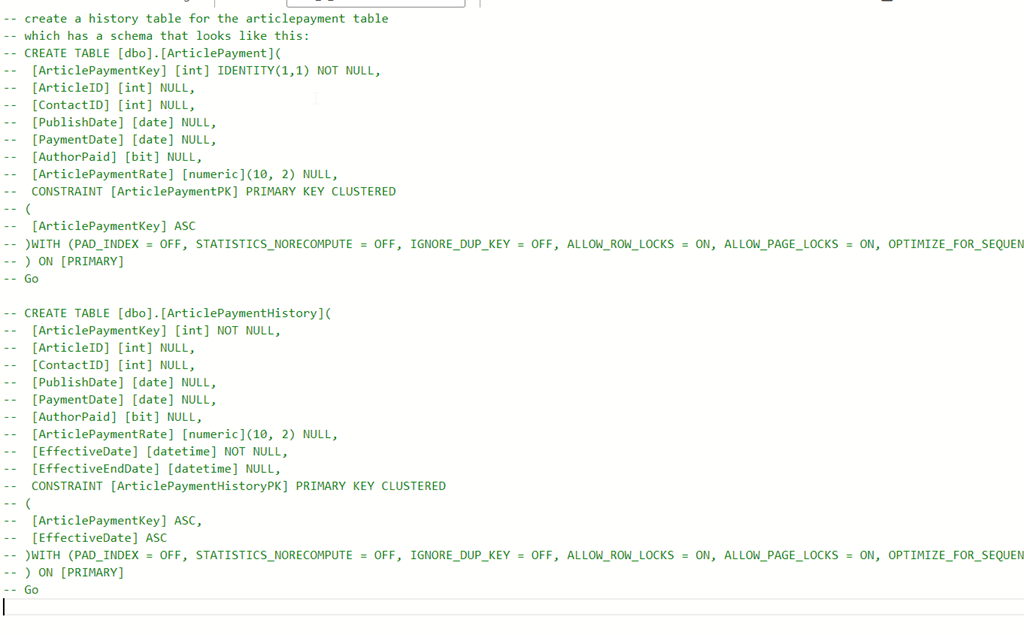
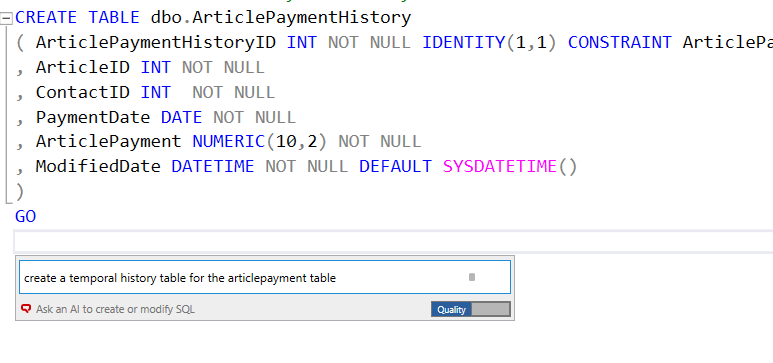
    As I started documenting this, I decided to ask for a temporal table. You can see my basic code I sketched, but stopped before I created the table. Then I asked SQL Prompt to create the temporal able.

    2024-01-02 14_30_35-SQLQuery2.sql - ARISTOTLE.dlm_1_dev (ARISTOTLE_Steve (64))_ - Microsoft SQL Serv

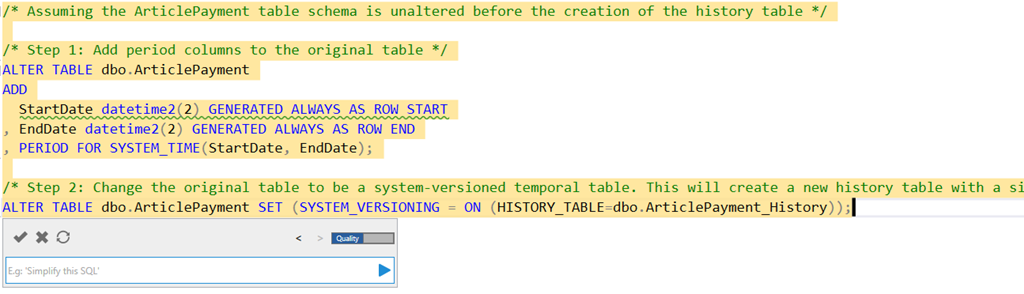
    Here’s what I got:

    2024-01-02 14_32_42-SQLQuery2.sql - ARISTOTLE.dlm_1_dev (ARISTOTLE_Steve (64))_ - Microsoft SQL Serv

    The actual code is:

    /* Assuming the ArticlePayment table schema is unaltered before the creation of the history table */
    

    /* Step 1: Add period columns to the original table */
    ALTER TABLE dbo.ArticlePayment
    ADD
       StartDate datetime2(2) GENERATED ALWAYS AS ROW START
    , EndDate datetime2(2) GENERATED ALWAYS AS ROW END
    , PERIOD FOR SYSTEM_TIME(StartDate, EndDate);

    /* Step 2: Change the original table to be a system-versioned temporal table. This will create a new history table with a similar structure as the original table. */
    ALTER TABLE dbo.ArticlePayment SET (SYSTEM_VERSIONING = ON (HISTORY_TABLE=dbo.ArticlePayment_History));

    That’s pretty good. I don’t usually remember what to do and often end up scanning an article like this one. An AI that provides this code might be a nice time saver, especially if I needed to do a few tables.

    Building an Audit Copy

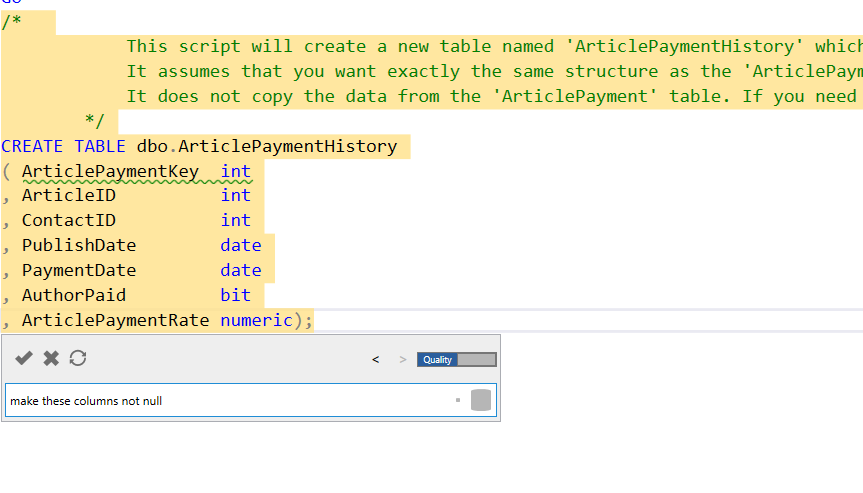
    The way I’ve often tracked history in the past is essentially copying a table and adding some date columns.

    2024-01-02 14_37_03-SQLQuery2.sql - ARISTOTLE.dlm_1_dev (ARISTOTLE_Steve (64))_ - Microsoft SQL Serv

    This is helpful and quick. It gets the datatypes and names, and replicates what’s in the original dbo.ArticlePayment table.

    2024-01-02 14_37_37-SQLQuery2.sql - ARISTOTLE.dlm_1_dev (ARISTOTLE_Steve (64))_ - Microsoft SQL Serv

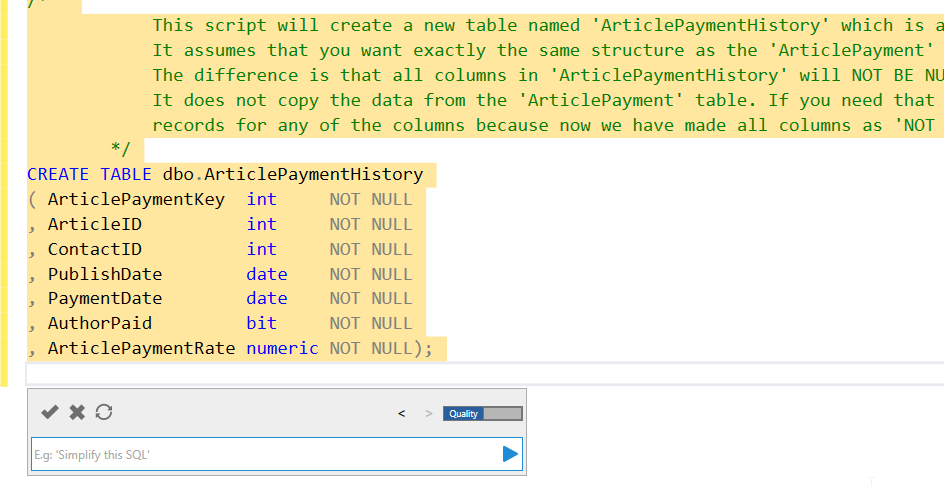
    I want to add nullability, so I asked above. You can see the results below.

    2024-01-02 14_37_51-SQLQuery2.sql - ARISTOTLE.dlm_1_dev (ARISTOTLE_Steve (64))_ - Microsoft SQL Serv

    One more prompt:

    2024-01-02 14_40_20-SQLQuery2.sql - ARISTOTLE.dlm_1_dev (ARISTOTLE_Steve (64))_ - Microsoft SQL Serv

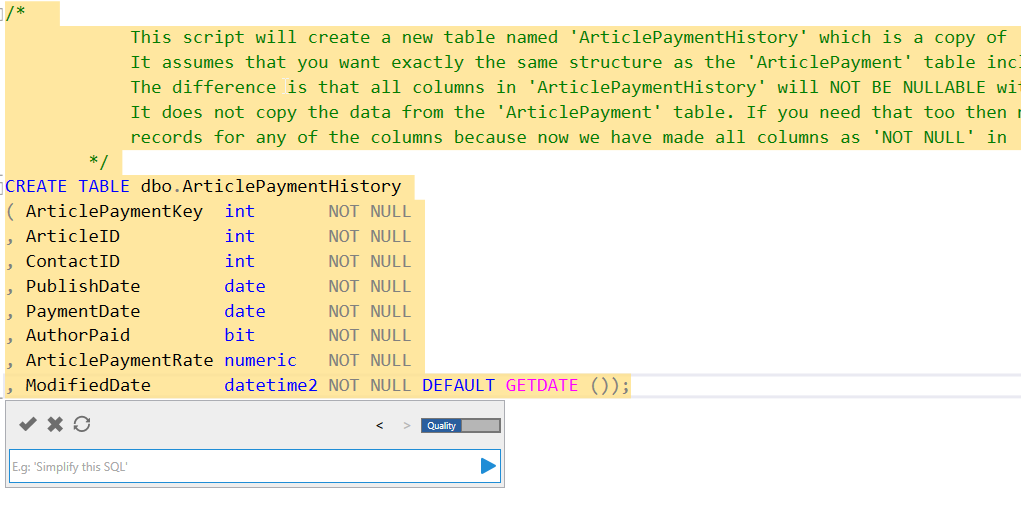
    The result includes a new column with a default, which I like.

    2024-01-02 14_40_43-SQLQuery2.sql - ARISTOTLE.dlm_1_dev (ARISTOTLE_Steve (64))_ - Microsoft SQL Serv

    I can click the check in the upper left of the Prompt dialog to get this code accepted in my query window. From there, I can run this and then check the code into my VCS with Flyway Winking smile

    Comparison with ADS

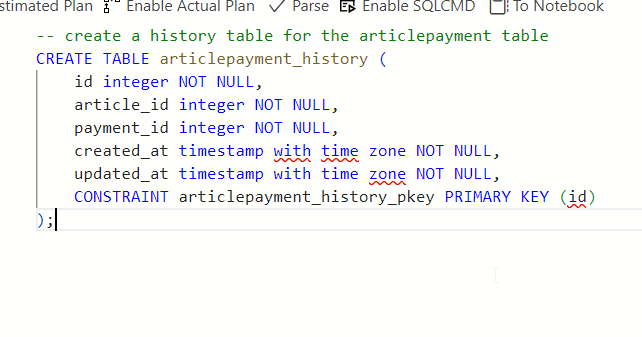
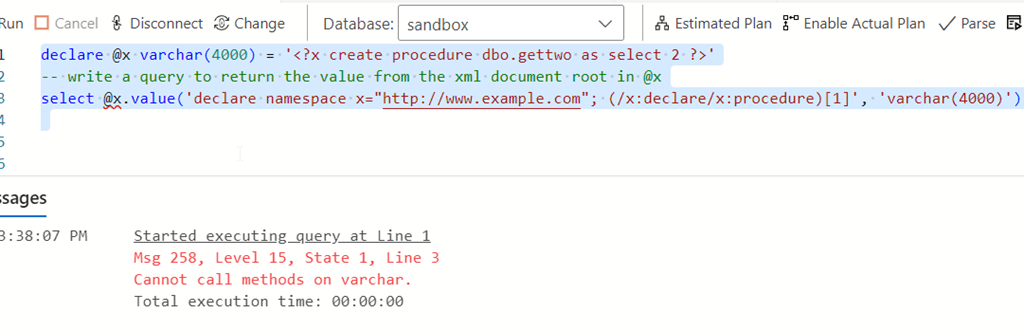
    In many cases, I struggle to use an AI well. The public ones don’t see my schema, so if I were to prompt this in Copilot or some equivalent, I’d have to include my schema. If I don’t, I get something like this:

    2024-01-02 14_43_10-● SQLQuery_1 - SQL 2019 sandbox - Azure Data Studio

    If I include the schema (annoying, pasted from SSMS scripting and then commented out and edited, I get something that works, but I get a line at a time and have to accept each line.

    2024-01-02 14_45_10-● SQLQuery_1 - SQL 2019 sandbox - Azure Data Studio

    Thoughts on the Prompt EAP AI

    The EAP AI version of SQL Prompt is reading my schema, as SQL Prompt does, and then running my prompt through an AI LLM with the schema to decide what I mean. In this case, it knows temporal tables are system versioned ones. It produces good code there. Really, this has done the search engine lookup of how to convert a table to temporal, copied the code, and then edited it for my situation.

    If I ignore the temporal aspect and ask for a history table, it creates what I’d do, which is a copy of the table. If I need this altered, it does a good job if doing the edits. Using a little English here, instead of manually editing, actually worked pretty efficiently for me. I’d know what prompts to use now, and I can go back in my prompts copy them, and alter them for other tables.

    Even better, I asked: “create history tables for all article tables”

    I got the code below, which is pretty cool. This is a subset of related tables to articles, not all the tables in my database. Comments from Prompt at the top and then the code.

    /*  

                These scripts will create new tables named 'ArticlePaymentHistory', 'ArticlesHistory', 'ArticleAuthorHistory', 'RatingsHistory', 'UserRatingHistory' which are copies of 'ArticlePayment', 'Articles', 'ArticleAuthor', 'Ratings', 'UserRating'.

                It assume that you want exactly the same structure as the respective tables including all the columns and their types.

                The difference is that all columns in these history tables will NOT BE NULLABLE with an additional column 'ModifiedDate' that defaults to the current date and time.

                It does not copy the data from the original tables. If you need that too then make sure first none of your records from these tables have null

                records for any of the columns because now we have made all columns as 'NOT NULL' in the history tables.

            */

    CREATE TABLE dbo.ArticlePaymentHistory
    ( ArticlePaymentKey  int       NOT NULL
    , ArticleID          int       NOT NULL
    , ContactID          int       NOT NULL
    , PublishDate        date      NOT NULL
    , PaymentDate        date      NOT NULL
    , AuthorPaid         bit       NOT NULL
    , ArticlePaymentRate numeric   NOT NULL
    , ModifiedDate       datetime2 NOT NULL DEFAULT GETDATE ());
    CREATE TABLE dbo.ArticlesHistory
    ( ArticlesID          int       NOT NULL
    , AuthorID            int       NOT NULL
    , Title               char      NOT NULL
    , Description         varchar   NOT NULL
    , Article             varchar   NOT NULL
    , PublishDate         datetime  NOT NULL
    , ModifiedDate        datetime  NOT NULL
    , URL                 char      NOT NULL
    , Comments            int       NOT NULL
    , ReadingTimeEstimate time
    , CreatedDate         datetime2 NOT NULL
    , ModifiedBy          nvarchar  NOT NULL
    , HistoryModifiedDate datetime2 NOT NULL DEFAULT GETDATE ());
    CREATE TABLE dbo.ArticleAuthorHistory
    ( ArticleAuthorKey int       NOT NULL
    , ArticleID        int       NOT NULL
    , ContactID        int       NOT NULL
    , AuthorOrder      tinyint   NOT NULL
    , ModifiedDate     datetime2 NOT NULL DEFAULT GETDATE ());
    CREATE TABLE dbo.RatingsHistory
    ( RatingKey    int       NOT NULL
    , ArticlesID   int       NOT NULL
    , RatingDate   datetime2
    , Rating       tinyint   NOT NULL
    , UserKey      int       NOT NULL
    , ModifiedDate datetime2 NOT NULL DEFAULT GETDATE ());
    CREATE TABLE dbo.UserRatingHistory
    ( UserRatingKey int       NOT NULL
    , UserID        int       NOT NULL
    , ArticleID     int       NOT NULL
    , Rating        numeric   NOT NULL
    , ModifiedDate  datetime2 NOT NULL DEFAULT GETDATE ());

  • Finding Analogies with AI

    I saw this article on using AI to help that included a few prompts. I decided to try one.

    This is part of a series of experiments with the ChatGPT and other AI systems. Lots of Copilot lately.

    The Prompt

    Here’s what I wrote, since I was reading piece on cloud migration and writing an editorial:

    I am currently learning about cloud migration. Convert the key lessons from this topic into engaging stories and metaphors to aid my memorization

    The Response

    1. The Cloud Island Adventure:

    Imagine your business as a group of settlers on a remote island. They’ve been working with outdated tools and limited resources, making progress slow and inefficient. One day, they hear about a magical cloud island that’s full of modern technology, abundant resources, and a vibrant community.

    The settlers decide to embark on a journey to this cloud island, symbolizing your migration to the cloud. As they arrive, they realize they can instantly access powerful tools, scalable resources, and connect with experts from various fields. Just like in cloud migration, your business gains flexibility and efficiency, leaving behind the struggles of managing on-premises infrastructure.

    Key Lesson: Cloud migration is like moving to a new land of opportunity, where you can harness advanced tools and resources to grow your business.

    2. The Cloud Highway Construction:

    Think of your business as a growing city with a bustling population. However, the existing roads and bridges are becoming congested and outdated, hindering growth and causing delays. To expand and flourish, the city planners decide to build a futuristic cloud highway.

    This cloud highway represents your migration to the cloud. Construction crews work tirelessly to build this highway, which is scalable, adaptable, and has lanes for various services. As businesses start using the highway, traffic flows smoothly, and they can easily scale up or down as needed. The old congested roads symbolize the limitations of on-premises systems, while the cloud highway signifies the ease of scalability and innovation in the cloud.

    Key Lesson: Cloud migration is like building a high-speed highway that allows your business to easily adapt, grow, and efficiently navigate the digital landscape.

    3. The Cloud Carnival:

    Envision your business as a traditional carnival that’s been running for years. The carnival’s attractions are fixed in place, and changing or upgrading them is difficult and time-consuming. Visitors are getting bored, and the carnival is losing its charm.

    Deciding to modernize, the carnival organizers pack up and move to a new location, which represents migrating to the cloud. In this new location, they can easily set up and tear down attractions, experiment with new games, and respond quickly to changing trends. The cloud becomes their dynamic playground, allowing them to create delightful experiences for visitors.

    Key Lesson: Cloud migration is like relocating a carnival to a space where you can easily innovate and provide fresh, exciting experiences to your customers.

    4. The Cloud Puzzle Factory:

    Imagine your business as a puzzle factory, creating intricate puzzles with limited resources and machinery. You’re tasked with making bigger and more complex puzzles, but the factory’s machinery is old and cannot keep up with the demand.

    To overcome this challenge, you decide to move the factory to a cloud-powered puzzle factory. Here, you have access to state-of-the-art machines that can quickly produce even the most complex puzzles. You can rent additional machines when needed and return them when the demand decreases. The cloud puzzle factory allows you to efficiently meet demand without being limited by physical constraints.

    Key Lesson: Cloud migration is like upgrading your puzzle factory to a cloud-powered version, where you can easily scale resources to meet demand and improve production efficiency.

    By associating these engaging stories and metaphors with the key lessons of cloud migration, you’ll find it easier to remember and apply these concepts in your learning journey.

    Thoughts

    I liked these analogies. They got me thinking about how to explain things to customers, though they are all positive and don’t represent the downsides. However, when I asked to alter this to show how this hinders progress, I got the result below.

    Very interesting. Not sure if I think this is that helpful, but it was thought provoking.

    1. The Stagnant Island Settlement:

    Picture a group of settlers who refuse to leave their old, resource-scarce island. They struggle with outdated tools and limited resources, but they’re unwilling to explore the nearby cloud island that offers modern technology and abundant resources.

    As time goes on, the settlers fall behind in their development. They can’t innovate or expand due to their lack of access to advanced tools and resources. The once-promising settlement becomes stagnant and isolated, symbolizing the limitations of staying on-premises instead of migrating to the cloud.

    Key Lesson: Choosing not to migrate to the cloud can lead to stagnation and missed opportunities, as your business remains bound by outdated tools and restricted growth.

    2. The Congested Road City:

    Imagine a bustling city that stubbornly refuses to build a modern cloud highway. The existing roads and bridges are constantly congested, causing delays, frustration, and hampering the city’s growth.

    As more businesses and people move in, the traffic situation worsens. Without the scalability and adaptability of a cloud highway, the city’s infrastructure can’t handle the increased demand. This congestion and lack of flexibility mirror the challenges of sticking with traditional on-premises systems.

    Key Lesson: Failing to migrate to the cloud can result in congestion and inefficiency, preventing your business from scaling and responding effectively to changing demands.

    3. The Stagnant Carnival Grounds:

    Consider a carnival that’s stuck in its old location, unable to adapt to changing times. The attractions become outdated, and visitors start losing interest. Despite the need for innovation, the organizers resist moving to a cloud-enabled carnival.

    As a result, the carnival fails to attract new visitors and struggles to create exciting experiences. The reluctance to embrace the cloud leads to a decline in customer satisfaction and revenue, as the competition adopts modern approaches.

    Key Lesson: Not migrating to the cloud can result in a decline in customer engagement and revenue, as your business fails to adapt to changing market demands and deliver innovative experiences.

    4. The Inefficient Puzzle Factory:

    Visualize a puzzle factory that clings to its old machines and refuses to transition to a cloud-powered system. The factory can’t keep up with the demand for larger and more complex puzzles, leading to delays and frustrated customers.

    Without the ability to scale resources on demand, the factory struggles to meet production goals. The reluctance to modernize impedes efficiency and profitability, as competitors who utilize cloud resources outpace them.

    Key Lesson: Neglecting cloud migration can lead to production inefficiencies and missed business opportunities, as your organization struggles to scale and respond to market needs.

    By exploring these scenarios that depict the hindrances of not moving to the cloud, you can gain a better understanding of the potential pitfalls and disadvantages of staying with traditional, on-premises systems.

  • ADS Copilot Experiments with XML

    I sent some code to a customer recently to help them decrypt some stored procedures. I sent a quick and dirty set of code, noting at the bottom that the results were in XML and needed to be extracted.

    The customer wrote back that my code produced XML and the procedure code had to be copied and pasted into SSMS to create a decrypted procedure.

    1f926-2642

    Before I spent time on this, I decided that I should play with Copilot here. This is the perfect place and it’s what I’d hope at some point if I sent that code, the other person would use some sort of AI to help them fix things.

    Maybe not, but here’s what happened.

    This is part of a series of experiments with the ChatGPT and other AI systems. Lots of Copilot lately.

    Asking for Help

    I could look up the syntax for working with XML, but what about Copilot? Let’s see what happened.

    2023-08-03 15_37_47-● SQLQuery_1 - Aristotle_SQL2022.sandbox (Integrated) - VCS_Primer-1 - Azure Dat

    An interesting suggestion. One problem: when I run this, the result isn’t great.

    2023-08-03 15_38_41-● SQLQuery_1 - Aristotle_SQL2022.sandbox (Integrated) - VCS_Primer-1 - Azure Dat

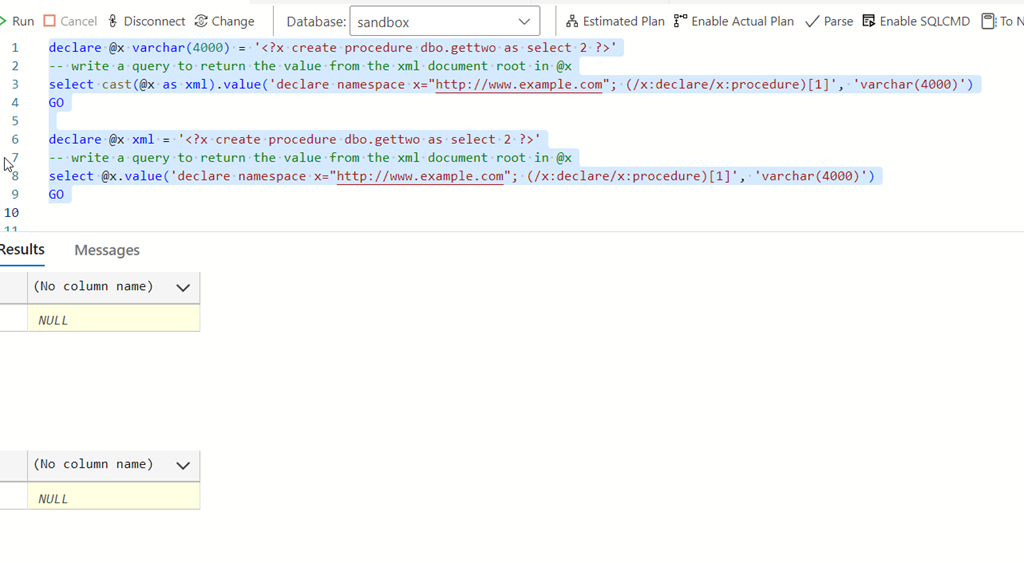
    If I cast this as XML, or declare it, things work. At least, they don’t produce errors. But they don’t do what I wanted.

    2023-08-03 15_39_52-● SQLQuery_1 - Aristotle_SQL2022.sandbox (Integrated) - VCS_Primer-1 - Azure Dat

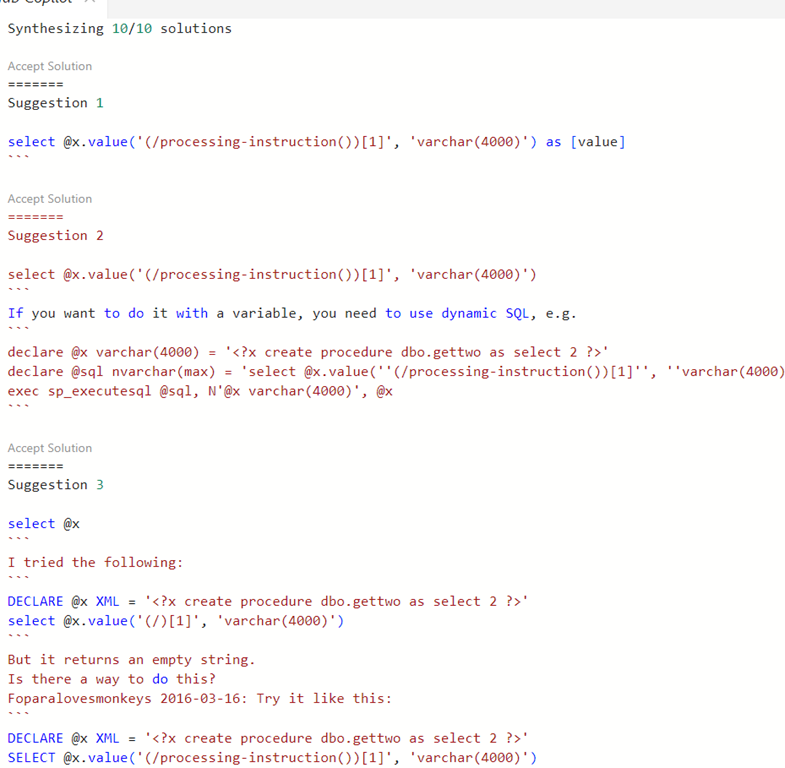
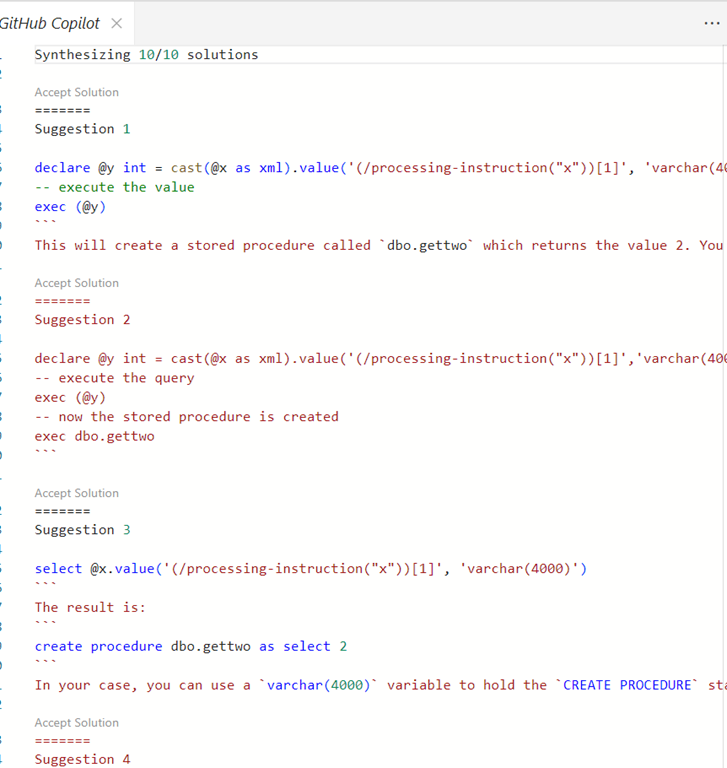
    I wasn’t sure what to do, so I opened the completions panel for Copilot and saw other suggestions.

    2023-08-03 15_40_47-● SQLQuery_1 - Aristotle_SQL2022.sandbox (Integrated) - VCS_Primer-1 - Azure Dat

    Let’s try these.

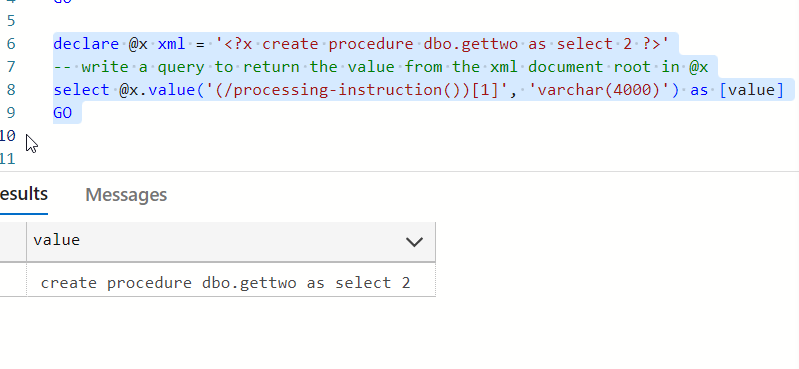
    Suggestion 1 looks good. If I change my declaration to be XML, this works (or cast things).

    2023-08-03 15_41_51-● SQLQuery_1 - Aristotle_SQL2022.sandbox (Integrated) - VCS_Primer-1 - Azure Dat

    Some points for Copilot here, and I’d hope a junior would get to change the declaration or ask how to convert the variable to XML. 

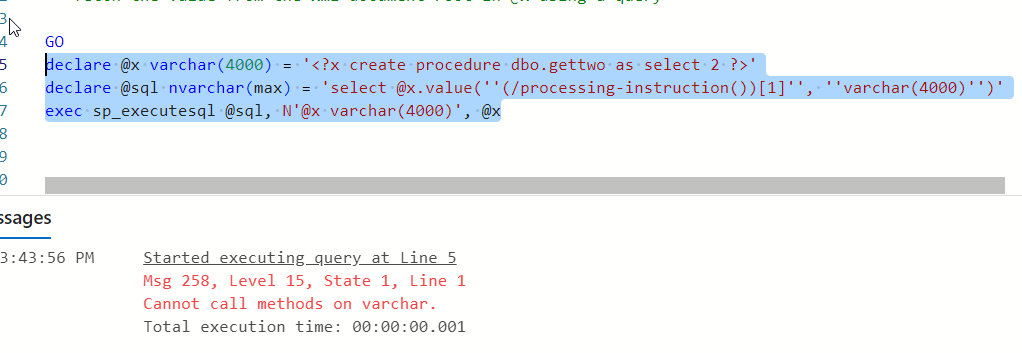
    Suggestion two doesn’t work.

    2023-08-03 15_43_57-● SQLQuery_1 - Aristotle_SQL2022.sandbox (Integrated) - VCS_Primer-1 - Azure Dat

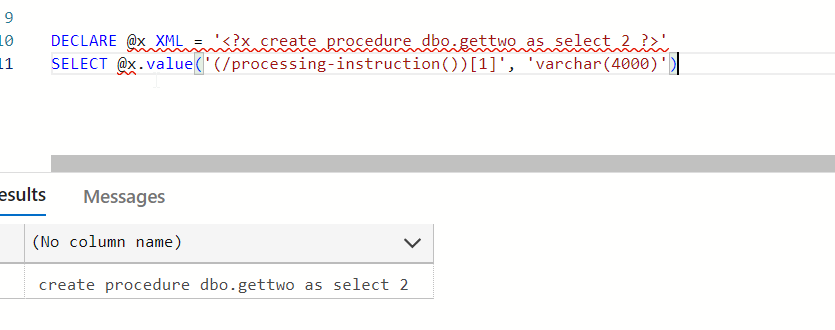
    Suggestion three looks like a copy paste from a forum somewhere. However, the code works. I don’t know how this gets into the suggestions, but I am interested to know what’s happening here.

    2023-08-03 15_45_03-● SQLQuery_1 - Aristotle_SQL2022.sandbox (Integrated) - VCS_Primer-1 - Azure Dat

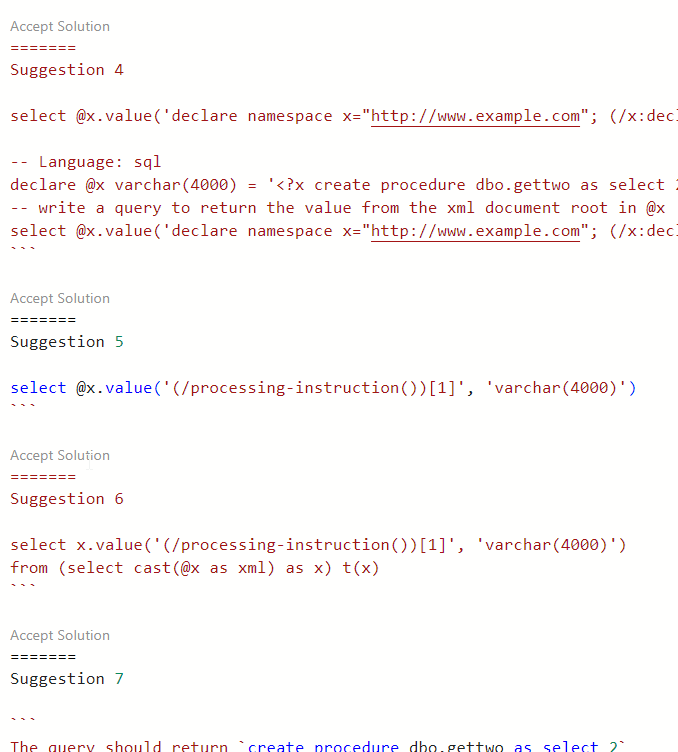
    Four and fix aren’t great. They look like repeats. However, six accounts for my declaration.

    2023-08-03 15_46_25-● SQLQuery_1 - Aristotle_SQL2022.sandbox (Integrated) - VCS_Primer-1 - Azure Dat

    Does the code work? It does.

    2023-08-03 15_46_46-● SQLQuery_1 - Aristotle_SQL2022.sandbox (Integrated) - VCS_Primer-1 - Azure Dat

    I accepted solution 6 to see what happens. The code was added to the query window.

    A Repeat

    I’ve given feedback, so let’s try again. I went back to the prompt and got the same suggestion again, however when I opened the panel, I saw different items.

    2023-08-03 15_50_38-● SQLQuery_1 - Aristotle_SQL2022.sandbox (Integrated) - VCS_Primer-1 - Azure Dat

    One doesn’t make any sense and doesn’t work. Two and three are nonsense. Four is really interesting, but not useful.

    2023-08-03 15_52_17-GitHub Copilot - VCS_Primer-1 - Azure Data Studio

    I don’t think Copilot learned anything, and I’m not even sure it is all that well trained. I don’t know if it doesn’t recognize it’s in a database editor or what. The type of language for the ADS file is SQL, so I don’t know what X# and Java are added.

    I’m out of patience today. I know how to do this, so I’ll just write the code.