Tag: AdventofCode

  • 2020 Advent of Code–Day 3

    This series looks at the Advent of Code challenges.

    As one of my goals, I’m working through challenges. This post looks at day 3.

    Part 1

    Day 3 was tough. The explanation isn’t great, at least, I didn’t get it at first. Essentially you have a map, and then you have some slope. The first part has a slope of right 3, down 1. If you move, assuming the upper left is (1,1), the next spot is 2, 4. That’s if you count going down as positive.

    Here’s the map:

    ..##.......
    #...#...#..
    .#....#..#.
    ..#.#...#.#
    .#...##..#.
    ..#.##.....
    .#.#.#....#
    .#........#
    #.##...#...
    #...##....#
    .#..#...#.#

    If I count each space, then there is a period (.) in this (2,4) space. If it’s a tree, then there is a hash (#) there. We are trying to count trees before we hit bottom.

    The trick I missed is that the map we’ve given repeats. It repeats to the right as often as needed to get to the bottom.

    This is really a coordinate problem, counting each down as we move, and repeating the map. The trick often in a short width here is to do the math to wrap around from the right to left if you run out of room.

    In SQL, I used a loop. I didn’t spend a ton of time, but couldn’t see a good way to avoid this as I need this to be readable, and I need this to keep working through the map. Here’s the code:

    WHILE @currentrow <= @rows
      BEGIN
        SELECT @currentcol += @right
        IF @currentcol > @width
          SELECT @currentcol = @currentcol - @width
        SELECT @currentrow += @down;

       SELECT @trees = @trees + CASE
           WHEN SUBSTRING(dataval, @currentcol, 1) = '#' THEN 1
           ELSE 0
        end
         FROM day3
         WHERE rowkey = @currentrow
      END
    SELECT @trees AS TreeCount

    I move, count the value if there’s as tree, and then continue moving through the next rows. The WHERE clause orients the rows.

    It worked. I go the right answer here.

    Part 2

    In part 2, this changes to checking a number of sloops and then multiplying the results together. In terms of my code, this is really a repetitive way of running the code again. I could have used different variables and checked multiple slopes at once, but I was busy.

    In python, I did something similar. I essentially calculated the next X and Y position, and then looped through the file. Each time the Y matched the current row, I checked for the matching #. If it matched, increment.

    Once I matched the correct Y, I incremented X and Y.

  • 2020 Advent of Code–Day 2

    This series looks at the Advent of Code challenges.

    As one of my goals, I’m working through challenges. This post looks at day 2.

    Part 1

    This problem is really a string processing issue. We get a long string that needs splitting into different parts. We have two numbers, a digit to check, and a password. In this part, we are looking to see if our check digit appears x number of times.

    For T-SQL, we can use Substring and charindex to split things. I had code like this:

    SELECT
                 SUBSTRING(datavalue, 1, CHARINDEX('-', datavalue) - 1) AS lowerbound
               , SUBSTRING(datavalue, CHARINDEX('-', datavalue) + 1, CHARINDEX(' ', datavalue) - CHARINDEX('-', datavalue) - 1) AS upperbound
               , SUBSTRING(datavalue, CHARINDEX(' ', datavalue) + 1, 1)
               , SUBSTRING(datavalue, CHARINDEX(':', datavalue) + 2, 50)
            FROM dbo.Day2 AS d

    From here, I can do some counting to determine if we have the correct number of check digits.

    For Python and PowerShell, I used split functions. The PowerShell one I did in two routines, one to break the numbers off into $counters, after everything is split.

    $values = $line.Split(' ')
    $counters = $values.split('-')

    From here, I could then break everything up into the 4 parts.

    $min = $counters[0]
    $max = $counters[1]
    $checkvalue = $values[1].Substring(0, $values[1].Length - 1)
    $pwd = $values[2]

    Now I get a count, and then an IF statement that can clean this up.

    if (($count -ge $min) -and ($count -le $max)) { $part1 += 1}
    if (($checkvalue -eq $pwd[$min-1]) -ne ($checkvalue -eq $pwd[$max-1])) { $part2 += 1}

    This worked right away.

    Part 2

    In Part 2, rather than counting, we are deciding if the check digit is in the positions specified by the numbers.  The trick here is to check if that substring is equal to the digit. Again, in PoSh, the trick is to see if we have one or the other, which is the requirement.

    if (($checkvalue -eq $pwd[$min-1]) -ne ($checkvalue -eq $pwd[$max-1])) { $part2 += 1}

    This code looks if the digit matches first, then the second digit matches, and if these are both a 0 or 1, it’s not valid. If only one is valid, we increment the counter.

    The python code is very similar.

  • 2020 Advent of Code–Day 1

    This series looks at the Advent of Code challenges.

    I started the Advent of Code at the beginning of December 2020, but life quickly got in the way. Weekends especially, where I try to get away from the computer, so I fell behind. However, I did work through a few, and one of my goals in 2021 is to get through all of them.

    I’m going to document my solutions on my blog.

    Day 1

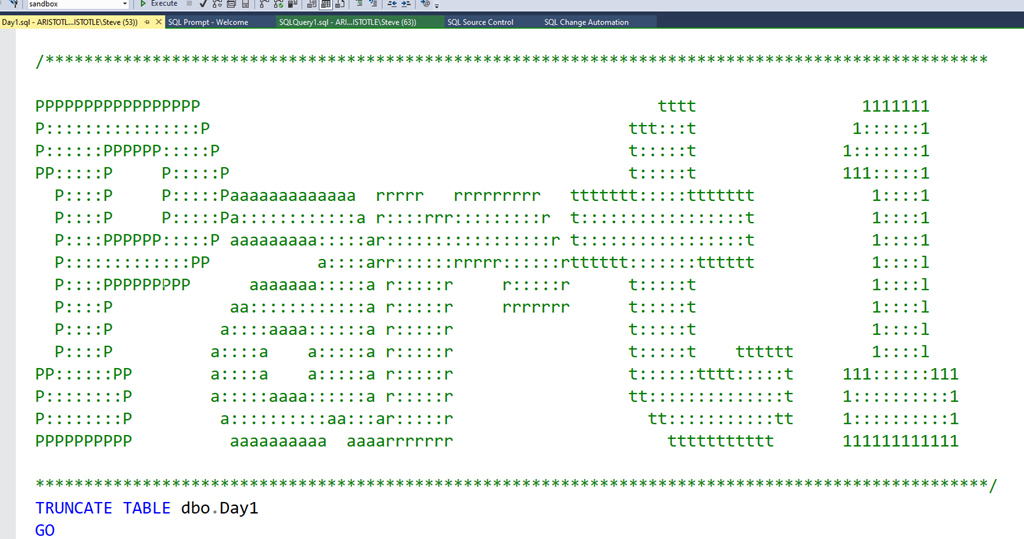
    The first thing I did was set up a template for the solutions. This is clearly important, and I used some basic ASCII art.

    2021-01-22 12_23_37-Day1.sql - ARISTOTLE.sandbox (ARISTOTLE_Steve (53)) - Microsoft SQL Server Manag

    From here, I tackled the challenge. This is one suited for databases, as there is the need to take a list of numbers and find two that add up to 2020. I created a simple table that contained a single column to store numbers.

    CREATE TABLE Day1
    (  datavalue INT)
    GO

    In here I inserted the test data from the challenge.

    The easy way for me to tackle this quickly was cross join the numbers with a sum. I put this in a CTE, which gives me the sum of all individual numbers.

    WITH cteCalc (a, b, sumab)
    AS (   SELECT
                           a.datavalue, b.datavalue, a.datavalue + b.datavalue AS sumoftwo
            FROM
                           Day1 a
                CROSS JOIN day1 b)

    Once I had this, in the outer query I added a WHERE that limited the results to the sum being equal to 2020, and for the column list, I produced the product.

    WITH cteCalc (a, b, sumab)
    AS (   SELECT
                           a.datavalue, b.datavalue, a.datavalue + b.datavalue AS sumoftwo
            FROM
                           Day1 a
                CROSS JOIN day1 b)
    SELECT a, b, a * b AS solution
    FROM cteCalc WHERE sumab = 2020;
    go

    This gave me the result.

    As a hint, I used BULK INSERT to load the complete data from the test file into my table.

    Part 2

    Each challenge has two parts, with the same data. In this one, I had to find 3 entries that summed to 2020. I just added another cross join and this was solved.

    WITH cteCalc (a, b, c, sumabc)
    AS (   SELECT
                           a.datavalue, b.datavalue, c.datavalue,
                           a.datavalue + b.datavalue + c.datavalue AS sumoftthree
            FROM
                           Day1 a
                CROSS JOIN day1 b
                CROSS JOIN day1 c
        )
    SELECT a, b, c, a * b * c AS solution
    FROM cteCalc WHERE sumabc = 2020;
    GO

    All in all, an easy day. Now I need to solve this in Python.

  • Testing SQL in the Advent of Code

    I like participating in the Advent of Code each year, though my participation often varies wildly as life gets in the way. Still, trying to solve some programming challenges is a good way of practicing your skills. If you’re competitive, you can try and see how quickly you can solve things and get onto the leaderboard.

    One note, if you enjoy the challenges, support the cost of running the site. Sending $5 would make a difference to what I’m sure is a decent amount of effort and some costs. Plus, I’d certainly be happy to buy the author some sushi if I were sitting next to him, so why not send something during the holidays.

    This year’s challenge is over, but you can still work through the challenges. In my case, I’ve gone through a few and hope to get to more in a few spare moments.

    Testing Day 2

    One of the things I’ve done in the past is see a challenge and then start to write some code. I’ve worked through the puzzles in PoSh, Python, and SQL, sometimes all three. When I think I’ve solved it, I often enter a result, which is wrong, and then code some more, repeating as needed.

    This isn’t different from what I’ve done as an employee for a company, but I’ve also realized that the subtle design specification is sometimes mis-interpreted by me. In that case, I’ve essentially been bothering the “QA” people for no reason. It’s an application in this case, but still.

    It would be better to have inputs and outputs specified and checked by the computer, which is way better at checking than I am. I decided to set up test harnesses after Day 1 (which was really easy) for the problems. Here’s Day 2.

    Puzzle A

    The first part of Day 2 is a puzzle about letters, asking you to compute a checksum based on whether any letters are repeated. This isn’t a complex set of instructions, but it would be easy to make a mistake. Across any number of sets, a human might have problems verifying the actual results.

    Since the answer here is a single value, this lends itself to a test. I decided to start by creating a table and then loading the input data into the table. That’s something I often do, so the basics here were:

    CREATE TABLE dbo.Day2
    ( Boxnumber INT
    , boxid VARCHAR(100)
    )
    GO
    INSERT dbo.Day2 (boxnumber,boxid)
    SELECT  ca1.ItemNumber,
             ca2.Item
    FROM    OPENROWSET(BULK 'e:\Documents\GitHub\AdventofCode\2018\Day2\input.txt', SINGLE_CLOB) dt(FileData)
    CROSS APPLY dbo.Split(dt.FileData, CHAR(10)) ca1
    CROSS APPLY (VALUES(REPLACE(ca1.Item, CHAR(13), ''))) ca2(Item);

    Now that I had data, I can write a test. I like to use tsqlt, so I started there. Since I want something to test, I decided to start with a procedure that will hold my solution. Since I’ll code here, I can stub this out.

    CREATE OR ALTER PROCEDURE Day2a
    AS
    BEGIN
         DECLARE @i INT = 1;

    -- Solution goes here
     
    RETURN @i
    END

    With this set up, we can now build a test. The basic outline for a test is Assemble an environment, Act on your code, Assert your results. Let’s follow this template.

    The Assemble is easy. I’ll fake out my table of values and insert the test section from the calendar. I’ll also add the expected result, which is given in the puzzle as 12.

    CREATE OR ALTER PROCEDURE tsqltests.[test Day2a]
    AS
    BEGIN
         ---------------
         -- Assemble
         ---------------
         DECLARE
             @expected INT = 12
           , @actual INT;
         EXEC tsqlt.faketable @TableName = 'Day2', @SchemaName = 'dbo';
         INSERT dbo.Day2
             (
                 Boxnumber
               , boxid
             )
         VALUES
             (1, 'abcdef')
           , (2, 'bababc')
           , (3, 'abbcde')
           , (4, 'abcccd')
           , (5, 'aabcdd')
           , (6, 'abcdee')
           , (7, 'ababab');

    The Act part is easy. I’ll call my procedure and get the result back.

    ---------------
    -- Act
    ---------------
    EXEC @actual = dbo.Day2a;

    The Assert part is also easy. I’ll just compare my actual result to what I expected.

    ---------------
    -- Assert   
    ---------------
    EXEC tSQLt.AssertEquals
         @Expected = @expected
       , @Actual = @actual
       , @Message = N'An incorrect checksum calculation occurred.';

    Once this is done, I’ll run it and it fails because my stub proc returns 1. Now to code the solution, which I can easily check by running my test. I can verify things work with a first change to my procedure.

    CREATE OR ALTER PROCEDURE Day2a
    AS
    BEGIN
         DECLARE @i INT = 1;
    SELECT @i = 12
    RETURN @i

    GO

    EXEC tsqlt.run 'tsqltests.[test Day2a]';

    That’s it, and the solution is to split out the box IDs, count the letters, and where there are repeats, tally those up.

    Puzzle B

    The second part of the puzzle is always a nice twist on the first part. In this case, I get a new set of IDs, which vary by a single character.I need to pick those two box IDs and return the common ones. A new solution needed, but only a slight change to the test.

    First, we change the Assemble section because we have new results and inputs.

        ---------------
         -- Assemble
         ---------------
         DECLARE
             @expected VARCHAR(26) = 'fgij',
             @actual   VARCHAR(26);

        EXEC tsqlt.faketable @TableName = 'Day2', @SchemaName = 'dbo';
         INSERT dbo.Day2 (Boxnumber, boxid) VALUES
    (1, 'abcde'),
    (2, 'fghij'),
    (3, 'klmno'),
    (4, 'pqrst'),
    (5, 'fguij'),
    (6, 'axcye'),
    (7, 'wvxyz')

    Next, I need to change the ACT section. Since I can’t return a string from a procedure, I could use a function, but I’ll just add an OUTPUT parameter to my Act.

    ---------------
    -- Act
    ---------------
    EXEC dbo.Day2a @actual OUTPUT;

    Lastly, I change the proc.

    CREATE OR ALTER PROCEDURE Day2b
       @r VARCHAR(50) out
    AS

    That’s it.

    Good luck solving the puzzles.