Tag: auditing

  • Acing an Audit

    Good procedures built into your processes should make passing an audit very easy.
    Good procedures built into your processes should make passing an audit very easy.

    I’ve been through relatively few audits in my database career. I’ve worked in a few industries that didn’t require them, and avoided the stringent requirements of PCI and HIPAA. ISO 9000 was the first audit I encountered and I had been preparing for Sarbanes-Oxley (recently passed) when I left that company to come work for SQLServerCentral.

    The preparation for an audit required a lot of work, meetings, and organization. The first time I suffered through an ISO audit, I was amazed at how much of our daily work was interrupted and the time spent ensuring we would pass the audit. The second time wasn’t much better, though I’d instituted some processes and controls for the DBA group that did reduce the amount of preparation needed for our portion of the audit.

    I wish that more companies I’d worked for had actually built the controls, security, and documentation into their processes. Maybe then they’d only need a 30 minute window to prepare for the audit. That’s what an insurance company needed to do recently according to this piece. I found many of the rules and regulations required in the ISO and SOX documents to be ones I’d want to implement for my database systems. The hard part was getting management to agree and implement the rules as part of our daily work.

    I did find it interesting that the company had built their own software to match their processes and allow employees to work efficiently. Lots of companies have struggled with the idea of becoming their own software company, but if software is truly going to be an important part of most businesses, perhaps it’s a good investment for most of them.

    Steve Jones


    The Voice of the DBA Podcasts

    We publish three versions of the podcast each day for you to enjoy.

  • Regulators, Mount Up

    Warren G - Regulate
    More auditing of regulation compliance is coming for data professionals working in health care.

    I have an encryption talk that I give and usually find a few people in the audience that have implemented encryption. In almost every case this has been because of PCI or HIPAA regulations that dramatically reduce penalties if data is encrypted. Whether you agree with the regulations or not isn’t important. There are rules that some of us have to follow because of our data and my guess is that the number and scope of those rules will increase in the future, not just in these industries, but others as well.

    If you are covered by HIPAA law, you may have gotten some increased scrutiny this year. There are audits underway from the Office of Civil Rights (OCR) for 115 organizations that will help them to ensure they comply with regulations. Penalties aren’t supposed to be assessed unless there are serious violations, but starting in 2013, the  Health Information Technology for Economic and Clinical Health (HITECH) Act requires that the auditing program will be enforced with surprise audits.

    For those managing health care data, you should be sure that you are complying with HIPAA regulations. If you’re not, you ought to make sure your boss is aware that next year you could have a surprise audit and should be ensuring that you meet the laws regulations. The OCR has released their audit protocol, and you should be sure that you understand what is being evaluated.

    If you aren’t regulated by PCI or HIPAA, you might still check over the protocol as much of it is good practice for securing any data. It can be general, but if you abide by the spirit of the criteria, I’d bet that will pass an audit by your security group.

    Steve Jones


    The Voice of the DBA Podcasts

    We publish three versions of the podcast each day for you to enjoy.

  • Finding DDL Triggers

    Triggers are the types of objects in SQL Server that are easy to lose track of. There isn’t an obvious way to tell that a table has a trigger on it and since most tables don’t have triggers, this is one of the things people often miss when troubleshooting unexpected results.

    DDL triggers are worse, since they aren’t tied to particular tables, but rather events. How can you find DDL triggers in your environment?

    There are a few ways. I’ll show you visually and in code.

    The GUI

    I like the Management Studio GUI to find information, and to quickly get code written. With SQL Prompt installed, I can get great intellisense that makes it easy to find parameters, names, objects, etc. I don’t like to run the actions from SSMS, but rather use the Script button and save the code, and execute it in a query window.

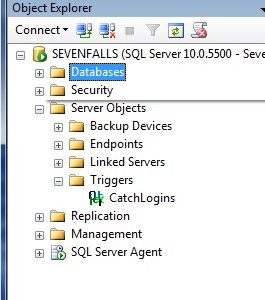
    In looking for server-side triggers, there is a “Server Objects” folder in the tree.

    ddl3

    Here is where you find your backup devices, endpoints, linked servers, and server level triggers. In this case, I can expand the folder (shown above) and find the trigger I created recently.

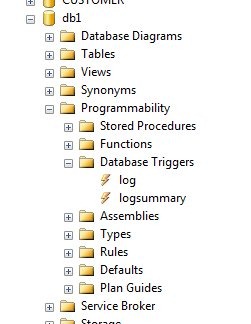
    At the database level, there’s a similar structure. Inside of a database, we find there is a programmability folder, which contains all the code items I can create in a database.

    ddl4

    In here we can see there is a Database Triggers item, and inside there are two triggers that I setup inside this database.

    You have to go look for these triggers, but if you’re wondering if they exist, you can find them here.

    Code

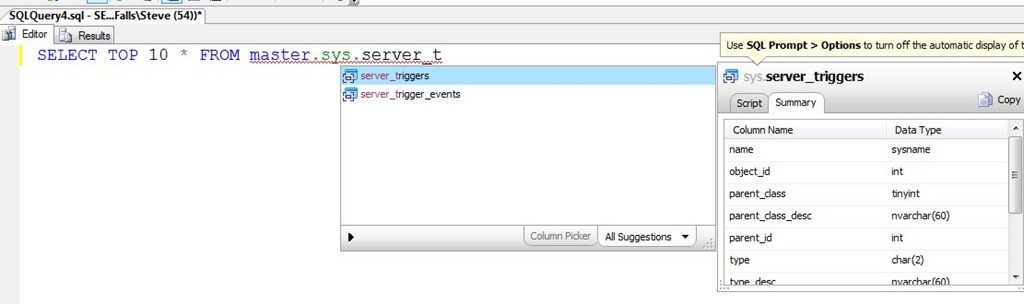
    The best way to look for triggers quickly is with code. Without resorting to BOL, I suspected there was some DMV that contained trigger code. As you can see below, I was right as typing SSF (a shortcut in Prompt), followed by “master.sys.server_t” got me this result:

    ddl5

    If I then examine the results from the server_triggers table, I get my one trigger at the server level.

    ddl6

    This is only part of the information needed as the server_trigger_events table has the events that will fire this trigger. I can query that to see I only have one event here:

    ddl7

    If I join in the events, then I can clean this up and get this:

    select
      t.name
    , t.object_id
    , t.is_disabled
    , te.type_desc
     FROM master.sys.server_triggers t
       INNER JOIN master.sys.server_trigger_events te
         ON t.object_id = te.object_id

    Which shows me the trigger, its ID, and the event’s.

    ddl8

  • Disabling DDL Triggers

    Suppose you want to stop using a DDL trigger for a short period of time, such as the login trigger I created recently. If you want to disable an index, you use

    ALTER INDEX xxx DISABLE

    That doesn’t work for triggers. The ALTER TRIGGER syntax is used for changing code.

    You could use ALTER TABLE on DML triggers, but not for DDL triggers. The DISABLE TRIGGER DDL can be used.

    To stop tracking user logins, I can use:

    DISABLE TRIGGER CatchLogins ON ALL Server
    ;
    

    There is an ENABLE TRIGGER syntax as well to turn the triggers back on. These two commands allow you to save the trigger code, but have it enabled or disabled as needed.