Tag: auditing

  • Removing a DDL Trigger

    In a recent post I talked about how to create a DDL trigger. You’d think to drop that trigger, I’d run this:

    DROP trigger CatchLogins

    That returns me this nice message:

    Msg 3701, Level 11, State 5, Line 1

    Cannot drop the trigger ‘CatchLogins’, because it does not exist or you do not have permission.

    I was logged in as a sysadmin, and I’d created the trigger in the same session, so it doesn’t make sense.

    Instead you need to add a little phrase:

    DROP trigger CatchLogins
     ON ALL SERVER
    ;
    

    Then you get the wonderful

    Command(s) completed successfully.

  • Creating a DDL Trigger

    One of the most amazing features to an old SQL Server 4.2 guy was the addition of DDL triggers to the server. As with any trigger, these can be problematic in that they can overload a server, and they ALWAYS fire, so you can cause yourself problems, but in terms of auditing, I think they’re great.

    As a quick example, perhaps you’re worried about new logins, as I talk about in my AlwaysOn and Contained Databases in SQL Server 2012 presentation. You want to capture when a new login is created. You can do this with a DDL trigger like this one:

    USE master
    GO
    CREATE trigger CatchLogins on ALL Server
    for CREATE_LOGIN
    as
    declare @data xml
    set @data = eventdata()
    
    SELECT @data

    That doesn’t do much, but if I run this code:

    CREATE LOGIN Delaney WITH PASSWORD = 'test'


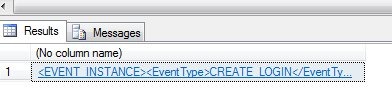
    I get this result:

    ddl1

    Not overly helpful, but if you click on it, you see the event data as an XML document

    <EVENT_INSTANCE>
      <EventType>CREATE_LOGIN</EventType>
      <PostTime>2012-07-23T11:47:41.427</PostTime>
      <SPID>62</SPID>
      <ServerName>SEVENFALLS</ServerName>
      <LoginName>SevenFalls\Steve</LoginName>
      <ObjectName>Delaney</ObjectName>
      <ObjectType>LOGIN</ObjectType>
      <DefaultLanguage>us_english</DefaultLanguage>
      <DefaultDatabase>master</DefaultDatabase>
      <LoginType>SQL Login</LoginType>
      <SID>Djwpf8IHNUicam9m2DkoBQ==</SID>
      <TSQLCommand>
        <SetOptions ANSI_NULLS="ON" ANSI_NULL_DEFAULT="ON" ANSI_PADDING="ON" QUOTED_IDENTIFIER="ON" ENCRYPTED="FALSE" />
        <CommandText>CREATE LOGIN Delaney WITH PASSWORD = '******'
    </CommandText>
      </TSQLCommand>
    </EVENT_INSTANCE>

    I can parse this out and store it. What do I want? Probably I want the server and object, the date for tracking, maybe the creator, but definitely the SID. The text doesn’t help since it doesn’t have the password. All I can do then is go find the user or admin and ask them to recreate this login on the secondary servers.

    Let’s start parsing. You have two choices here with the XML: the .data or .query methods. There may be more, but that’s what I know. I’ll parse in two ways here:

    ALTER trigger CatchLogins on ALL Server
    for CREATE_LOGIN
    as
    declare @data xml
    set @data = eventdata()
    
    select 
      @data.value('(/EVENT_INSTANCE/PostTime)[1]', 'datetime')
    , @data.value('(/EVENT_INSTANCE/ServerName)[1]', 'nvarchar(1000)')
    , @data.query('(/EVENT_INSTANCE/ServerName)')

    This returns some data.

    ddl2

    You can see the .query returns XML, which (to me) is a hassle. So I’ll stick with the .value clause.

    I would probably create a table here that stores this data. If I used a generic table for multiple types of audit data, I’d need to include the type of event as well. You can just use the first XML document for different audit types to see what’s returned, and then deal with it as appropriate.

  • Detecting Database Option Changes with DDL Triggers

    One of the keys to managing a large production SQL Server environment is being aware of changes that are taking place in the environment, and preventing potentially harmful changes. There are any number of ways to do this: triggers, auditing, PMB, third party monitoring, and more.

    In this post, I want to look at a quick way to detect issues with databases using DDL triggers. Specifically, I will build a quick trigger that responds to the ALTER DATABASE event.

    Tracking Changes

    In general, I try to avoid those options that severely limit my flexibility. I dislike trying to enforce every possible rule I create since I understand that IT environments often evolve and change, and the hard rules you have today may not apply tomorrow. I also realize that most of the time the hard rules have exceptions to them for various reasons and it’s much easier to manage a set of instances if you expect that the might not have the same requirements.

    I do want to be informed of changes, and one option is a DDL trigger that responds to a particular event. DDL triggers have a large list of events that will trigger them, of which the ALTER DATABASE is one.

    We build the trigger by giving it a name, scope and an event. In this case, we’ll start with this template

    CREATE TRIGGER [name]

    ON ALL [scope]

    FOR [event]

    You can change the scope and events as needed. For me, I need the Server level scope (database changes are a server instance event) and then the ALTER_DATABASE event. From there, it’s pretty much normal T-SQL coding.

    The data comes back from the EventData() function as an XML fragment, so in the trigger, I need to parse out the particulars that I care about.

    The code I’ll use is this:

    CREATE TRIGGER DBAAudit_ALTER_Database
    ON ALL Server
    FOR ALTER_Database  -- Captures a Create Database Event
    AS
         
    DECLARE
      @EventTime datetime
    , @ServerName varchar(200)
    , @LoginName varchar(200)
    , @DatabaseName varchar(200)
    , @TSQL varchar(2000)
    , @event XML
    
    select @event = EVENTDATA()
    
    SELECT @ServerName = @event.value('(/EVENT_INSTANCE/ServerName)[1]', 'varchar(200)')
    SELECT @EventTime = @event.value('(/EVENT_INSTANCE/PostTime)[1]','datetime' )
    SELECT @LoginName = @event.value('(/EVENT_INSTANCE/LoginName)[1]','varchar(200)' )
    SELECT @DatabaseName = @event.value('(/EVENT_INSTANCE/DatabaseName)[1]','varchar(200)' )
    SELECT @TSQL = @event.value('(/EVENT_INSTANCE/TSQLCommand)[1]','varchar(2000)' )
    
    Print 'Database ' + @Servername + '.' + @DatabaseName + ' was altered by ' + @LoginName
    Print 'Command: ' + @TSQL


    When I create this on my instance, it is stored in the Server Objects \ Triggers area on my server. Just like any other object, I can right click and perform all kinds of actions in SSMS.

    ddltrigger_a

    When I execute a change on a database, such as setting a database to read only with this:

    alter database dba_admin set READ_ONLY
    

    I get this in the messages tab (from the Print statement)

    Database DKRSQL2012.dba_admin was altered by DKRSQL2012\Steve

    Command: alter database dba_admin set READ_ONLY

    If I set the database back to read_write, I get this:

    Database DKRSQL2012.dba_admin was altered by DKRSQL2012\Steve

    Command: alter database dba_admin set READ_Write

    This is a nice example, but in a real system, I’d use a database for tracking these changes and store the information from the event in a table. Instead of a PRINT, I’d insert data into a table that tracks changes.

  • Regular Audit Analysis

    Do you regularly review audit data?

    I was reading over a digital supplement that I received from Dark Reading recently, which details some of the issues in the Epsilon, Gawker Media, and a few other data breaches. It was light on details, but there were some nuggets of knowledge in there about how these attack occurred. Some were sophisticated, and some were insider attacks, but the advice given to help protect your data was all similar: limit access, watch for injection, audit, and monitor.

    I know that over the last decade as I’ve run SQLServerCentral, the topic of security and auditing has grown in importance. More and more people are implementing auditing functions in their applications and slowly tightening security where they can. There is a lot of work to do, and a lot more education that needs to be spread to a wider audience, but the trend is positive.

    However one thing in the article caught me eye, and it had me wondering how many people are going beyond the basics. For those of you that have auditing built into your application or database, I have a question this week:

    Do you regularly analyze the audit data to look for abnormal trends or access?

    All the data in the world doesn’t have any value if it’s not used. In a security context audit data isn’t all that useful if it’s only examined when an incident is discovered. The real value in auditing data is the ability to uncover problems before they occur. Looking for inappropriate access, unusual access for a particular individual or application, or even repeated attempts to gain access can help prevent a data breach.

    After all, catching the criminal later doesn’t necessarily mean you’ve “recovered” the data. Unlike physical objects, data can easily be copied and spread in way that prevents it’s complete recovery.

    Steve Jones


    The Voice of the DBA Podcasts