Tag: career

  • Less is More

    The world of Information Technology has changed a lot during my career, but in some ways, many things remain the same. There are still mainframes in use, and plenty of jobs. Lots of companies maintain their infrastructure in data centers, even though some are turning to private clouds for their infrastructure. There are plenty of jobs in that area as well.

    There is a trend to consolidate resources into a bucket and then allocate those as needed for various applications and services. This is what mainframes do, albeit at a very high degree of reliability (and cost). The cloud seeks to replicate this, not with high reliability, but with redundancy, expecting systems to fail. In fact, plenty of the data centers these days involve a lot of similar hardware systems tied together with software, with failed systems being left in place rather than replaced.

    This trend aims towards a lights-out data center, where humans don’t work inside the location with servers. As someone that used to keep a coat by my desk in the summertime for trips inside the locked “computer room”, it’s a welcome trend. While a few people might actually need to check a cable or service an AC or UPS unit, most of us these days never see the systems we work on, whether those systems are owned by our company or rented in the cloud.

    This doesn’t mean that we won’t have as much work. In fact, I think that most of the trends in computing over the last three decades have opened up opportunities for workers. This article talks about some of those changes that allow workers to morph along with technology to tackle different aspects of similar jobs. I certainly expect that anyone who wants to improve their skills and adapt to the new data center of the future to have plenty of work.

    This reminds me of a scene from Aliens, where workers use enhanced suits to load heavy crates. I think this is the type of future I see, where humans work alongside new technology rather than being displaced by it. The need for humans to monitor, manage, adjust, and configure software systems and physically work alongside high-tech software is not going away anytime soon. The more that we adapt new technology, the more it seems that we add humans to work alongside it in some new way.

    Continue to learn, adapt, and adjust your skillset and you can remain employed for a long time.

    Steve Jones

    Listen to the podcast at Libsyn, Stitcher, Spotify, or iTunes.

  • Azure Redundancy for Storage

    This is part of a series on my preparation for the DP-900 exam. This is the Microsoft Azure Data Fundamentals, part of a number of certification paths. You can read various posts I’ve created as part of this learning experience.

    In a previous post, I discussed the makeup of Azure regions and Availability Zones. These are important concepts to understand how storage protection works. This post looks at the various redundancy types: LRS, ZRS, GRS, and GZRS and RA-GZRS.

    Note: This isn’t directly on DP-900, but these concepts did help me understand better how the Azure options fit together.

    As I discuss these, this infographic might help. Also, MS Docs has an article.

    2022-02-04 09_43_49-Azure Resiliency Infographic_PostFinal

    Local Redundant Storage – LRS

    As it might imply, this means that your storage bits are copied synchronously to redundant storage in the local area. In this case, this means the data center where your  storage is located. Your files (or VHD or whatever) is copied three times into separate locations. This means that your files can survive a single node (computer or disk) failure.

    This also means you should forego software RAID for VMs or data files as there are already three copies that will acknowledge the write.

    You do not get to pick which data center, just the region where the data center lives. This means your resource could be in any of the data centers in a region, but there are three copies.

    Impressively, this gives you 11 9s of durability. However, a fire or major failure of a single data center might cause all your data to disappear.

    You can use managed disks with LRS.

    Zone Redundant Storage – ZRS

    The next level of protection is ZRS, where you get three copies, but this time the copies exist in three parts of an Availability Zone. This is why the AZ must be inside a 2ms latency boundary. This way your files can be copied from data center to data center inside of the AZ.

    In this way you achieve 12 9s of durability for your files. More importantly, if a single data center were to go offline, you would still have access to your files (or VHDs).

    You can use managed disks with ZRS.

    Geo-Redundant Storage – GRS

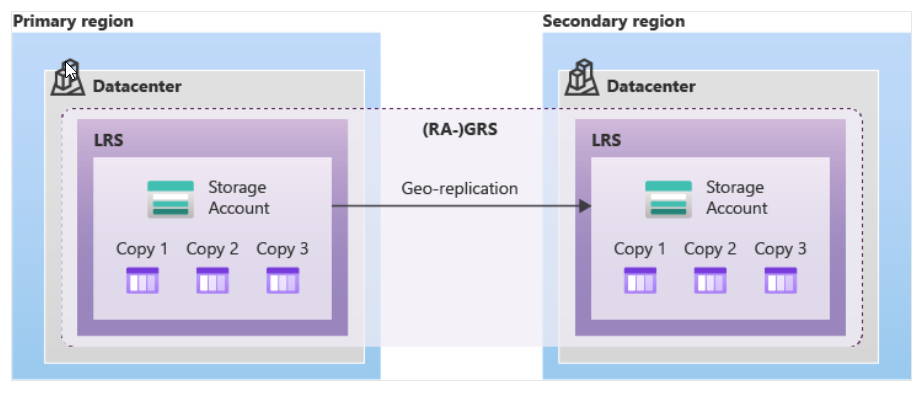
    This is a type of redundancy that is between LRS and GZRS. In GRS, the primary data center implements LRS, with 3 copies of files in the single data center. This gives you protection against node failures.

    A second copy, asynchronously, is made in a second region, where LRS is also implemented. This means 6 copies of your data, spread across 2 data centers, one in each of two regions. The image below shows this:

    2022-02-04 10_18_30-Data redundancy - Azure Storage _ Microsoft Docs

    Note, the files in the secondary region are not accessible unless there is a failover. However, if you add RA-GRS, the read access equivalent, you can access files in either zone.

    Geo-Zone Redundant Storage – GZRS

    GZRS expands the ZRS storage to include a second region. You still get three copies in your primary region spread out across an AZ, but you also get three copies in a secondary region. These are replicated asynchronously as the latency between regions isn’t bounded closely enough for synchronous changes.

    The secondary zone uses LRS for the copies. The difference between GRS and GZRS is the replication in the primary region.

    GZRS is supposed to give you 16 9s of durability.

    Read Access Geo-Zone Redundant Storage – RA-GZRS

    With GZRS, there is more protection for your files, but you cannot access the files in the secondary region unless you fail over from the primary region. The customer or Microsoft can initiate this.

    In some cases, you might wish that you could spread the read workload between the primary and secondary regions. With RA-GZRS, you can do this. Your clients can access files in the secondary or primary region.

    Availability of Azure Storage Options

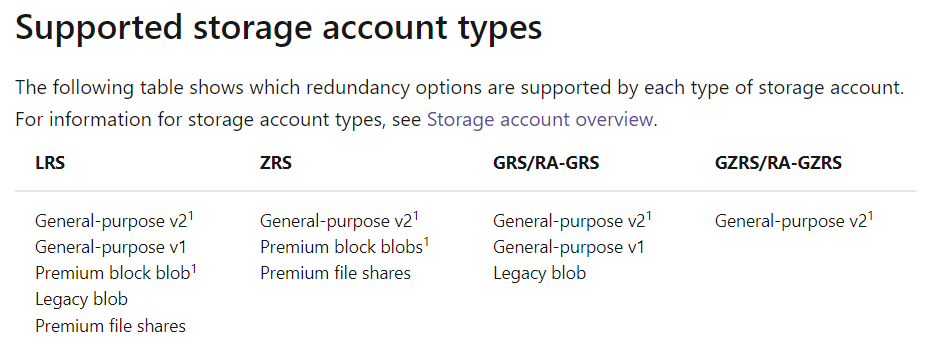
    Not all Azure Storage options are available with the different redundancy options. In the redundancy article, there are two charts, I’ve reproduced below. This first one looks at the different redundancy options and which types of storage fit:

    2022-02-04 10_24_53-Data redundancy - Azure Storage _ Microsoft Docs

    This next one shows that the different account types fitting in the options.

    2022-02-04 10_25_14-Data redundancy - Azure Storage _ Microsoft Docs

  • An Active Job Search

    I caught this link in a Brent Ozar newsletter. It’s a post from Alice Goldfuss noting she’s on the market for hiring. Not that she’s looking for a job, but rather, saying she’s willing to talk to you if you want to hire her. Quite a bold announcement, but she’s quite a talent that many organizations might want. I don’t know that many of us could post something and have companies come find you, but I did like the list of items she lays out for a hiring conversation.

    These are the types of questions that you might keep handy, even as notes, for your next interview. I’ve often had a series of questions like this that I ask when I go into an interview for a job. I’ve learned that I need to be curious and careful if I want a successful position for both me and the company. Both of us are trying to put our best foot forward, sometimes stretching the positives and minimizing the downsides. That means that both sides can be surprised later by how the relationship actually proceeds.

    Many of us proceed from job to job, often taking the first offer we get whenever we are looking for a job. That usually occurs because we need to make money and cover bills. The timing of job interviews and offers usually means that we can’t often consider two at once. Sometimes we can, but it’s been rare for me.

    My view has been that the best time to find a new job is when you have a job. If you are unhappy, or you feel that you want a better position/challenge/compensation/etc., then look for alternatives. If for no other reason, you should be aware of how your current job compares to others. It’s easy to get complacent and not realize that the world of employment has changed dramatically.

    At the same time, I also ask you to actively think about the things that you like and don’t like about your job. Think about what you really want from employment. It could be the compensation, the hours, the challenge, the colleagues, the benefits, or anything else. Make a real list, and then assign some weights to these factors and decide what is important to you. I actually like the Thymometrics that Redgate uses to track employee satisfaction, and I take the data I’ve entered and use that to evaluate my own satisfaction with employment. I do this every year, making an evaluation of my own position and then making a conscious decision to stay. I’ve written about the service, and I love it.

    For 14 years I’ve made the decision to stay in my position, usually because I don’t find other positions offering a better balance of the things important to me. I could make more money, but I’d have to change other things, and I haven’t found the overall value from alternatives to be worth me making a move. I hope you can say the same, but in order to do that, make sure you are actively thinking about what you want from employment, evaluating your current environment, and then actively managing your career in the way the direction that matters to you.

    Steve Jones

    Listen to the podcast at Libsyn, Stitcher, Spotify, or iTunes.
  • DP-900: What’s a Region and an Availability Zone

    This is part of a series on my preparation for the DP-900 exam. This is the Microsoft Azure Data Fundamentals, part of a number of certification paths. You can read various posts I’ve created as part of this learning experience.

    This isn’t covered per se on the exam, but it does matter for understanding some other concepts, like reliability and other HA (high availability) concepts. I decided to do a quick post on these concepts as learning them helped me better understand some other things, like LRS and ZRS.

    Geographies

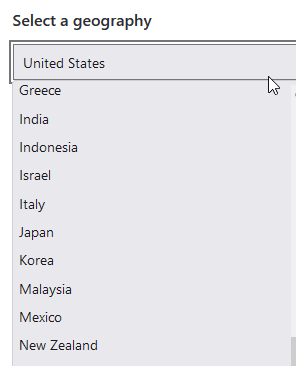
    I didn’t see this on the test, but it could be in the pool of questions. A geography is roughly a country, but not always. You can see this list in the link below:

    Azure Geographies

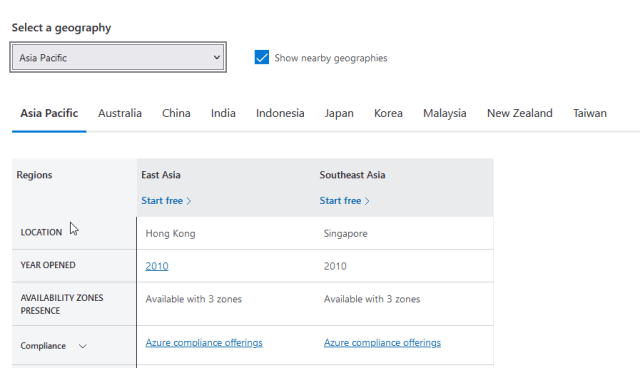
    Note there is an “Asia Pacific” geography, which is Hong Kong and Singapore listed as regions.

    2 regions in Asia Pacific

    Region

    A region is an area in a country. Regions don’t span countries, and there can be multiple regions in a country. Microsoft has a list of regions available in various geographies. As an example, if the United States is selected, you can see these regions:

    • Central US (Iowa)
    • East US (Virginia)
    • East US 2 (Virginia)
    • West Central US (Wyoming)

    and more. If you pick the UK, you will see UK South and UK West (as of Feb 2022). These are located in the London and Cardiff areas, respectively.

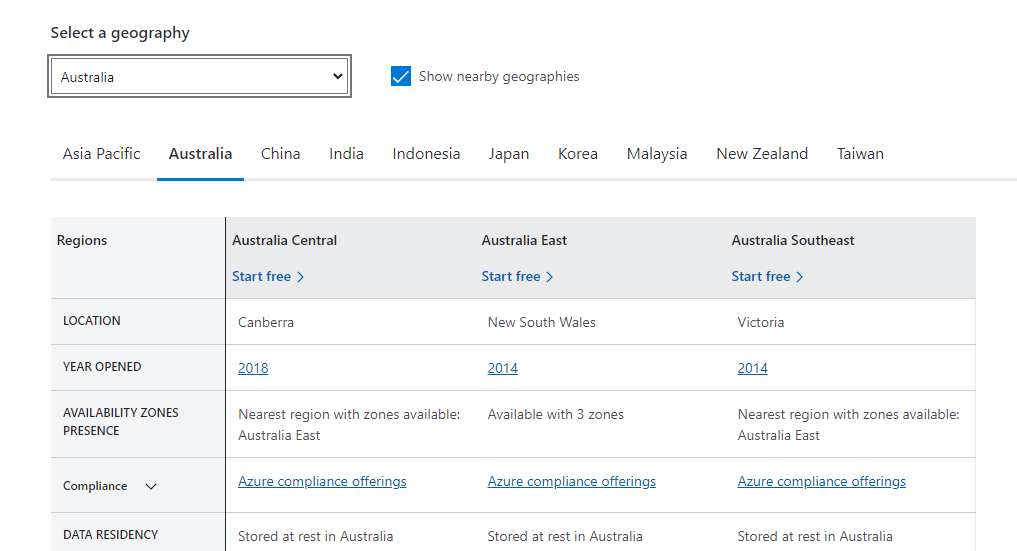
    You can think of a country as divided into regions, separately from their province/state/county governmental borders. A set of data centers is then built to make up a “region” for Azure. The Australia regions are shown in the image below:

    2022-02-04 08_59_42-Choose the Right Azure Region for You _ Microsoft Azure

    In the image we have a Canberra location,  which is a city. Victoria and New South Wales are states, and the location in these states isn’t specified. Some inconsistency here, but think of a region as an area in a country. This region provides a low latency network between the various data centers in the region.

    Regions are a unit where different services are provided. Not all regions are equal as some capabilities are deployed in some regions first. It is always important to verify a particular service or feature is in a particular region before you plan a deployment.

    Availability Zone

    The Availability Zone concept is a more ephemeral one. This is a set of data centers inside of a region. These are within a latency boundary, meaning that network communication between hosts in two different data centers is 2ms of less.

    When you have at least 3 data centers inside of this latency boundary, they an comprise an Availability Zone. This is a concept for redundancy purposes and to survive some sort of disaster in a single data center. If a single data center loses power or some other issue, the other data centers in the AZ can take over. This could be a single server or rack of servers failing as well, with servers inside another data center in the AZ taking over.

    Zone Redundant Service (ZRS) is the concept here that is used with an Availability Zone. With this, there are copies of the service in the different zones that allow a service to continue to function, despite a local failure in a DC. This is in contrast to Local Redundant Services, which have multiple nodes inside of a data center, but would be unavailable if that particular data center failed.

    Here is an image from MS Docs that shows there are three zones inside of a region that are connected together.

    2022-02-04 09_37_19-Azure regions and availability zones _ Microsoft Docs

    The documentation notes there are a minimum of 3 zones to have an AZ, and I’m guessing some regions potentially have 4 or more zones to ensure services are uninterrupted and capacity is available.

    Overall Hierarchy

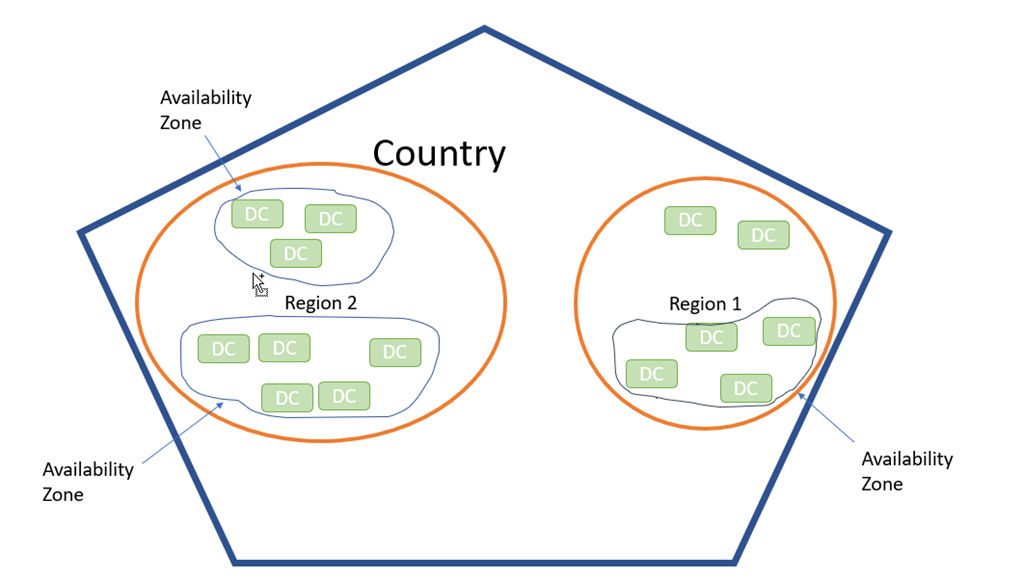
    I didn’t find a great image that explains things. I made a simple one, showing a country, with regions, then AZs, and data centers.

    2022-02-04 09_36_50-Presentation1 - PowerPoint

    Note, Azure calls areas of the world geographies. So the US is a geography, which might help if there were governmental or political changes over time.

    The basic idea is to understand this relating to storage, which will be another post where I examine the different levels of protection offered by Azure.