Tag: cell phone

  • The Pebble

    I have been a "watch" guy for most of my life. Ever since I was a teenager, I’ve almost always worn a watch, usually a Timex, that lets me track time. At one point I really had the goal of being successful enough to buy a Rolex, but at some point that fell away. I decided I liked something that was lighter and more durable.

    A few years ago I lost a watch, taking it off for karate and forgetting about it in my bag later. I found it months later, but in the intervening time, I tried to make do with my cell phone. I found it annoying to pull out my phone to check the time. I also found myself spending time on the phone more, when I could do something else.

    I was intrigued with the idea of smart watches, and I’ve looked at a few. I backed a Kickstarter project, thinking I’d get the watch and use that with my phone. The project got delayed, I got more annoyed with my phone, and eventually I got a device that didn’t work. It needed a charge every night, and the quality was slow. The app was also flaky, crashing often.

    At this point I was disappointed and still wanted a watch. It was close to Christmas, so I bought myself a Pebble watch. It was on sale, only about $60, just slightly more than the $40 I’ve paid for Ironman style digital watches.

    I did look at the various Android Wear watches, and the Apple watch, but they seemed to be flaky, as well as very expensive. A watch is a tool for me, not something I wanted to spend a lot of money on. Plus, I wasn’t sure how well the integration would work and how much I’d use it, so I wanted a cheaper experiment.

    Getting Oriented

    I was somewhat fascinated with the Pebble. It was about as simple a device as you’d want, and it just worked. I can’t speak for the Android experience, but I suspect it was as simple as the iPhone one. I essentially plugged it in, and when it had a little charge, I could connect it to my phone through Bluetooth using the Pebble app.

    The small box the Pebble came in just had the watch and a cable. You can see the multiple contact cord (with USB) and the matching connectors on the watch. This is a magnetic connection, like some laptops use. It easily connects and disconnects.

    Charging seems to be fast, as I’ll get a low battery warning and can connect it to my desktop, having it charged in a couple hours.
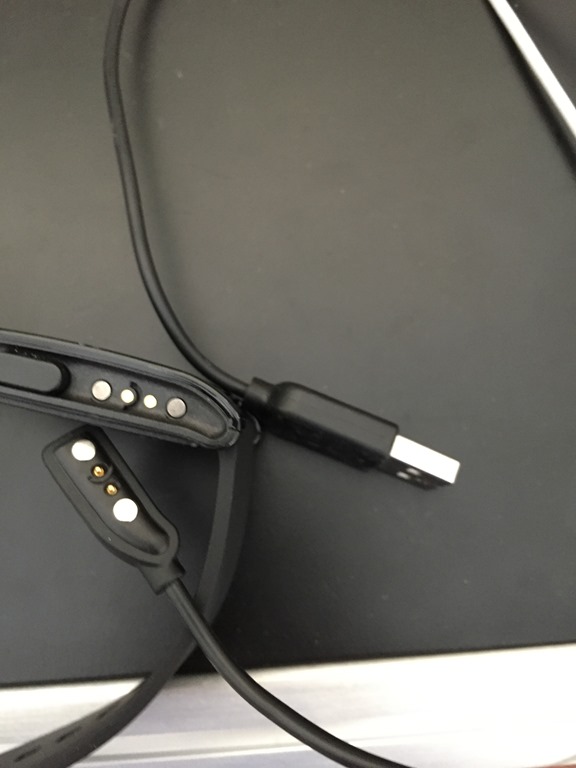
    Photo Feb 26, 1 50 36 PM

    The watch itself has a nice display, that’s easy to read. There are lots of watch faces you can choose. I tend to use something simple like this:

    Photo Feb 26, 1 51 07 PM

    That gives me dates and times, which I like. I also have this one, which I’ve used when I want to get away from time and work. It’s just a simple display to remind me not to worry about time. This is one I use on weekends regularly.

    Photo Feb 26, 1 50 57 PM

    You can download faces from the Pebble app store, and they mostly appear to be small and fast. I’ve loaded 4 or 5 on my watch that I can choose from. There are some really interesting ones that you can get.

    Photo Feb 26, 2 11 17 PM

    There’s an app store, and while you can download a bunch to your phone, you can only have 8 on your device. It’s easy to remove and add them, with a few taps on the phone and a short delay. I’m surprised how quickly they load, given the slow, bloated software I find elsewhere.

    Photo Feb 26, 2 11 29 PM

    Some of the apps do time, some do other things. I’ve got this Weather Channel app, that gives me time and weather wherever I am, which is nice when traveling.

    Photo Feb 26, 1 50 52 PM 

    It’s a basic watch, so I needed to find a stopwatch app to use. That surprised me, but it makes sense.

    I also worried about the display, but it’s easy to read during the day, and a shake of my wrist will bring up a brief backlight. That’s really handy at night when I might want to check to see if I’ve overslept in a hotel room.

    45 Days Later

    I initially played around with lots of watch faces. I found some neat ones, but I quickly discovered most were a bit hard to read when I was in a hurry, or driving, which is when I usually need the time. I decided that a basic display suited me better.

    I’ve messed with apps, but for the most part, I want this to be a watch and a notification device. Controlling music or getting ESPN scores isn’t want I need. Those things might be handy, but as I appreciate time away from my device more and more, I want it to do less.

    Battery life is great. I bought a second charging cord for traveling, and promptly forgot it on my trip to the UK in February. I had charged the device Monday morning before leaving for the airport and had the watch work until Friday morning. I’d realized I didn’t have a cord and turned off notifications sometime Wednesday, but that was still impressive. I’ve since put my cord in my laptop bag.

    There isn’t a lot of notification that the battery is going down. I’ll get a 20% battery note, or a low battery, and I don’t have a lot of time (a few hours) before it just turns off. I dislike that. I need to find a battery app for the device (I’ll do that shortly).

    The notifications just work. The ones that normally appear on the lock screen (texts, Word With Friends, etc.) appear on my phone. That’s super handy, especially while driving. I can see a text and decide what to do. It’s even more handy with 2FA notes from Google or WordPress. I don’t have to go find my phone. I can read things on my watch. Apps don’t have to be "pebble aware" as my Tempo calendar alerts just appear on the watch. No configuration.

    Photo Feb 26, 2 15 59 PM

    It’s water proof to the extent I’ve worn it in the shower. I wore it in the pool once, for a lap, but didn’t like it and was worried, so I pulled it off. The band is a little annoying for me, so I tend to take it off when it’s going to get wet. I may look for another band at some point.

    Overall, I’m very happy with the Pebble and there isn’t really anything else I want from a watch. I don’t want color if I give up any battery. I think the bluetooth cost is minimal, and haven’t noticed issues with my phone. I think it’s a great investment, and if you want a basic smart watch that gives you time and notifications, this is it.

  • Six Months with the iPhone 6

    A couple years ago I switched from iOS to Android, pre-ordering a Samsung Galaxy 4. I wrote about my decision and then a short term update before I moved back to my old iPhone 4S and iOS. I have a few more thoughts on what was better on Android, but in the end there were a few things that really annoyed me, specific to how I use a mobile device.

    Last fall I eagerly looked forward to the iPhone 6 as my 4S was getting old, slow, and the battery was dying. I pre-ordered the 6, and switched from Verizon to T-Mobile at the same time. I decided to take a look at the past six months and my thoughts. I’ve broken this into two parts because the carrier and phone are separate.

    T-Mobile

    I have mixed feelings here. I really like lots that T-Mobile has done. The freedom from contracts, the high speeds, the music streaming, the wi-fi calling, overseas data, it’s a neat company. And in some ways, they perform well. I remember sitting in Starbucks, in Parker, CO, and trying my speed test app on the phone with T-Mobile’s LTE network. I got 40Mbps down, better than I get at home!

    At times, it’s amazingly fast and I appreciate that. However, at times it’s really, really bad. I live out in the country, and service is spotty near me. I can accept some of that, and certainly in the last six months I’ve seen LTE get close to me and have better service.

    However I’ve been in buildings in Denver and other cities, where I have great connectivity outside, but inside a building, even a smaller two story one, I’ll see very, very poor service. Near my house the service is flaky, and T-Mobile hasn’t given me the ability to turn off data roaming near my house. Since I only get 50MB each month of roaming data, I don’t want to waste it. However I have no control, and I’ve given up. If I’m using the phone near my house, but not on wi-fi, I’ll run out of data in a few days. Even if I’m not actively browsing or searching, apps on the phone will use data.

    Slightly maddening.

    Overseas access has been good, and I’ve appreciated the connectivity without additional costs in the UK. Since I go 2-3 times a year, this is handy.

    Wi-fi calling is spotty. At times I know my network has hiccups, but I’ll drop off  the wi-fi calling and it doesn’t come back quickly. I’ll have to drop into airplane mode and back out to get wi-fi to reconnect. The transition from wi-fi calling to cellular hasn’t been very smooth, which is disappointing.

    iOS8 / iPhone 6

    The phone came with iOS 8, which is an evolution, not a revolution, from iOS7. I was somewhat excited, as there are a few enhancements, but also disappointed in some ways. I’ll cover a few things I like and some I don’t.

    The phone itself is an iPhone. Slightly larger than the 4S, thinner, and light. It’s basically a slightly stretched version, and I haven’t noticed much. I get 5 rows of icons on the screen, which does look amazing at times. A few of my pictures, or videos I’ve shown on there look fantastic. As good as my Galaxy 4 screen. Battery life seems inconsistent. At times it runs down far too quickly, and at times it lasts. I’ve uninstalled apps at times when I’ve noticed poor battery life, but haven’t really figured out what’s happening. I have a battery case, so mostly I don’t worry about it.

    iOS 8, however, took a few steps back.  The biggest thing I noticed right off was that when I get forwarded to some web pages in Twitter, Facebook, or other apps, I’ll only get a partial page load. Then I’ll get white screen halfway through an article. I know this is iOS/Safari somehow, because if it happens on all kinds of target sites, and if I reload the page in Chrome, it works fine. That’s slightly maddening.

    The music app works fine, and the camera does well. It’s quick, though once in a great while it hiccups. Overall, this is a better photo/video/music device than any I’ve had, but just because it’s a bit faster and it works well. I love the slow motion video, especially capturing my kids’ sports events.

    Navigation/maps are fine, though I wish I could switch defaults from Apple to Google. Not that Apple maps are bad, but I often want to get a look ahead at the route. Apple maps does not make that easy.

    I love having Passbook again, and I use that extensively for airline tickets, movie tickets, and Starbucks. I also use Apple Pay at a few places, but since most don’t accept it, it’s not super handy. However being able to give my phone to my daughter to go get coffee while I get gas is very nice. It’s also super handy. It wasn’t as clean on Android, though I suspect the Starbucks app there would do fine.

    The TouchID, which I thought was gimmicky, is great. I use it all the time, letting me unlock my phone while I’m walking or trying to move through a line without looking at the screen. I have a password manager that uses it as well and I love it. It’s not a great security feature, but it works well enough for me for now.

    The third party keyboards don’t work. That’s one thing I am disappointed in. The responsiveness of Swype and Swiftkey aren’t’ there, and at times they freeze up, especially in messaging. It doesn’t have to happen more than a few times before I abandoned them.  I hope they fix this.

    I do miss having the ability to resize icons, or move them around on the desktops. I’m slightly jealous of my wife’s LG III, as she got an amazing loader that gives her different backgrounds on different screens. It also rotates through all her "desktops" in a circle. I’d like to have my icons around the edge of the screen and see the background clearer as I like pictures.

    I’m not too concerned anymore about which apps are where. Since I can pull down and search, I do that often, and rarely look through screens. That’s a feature I great appreciate.

    The Future

    I’d still like to see Windows Phone succeed a bit and evolve, but I also want it to get more apps and have more choice. That’s still a failing that keeps me off it.

    I am tempted by Android, except that every time I hear a camera click or text pause the music on my wife’s phone, I’m glad I’m not using it. She did get a third party camera app that responds much quicker than the native one, so I suspect that real time interrupts and issues with the camera and music apps I had on Android are built in, but potentially handled with third party apps.

    I may switch at some point, but for now I’m very pleased with my iPhone, despite a few glitches.

  • Smart Gadgets

    I saw this post on what a smartwatch should look like and it got me thinking. I’ve got a Kreyos watch coming (I hope) and it fulfills some of the things I was looking for, and a few that the Pebble didn’t.

    However I wonder where we’ll go with gadgets in the future. My son and I sometimes dream, trying to decide what we’d like to see built in the future. One of the main things we talk about is how we might wear things. A bracelet of some sort seems to be the consensus. Getting something larger that we can see better, but more convenient then a smart phone. Already I think the 5″ ones are a bit large and cumbersome to use. One of my complaints about the Galaxy S4 was that I couldn’t easily use it with one hand.

    Glasses are an interesting idea. Google Glass has some good ideas, though I think the idea of including the camera was one that caused a lot of concern from people, and rightly so. Even though cell phone cameras haven’t caused too much of a problem, there certainly have been privacy incidents. I think I’d like the idea of getting some information in my field of vision, and I’d like to try some “smart glasses” at some point.

    I found this post on gadgets out there, and most of them aren’t revolutionary and a few aren’t interesting. A USB drive in cuff links or a necklace? Doesn’t seem that interesting to me. What I’m looking for is perhaps some type of mix of gadgets that can work together.

    Could I get a phone that connects with various devices that can run for a long time? Perhaps a belt buckle that provides power and also tracks movement like my Fitbit flex? It can connect to my watch as well, providing me with information from a device in a pocket. Ultimately I’m not sure what would be enhance the phone much. Any jewelry might not provide much more than notification of information through vibration, or possible light, and you’d still need a device.

    Ultimately I think I’d like to have more ways to connect devices together. Easily get my phone to project on a larger monitor when it’s available, like in the kitchen or car, perhaps even using a camera there to communicate with others.

    My hope is we’ll get gadgets that communicate, but with the separation of platforms and the reluctance for many to work together on common APIs, I’m not sure we’ll get there.

  • The Effective Cell Phone

    I’ve written a bit about phones recently as I’ve experienced the switch back to iOS from Android. There are a few other posts in this series:

    I wanted to stop and take a moment and think about design of cell phones for a minute. I think that Android, iOS, Windows Phone 8, and other systems have their own strengths and weaknesses. Even though I prefer iOS, I wouldn’t want that to be the only choice for everyone.

    However why should the choice stop there? I think Apple has done a great job with their App Store, and while I don’t like their censorship of applications, I do appreciate their certifying and curating apps. I just wish they’re allow more applications, and more importantly, more defaults.

    What does a smartphone do?

    If I think about what a smartphone, I am looking for it to have these functions:

    • Make and receive phone calls
    • Manage voice mails
    • Manage contacts
    • Handle text messages
    • Browse the web
    • Get email
    • Work with my calendars
    • handle navigation
    • provide keyboard for input
    • provide voice to text services

    I’m sure there are other things. For example, being able to connect with various other platforms (twitter/facebook, etc) from within any application. Maybe I am concerned about text to speech capabilities, or more. When I look back at Android, I appreciated the variety of keyboards that were available. Like most people, I quickly settled on one (Swype), but I did try out the Swiftkey and KeyPal keyboards.

    Why doesn’t that make sense for all of the functions above? Perhaps I want a different dialer that somehow presents data differently, or makes phone calls in a different way. I’m imaging that I might want to route some calls through a service like Skype or Google Voice and some through cellular. I would love the ability to replace the default dialer with some other dialer, just as I could replace keyboards on Swype.

    Many of us have a favorite browser, but it’s not the default on your platform, you may find some links opening in another browser. I should be able to set the core default programs for functions on my platform, as I choose them. I don’t expect that any dialer, or calendar, or other service is allowed. There are core functions that need to be met, and I’d accept that the platform provider, or maybe store, would certify applications as working on the OS, but after that, I ought to be able to replace the default programs that can be run.

    Android is much more open about this than iOS or WP8 in many ways, and I’m not sure if everything above can be replaced. I know I could replace the dialer with Skype instead of cellular, but I’m not sure if all these functions can be replaced. If they can, then kudos to Android.

    I also know that some applications are available for all of these functions, or most of them, but I thought there were places I couldn’t set something as the default. I’m not ready to go back to Android and experiment now, but for sure I wish I had the ability to get automatic, default functionality from the phone in the way I want it.

    Ultimately Apple isn’t making money, or loyalty, on their dialer, or calendar. They make money on the platform, so build the amazing platform, but let other people provide more customizations, as you do now in app stores. Just allow consumers to make those defaults if they choose to.