Tag: data management

  • The Challenge of Deleting Data

    We collect a lot of data in our databases. Not as much in bytes as a lot of the video/audio/TikTok/Instagram sites, but still enough that many of us are constantly adding storage to our systems. All this data is not only a challenge to manage, but it also means that we are regularly dealing with query tuning issues. Better code, indexes, and more become regular challenges with large volumes of data.

    I am a big fan of trying to reduce the data you manage where possible. Archive, delete, remove older data, do something. This not only makes your systems easier to manage and improves performance, but it reduces your risk. Any PII data you have that might store is an ongoing risk in the event of a data breach. I don’t pretend this is easy to do in any way, but it’s a good idea.

    If you can remove data (or must because of a regulation like the GDPR), how do you ensure that data is deleted? Most of us know how to submit a DELETE statement, but that just removes the data from an online system. What if you restored or recovered this database tomorrow, would you remember to delete the data again? What about losing a copy of the data or log backup? What about older dev/test systems that were refreshed from production? The data might be in there. If you work through the possible problems, deleting data from a system isn’t as simple as you might expect.

    This might be even more complex in the age of cloud computing, where we don’t control the hardware for primary systems, or for backups. There is an article on deleting data in the cloud that talks about the government standards that require that you not only delete data, but that you overwrite the physical hardware to ensure it can’t be recovered. This still doesn’t address backup systems, but it does help to clarify that many of us might start to demand cloud vendors not only de-allocate the disks we use (or the backup storage), but they also overwrite the storage with zeros.

    Data security and the risks of not taking this seriously is becoming a bigger issue all the time. I don’t know that poor security will cause your organization to fail, but there can be significant costs and possibly reduced employment opportunities. While you might not want to be overly paranoid or concerned about every possible issue, it is worth asking questions of vendors, working through likely scenarios, and trying to quantify risk.

    More and more systems are regularly under attack from malicious groups, which means we want to minimize simple mistakes, reduce human error, and limit the exposure we have from the data we have by storing only the data we need.

    Steve Jones

    Listen to the podcast at Libsyn, Stitcher, Spotify, or iTunes.
  • Finding the Titles in R

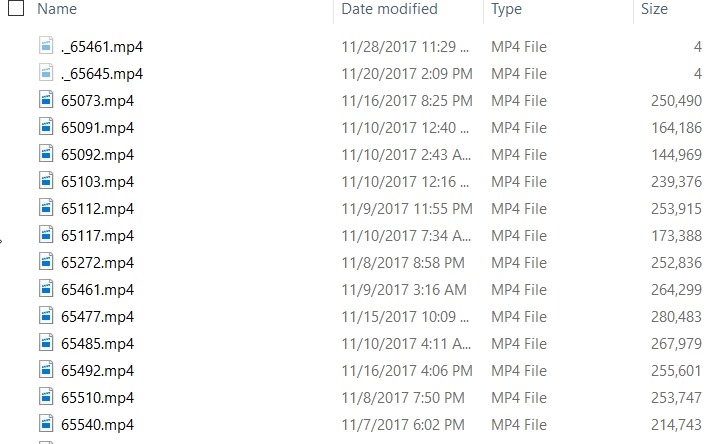
    PASS has released the videos to members from this past Summit. I say TJay Belt today ask about relating a video name to a session. I have the USB drive, so I looked on there. Here are the videos:

    2018-01-10 13_25_47-Video

    Not terribly helpful. If you run the HTML file from the stick, you see this:

    2018-01-10 13_26_23-PASS Summit 2017

    If I hover over a title, I see the link as a specific video file. For example, the first one is 65545.mp4. With that, I looked around and found a javascript file with information in it.

    The structure was like this:

    //SID
    Col0[0] = "65073";
    Col0[1] = "65091";
    
    …
    
    //Speaker Name
    Col2[0] = "Steve Stedman";
    Col2[1] = "Kellyn Pot'Vin-Gorman";
    
    …
    
    //Session Name
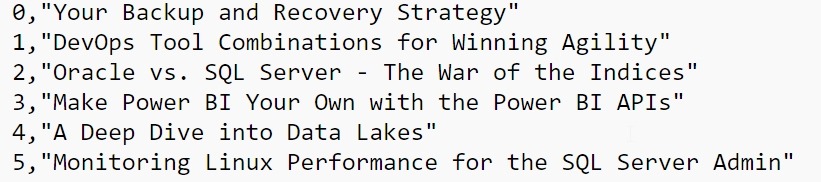
    Col4[0] = "Your Backup and Recovery Strategy";
    Col4[1] = "DevOps Tool Combinations for Winning Agility";

    All the data is in one file, but the index in each array matches. So Col0[0] is the SID for video 65073, which has Col2[0] as the speaker and col4[0] as the title.

    Now I want to get these in some sort of order. First, let me copy this data into separate files. That will make importing easier. I’ll copy the SID array into one file, the speaker array into a second file and the title array into a third.

    This gives me data like the list above, but I need to clean that. This is easiest in Sublime, with a few replacements. I did

    • “COL[“ –> “”
    • “] = “ –> “,”
    • “;” –> “”

    This gives me a clean file that looks like this:

    2018-01-10 13_29_18-e__Documents_R_titles.txt - Sublime Text

    Working in R

    I almost started to move this into T-SQL and a table, but since I’ve been playing with R, I decided to see what I could do there. First, I know I need to load data, so I the first file into a data frame.

    session.index = read.csv("e:\\Documents\\R\\videosid.txt", sep=",")

    The column names aren’t great, so we’ll fix those:

     colnames(session.index) <- c("Index", "SessionSID")

    Now
    let’s get the other data.

    session.speaker = read.csv("e:\\Documents\\R\\passspeaker.txt", sep=",")
    > session.title = read.csv("e:\\Documents\\R\\titles.txt", sep=",") 
    > colnames(session.speaker) <- c("Index", "Speaker")
    > colnames(session.title) <- c("Index", "Title")
    

    I have three data frames. I want to combine them. Let’s do that. I’ll use the merge() function to do this. Since I’ve got common column names, I’ll use those.

    > pass.videos <- merge(session.index, session.title, by="Index")
    
    > pass.videos <- merge(pass.videos, session.speaker, by="Index")

    This gives me a data frame with the index, title, and speaker. Now I’ve got the data merged, let’s produce a file..

     write.table(pass.videos, file="e:\\Documents\\R\\passvideos.txt",sep=",")

    With that done, I can see I have a list of video numbers, titles, and speakers.

    "Index","SessionSID","Session","Speaker"
     "1",1,65091,"DevOps Tool Combinations for Winning Agility","Kellyn Pot'Vin-Gorman"
     "2",2,65092,"Oracle vs. SQL Server - The War of the Indices","Kellyn Pot'Vin-Gorman"
     "3",3,65112,"Make Power BI Your Own with the Power BI APIs","Steve Wake"

    I did something in R. Smile

  • Data Governance Survey–Still Time

    Just a reminder. Redgate is doing research into data governance, and we have a small survey we’d love to get some answers to about how you view the process inside your company.

    Take the Survey and be entered to win $100 gift card.

    If you want to read some thoughts on why we’re doing this, check out this post from the Foundry at Redgate.

    I think this will become more important over time. It’s not just GDPR in Europe, but more and more companies are getting increasing negative press and potential fines for losing data. As much as the Equifax event angers me, I’m glad there are calls for investigations, as their should be.

    No good excuse for not having strong security from all vendors, even if it slows deployment and enhancement. We can’t have data being lost to criminals this often because of misconfiguration or silly issues.

  • Classifying Sensitive Data

    Our databases store all kinds of data in them, depending on the purpose of your database. Most of us create tables and store data in response to some requirement or necessity in our organizations. Our decisions should be driven by good design principles, and I’d hope they are, but we do need to find a place to put all the data that our system will receive.

    Depending on the sensitivity or personal nature of data, we may have to alter the way we store data (perhaps encrypt it) or alter the security for parts of the system. This is almost an ad hoc, deal with it at that time task. The exceptions might be when I’ve had to conform to a regulatory statute, such as SOX, PCI, HIPAA, etc. In those cases, I’ve often had to ensure the entire database is protected in some way that ensures it meets the requirements of the statute.

    The time when I have had to think about individual columns of data is usually when building a development database where potentially sensitive information can’t be transferred to development machines. In that case, because of the effort of changing data, I’ll try to build scripts that change out individual columns and ensure that sensitive data doesn’t get copied. However, the data that may be deemed sensitive for one company, isn’t always classified that way for another.

    At least that’s been my experience. I shared some of this with the Redgate Foundry, who is running research into data classification. They’re looking for people to share opinions, but the project has me curious. I’ve always felt intuitively we could classify data in tables, but perhaps that’s too simplistic a way of looking at the problem. I know that legal groups struggle with some this problem with email and file server documents. Classifying the content in different ways is a challenge.

    Is it the same in databases? I’m not sure. I don’t know if there complex rules needed or if this is a simple problem that we easily solve and rarely deal with. I’m curious from those of you that deal with highly regulated industries. Is data classification something that you work with often? How do you decide the data classes and does this impact your administration of the database? If you don’t classify the data, do you worry about the sensitivity of the bits in your database? Let us know today.

    Steve Jones

    The Voice of the DBA Podcast

    Listen to the MP3 Audio ( 4.1MB) podcast or subscribe to the feed at iTunes and Libsyn.