Tag: deployment

  • Making VSTS Deployment Changes to Databases without Breaking Your Application

    One of the things that I do a lot is demo changes to databases with CI/CD in a DevOps fashion. However, I also want to make some application changes to my sample app without breaking things. As a result, I’ve built a few ideas that work well for both situations. I found recently these ideas can help me when I need to actually upgrade or change my CI/CD pipeline.

    Note: DevOps isn’t a thing, it’s a set of principles, ideas, and culture that produces results. I will endeavor to ensure I call out the specific principles I use to adhere to DevOps ideas. In this case, automation and CD.

    Release On Your Schedule

    One of the principles of DevOps is that we use feedback loops to ensure information moves from right (operations) to left (development).  One way of doing this is to release more often, though this isn’t required. What we really mean is release on your schedule, when you want, and allow developers to get feedback on their work quickly.

    If a developer takes a month to build a feature, they don’t need hourly or daily releases. They need a release after the month is over (assuming testing, review, etc. has taken place). If releases occur on the 5th of the month, and the developer finishes on the 6th, they must wait a month before they get feedback. What I want to ensure is that we can release on the 5th, and also on the 6th if I need to.

    Upgrading my VSTS Pipeline

    I wrote in another post that I planned on upgrading my Redgate DLM Automation tasks in VSTS. I was doing this on a trip to a conference, and I didn’t want to start making the demo changes I’d make as I’d have to undo them, and it’s possible that I’d forget to clean something up. I hate making that silly mistakes, so I needed a way of testing my build and release without breaking demos.

    I decided to use a technique that I use in presentations when I’m talking process and not code. In those cases, what I deploy doesn’t matter, but if I change random objects, sometimes I break the application using the database. As you can see here, I needed to do a bunch of tests, and repeat some.

    2017-04-01 11_52_03-ST Pipeline_Mobile - Visual Studio Team Services


    Deploy Often

    When I talk with Redgate clients, and they are starting to get comfortable with the idea of deploying on their own schedule, they will sometimes make innocuous changes that trigger a deployment they can test, without breaking things. For example, a user might take this stored procedure (partially shown):

    ALTER PROCEDURE [dbo].[GetEmailErrorsByDay]
      @date DATE = null
    /*
    Description:

    Changes:
    Date       Who         Notes
    ———- —         —————————————————
    2/14/2017  WAY0UTWESTVAIO\way0u   
    */
    AS
    BEGIN

    IF @date IS NULL
      SELECT @date = DATEADD(DAY, -1, GETDATE())

      SELECT Errcount = COUNT(*)
       FROM dbo.EmailErrorLog
       WHERE EmailDate = @date


    and make a small change. Perhaps they add SET NOCOUNT ON, or maybe they’ll add a comment. I’ve even see someone add this code:

    AS

    BEGIN

    SELECT 2 = 2

    These aren’t big changes, and certainly choose which stored procedure to change (one that isn’t used a lot or is critical). These are changes to test your process, gates, approvals, deployments, etc.

    I decided to try something else. I tend to write this code when I want to test changes, since I can be additive with a procedure like this:

    CREATE PROCEDURE Get7

    as

    SELECT 7

    Or I can modify things with this:

    ALTER PROCEDURE Get7

      @plus int

    as

    SELECT 7 + @plus

    In either case, I can see if my changes go through. Since I often deploy to multiple environments (QA, Staging, UAT, production, etc.), and I don’t always have deployments go all the way through (see my image above), I will usually end up creating Get7, Get8, Get9 as subsequent procedures. This way I can continue to commit new changes to the VCS, get new builds, and get new releases.

    I can also do this with tables. My favorite is MyTable, MyTable2, etc. I usually just have an integer MyID column, but I can add other ones to test the ALTER process. I can even use this to test data movement, static (reference/lookup) data, or anything else to do with tables.

    Eventually (hopefully) I get clean deployments all the way through to all environments.

    Cleanup

    I sometimes get collissions, where a test will return the error that “Get10 exists”, and I’ll move on to Get11. However, I don’t want to leave those objects in all environments. After all, likely I’ll find a way to improve things in the future and I’ll want to repeat this testing.

    This usually is one last deployment for me. I’ll delete these objects in dev, and then deploy the changes all the way through to production. This allows me to test my checks to prevent data loss, if I have any. Including if approvers actually read scripts Winking smile

  • Upgrading VSTS Redgate Build Tasks

    I’ve been putting it off, but in prepping for SQL Bits demos, I decided this was a good time to just upgrade my original build and release tasks on VSTS from v1 to v2 for the Redgate tasks.

    The first step was to go into the marketplace and find the new tasks. If you browse the marketplace (click the shopping bag icon in the upper right of VSTS) and search for “redgate”, you’ll see the tasks.

    2017-03-31 16_42_13-Search results - redgate _ Visual Studio Team Services , Visual Studio Marketpla

    I picked the two on the right, the build and release tasks v2. The v1 tasks aren’t in the marketplace, but if you’ve added them to your account, they’re still there and they work in your build and release pipelines.

    Once I installed them, they appear in my list of extensions.

    2017-03-31 16_44_56-Manage extensions - Visual Studio Team Services

    Now I can edit my pipelines.

    I’ve got a release pipeline that looks like this. Note that these are the v1 plugins, because there’s no v2 on the name.

    2017-04-01 11_25_17-SimpleTalk Release Pipeline 1 - Visual Studio Team Services 

    My plan is to upgrade these to the new extensions, however, there are lots of settings. If you look to the right for any of the tasks, for example the Create task, there are lots of boxes to fill in.

    2017-04-01 11_26_34-SimpleTalk Release Pipeline 1 - Visual Studio Team Services

    This is expected as if I were doing this manually, I’d expect to have  along set of commands or switches to programs or parameters, that I’d need to pass in to a process. After all, the mechanics of implementing CI or CD aren’t hard, but they do have lots of moving parts.

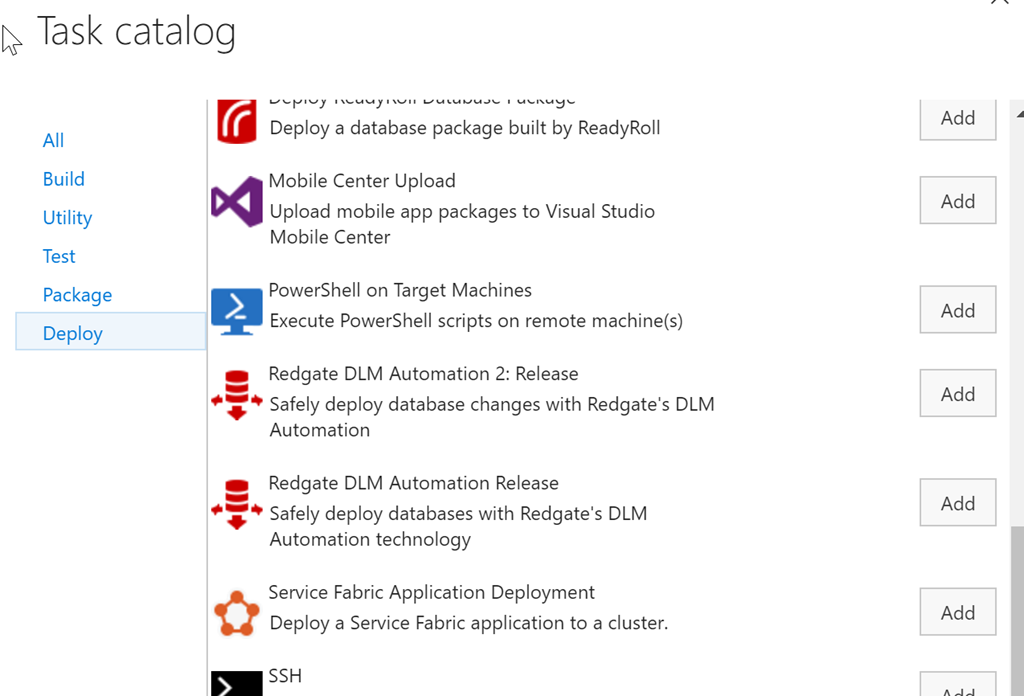
    My first step in making this easier is to add a new task. To do that, I click on the “Add tasks” button above. This will default me to the set of tasks for me particular function, in this case, release (deploy). I scroll down to see the v2 tasks.

    2017-04-01 11_29_23-SimpleTalk Release Pipeline 1 - Visual Studio Team Services

    Here I see the v1 and v2 tasks because they’re both listed in my set of tasks because I’ve installed both into my account. In this case, I’ll pick the “2” version of this task.

    Once this is added, I need to configure the task. In my case, the easiest way to do this was to click on the v1, copy the contents of a text box, and then click on the v2 task and paste the values in there.

    Once I had done this, I have both tasks listed. For this particular pipeline, I had actually added a new Agent Phase, separating my tasks out. There wasn’t any great benefit to this, though I can then just delete one whole phase and all the tasks in it (once things are working).

    2017-04-01 11_33_41-ST Pipeline_Mobile - Visual Studio Team Services

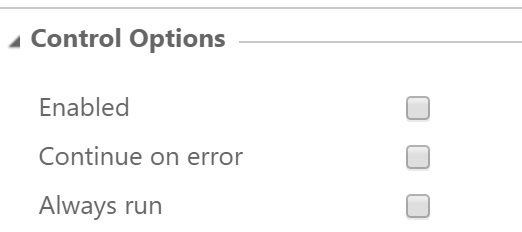
    After copying all the settings from one to the other, and checking that v2 was configured the same, I was ready to test. I first went to each of the v1 tasks and unchecked the “enabled” box. This means those tasks won’t run, but they’re still in the definition.

    2017-04-01 11_33_52-ST Pipeline_Mobile - Visual Studio Team Services

    After that, I created a release and deployed it. Not every deployment worked. My first ones did, but when I tried to hit the production environment (the far right), it failed early on. This list is from newest to oldest, so I had a few things to work out here.

    2017-04-01 11_36_20-ST Pipeline_Mobile - Visual Studio Team Services

    As you can see, this isn’t necessarily a simple, easy process. In my case, the v2 tasks have some additional path items, and I had to sort those, I also had firewall issues to production as I was traveling between the tests, which meant forgetting, and then needing, to reset the firewall rules.

    However, it’s all good now.

    2017-04-01 11_38_21-ST Pipeline_Mobile - Visual Studio Team Services

    I would encourage you to upgrade your DLM v1 tasks to v2. There are a few bug fixes, some of the deprecated cmdlets are removed, and these work slightly better. I know have pathing options to separate my environments on the agent and can easily see the code being run.

    I’ll talk about my test procedure for upgrading in the next post, because I think trying to do too much at once is how I’ve gotten into trouble and created stress for myself in the past. Now I have a better idea. 

  • Staging Deployments

    This editorial was originally published on Nov 30, 2011. It is being republished as Steve is out of the office.

    Software development can be a complicated dance. Most of us do not work for a software vendor and don’t have the strict requirements for our deployments when we control the client systems. That doesn’t mean it’s easier for us, especially as our environments grow more complex and the availability of our systems becomes more important. Application changes can become disconnected from the database changes, especially when the scope or scale of the change is large, which can present problems.

    Making database changes can be challenging since we must ensure that our data is not lost as objects are altered. We have to ensure that any application functions that depend on a certain schema receive the data they need, without unnecessary errors. The timing of changes becomes more important in the database than in applications in many situations. This Friday I am curious how many of you decide to stage these changes in your environment. If you have dependent changes, I’m wondering if you might alter the database first and change the application in a later deployment.

    How many of you deploy database changes before code changes?

    By “before” I mean you deploy the database changes, possibly making some application changes, but there are other code changes deferred for a separate deployment at a later time. The use of views, defaults, optional parameters and more allow database changes to proceed without accompanying application changes. It may require a bit more work, but the database can potentially be changed during a less busy time, even if development or testing for the all the application changes is not complete.

    The future will require more availability and stability from our systems as they become more essential to our organizations. Learning to update software, and databases, with minimal disruption is a skill that will set you apart in the future.

    Steve Jones

  • Watch the Manual DBA v Automated Deployment Challenge

    At last year’s SQL in the City, I played the part of a manual DBA making changes and deploying those from development to test, staging, and production environments. Actually, I don’t think we went to production because I didn’t have time.

    My co-worker, Tom Austin, showcased the automated process using SQL Source Control and other Redgate tools. As much as I believe in using tools, and despite the fact I regularly use them,  even I was impressed by how much less work the automated process took.

    Watch our session below.