Tag: DevOps

  • Does Speed Compromise Quality?

    One of the parts of DevOps that is often hyped is the speed and frequency of releases. Starting with Flickr and their 10 deployments a day, to Etsy deploying 50 times a day, we’ve seen companies showcasing their deployment frequency. Amazon has reported they deploy code every 11.7 seconds on average. That seems crazy, but with so many applications and lots of developers, not to mention each change being smaller, perhaps it’s not completely crazy. With the forum upgrade here at SQLServerCentral, we had two developers (with occasional other sets of eyes reviewing code changes), and while we were bug fixing, we deployed multiple times per day.

    Is that a good idea? Does a rapid set of changes mean that quality is lower and more bugs are released? It certainly can. In fact, if you’re a development shop that struggles with releases and code quality, producing software faster is not going to help you. In fact, if management pressures you to adopt DevOps, and deliver code faster without culture change, without implementing automated testing, including for your database code, and using automated scripts, tools, or something to deploy software, then you are going to get more bugs out faster. You’ll still get to change direction quicker if you find you’re building the wrong software, but you’ll still end up becoming more inefficient because of bugs (And technical debt).

    There’s a fantastic video (long) about refactoring code in two minutes. A bit of an oxymoron since the presentation is nearly two hours long, but the video is from a real project. However, their approach is that good unit testing allows them to refactor code, to change things, without introducing bugs. That’s a big part of the #DevOps philosophy. I always note in my DevOps presentations that if you can’t implement unit testing, meaning you won’t bother, then you don’t get much benefit from CI, CD, or any DevOps ideas. Tests protect you from yourself (and others).

    In many of the DevOps reports, companies that release faster report fewer bugs and less downtime. Since Amazon has increased their speed, they have 75% fewer outages across the last decade, 90% fewer time down, and many, many fewer deployments causing issues. Turbotax made over 100 production changes during tax season and increased their conversion rates. The State of DevOps reports bear this out (2016 here). Thousands of responses show that speed doesn’t cause more bugs.

    Because they work differently.

    If your management won’t let you change the way you work, if you don’t implement automated unit tests (and other types of tests), if you don’t take advantage of version control, if you don’t ensure every change is scripted, then you won’t work differently, and speed will bring bugs.

    You can do better. Your company can do better. Will they?

    Steve Jones

    The Voice of the DBA Podcast

    Listen to the MP3 Audio ( 4.2MB) podcast or subscribe to the feed at iTunes and Libsyn.

  • Upgrading VSTS Redgate Build Tasks

    I’ve been putting it off, but in prepping for SQL Bits demos, I decided this was a good time to just upgrade my original build and release tasks on VSTS from v1 to v2 for the Redgate tasks.

    The first step was to go into the marketplace and find the new tasks. If you browse the marketplace (click the shopping bag icon in the upper right of VSTS) and search for “redgate”, you’ll see the tasks.

    2017-03-31 16_42_13-Search results - redgate _ Visual Studio Team Services , Visual Studio Marketpla

    I picked the two on the right, the build and release tasks v2. The v1 tasks aren’t in the marketplace, but if you’ve added them to your account, they’re still there and they work in your build and release pipelines.

    Once I installed them, they appear in my list of extensions.

    2017-03-31 16_44_56-Manage extensions - Visual Studio Team Services

    Now I can edit my pipelines.

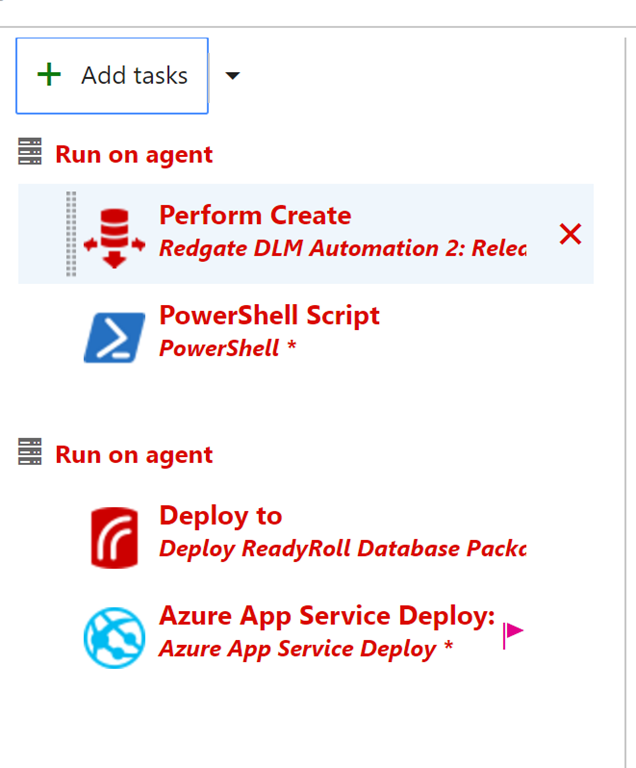
    I’ve got a release pipeline that looks like this. Note that these are the v1 plugins, because there’s no v2 on the name.

    2017-04-01 11_25_17-SimpleTalk Release Pipeline 1 - Visual Studio Team Services 

    My plan is to upgrade these to the new extensions, however, there are lots of settings. If you look to the right for any of the tasks, for example the Create task, there are lots of boxes to fill in.

    2017-04-01 11_26_34-SimpleTalk Release Pipeline 1 - Visual Studio Team Services

    This is expected as if I were doing this manually, I’d expect to have  along set of commands or switches to programs or parameters, that I’d need to pass in to a process. After all, the mechanics of implementing CI or CD aren’t hard, but they do have lots of moving parts.

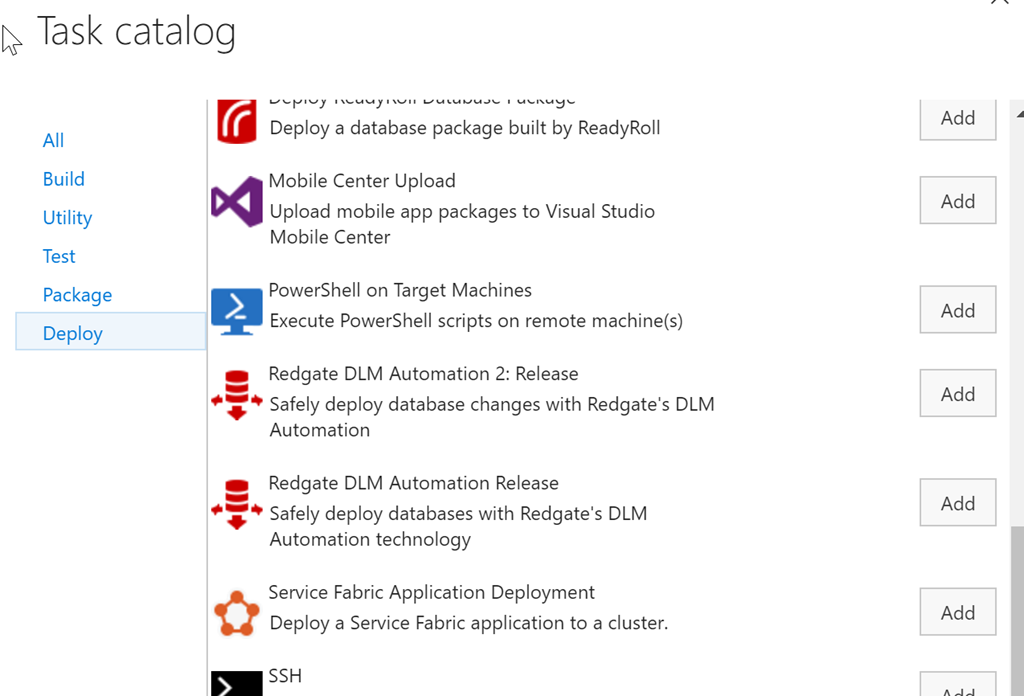
    My first step in making this easier is to add a new task. To do that, I click on the “Add tasks” button above. This will default me to the set of tasks for me particular function, in this case, release (deploy). I scroll down to see the v2 tasks.

    2017-04-01 11_29_23-SimpleTalk Release Pipeline 1 - Visual Studio Team Services

    Here I see the v1 and v2 tasks because they’re both listed in my set of tasks because I’ve installed both into my account. In this case, I’ll pick the “2” version of this task.

    Once this is added, I need to configure the task. In my case, the easiest way to do this was to click on the v1, copy the contents of a text box, and then click on the v2 task and paste the values in there.

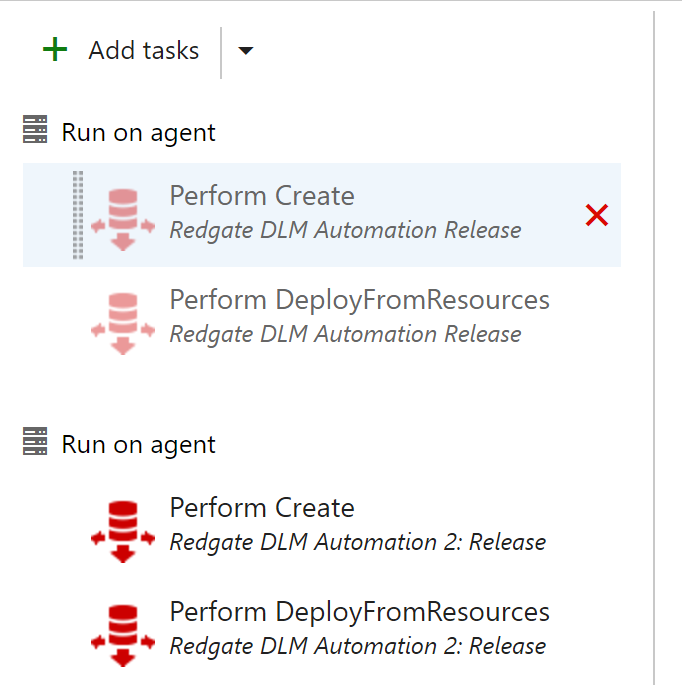
    Once I had done this, I have both tasks listed. For this particular pipeline, I had actually added a new Agent Phase, separating my tasks out. There wasn’t any great benefit to this, though I can then just delete one whole phase and all the tasks in it (once things are working).

    2017-04-01 11_33_41-ST Pipeline_Mobile - Visual Studio Team Services

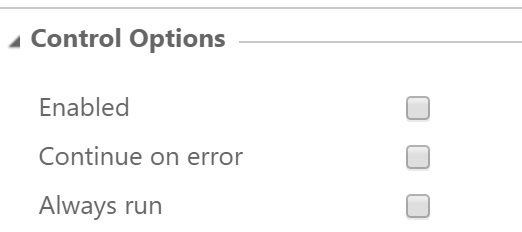
    After copying all the settings from one to the other, and checking that v2 was configured the same, I was ready to test. I first went to each of the v1 tasks and unchecked the “enabled” box. This means those tasks won’t run, but they’re still in the definition.

    2017-04-01 11_33_52-ST Pipeline_Mobile - Visual Studio Team Services

    After that, I created a release and deployed it. Not every deployment worked. My first ones did, but when I tried to hit the production environment (the far right), it failed early on. This list is from newest to oldest, so I had a few things to work out here.

    2017-04-01 11_36_20-ST Pipeline_Mobile - Visual Studio Team Services

    As you can see, this isn’t necessarily a simple, easy process. In my case, the v2 tasks have some additional path items, and I had to sort those, I also had firewall issues to production as I was traveling between the tests, which meant forgetting, and then needing, to reset the firewall rules.

    However, it’s all good now.

    2017-04-01 11_38_21-ST Pipeline_Mobile - Visual Studio Team Services

    I would encourage you to upgrade your DLM v1 tasks to v2. There are a few bug fixes, some of the deprecated cmdlets are removed, and these work slightly better. I know have pathing options to separate my environments on the agent and can easily see the code being run.

    I’ll talk about my test procedure for upgrading in the next post, because I think trying to do too much at once is how I’ve gotten into trouble and created stress for myself in the past. Now I have a better idea. 

  • Good DevOps Books to Read

    I was interviewed recently at DevOps.com talking about the database as a part of DevOps. As part of the interview, Alan Shimel asked me for a book recommendation. After that, I decided I should recommend a few books that I’ve read and think have helped me to understand DevOps.

    Tl;Dr: The Phoenix Project, The DevOps Handbook, Continuous Delivery.

    The Phoenix Project

    I actually read The Goal first, which applies the principles of DevOps, grown out of the lean movement, to manufacturing. The Phoenix Project is based on the Goal, but looks at Information Technology.

    5170sr05QAL._AC_US327_QL65_

    The book is a good, light read. It felt like a repeat of The Goal, but it cemented some ideas, and I enjoyed it. The guru character is a little overdone, but certainly the “Brent”,  jack of all trades, the one everyone depends on rings a bell. I’ve been Brent in a few places, where I had to be involved in everything. While flattering, it’s tiring and annoying.

    This is a good, semi-satirical look at IT projects that helps you to realize the somewhat silly ways we build and deploy software sometimes. A nice overview for DevOps.

    The DevOps Handbook

    I read The DevOps Handbook the most recently of these three. After looking for more information on how DevOps is evolving, and following the research of Gene Kim in talks and articles, I decided to give this a try.

    51WMrr2knUL._AC_US327_QL65_

    The book is long, though if you read on the Kindle, you’re at the end around 70%. The rest of more details and additional material. It was interesting, using case studies and information from a variety of companies to explain the three ways that Gene Kim has postulated as the principles of DevOps. They are:

    • Systems Thinking
    • Amplify Feedback Loops
    • A Culture of Experimentation and Learning

    Those are discussed in chapters with examples of how companies implement these, along with the shift left and shift right concepts. I’d definitely recommend this one.

    Continuous Delivery

    I actually read this book first. Continuous Delivery was recommended to me when Redgate got serious about DevOps and DLM (Database Lifecycle Management). I was reading this as I attended FlowCon and had the chance to meet Jez Humble. That was a great conference, and I’d like to go back to another (or similar) one.

    51NbiDn81NL._AC_US327_QL65_

    This book talks mostly about how CI, automated testing, CD, automated deployments, and other specific parts of good software development and deployment practices that come under the umbrella of DevOps. When you look for specific things to implement as you adopt DevOps, this is a good book to give you ideas.

    Remember, DevOps isn’t a tool. It isn’t a think you buy or a specific way you do something. DevOps is an idea, a set of principles, by which you get better. If you have a way of doing that, no matter what you call it, others might call this DevOps.

    Conversely, if you aren’t getting better, if you struggle to get software changes to customer, have quality issues, or stressed staff that don’t collaborate, it’s not DevOps, no matter how much “stuff” you do.

  • Including Your Database in a DevOps CI/CD Process

    Abstract

    DevOps is changing today’s software development world by helping us build better software, faster. However many organizations struggle to include their database changes with their application deployment. In this session, we will examine how the concepts and principles of DevOps can be applied to database development by looking at both automated comparison analysis as well as migration script management. We will cover using branches and pull requests for database development while performing automated building, testing, and deployment of database changes to on premise and cloud databases.

    Level: 300

    I chose 300 because you’ll need some understanding of how software development proceeds, be very comfortable with producing code and executing it on different servers, using a variety of techniques.

    Downloads