Tag: dp-900

  • DP-900: What’s a Region and an Availability Zone

    This is part of a series on my preparation for the DP-900 exam. This is the Microsoft Azure Data Fundamentals, part of a number of certification paths. You can read various posts I’ve created as part of this learning experience.

    This isn’t covered per se on the exam, but it does matter for understanding some other concepts, like reliability and other HA (high availability) concepts. I decided to do a quick post on these concepts as learning them helped me better understand some other things, like LRS and ZRS.

    Geographies

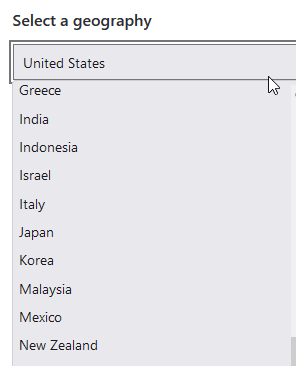
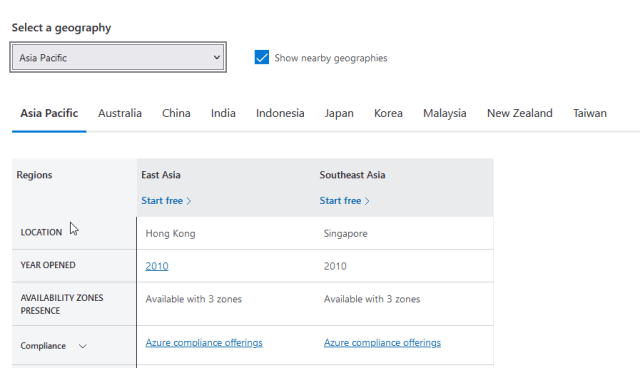
    I didn’t see this on the test, but it could be in the pool of questions. A geography is roughly a country, but not always. You can see this list in the link below:

    Azure Geographies

    Note there is an “Asia Pacific” geography, which is Hong Kong and Singapore listed as regions.

    2 regions in Asia Pacific

    Region

    A region is an area in a country. Regions don’t span countries, and there can be multiple regions in a country. Microsoft has a list of regions available in various geographies. As an example, if the United States is selected, you can see these regions:

    • Central US (Iowa)
    • East US (Virginia)
    • East US 2 (Virginia)
    • West Central US (Wyoming)

    and more. If you pick the UK, you will see UK South and UK West (as of Feb 2022). These are located in the London and Cardiff areas, respectively.

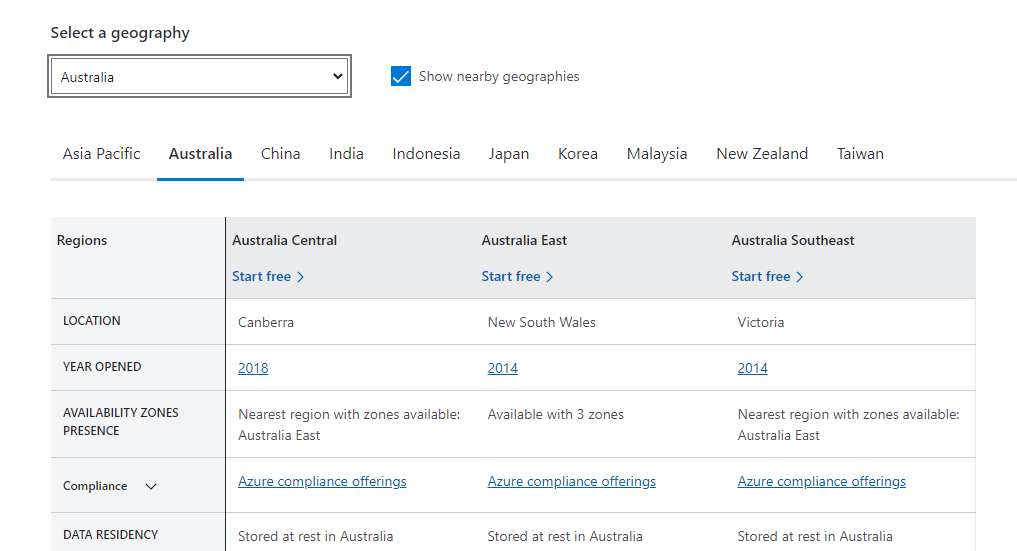
    You can think of a country as divided into regions, separately from their province/state/county governmental borders. A set of data centers is then built to make up a “region” for Azure. The Australia regions are shown in the image below:

    2022-02-04 08_59_42-Choose the Right Azure Region for You _ Microsoft Azure

    In the image we have a Canberra location,  which is a city. Victoria and New South Wales are states, and the location in these states isn’t specified. Some inconsistency here, but think of a region as an area in a country. This region provides a low latency network between the various data centers in the region.

    Regions are a unit where different services are provided. Not all regions are equal as some capabilities are deployed in some regions first. It is always important to verify a particular service or feature is in a particular region before you plan a deployment.

    Availability Zone

    The Availability Zone concept is a more ephemeral one. This is a set of data centers inside of a region. These are within a latency boundary, meaning that network communication between hosts in two different data centers is 2ms of less.

    When you have at least 3 data centers inside of this latency boundary, they an comprise an Availability Zone. This is a concept for redundancy purposes and to survive some sort of disaster in a single data center. If a single data center loses power or some other issue, the other data centers in the AZ can take over. This could be a single server or rack of servers failing as well, with servers inside another data center in the AZ taking over.

    Zone Redundant Service (ZRS) is the concept here that is used with an Availability Zone. With this, there are copies of the service in the different zones that allow a service to continue to function, despite a local failure in a DC. This is in contrast to Local Redundant Services, which have multiple nodes inside of a data center, but would be unavailable if that particular data center failed.

    Here is an image from MS Docs that shows there are three zones inside of a region that are connected together.

    2022-02-04 09_37_19-Azure regions and availability zones _ Microsoft Docs

    The documentation notes there are a minimum of 3 zones to have an AZ, and I’m guessing some regions potentially have 4 or more zones to ensure services are uninterrupted and capacity is available.

    Overall Hierarchy

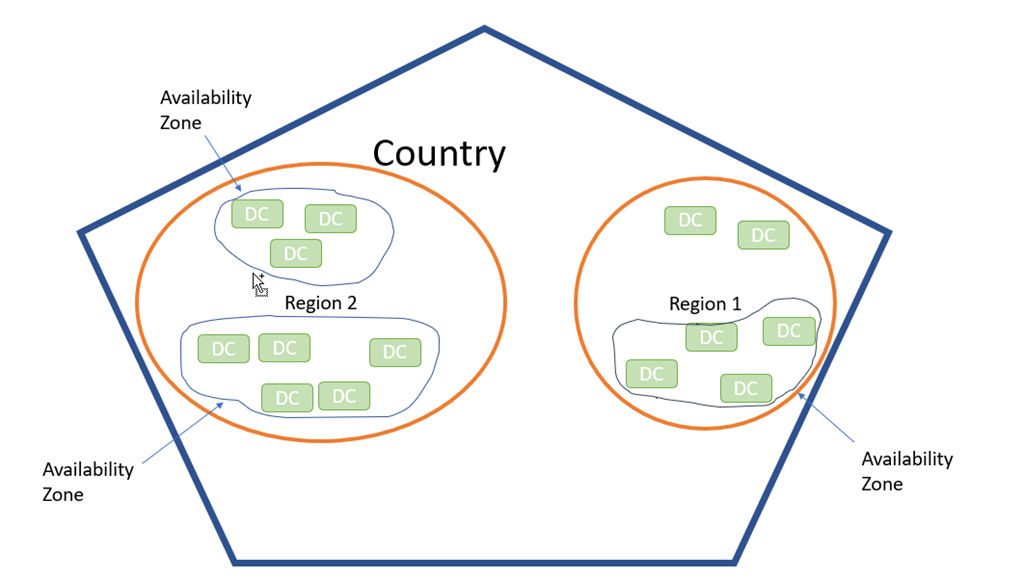
    I didn’t find a great image that explains things. I made a simple one, showing a country, with regions, then AZs, and data centers.

    2022-02-04 09_36_50-Presentation1 - PowerPoint

    Note, Azure calls areas of the world geographies. So the US is a geography, which might help if there were governmental or political changes over time.

    The basic idea is to understand this relating to storage, which will be another post where I examine the different levels of protection offered by Azure.

  • OLTP Star, Snowflake, and Galaxy Schemas

    This is part of a series on my preparation for the DP-900 exam. This is the Microsoft Azure Data Fundamentals, part of a number of certification paths. You can read various posts I’ve created as part of this learning experience.

    There are types of schemas the exist in data warehouses. This topic is definitely on the exam.

    OLTP/Relational

    The type of schema that many of us work with is the standard OLTP or relational model. We have lots of transaction tables, most should have a PK, some of which have PKs. The schema expands to meet different needs and can have lots of entities.

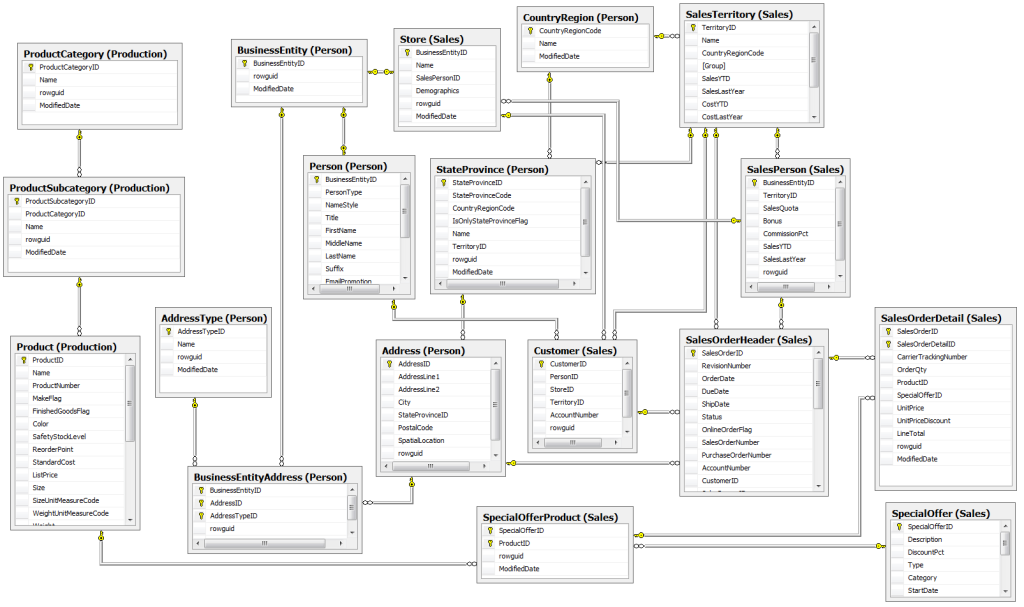
    As an example, here is a view of the AdventureWorks database.

    adw_er

    This isn’t fundamentally different from the schema types below, but there isn’t a central, or two central, tables here. Instead, we have a lot of different groups of tables. The structure is designed for normalization, and usually has lots of tables compared to a data warehouse.

    Star

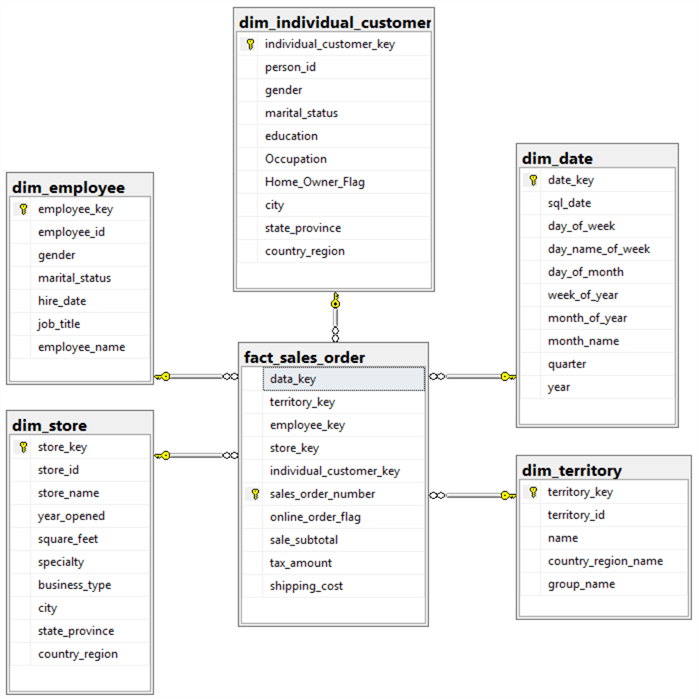
    The star schema is often used in data warehouses. The name comes from the fact that the table arrangement looks similar to a star. There is a central fact table, which has some details of the main data, often something like sales, and a lot of foreign keys (FK).  The fact_sales_order is the fact table below.

    Then there are supporting tables around the fact table, linked by the FKs. These are the dimension tables, and contain details about a specific dimension or area. In the image below, we have date, employee, store, and other dimensions tables.

    5690_create-star-schema-data-model-using-microsoft-toolset.028

    This is a somewhat de-normalized structure, as the primary purpose is to report on a set of facts.

    Snowflake

    This schema builds on the star schema. Here there is still one fact table (Sales below), but the dimension tables have their own dimension tables, providing more details. Essentially, the dimension tables are normalized. An example is the Employee dimension, which has a linked Department dimension.

    Capture-163

    Galaxy

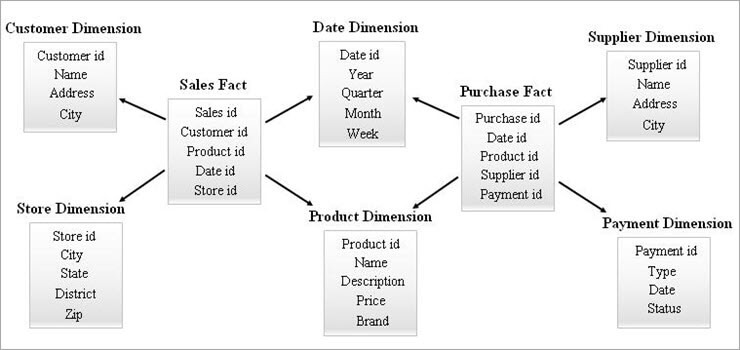
    The galaxy schema expands with a second fact table. In the image below, we have the sales and purchase as fact tables. There are dimension tables, which can be linked to one or more fact tables.

    Galaxy-Schema

    It isn’t that important you know how to build these schemas or design the entities for the DP-900 exam, but you do need to recognize the structures.

  • Passed DP-900–A Review

    This is part of a series on my preparation for the DP-900 exam. This is the Microsoft Azure Data Fundamentals, part of a number of certification paths. You can read various posts I’ve created as part of this learning experience.

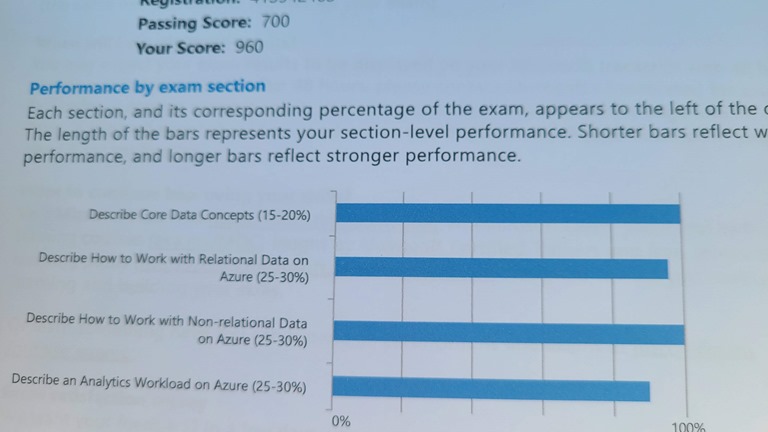
    I passed the DP-900 exam. I did well, though I likely over-prepared.
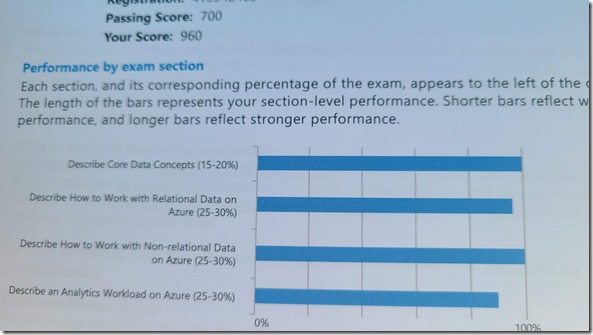
    20220131_135452

    I have typically been a good test taker, but I’m nervous about them, especially when they cost money. I did well on most finals in college, but was always very nervous. For most of these exams, even though my employers have paid, I’ve been worried.

    This post looks back at the things I did, building on my prep post.

    Final Prep

    Since this was for work, and they’d pay for it, and because I wanted to review things, I got access to the Official Microsoft Practice Test. This is US$99 for 30 days or a bit more for 60 days.

    Side note: I once worked for an education company in the early 2000s that partnered with MeasureUp and I had access to these tests.

    I purchased this about a week before I thought I’d take the test. I’d been lightly going through the courses and reading docs on and off for a few weeks, usually about an hour every few days. I took the first practice test, which simulates the exam (49 questions, timed) and got a 650. Not good enough.

    I went back through some of the self-paced training quicker, and then I dug into books online in a more intense fashion, for about an hour a day for a few days. I then retook the practice test and got to a 780. Passing, but not great.

    I consistently struggled with CosmosDB and Synapse, and a few Power BI and Azure Storage items, so I concentrated on those items.

    The week I’d orginally planned to take the test was spent taking a practice test every day, and then using the mistakes I’d made to focus on some new concepts. Once I passed 2 days in a row, I scheduled the exam. I spent the next 4 days taking practice tests and studying.

    One of the best things I did was get a notebook and a pen. I then watched John Savill’s Exam Cram and took notes by hand. I find that helps me remember things. I paused in a few areas if I wasn’t sure I knew what he was talking about and looked up details in MS Docs.

    The morning of the exam I went to the gym, which helps me relax. I then got a cup of coffee and took the practice test, but every question. All 150. I scored a 970, and thought I was ready.

    The Actual Exam

    While you can take this at home in a room by yourself, I wasn’t confident I could get by without someone interrupting me, or something going sideways at the ranch. I get interrupted regularly as people forget I’m working or don’t realize I’m on a call. I scheduled this at a local test center that I’ve used for years.

    If you haven’t been in a test center, it’s usually fairly strict. This one does FAA/Pilot testing, so they are very careful. The things to know:

    • Nothing goes in to the exam room with you (except mints).
    • You need an ID, they take a picture, have you digitally sign an MS doc, and paper sign a couple waivers as well.
    • Mask the whole time, which isn’t great with my readers
    • ID, watch, phone, even lip balm all get locked up. I take the key into the room.
    • I grabbed a few extra mints because I’m nervous.
    • There are dry erase markers and pens for notes, and ear muffs for quiet. Monitor, keyboard and mouse on the desk, cube partitions separating everyone and cameras above. In my center there are 8 desks and at least 3 cameras watching you.
    • I’ve never taken a break, but I also know to use the bathroom before going in (again, nervous). I did have an issue once, raised my hand, and within 3-4 minutes someone came in to check on me (computer froze).

    Exam Format

    The format is this:

    • 3 minute survey of your experience (how confident are you about azure rdbms, analytics, etc.)
    • 45 minutes for the exam, 49 questions. You can mark questions for review and then a list of these appears at the end that you can go back and change answers.
    • A mix of multiple choice (radio buttons), select x (2 or 3 answers required), lots of “click yes for true, no for false”, a few drag and drop from a list of answers.
    • No case studies, no free text entry
    • 3-4 minutes for feedback on specific questions. I thought a few were strangely worded, so I left feedback on some.

    The practice test mirrors this well.

    Exam Coverage

    I can’t disclose the questions, but I can give you a few things to think about. Note I got 49 of who knows how many questions. I would guess there is a pool of a few hundred, but I don’t know.

    If you look at the skills measured, I would say this about the major areas:

    • Describe core concepts – I had at last 3, maybe as many as 7 questions directly in this area. These are fairly easy to answer if you know what these are. I’ll do a couple prep posts in these areas.
    • Describe working with Relational Data – Again, I find the workload stuff fairly easy, and I had 2-3 questions here. The PaaS, IaaS stuff is important and I’ll post things that matter. The understanding of the basics of Azure SQL family, Synapse, and how you might “accidentally” work with PostgreSQL/MySQL/MariaBB matter. There also were some light questions on concepts around tools, connectivity, firewalls, and CLIs. Again, I’ll post prep. The T-SQL specifics were easy, a couple questions there.
    • Describe work with non-relational data – This is a weak area for me.I think some of this is not being completely confident on how/where I use different NoSQL structures, and the nomenclature being strange. Knowing the types of data stores and when to use them matters. Practice test helped here. You do need to know a good outline of CosmosDB and the Azure Storage structures. Glad I spent time here.
    • Describe Analytics workload – Also a weak area. I don’t know Synapse well, and I think the docs are poor. They tend to be written, in my opinion, assuming you know some things. They don’t describe things well, and to be fair, Synapse appears to have evolved a lot and quickly. You need to know a bit about when/where you use tools, understand some concepts about ADLS Gen 2, Databricks, Synapse, and HD Insight. A lot, but this is high level, not in the details. Know conceptually where you use ADF with these tools. The PowerBI stuff means you better know the What is Power BI? and the Basic Concepts docs well. Again, I’ll do a prep post.

    My Recommendations

    First, make sure you could explain each concept in the skills document to a friend, every single line, with about 3-4 minutes of talking. Not a highlight, but that you’d sound like you had a grasp of each area. If not, dig into docs.

    Second, if you want a good outline of data services on Azure, this helps you focus. You need to know the storage stuff, the relational options, and the analytics stuff. I felt like I learned a lot in about 3 weeks of prep. Not a ton each week, but regular. Really this was about 10 days of constant prep, something every day, and a few weeks of sporadic prep.

    Learning how to dig into and get a level of detail was tough, but the practice test was worth the $$$ to me. It helped me focus. Jon’s cram video, about 90 minutes, was a good place to start. I wish I’d done that first, taken notes, and then looked up weak areas.

    Hard to determine weak areas without testing. Again, practice tests help. I can’t mimic the exam without worrying about NDA, but I’ll try to give you a set of things to know in various posts.

    Work with a friend. I’m thinking to do some prep classes with my local user group. If you’re interested, let me know. Maybe I’ll just do some online recordings. Other people helped me, and I can give you a set of things to learn.

    Lastly, over prepare a bit. Don’t spend months, but think of this like a final exam from high school. Learn some things, practice a bit with the online stuff, and then increase your focus as the exam date approaches.

    If you have questions, ask. No specific questions or answers disclosed, but I’ll try to help where I can.
  • Batch, Streaming, and Relational Data

    This is part of a series on my preparation for the DP-900 exam. This is the Microsoft Azure Data Fundamentals, part of a number of certification paths. You can read various posts I’ve created as part of this learning experience.

    The first part of the DP-900 skills document has these items:

    • describe batch data
    • describe streaming data
    • describe the difference between batch and streaming data
    • describe the characteristics of relational data

    These are concepts that are important to this exam. I lightly blew these off when I started studying, but every other person with guides and the practices tests has lots of focus here. I’m glad I spent time here.

    This post covers these concepts a bit. Note, these are more ETL/analytic concepts, not really

    Batch Data

    Most of my career deals with batch data, meaning a bunch of data that arrives at once and is imported into a system. This is different than a connection and query submitted to an OLTP system. The general idea is:

    • Lots of data
    • Processed periodically
    • Latency doesn’t matter.

    Think these key words:

    • Not real-time
    • periodic
    • large/big/lots

    There is an MS Docs article on this. The general idea is that you want to think about a scheduled (or some periodic) processing of lots of data for a purpose.

    Examples of where batch is used.

    • Total up all hours worked last week for employees
    • Load and transform log files from all web servers each day
    • Import files from regional offices into a main database server

    In the analytics space, you’d be using Azure Data Factory (ADF), HD Insight (U-SQL, Hiuve, Pig, Spark), Azure Data Lake (ADLS).

    Streaming Data

    There is a course on this topic. When you think of streaming, think of these key words:

    • real-time
    • stream
    • data processed as soon as created
    • IoT
    • few transactions
    • monitoring or instant decision making

    Streaming is really about time series, about tumbling windows, about data like a stock ticker that you need to constantly and/or quickly process.

    Differences

    These items helped me:

    • Lots of data – Batch
    • Low latency – Stream
    • Long latency, latency doesn’t matter, periodic work – Batch
    • Small, constant sets of data – Stream

    Relational Data

    The workload here is that you are handling regular changes to data, lots of insert/update/deletes, for a business process. Really this means you are thinking some sort of CRUD application the gets and sends data to users in real time, but not with low latency issues. We are thinking a web server, a data entry business app, something that operates on time scales for humans, seconds. Not real time, IoT millisecond work.