Tag: hardware

  • The 2020 Desktop Upgrade

    It’s been a few years since I upgraded my home hardware. Being stuck at home, doing more work here, and trying to help with The #SQLFamily Folding@Home group, I’ve been contemplating some upgrades. I also have a guilty pleasure of playing Doom.

    I first ran into the DOS version early in my career and even joined in some lunchtime LAN tournaments at work with Doom and Quake. When my son was about 12, we bought Doom 3 and upgraded my desktop to work through the game together. We had hours of fun and I’ve been tempted to recreate that. I decided not to upgrade my system when Doom 2016 came out,  but I posted a note that I was tempted to get Doom Eternal and escape a it from the sameness of this quarantine time at home. Glenn Berry suggested I upgrade a few things if I was doing to change video cards, and I decided to treat myself a little.

    Tl;dr: I spent about $800 to get to a place where I could comfortably play Doom Eternal.

    Current Hardware

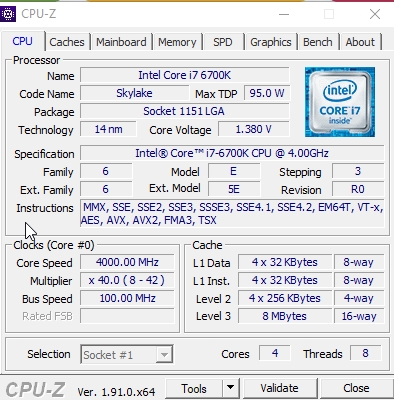
    I built my own machine in 2016, upgrading from the previous generation of hardware. I don’t love building hardware, though it can be fun to get things working. However, I’m more of a “I want it working” person than someone that enjoys building. In any case, I have this:

    This has worked well for me, but it’s been a number of years. I have SQL 2014-2019 running, VMWare, and lots of other apps that could use a little more horsepower and cleanup.

    The CPU-Z data is here:
    The Upgrades

    I hadn’t really planned on upgrading everything, but a friend offered a deal on an AMD  Ryzen 7 2700 X system with 32GB of RAM. Since it was already in a system with an SSD, that was attractive. This gives me more cores, a slight CPU boost, and I can move things from system to system without being rushed. I like that.

    Specs:

    Upgrades:

    • RAM: 32GB for $154 gives me 64GB
    • EVGA GeForce RTX 2060 KO Ultra Gaming, 6GB GDDR6 – $305
    • Mini Displayport to DVI adapter (my monitors are VGA/DisplayPort only – $13
    • Samsung EVO 860 1TB – $160
    • USB Wi-Fi adapter – $12
    • Power Supply Corsair RM 750X (Swap from the old to new machine) – $0

    Total cost for a second, upgraded desktop was $994. That’s a pretty good deal for me, slightly more than the $600 I thought I’d spend, but I ended up with more RAM and disk space than I’d planned on initially.

    For me, the hardest part was switching out power supplies, which is easy in terms of unplugging things and removing a few screws. It’s a royal pain in terms of trying to disconnect things in a tight space. I don’t have the smallest hands, but I managed to get things set up and the new machine booted the first time. That doesn’t always happen when I remove and reinstall motherboards.

    Once the new machine was up, I installed chocolatey first, Dropbox second, and then use choco install to start grabbing other things. I my case, I disconnected one monitor from the old system, added a second keyboard and mouse (temporarily) and started to install things as I was working. I’d glance over at the new machine, so what icons were on the old machine or what I was doing and then install more software.

    Across a few days, I managed to get most software installed. During this time a few pieces of hardware arrived, and I installed them piecemeal.

    Performance

    The newer CPU-Z info is here:
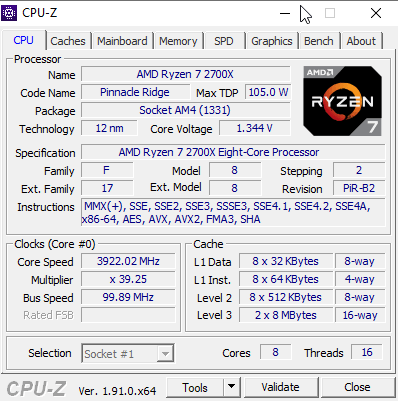
    New desktop CPUZ

    Windows Experience Scores

    Area Old Score New Score
    CPUScore 8.5 9.2
    DiskScore 8 9
    GraphicsScore 8.1 8.9
    MemoryScore 8.5 9.2
    WinSPRLevel 8 8.9

    Next Steps

    Moving machines is always a bit of a chore, but in this case, I don’t have to be in a hurry by adding a second machine. I have enabled remote access, so that I can move the old machine into a headless configuration and still access things I might need.

    This is a big job, as I’m migrating data, apps, VMs, and more, so this will be an interesting process across the next few weeks as I slowly get setup on the new system.

  • Better Protection from Hardware

    Microsoft is working on ways to protect your system at an even lower level than the bootloader. Many modern computers have UEFI protection, which allows for security in the boot process, and prevents untrusted code from running. This is intended to ensure that some other boot process cannot run and then invoke your Windows bootloader

    This doesn’t protect from firmware issues, but Microsoft may have a solution. Working with hardware companies (Intel, AMD), they have a System Guard Secure Launch that provides a way to secure your OS. There’s a light explanation at Ars Technica of what this means for you. Essentially, this allows the OS to reset the CPU and ensure untrusted firmware code isn’t running

    I won’t pretend to know how this works in depth, or what additional levels of security this provides, but I do recognize the problem being worked on here. I also think that criminals (and rogue nation state actors) are making deeper and more complex attacks on systems. We know that compromised code can be a major problem for our servers, and we need better mechanisms to ensure we can trust the platform on which we run our database servers

    Just recently there was an alert about a backdoor in SQL Server. This was noted as being in SQL Server 2012 and 2014. At first I was surprised this didn’t get more play, then I realized this was an issue with the Windows OS being compromised and then a patch installed on the SQL Server service to allow attackers to log into the database server. Disconcerting, but if someone gains control of the Windows OS, I’d expect they can get into SQL Server.

    Security is a problem with database servers, and the number and variety of attacks continues to grow. It pays to be diligent, and certainly, use whatever tools are available. Strong passwords, access controls and low privileged accounts, UEFI, SGSL, set up every security feature you can. After all, data is your organization’s most important asset.

    Steve Jones

    Listen to the podcast at Libsyn, Stitcher or iTunes.

  • HP is the 2019 Laptop Winner

    This is for me, not necessarily for you, but I decided to go with the HP Spectre again. I saw an email from Best Buy over the Thanksgiving weekend, and surprisingly, the HP was listed on sale. US$300 off the normal $1799 price. I checked HP and they had the laptop at $1399, but that was a 512GB SSD instead of 1TB.

    I thought about it for a few days and Sunday, after a little gym time, I decided to just get one. I was lad I did as the item showed sold out when I got come and wanted to check the Windows edition. Apparently more were on sale Monday, but I was glad I just grabbed on.

    It’s a nice machine, and I like the power cord being angled on the rear corner. Much easier (for me) than the side. I also like the power button being on the other corner, as I often accidentally hit the other power button when picking up the machine.

    Contenders

    The big contenders for me were the  Dell XPS, the Lenovo X1 Carbon, and the Yoga 940. These were all the small size and weight, with similar specs. I read a number of reviews, and tried to weigh the importance of differences for me.

    The Dell is really nice, but I bemoan the lack of a USB-3 port. I often use this for a pointer when presenting. While I can certainly have a dongle or adapter, I felt like I’d just prefer a normal USB port. It’s also nice for a quick phone charge if I need it.

    The X1 is a very light machine, and the pointer is very attractive. I’ve missed not having one over the years, as I first thought this was a great idea in the 90s, in the era before trackpads. Ultimately, this was a more expensive machine, and I’m not sure it was worth it. The config I wanted, even on Cyber Monday, would have been $400-500 more (I only lightly repriced it). At Redgate, we try to spend wisely, and I decided to do that.

    Initial Impressions

    The HP is a nice machine. It’s well built, and it reminds me of the previous model I had (actually 2 generations back), but this one seems to have a better trackpad and a nice, solid feel. That previous one has lasted well, and I’m looking forward to this one.

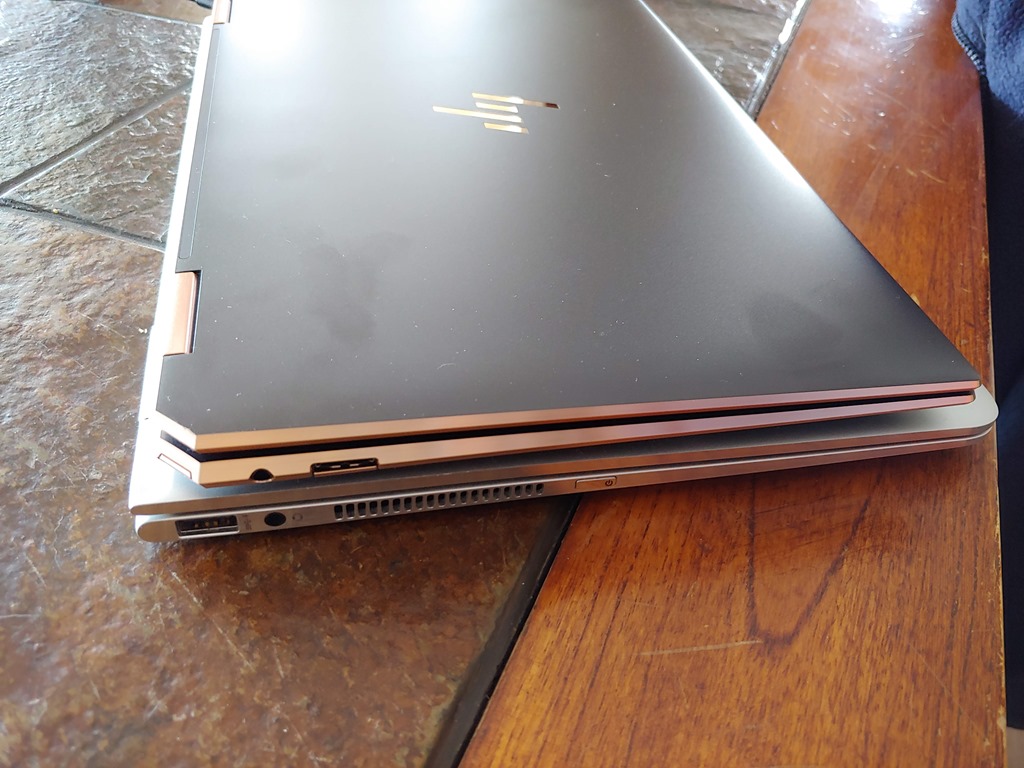
    20191202_114525_HDR

    In using it for a few hours to start installing things, it worked well. I found the keyboard to be smooth and comfortable, and the trackpad certainly works better than the old one. I found the old one to have lots of inadvertent touches, but this one didn’t give me trouble.

    It’s slightly smaller than the older one, with angled rear corners. All inall, a beautiful machine.

    20191202_114505

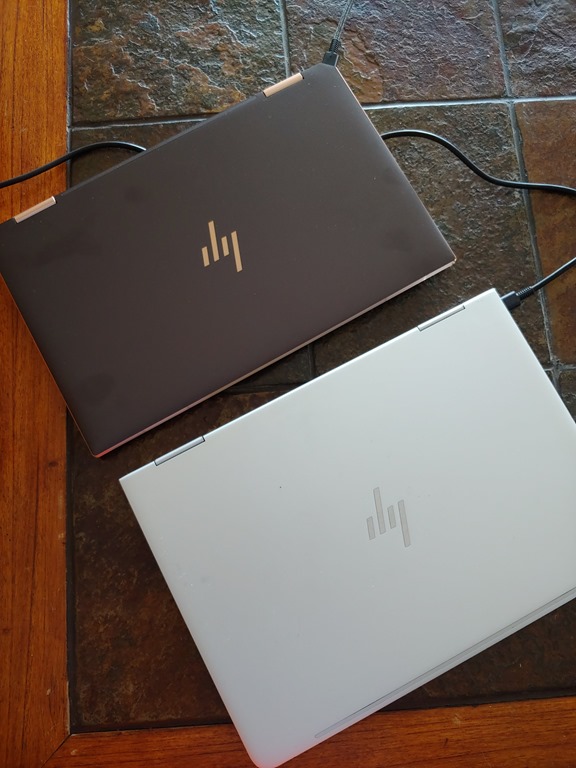
    The size is similar, but feels much smaller and lighter. Overall, I’m pleased.

    20191202_114516

    I’ll be spending a lot of time on this one in the next week as I prepare for SQL Saturday #910, so I’m sure I’ll tease out any issues soon. So far, I’m pleased, and hoping it performs and lasts as long as the previous one.

  • The Network Bottleneck

    Most of us know that sending extra data back in a result set is a waste of resources. This can certainly cause delays and poor response in our apps, and across slow networks, this can even cause timeouts. Good developers try to limit the data transfer to just the data necessary, without pulling back extra fields. This is one reason a “SELECT *” is a bad idea.

    What about when we are sending just the data we need, but that data is so voluminous that we can’t easily transmit it across a network. That’s one of the ideas that is noted in this piece, which asks for innovation in the way that we move data around, especially IoT data. This type of data is growing, and potentially growing across networks that are bandwidth constrained, such as satellite and cellular links.

    Do many of you find that your network links are constrained? I certainly do at times, though I live in a place where the broadband and cellular networks are not very robust. Even so, most of the time I never notice issues with moving data around. Even when using a real time application, such as streaming data.

    Perhaps there are tricks that buffer data and hide network issues, but even if that is the case, is there a problem? After all, that’s part of what our applications should do: isolate and protect us from the inherent unreliability of hardware.

    Relational databases continue to store and process larger amounts of data all the time. Size of data operations, which grow increasingly cumbersome as data volumes grow, are a place where many vendors are trying to improve their offerings. Microsoft is one of these, and some of the improvements in SQL Server 2019, with Big Data Clusters, Accelerated Database Recovery, and scale out architectures are designed to precisely help us cope with more data.

    I have confidence that we will continue to solve these problems, and that networks will keep growing to support the demands of our ever increasing database sizes. We just need to be sure we continue to evolve and grow our applications to take advantage of these improvements.

    Steve Jones

    Listen to the podcast at Libsyn, Stitcher or iTunes.