Tag: PASS

  • What’s Your Vision for PASS?

    The PASS election slate was released for 2020. The candidates and their statements are::

    1. Hamish Watson (@thehybriddba)
    2. Joey D’Antoni (@jdanton) – Community Matters–Why I’m Running for the PASS Board of Directors
    3. Jose Rivera –  (@SQLConqueror) –
    4. Lori Edwards (@loriedwards)-
    5. Matt Gordon (@sqlatspeed) – Why I Am Running for PASS Board
    6. Robert Fonseca (@roberto_mct) –
    7. Steph Locke (@TheStephLocke) – I’m Running for the PASS Board

    Not everyone has a statement, though you can read their bios and applications on the PASS Site.

    PASS is at a turning point in the organization, with the pandemic and the move of their main fundraiser to a virtual event. Across the last two years, I’ve been a member of PASS, a supporter, and a critic with my own thoughts and ideas about the organization.

    However, I’m not sure where PASS should go. There is a lot of enthusiasm for the organization from some, and no shortage of criticism. I see both sides, but what I’m not sure about is what I want PASS to be or do in the future. I suspect the organization will change, but into what?

    I’d ask that each of the candidates outline a vision for what PASS should be. Not tactical specifics or complaints, but ideally, what do we want from the organization. What would represent the members and be a great community group?

    Hopefully we’ll see something before Wednesday, when voting starts.

  • My Recording Experience for the #PASSSummit

    I wrote a post about the online recording, which wouldn’t work for me. This post looks at the live recording for me, giving you my process and time.

    This doesn’t cover the building the deck, setting up demos, or practice time. That’s the same for every presentation for me.

    First Take

    The first take was a mess, since I didn’t have some things set up or my hair combed, and I mangled the opening slide, so after 2 minutes, I just abandoned it.

    Second Take

    This was really a live practice for me, mostly to tech check and get timing down. It’s always different when you do it live. I didn’t bother getting my shirt, so this was at the end of a normal workday.

    I had some Internet issues, so I couldn’t keep this anyway, but it was annoying to get some missing pages, and delays in refreshing. I had to refresh in Azure DevOps a few times to get the site to come up. I use microwave Internet, so if the air is bad things can be slow or drop. With a fire near Denver, that was happening, but you should be glad here that if you have Internet issues, which could happen in the convention center, you couldn’t rerecord.

    My timing was long as well, about 5 minutes over, so I took a few notes to help me get better for the next time.

    I did load this into Camtasia and check the sound and view. I also wanted to play with splitting the camera track and having it visible sometimes and not others. Easy to do, and I need to remember that I’ll watch this whole thing, plus render it, so I need to account for probably a 3 hour process.

    Third Take

    A day later, I had some time, so I set thing up, reset my demo, and started to record. Overall this was one take, but two pauses, so my recommendation is that you know where the pause button is on your recorder.

    1. I forgot to pre-stage one item in the demo, and realized it, so at the end of a slide, I paused, staged an item, and restarted. Pausing at the end lets me move to the next slide and start more naturally.

    2. I had to sneeze, so I stopped talking and quickly hit pause.

    Editing

    Camtasia does a picture in picture when you record with the camera, which is what I wanted. However, I didn’t want to have that up the whole time. I wanted a larger insert, and then at times, to hide it.

    This is easy, so as I watched for issues, I would pause, split the camera feed, and either resize it or move it out of the way. Took maybe 5 minutes on top of the 53:00 to watch my recording.

    Uploading

    Once things were done, I looked again and then uploaded it. My file was 688MB, more than a CD! I started the upload, and I initially got about 2.5M/sec, and the upload noted that this would take 5 minutes or so. That didn’t see right to me.

    The upload somewhat froze in the pop up window with 3:57 left, and stayed that way for a few minutes, with 11% done. However, at about 4:45 total, the window closed itself and I got a confirmation email that the session had been uploaded.

    Watch the Details

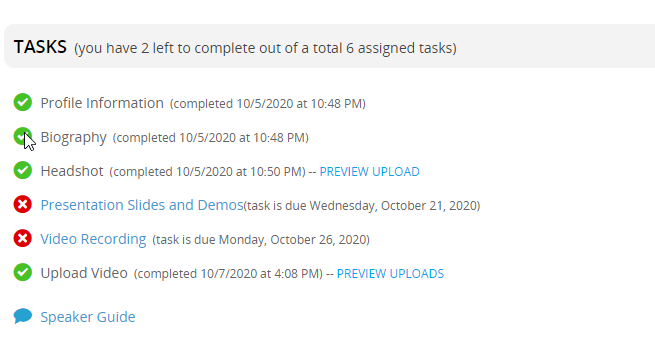
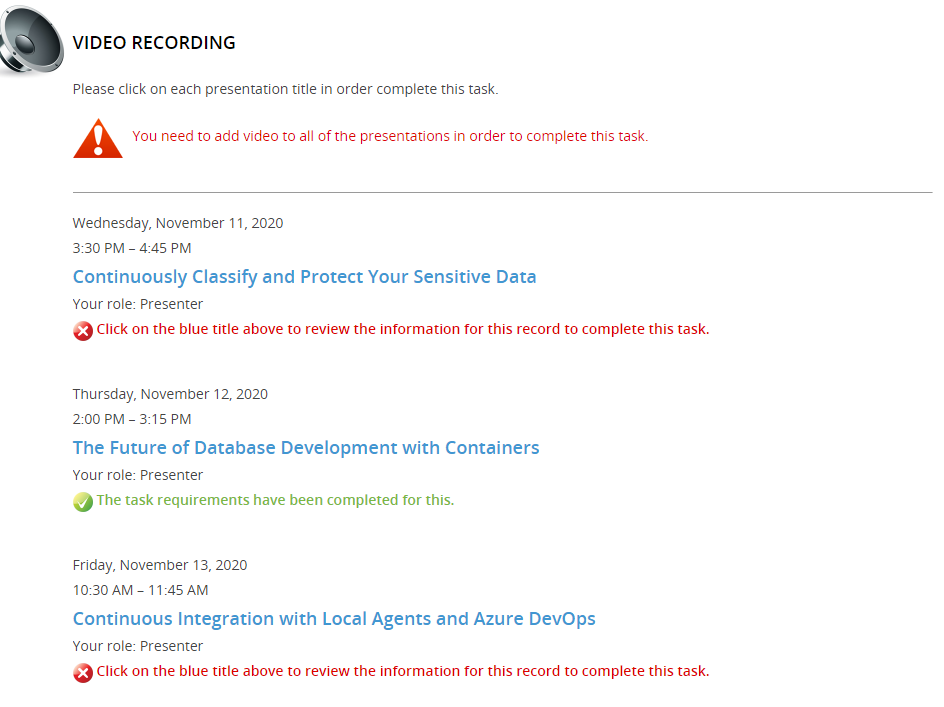
    My task was noted as completed on the main page when I first went here.

    2020-10-19 08_36_25-Conference Harvester - PASS Virtual Summit 2020

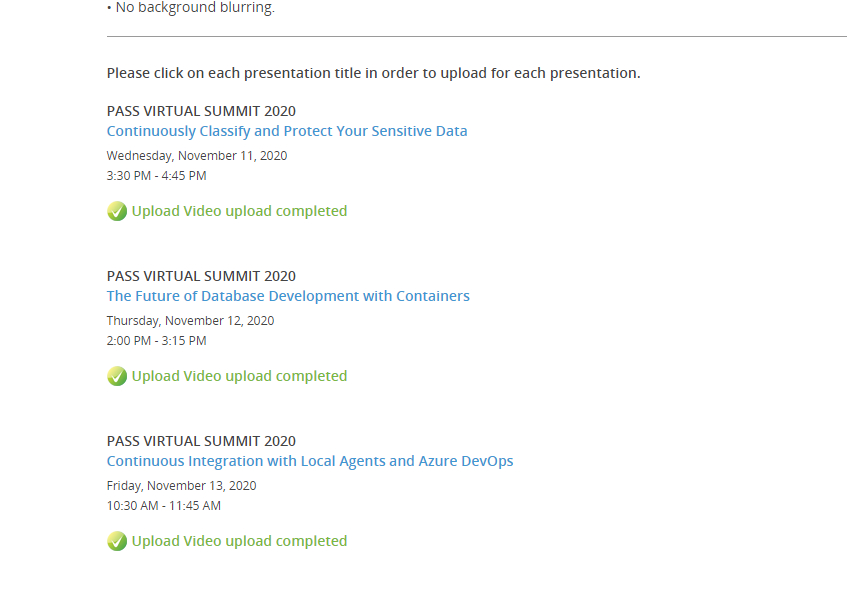
    Even if I click the Upload Video link, I see this:

    2020-10-19 08_37_09-Conference Harvester 2.0 - PASS Virtual Summit 2020

    I had only uploaded one video at this point, so this interface doesn’t properly handle multiple sessions. If I wasn’t careful, I’d think I’d already uploaded everything. Since I’ve only recorded 2, this isn’t right.

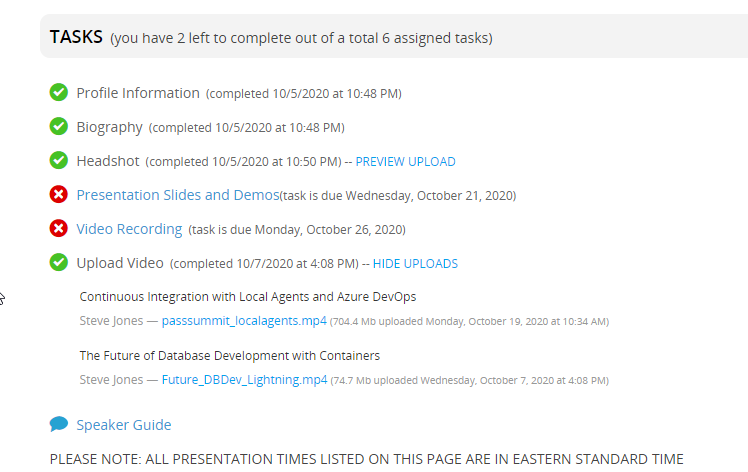
    If I return to the  main page and click “Preview Uploads”, I see this.

    2020-10-19 08_35_53-Conference Harvester - PASS Virtual Summit 2020

    Two are uploaded, and the task isn’t really completed. I wish there were some yellow indicator for partial completion here.

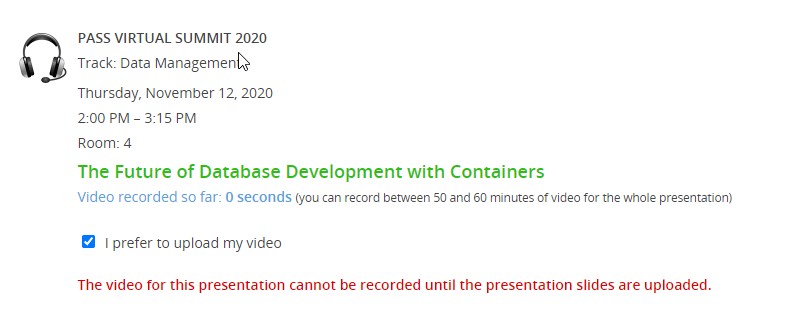
    I did go into the “Record video” for another session, and there I can mark the item as an upload.

    2020-10-19 08_41_57-PASS Virtual Summit 2020

    This gives me a better view of what I’ve done.

    2020-10-19 08_42_40-Conference Harvester 2.0 - PASS Virtual Summit 2020

    Pay attention to what you’re doing. This is a good set of tools in one sense, but a little incomplete, and slightly misleading. A few things to improve:

    • Details for slide uploads, consistent with the video recording
    • Upload video doesn’t properly show status
    • Status for partial completion.

    The slide details do show in in that page, but I have to walk through each section to double check. Do that. We want to look good at the event, and part of this is speakers doing a good job of checking their work.

  • Recording Sessions for the Virtual Summit

    A week ago the SQL Bits conference took place in London, sort of. The event was virtual, but it was held during the London timezone, which makes sense as all the organizers are there.

    A few weeks before this, PASS announced that they wanted speakers to record their sessions in advance of the Virtual Summit. Some speakers were already doing this for SQL Bits, but I saw lots of complaints in blogs, on Twitter, and various other places. I understand the complains, and the concerns over the time needed. I also understand the equipment concerns, which can be an issue for some people.

    I feel all those things myself.

    This post talks about how I view this process for 2020. If you want to know what the platform looks like, I have another post on that.

    My Advice

    I’ve talked with a few people, all of whom have different views on this. My approach for this is to forget about the issues and prepare as you would for any other conference, albeit with a deadline being 2 weeks early.

    Write your presentation, build the deck, practice the demos.

    Then just record it. Set aside a quiet time, and put a timer on your desk and start recording. If you make a mistake, treat it like you are on stage and keep going.

    Stumble over words, keep going. Have a demo break, move on or spend 30s trying to debug it. Just like on stage.

    Get the recording done and make sure it’s under time. If things really went poorly, then correct them in your demo, practice again, and record one more time.

    That’s it.

    Don’t spend more time or effort. This is a conference, we all have things go wrong, so adapt to them as you might on stage.

    Perfection Is an Enemy

    I tend to not want a lot of mistakes, and often end up with 5, 10, or more takes for some things I record. I may spend lots of time editing, or re-watching the recording and trying to decide what to do.

    I may practice a talk 10 or more times before I give it, including going through it the night before. I often set a timer, close my door, tell my wife I’m busy, and run through things in real time. I may even speak out loud, working through tough times. I try not to fix anything while I’m rehearsing, but I might make a quick note on a pad.

    I worry when I have to do recordings because an hour of recording could easily be 20+ hours of stuff. However, much of that 20 hours is also what I spend getting ready for a conference. So I’ll do that part and ignore any minor mistakes.

    Just prepare as best you can, test equipment, and then pretend you are on stage.

    If you really hate the recording, I might request that PASS delete it after the year of access for attendees. I may do that anyway.

    There are three options people have noted that might help some of you. If you just need slides, you can record directly in PowerPoint. You can also record in Teams, if you have access to that platform. Zoom is a great tool, and you can do a limited recording for free. I have an account and happy to help record you remotely if you need it.

  • I Want PASS to Survive

    I want PASS to survive.

    I can say that unequivocally, because this organization has been a part of my career, my job, and my life for twenty years. Many of my fondest memories, my widest smiles, and my deepest thoughts have been connected in some way to the PASS organization.

    I want them to survive.

    I’m also angry at them. The board, C&C, past directors, the whole last decade because of the way I think things have been run. I have my own demons here, with how I feel I’ve been poorly treated by the organization in the past. I am trying to set that aside, and focus on what’s important.

    We need PASS to survive this year, which means we pull together and push forward. Let’s make this the best Summit we can.

    There are plenty of people complaining about PASS, and the way the Summit is run. I do not think I could have done things better than anyone else has. Perhaps I could have, but I certainly could have managed things worse. I don’t know what data is inside this organization, or why decisions are made. Maybe there should be more transparency and accountability, but those are issues to examine after another 60 days. This year is a black swan event, one of a few that PASS has survived. Whether this organization should have been better prepared is also a discussion for late November.

    I truly don’t think that anyone is trying to make bad decisions or upset others. Making decisions is hard, and I know there is a lot of pressure on everyone. I also think that it’s up to each of us to hold everyone accountable regularly, something that hasn’t been done often enough, or widely enough. Again, we can discuss and debate that later in the year, and certainly these are things anyone running for the board needs to address, but remember that a lot of things have gone wrong this year for everyone. At home, and in business. Certainly at PASS.

    This Summit is a great opportunity to learn something, and get access to the content for a full year. There are some great pre-cons at a competitive price. Booking two of these and adding the Summit is a price that many of us would pay for two days of training. You can learn a lot in two days, and then access the rest of the content for a full year.

    You also support PASS. I want them to survive.

    I don’t want PASS to continue to operate in the same manner next year. I don’t want the same levels of accountability, transparency, financial disclosure or protocol. I want all that to be better. I think everyone involved wants that, and they want change.

    For now, I want PASS to survive, and I hope you do, too.

    If you’ve enjoyed a past Summit or a SQL Saturday or a virtual group, think about attending the Summit this year. Get some training, reconnect with those of us in the same industry, and get inspired by all the possibilities of what you can do with data in your job.