Tag: Performance

  • Foreign Keys Help Performance

    I have always put FKs into my database for data integrity purposes. I’ve worked on enough applications that didn’t have FKs, or any RI in place and it was always a nightmare when the application broke down or there were enhancements that allowed duplicates, orphans, or other data integrity problems.

    However I ran across an old post form Grant Fritchey that shows Foreign Keys do more than that. They can actually help performance because the SQL Server database engine knows that there is data in the related tables that matches because of the FK relationship.

    Does that matter?

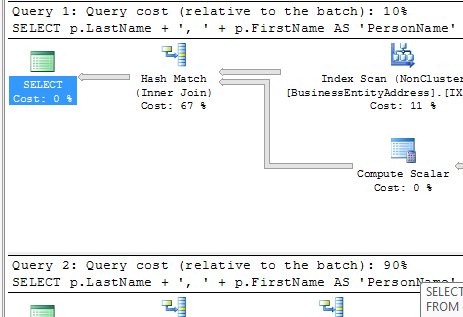
    If you read Grant’s post, and you should, it shows two different queries of the same data, but one has FKs enabled. That results in a much smaller execution plan, hitting fewer tables. I took Grant’s test and added one more twist.

    I ran both queries in the same batch, with the execution plan. Guess what I found? Check out this image:

    query1

    Guess which query has FKs and which one doesn’t? If you read Grant’s post, you’ll realize the first one has the FKs, but more importantly, if you look at the relative percentages of the batches, you see that there’s a 9x difference in resources.

    Use FKs. They do more than protect data, they speed things up.

  • Test Before Deciding

    Do you extensively test?

    Will a new index improve the overall performance of your database server? Will adding another index slow down your insert or update performance? Can adding another file to tempdb make things run quicker?

    The answer to all of those questions is definitively “it depends.” That sounds contradictory, but it’s actually the answer that applies to all of your workloads. Your workload, on your version of SQL Server, on your hardware, with your data sets, will perform differently than the same version of SQL Server on the same hardware than my workload.

    What does that mean for DBAs and developers? It really means that you can’t easily make hard and fast decisions about many of the settings, configurations, and designs you use for performance are just guidelines. The best DBAs I know have lots of guidelines and rules of thumb that they use to begin their design or analysis of a database instance. However they are willing to make exceptions or changes to their “rules” if the situation warrants a change.

    How do they know when to change? They test.

    It’s that simple. Running tests, comparing the changes in performance, measuring the metrics that occur from implementing a particular feature allows a DBA to make an educated guess about whether or not any alteration of your code, your indexes, or your design will bring about improvement. However testing before you make the chance isn’t enough. Even after you have made a change, you need to continue to monitor, essentially “re-testing” in a live system, to determine if the system is still performing well.

    Just trusting that you are “sure” of what to do or not to do is a mistake. Set up tests, gather metrics, and make informed decisions to ensure you servers are operating at peak performance.

    Steve Jones


    The Voice of the DBA Podcasts

  • Disk Partition Alignment–MCM Prep

    Does disk partition alignment matter to SQL Server? Without a doubt. When new disk partitions are created, there could be a reserved set of sectors that could differ across disks because of the way that the hardware interacts. In the white paper, Disk Partition Alignment Best Practices for SQL Server, there is an image that helps to explain this:

    Starting with Windows 2008, the disk partitions are automatically aligned to help improve performance. In a decade, it is unlikely that this will be a problem for most systems as most of the installed systems will be running Windows 2008 or later, at least for SQL Server.

    However now there are still lots of Windows 2003 and Windows 2000 systems out there at this time. For those systems, they could be experiencing a degradation of up to 30% according to the testing done by Microsoft. Which means that you can get a quick performance improvement in your systems, if they are disk I/O bound, if you can realign partitions.

    How can you do this? The hard part is that you must move everything off the partition (all data), delete, and then recreate the partition and restore data. That can be a time consuming exercise, but it is really a time effort. It doesn’t cost anything if you have extra disk to hold your data and can handle the downtime. In the white paper, there is a section that explains how to align your partitions in Windows 2000 and Windows 2003 using diskpar.exe and diskpart.exe, respectively.

    Note that this is mentioned in another white paper on SQL Server Best Practices. This gives you a number of I/O related pre-deployment best practices that you ought to consider before installing SQL Server on your systems. If you are building a system of any importance, this is a great article to understand, and apply many of these practices before SQL Server is installed.

    This can cause a delay in the deployment of a new server, but performing these tests and establishing a baseline cannot be done later, and discovering potential problems early can help you to build a better performing server from day one. Finding these problems later will ultimately result in way more embarrassment and hassle than implementing a short delay before deployment.

    If you have a group of people responsible for installing Windows and possibly SQL Server as part of your build process, have them review the article, or even give them a checklist that will help them to incorporate this testing and benchmarking into their routine.

  • Speed

    We are always improving our computer hardware. It used to be that our CPUs increased their clock speed regularly. Then we started to add additional cores. Along with large increases of memory and disk technology, there has been this quest to lower the response time of our systems. However many of our computers don’t seem to actually be moving quicker.

    Are our database systems responding quicker? We have better search and join algorithms, hardware that transfers data quicker, and more knowledge about how to index our tables. I know all that information might not always be used in many systems, but we can strive to use the DMVs and DMFs to learn more about our databases and tune them better.

    But do they respond quicker? In many cases they don’t, and part of this is the continual growth of data. It seems we accumulate more and more data, at faster rates each year. There is also the ever-increasing level of overhead we seem to add to each piece of software we use. The bloat of software, often with frameworks designed to make the developer’s job easier, result in systems that aren’t any more responsive than they have been in the past.

    I do wish software responded quicker, but I also love the richness of so many applications and web sites that I see. I think overall we’ve improved the experience of working with software by adding new features and capabilities over the years, especially in SQL Server.

    Steve Jones