Tag: powershell

  • Parsing SQL Saturday Data – Looping Through And Loading All XML Files

    After my last post on parsing the XML, I decided to continue forward and get ready to put the data in a database. For that, I’m really looking for this data:

    • event ID
    • session title

    With this, I can easily insert data into a table. I’ll have separate tables for the events themselves and the speakers, but for now, I can easily showcase the titles of the sessions.

    With that in mind, I decided to start expanding my efforts and building a series of loops that get all the data from the XML documents.

    Looping through all files

    The first thing I needed to do was loop through all the files I’d downloaded and get the documents loaded. I decided to use a DO loop for this, since I should be doing this at least once each time. Eventually I’ll add logic to avoid downloading files I’ve downloaded already.

    Here’s the basic code:

    $loop = 1

    $loopend = 450
    $doc = New-Object System.Xml.XmlDocument

    do {
    #start large loop

      # get the filename
      $sourceURL = $baseURL + $i + ".xml"

      # do other stuff

      $i++

    #end outer loop
    } while ($i -lt $loopend)

    This is the basis for looping through all the file names, based on my downloads. A quick test shows this is building all the filenames I need.

    Loading files

    The next step is to actually load each XML file in and start querying it. I changed from the parsing code to use a loop since I’ll need to insert each item separately and I don’t think the code I had from the previous article will work. At least, I haven’t found a way.

    If you know of one, let me know.

    I used the Test-Path method to be sure that the XML exists, as there was at least one lost event in my initial download. I think that’s fixed now, but in any case, I added this code:

    #test the path first. If it exists, load the XML
    if (Test-Path $sourceURL) {
      $doc.Load($sourceURL

    #trap the event number. This will be the ID I use in the database table.
        $event = "SQL Saturday #" + $i

    That seems to work fine, and with with $event variable, I know which event the sessions are associated with.

    Next Steps

    That’s all I wanted to put here, giving me a nice, simple way of going through a series of files in a pattern. From here I’ll add more detail to the inner loop that gets the session titles out of the XML document and displays it.
  • Parsing SQL Saturday Data – Getting the Titles

    I wrote about downloading the SQL Saturday data with Powershell, and that has worked well. However, I also need to parse this data. You can look at a sample XML file from the site with this link, and examine the structure.

    Essentially, it’s something like this:

    <event>

      <title>x</title>

      <speakers>

         <id>1</id>

         <speaker>a</speaker>

      </speakers>

    </event>

    I’ve left a lot out, but it’s not important. For my purposes, this is the main stuff I’m concerned about.

    As a first step, I wanted to print out some information. I’m tackling this in stages, so this is the first step.

    SelectNodes

    I found a number of ways to do this, but I liked the SelectNodes method. I won’t include all the code, since the loading of the XML file was covered in the previous post. I have the XML data in the $doc variable, so I did this:

    $doc.SelectNodes("//guide/name")

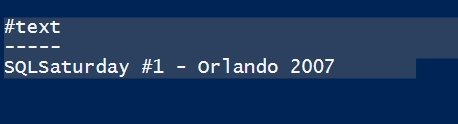
    That gives me this:

    sqlsatloop_b

    This is the path to an element in the document. However this isn’t what I care about here. I’ll need this later as I store other data, but for now I want session titles.

    If I change my code to:

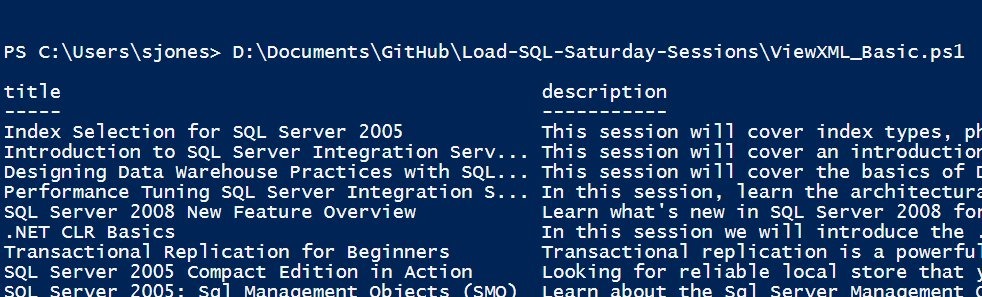
    $doc.SelectNodes("//event") | Format-Table title, description

    I get this:

    sqlsatloop_c

    That’s a good start. I didn’t need the description, but I wanted to show multiple values in the table as a test.

    My plan was to get the speaker, but speaker isn’t an element below event. It’s below "Speakers", which is separate.

    That’s somewhat OK, as I’ll need to parse those out appropriately. The next step is getting the speakers. A little more complicated. The speakers are a child element below the event.

    I’ll tackle that in another post, because it’s slightly more tricky and I want to be sure I can devote a bit more time to discussing a way to do this.

    In the meantime, I cleaned up the code to be simpler and used the

    References

  • Downloading SQL Saturday data

    I wanted to find out how many SQL Saturday’s I’d spoken at and how I ranked with others. I got a spreadsheet from Kendal Van Dyke at one point, but it was quickly out of date. However Kendal mentioned that there was an XML document on the site, and I looked. Sure enough, there is, but it’s separate for each event.

    That makes sense, and it’s fine. I can get the data and put it together. That’s a nice project and I decided to tackle it with Powershell. Certainly SSIS would work, and I may do that as well, or leave it to you to do. There are others that have done this and Kendal has an XLS he’s updated with this data, but this is something I wanted to just try.

    In any case, here was my plan:

    • Download the XML file for each event.
    • Save the XML locally.
    • Parse out the event node, capturing the title and speaker.
    • Load data into a SQL Server database on Azure.
    • Report on speakers and events.

    That’s it, and it’s not a big project, but it does take a little work to get the pieces to work well. I have potential load issues, duplicate data, etc.

    This post will look at just the first and second items, downloading the XML data for each event and saving it.

    Downloading XML – Technique #1

    This is the first way I found to do this, which was interesting. I hadn’t expected this, thinking I’d need to load the XML document and then save it. However the Invoke-WebRequest doesn’t need that. It has this format:

    Invoke-WebRequest $sourceURL -OutFile $DestinationFile

    I can give a source file location (URL) and a destination, and it works. I used this code, and it downloaded an XML file to my local machine.

    # get SQL Saturday data from the site

    $debug = 1;
    # counter for events
    $i = 1
    $baseURL = “
    http://www.sqlsaturday.com/eventxml.aspx?sat=”

    $DestinationFile = “E:\SQLSatData\SQLSat” + $i + “.xml”
    $sourceURL = $baseURL + $i

    # debug information
    if ($debug -eq 1) {
    write-host $DestinationFile
    }

    if ($debug -eq 2) {
    Write-Host $sourceURL
    }

    # Get file from web server
    Invoke-WebRequest $sourceURL -OutFile $DestinationFile

    Now if I add a counter to increment the $i variable, I’ll get all the files.

    Downloading – Technique #2

    The other way of doing this is to load an XML document from a path. In this case, instead of the Invoke-WebRequest, I’ll use this code:

    $doc = New-Object System.Xml.XmlDocument
    $doc.Load($sourceURL)
    $doc.Save($DestinationFile)

    I create an XML document, load it, and then save it to the path.

    Looping

    In both of these cases, I add a looping item, looking for an error. For me, I decided to use 9999 as the loop terminator. That’s an easy one, since I’m not sure we’ll get to 9999 events any time soon.

    I added this code to the top:

    While ($i -lt 9999) {

    I then covered the load call with a TRY..CATCH.

    try {

      $doc.Load($sourceURL)

      # save file
    $doc.Save($DestinationFile)
    }
    Catch
    {
    # if we can’t load the file, assume we’re done for now.
    $i = 9999
    }

    $i = $i + 1
    # end loop
    }

    This worked OK, as you can see, but it failed early on.sqlsatloop_a

    Event 39 doesn’t have an XML file. In fact, the site for SQL Saturday #39 – New York City, fails with an ASP.NET error.

    This isn’t a good design, but it was a good start and allowed me to get moving on the data. From here, I can start working on the parsing and import procedures.

    A better development process might be to encapsulate the download into a separate process and pass in the path, as I can use this same technique to read my local XML files. I should also separate out the save, and the parsing.

    Of course, I need a better way to error handle and loop through files. I don’t want to download all the files every time, so I think I should have some parsing of my file system, finding which files I’m missing, and then ignoring those in my loop. I should also be limiting my downloads based on some number, which I’m not sure about how to calculate now, but I’ll think about it. I guess I could increment based on some list, but I’d have to get one from the SQL Saturday people. Or I could take a high guess, like 500, and just try to load all those files.

    References

  • Selling Automation to Ops

    The DevOps movement isn’t new in some companies. It’s the same coordination and teamwork that has existed for a long time between the development and operations staffs. Developers take advantage of the skills in Operations to get standardized environments for their work, and let the Ops people manage (and track) changes. Operations people talk to developers about the challenges and issues faced in production, and the let the developers build applications that can easily be deployed. The sharing of information ensures each group knows what the other faces, and the regular contact builds bonds and respect between employees. Neither wants to let the other down or make someone else’s job any harder than it needs to be.

    However that’s not the case in many companies where developers view Operational staff as complainers that slow the process down. Operations staff see developers as wild and irresponsible, tossing code into production that they don’t need to support and haven’t tested. Both of these views are correct in that each side sees a reality in the process that makes their job more difficult.

    Ultimately I believe it’s up to developers to change things. Those of us that build the software need to respect the problems that instability causes and learn to help ensure that our changes can be deployed smoothly. The development side of an organization has more skill in tracking changes in version control, in managing the movement of those changes among environments, and in programming systems. We should be working to help push that knowledge through to Operations personnel that become responsible for our applications.

    That means we need to build scripts and tools to migrate our changes and give them to Operations. I’d recommend that we learn how to automate the configuration of our development systems, as well as script our changes. Most modern platforms allow us to programmatically make changes, so let’s do that. Then let’s take a few hours and show Operations people how to use these scripts, and let them setup and change our development environments. It will be slow at first, but they’ll learn to make changes faster, but also bring stability to every environment from development to QA to production, and can ensure we have the same configurations everywhere. We’ll have one less thing to manage, and our changes will get deployed faster, but also more consistently.

    Ultimately we all want the same thing. Better software delivered to customers faster. We want to Ship Safe, and Ship Often.

    Steve Jones

    The Voice of the DBA Podcast

    Listen to the MP3 Audio ( 2.5MB) podcast or subscribe to the feed at iTunes and LibSyn.