Tag: python

  • 2020 Advent of Code–Day 3

    This series looks at the Advent of Code challenges.

    As one of my goals, I’m working through challenges. This post looks at day 3.

    Part 1

    Day 3 was tough. The explanation isn’t great, at least, I didn’t get it at first. Essentially you have a map, and then you have some slope. The first part has a slope of right 3, down 1. If you move, assuming the upper left is (1,1), the next spot is 2, 4. That’s if you count going down as positive.

    Here’s the map:

    ..##.......
    #...#...#..
    .#....#..#.
    ..#.#...#.#
    .#...##..#.
    ..#.##.....
    .#.#.#....#
    .#........#
    #.##...#...
    #...##....#
    .#..#...#.#

    If I count each space, then there is a period (.) in this (2,4) space. If it’s a tree, then there is a hash (#) there. We are trying to count trees before we hit bottom.

    The trick I missed is that the map we’ve given repeats. It repeats to the right as often as needed to get to the bottom.

    This is really a coordinate problem, counting each down as we move, and repeating the map. The trick often in a short width here is to do the math to wrap around from the right to left if you run out of room.

    In SQL, I used a loop. I didn’t spend a ton of time, but couldn’t see a good way to avoid this as I need this to be readable, and I need this to keep working through the map. Here’s the code:

    WHILE @currentrow <= @rows
      BEGIN
        SELECT @currentcol += @right
        IF @currentcol > @width
          SELECT @currentcol = @currentcol - @width
        SELECT @currentrow += @down;

       SELECT @trees = @trees + CASE
           WHEN SUBSTRING(dataval, @currentcol, 1) = '#' THEN 1
           ELSE 0
        end
         FROM day3
         WHERE rowkey = @currentrow
      END
    SELECT @trees AS TreeCount

    I move, count the value if there’s as tree, and then continue moving through the next rows. The WHERE clause orients the rows.

    It worked. I go the right answer here.

    Part 2

    In part 2, this changes to checking a number of sloops and then multiplying the results together. In terms of my code, this is really a repetitive way of running the code again. I could have used different variables and checked multiple slopes at once, but I was busy.

    In python, I did something similar. I essentially calculated the next X and Y position, and then looped through the file. Each time the Y matched the current row, I checked for the matching #. If it matched, increment.

    Once I matched the correct Y, I incremented X and Y.

  • Fixing Python on Windows 10 – #SQLNewBlogger

    Another post for me that is simple and hopefully serves as an example for people trying to get blogging as #SQLNewBloggers.

    The other day I picked up a laptop, opened a command prompt and typed “python” to check something. I got this:

    2021-02-04 17_52_35-Microsoft Store

    I did have Python 3.8 installed, so upgrading to 3.9 wasn’t out of the question. However, why did this come up?

    I searched around and found out that Windows sets up application aliases for some versions. I can only assume since I had python on here that some update last fall did this and I hadn’t used this laptop for python because I’m stuck at home.

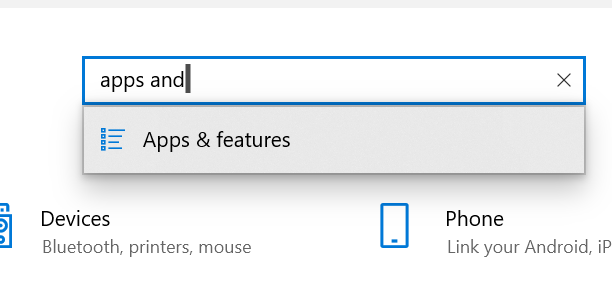
    I saw this on SO as an issue, and followed the instructions. I used Win+I to open the control panel. Here I typed “apps and” to get to Apps and Features.

    2021-02-04 17_56_28-Settings

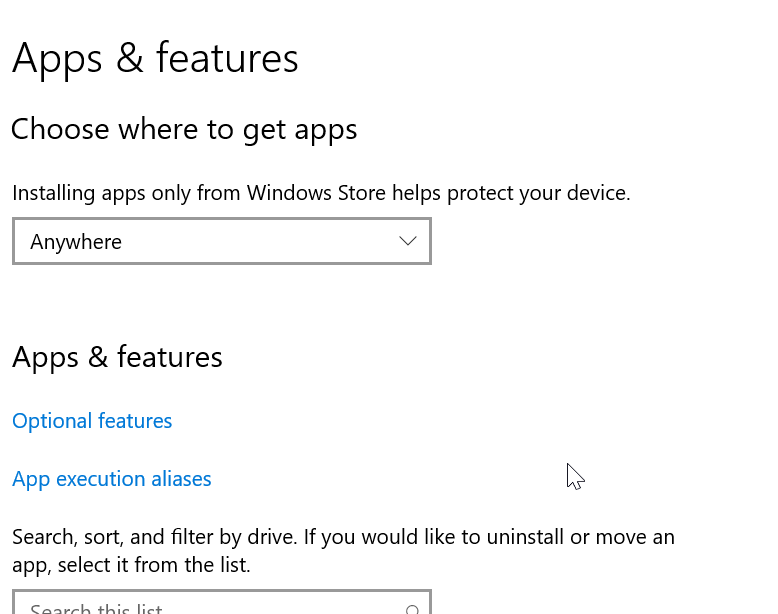
    In here, I see there are “App execution aliases” as a link.

    2021-02-04 17_56_57-Settings

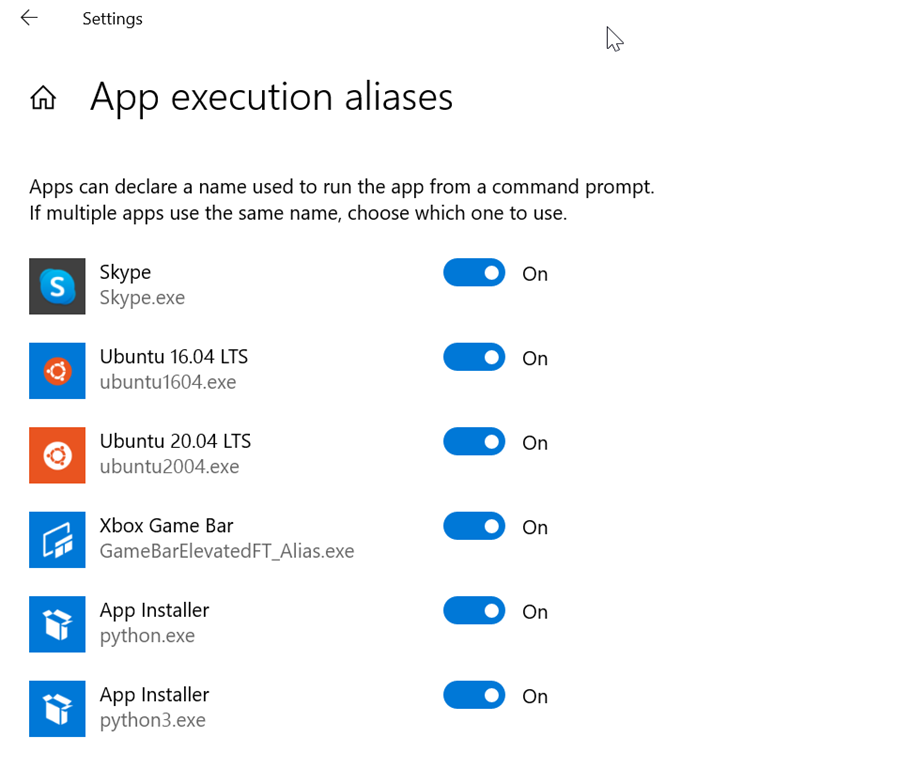
    In here, I see that both Python.exe and Python3.exe are set as aliases.

    2021-02-04 17_57_38-Settings

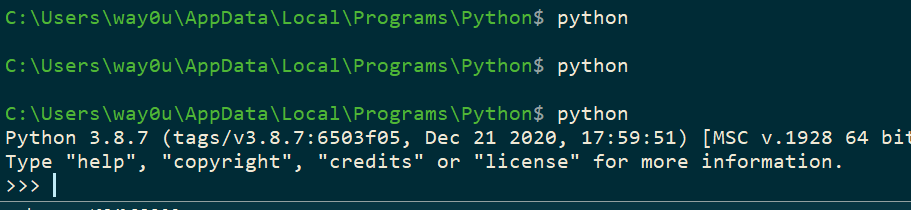
    I turned these last two off and then when I type “python,” I get what I want.

    2021-02-04 17_58_14-cmd - python

    SQLNewBlogger

    I wrote this as many of us run into silly issues, and while I found that SO article quickly, you might not. Your search terms might be different, or the search engine might give you different results. This might help you get setup quickly with Python, which is becoming more useful for data professionals.

    This took my about 5 minutes to type up and grab a few screenshots.

  • Fixing Broken Pip

    I’ve got Python 3.8 on my machine, and recently I got a note that my pip version was old. I tried to upgrade PIP recently with this command:

    c:\python38\python.exe -m pip install --upgrade pip

    This resulted in an error. When I got the error, which I didn’t save, I tried again from an admin console, but got this:

    # c:\python38\python.exe -m pip install --upgrade pip
    c:\python38\python.exe: No module named pip

    That is frustrating. In searching around, I found an issue that a broken upgrade from Windows may cause Pip to get lost. As a result, I need to get pip reinstalled. This post shows how to get this, with a quick curl and python script execution.

    Steve@ARISTOTLE C:\Users\Steve
    # curl https://bootstrap.pypa.io/get-pip.py -o get-pip.py
      % Total    % Received % Xferd  Average Speed   Time    Time     Time  Current
                                     Dload  Upload   Total   Spent    Left  Speed
    100 1840k  100 1840k    0     0  1840k      0  0:00:01 --:--:--  0:00:01 2103k
    
    Steve@ARISTOTLE C:\Users\Steve
    # python get-pip.py
    Collecting pip
      Using cached pip-20.2.1-py2.py3-none-any.whl (1.5 MB)
    Collecting wheel
      Downloading wheel-0.34.2-py2.py3-none-any.whl (26 kB)
    Installing collected packages: pip, wheel
    Successfully installed pip-20.2.1 wheel-0.34.2
    
    Steve@ARISTOTLE C:\Users\Steve
    # pip install tweepy

    That worked, and allowed me to do what I wanted, which was get the tweepy module.

    Now to do a little Python work.

  • Practical Web Scraping–More Reading

    As part of my learning goals for 2018, I wanted to work through various books. This is part of  my work with Python.

    It’s the end of the month, and I’m behind. I know it’s a short month, but it’s not that short. I had time to read the last couple week and I did some reading, but I didn’t get much practice.

    First the positive, then the excuses.

    Reading

    I did manage to read through the basic tutorial in Part I for how to use he BeautifulSoup module to read through an http page. This provided more ideas for finding sections of code and extracting out sections.

    I started Part II, which talks about more in depth http, with forms and posting. I’m still inside that one, and as of this point, I’m only 30% through the book.

    The plan for this weekend is to stop and practice a bit from BeautifulSoup and see what I can accomplish by reading a few web pages.

    Life Gets in the Way

    This month I had two long events on weekends that ate into my reading/working time, as well as a work project. I’m in the middle of volleyball season, and February brought me two 3 day tournaments to coach or watch. One was coaching a 13 year old team, and that occupied a lot of time. The evenings were spent with other coaches and I didn’t bring a laptop because I knew time would be limited. Add to that the need to get a few things done before and after the trip and I couldn’t practice web scraping.

    The second trip was for my daughter, and apart from watching her, my wife was in charge of team activities and I had to help. I had my laptop, but again, no time. I also chose to enjoy some time with my wife in the evening, which was worth it.

    Work was busy. We’re trying to migrate SQLServerCentral to a new platform and I’ve had to test things, as well as try and get other work done. As a result, I’ve been busy during the week and couldn’t even make time to incorporate any web scraping into my job. I also had to get other work done, so it’s been too busy to do much learning.