Tag: python

  • Setting up a Local LLM

    I wanted to experiment a bit with an LLM and training it, so I decided to try a few things. I looked at a few tutorials (see the references below) and then finally got this working. This post distills down what I got to work.

    Getting Started

    I like containers, and rather than install something on my machine, I decided to get docker images for ollama. I ran this to get started:

    docker pull ollama/ollama

    I ran the Docker container with this command:

    docker run -d -v ollama:/root/.ollama -p 11434:11434 --name ollama ollama/ollama

    From there, I pulled a few models into the container with these commands:

    docker exec -it ollama ollama pull mistral

    I then ran this to start the model and interact with it.

    docker exec -it ollama ollama run mistral

    Here are a first few things I typed in to test the model.

    2025-01_0111

    From here, I exited and then ran this to start the model in detached mode.

    docker exec -d ollama ollama run mistral

    From there, more experiments, but that’s in another article.

    References

    Here are some places and tutorials I looked at:

  • Writing Parquet Files – #SQLNewBlogger

    Recently I’ve been looking at archiving some data at SQL Saturday, possibly querying it, and perhaps building a data warehouse of sorts. The modern view of data warehousing seems to be built on using a Lakehouse architecture where data moves through different phases, but much of the data is stored in text files, often parquet files.

    As a start to this I decided to try and move data to parquet. This post looks at writing parquet files.

    Another post for me that is simple and hopefully serves as an example for people trying to get blogging as #SQLNewBloggers.

    Writing Parquet Files

    In a previous post I looked at reading in JSON data, which is how some of my data is archived. I also talked about importing modules. There is a module, called pyarrow, that allows me to work with various parts of Apache Arrow.

    One of the submodules in pyarrow is the parquet module, which lets me read and write parquet files. So, let’s get those modules.

    import pyarrow as pa
    import pyarrow.parquet as pq

    I am giving these show names so I can refer to them in code. Now, let’s skip the code from the previous article and assume I’ve got a dataframe with my sessions in it. How do I get a parquet file?

    Fortunately, I don’t need to know anything about the physical structure, as I can use the write_table() function from the parquet module to do that. I’ll also use the pyarrow.Table.from_pandas() function to get data from the dataframe into this module. This code does that (with some setup for a filename).

        outputFilename = f + '.parquet'
        outputFile = join(outPath, outputFilename)
        pqtable = pa.Table.from_pandas(df)
    # Write Arrow Table to Parquet file
        pq.write_table(pqtable, outputFile)

    Note: I don’t know the technical differences between how pandas dataframes and the pyarrow tables work. I found a few notes online and it looks like pyarrow tables can handle more complex data structures.

    Once this code is added to the code from the previous article (it’s already indented), this will write .parquet files to the bronze folder underneath the location from where it is run. In essence, this takes data from the raw folder and writes it to bronze in a new format.

    Summary

    This post shows how to write parquet files out from JSON data. Take the previous article and this one and you can move data from JSON to parquet.

    This code isn’t perfect. In fact, it needs work. I am only moving session data, so only a portion of the JSON data. This code should be enhanced, or the file names changed to reflect that, but for now, this is a quick example of producing parquet data.

    SQL New Blogger

    This post took about 10 minutes to write once I had the code working. In fact, adding these functions to the code from the last article only took a few minutes. I had to debug a few things to get the files into the correct folder, but it took longer to get these words down than get code working.

    Not a lot longer, but longer.

    You can do this. If you want to work in modern technologies, learn them. Learn how to work with parquet, which is being used a lot in data warehousing, and then write about it. Prove you can get things done and your current employer, or your next one, might give you a project to actually do this work.

  • Reading JSON Data with Python

    Recently I’ve been looking at archiving some data at SQL Saturday. As a start, I needed to read some of the archive data I have in Python. This post looks at the basics of reading in JSON data in Python, one of the more versatile languages for working with data.

    Another post for me that is simple and hopefully serves as an example for people trying to get blogging as #SQLNewBloggers.

    Reading JSON Files in Python

    I have some data in the SQL Saturday repo in JSON format. This is schedule information, which is exported from Sessionize. I also have XML data, but I decided not to mess with that for now.

    Getting this data into a dataset is actually easy in Python. Here are the basics. First, we need to import a few modules. In Python, lots of functionality is from various modules, which aren’t available until added to your workspace. However, they are easy to import.

    We need a few modules:

    • json – used to work with json data
    • os – used to work with files and call OS functions.
    • pandas – used for creating dataframes
    • chardet – functions to detect encoding

    I’ll import these, though from os I’ll only get a few things.

    # Basic import of a JSON file

    import json
    import chardet
    import pandas as pd
    import os

    Once I’ve done this, I can use these modules in my code.

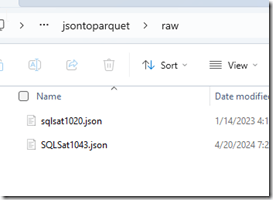
    Now for the code. The first thing is to find my files. I’ve stored json files in a “raw” folder, which I assume is below the place where I’m running the code. In this case, I have two files.
    2024-05-06 14_11_40

    Here’s a little setup code that sets the path (which could be an argument to the file), but creates a path to the files and starts a loop:

    mypath = '.\\raw'
    onlyfiles = [f for f in os.listdir(mypath) if os.path.isfile(os.path.join(mypath, f)) and f.endswith('.json') ]
    # loop through the files
    for f in onlyfiles:

    In Python, once I want to create a set of code in a loop, I need to indent it, so the next few lines are indented below the for statement above. I’ll repeat that for clarity.

    In the loop, I want to do a few things. First, I get a path to the file with the os.path.join  command, which builds me a path that works in various functions. Next, I want to use the chardet module to detect the encoding of the file. They should all be the same, but I had some issues when expecting the default encoding (this post helped). This ensures I get the correct encoding for the file.

    Lastly, I’ll open the file.

    # loop through the files
    for f in onlyfiles:
    
        currentfile = os.path.join(mypath,f)
    
        enc=chardet.detect(open(currentfile,'rb').read())['encoding']
    
    with open(currentfile,'r', encoding=enc) as json_data:

    Again, I have a with statement and want to run other code, so I’ll indent the next line. The next line reads in the file using the json module, which has a load() function. This function knows how to parse a json file so that we can work with it.

    Lastly, outside of the with command, I’ll return to the for loop be de-indenting one level and calling a pandas function to take a portion of the JSON file and load it into a dataframe. Think of a dataframe like a resultset in SQL or a datatable in C#. In this case, I’ll take the “sessions” structure. I print the first five rows with the head() function.

    The entire code structure looks like this:

    # Basic import of a JSON file
    import json
    import chardet
    import pandas as pd
    import os
    
    mypath = '.\\raw'
    onlyfiles = [f for f in os.listdir(mypath) if os.path.isfile(os.path.join(mypath, f)) and f.endswith('.json') ]
    
    # loop through the files
    for f in onlyfiles:
        currentfile = os.path.join(mypath,f)
        enc=chardet.detect(open(currentfile,'rb').read())['encoding']
        with open(currentfile,'r', encoding=enc) as json_data:
            data = json.load(json_data)
        # get session data from json
        df = pd.DataFrame(data['sessions'])
    
        # print the head
        print(df.head())
    

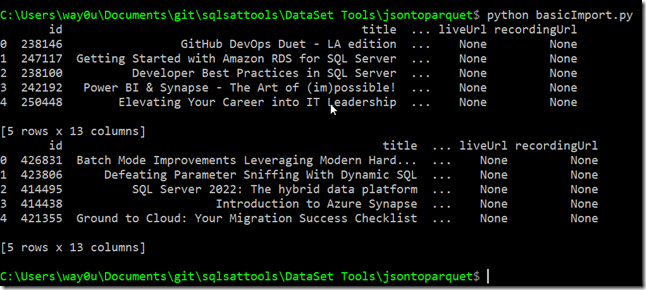
    The results look like the image below. I’m not covering how to run Python or anything else, but you can see the first five rows with the session title and a couple other elements.
    2024-05-06 14_20_09

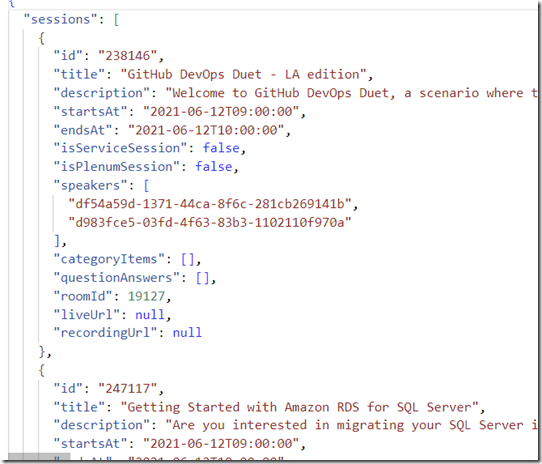
    The raw JSON looks like this for the first file with the sessions element.
    2024-05-06 14_21_21

    Now I can work with the data and query, transform, rewrite, store in a database, whatever. I’ll cover how to move this data in another post.

    SQL New Blogger

    This post took me about 15 minutes to write, mostly because of looking up some links. The code itself was for something I was already doing, so after getting the code working, I wrote this post using it.

    This is a good example of something you could write to show that you are building some data warehouse skills, which are valuable for many employers.

  • 2020 Advent of Code Day 6

    This series looks at the Advent of Code challenges.

    As one of my goals, I’m working through challenges. This post looks at day 6. I’m going to do this one in Python here, though I did solve it in other languages in my repo.

    Part 1

    This is another weird string grouping issue. The data load is a mess, meaning that there are groups of data I need to consider, and the groups are separated by blank lines. However, each group has multiple lines.

    Ugh.

    Easier in Python, where I can load the data line by line and break things. I do that with this code:

    for answers in open("2020\day6\day6_data.txt").read().split("\n\n"):

    In SQL, it’s harder. I bulk load into a table, the cursor through the data.

    DECLARE pcurs CURSOR FOR SELECT lineval FROM Day6 ORDER BY linekey;
    DECLARE
         @val VARCHAR(1000) = ''
       , @groups VARCHAR(1000);
    OPEN pcurs;
    FETCH NEXT FROM pcurs
    INTO @val;
    SET @groups = '';
    WHILE @@FETCH_STATUS = 0
    BEGIN
         IF @val > ''
             SELECT @groups += ' ' + @val;
         ELSE
         BEGIN
             INSERT dbo.Day6_Groups (groupanswers) VALUES (@groups);
             SET @groups = '';
         END;
         FETCH NEXT FROM pcurs
         INTO @val;
    END;
         INSERT dbo.Day6_Groups(groupanswers) VALUES (@groups);
    DEALLOCATE pcurs;
    GO

    Once that is done, I again have to do things differently. Python is easy, where I count the values and add them up.

    answers = set(answers.replace("\n",""))
    part1 += len(answers)

    In SQL, I need to distinctly find the values, for which I need a function of some sort.

    UPDATE dbo.Day6_Groups
      SET deduppedanswers =  DBO.REMOVE_DUPLICATE_INSTR(1,groupanswers)

    Once that’s done the answer is the sum of lengths.

    Part 2

    More complex here. Now I need to match up the common answers among the groups. In Python, this isn’t bad. I use the intersection method to find out what matches between the groups.

    for answers in open("2020\day6\day6_data.txt").read().split("\n\n"):
        matches = set.intersection(*[set(answer) for answer in answers.split()])
        part2 += len(matches)
    print("Part 2: ", part2)

    Fairly simple here, with the grouping of the answers in a set.

    SQL is hard.I reloaded the data, and separated each group by a comma. This gave me data I could split up, keeping each group in a group.

    2021-05-12 13_41_16-day6.sql - ARISTOTLE.AdventofCode (ARISTOTLE_Steve (56)) - Microsoft SQL Server

    From here, I had a CTE for this, another to put these into groups of 2 strings by groupID. I then did a comparison for common characters across each group of 2 strings. This gave me partial matches, and I then compared all these in a group, taking the minimum number of matches. From here, I summed up the count of all the matches.