Tag: security

  • Create a Login – Basic Skill #3

    This post is part of a series based on my presentation The Top Ten Skills You Need for SQL Server. This post is part of Skill #3 – Setup Security.

    I wrote about the basic security model for SQL Server, recently and wanted to now expand on the practical aspects of how you setup security. Let’s start with logins and creating them.

    In the current versions of SQL Server, which includes SQL Server 2008 R2 and below, a login is the way in which you connect to an instance of SQL Server. Things may change in SQL Server 11 with contained databases, but I think this will still apply in many situations.

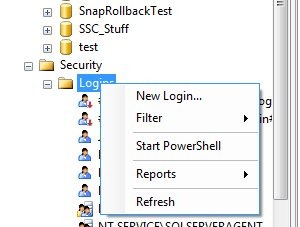
    Logins are defined at the instance level, and in Management Studio, you can right click the Logins folder and select New Login to create one.

    newlogin

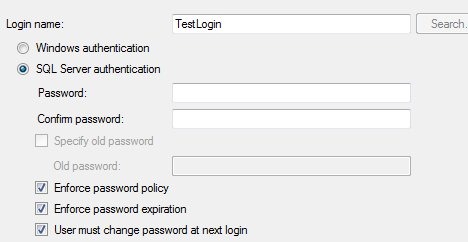
    This will create a dialog like this one:

    newlogin2

    There are lots of choices here, but really there are only a few decisions that we make for most logins. You might use the other options, but these are the basics for 80% of the cases, following the 80/20 rule of this series.

    The first thing is the login name. This can be a user or group in Active Directory, and as you can see in the next image, if you don’t know the exact name, there is a search button. This is the standard AD search dialog.

    newlogin3

    There is a radio button below the name, which defaults to Windows Authentication. That’s for AD accounts, and is the recommended default. You can also choose SQL authentication, which means that a password is required and the administrator must set it.

    newlogin4

    If you choose SQL authentication, and are on Windows 2003 or later (Vista/XP as well) that allow you to set password policy. As a note, leave these checked unless you have a great reason not to. For most logins you should not know the user’s password and it ought to conform to the policies.

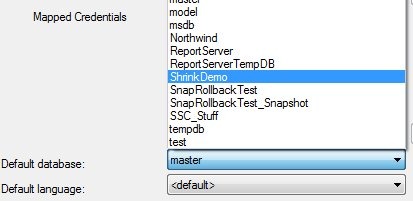
    The rest of this page is advanced stuff that isn’t often needed. The only thing that you should look over is the default database. For normal users, make sure this is a database the person will have access to. For administrators, leave it at master.

    newlogin5

    Next we look at the server roles page:

    newlogin6

    These are roles, or groups, with permissions for the instance. They don’t necessarily give a person access to a database, but many of them could allow someone to gain access, so for most users, leave this blank. For administrators, give them just what they need.

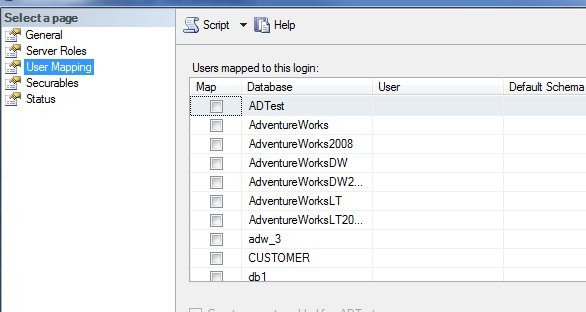
    The user mapping is next, and this is where you can have the dialog create a user in the database and grant access.

    newlogin7

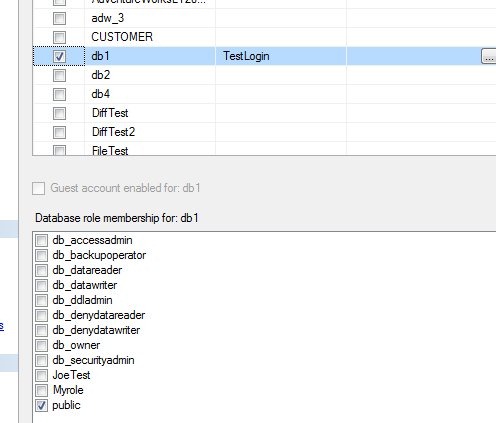
    Most users will need access to a specific database, usually the one you chose as their default database. If you select a database checkbox, the user will be created with the same name as the login by default. Leave this alone, it’s a good policy.

    newlogin8

    Once you select the user, you also can add a database role at the bottom. Everyone is a member of public, and you should have a database role you’ve created for permissions that you can assign to them. I dislike giving regular users any of the fixed database roles like db_datareader. They are too global in permissions and have caused me confusion later on.

    Create your own role and assign permissions.

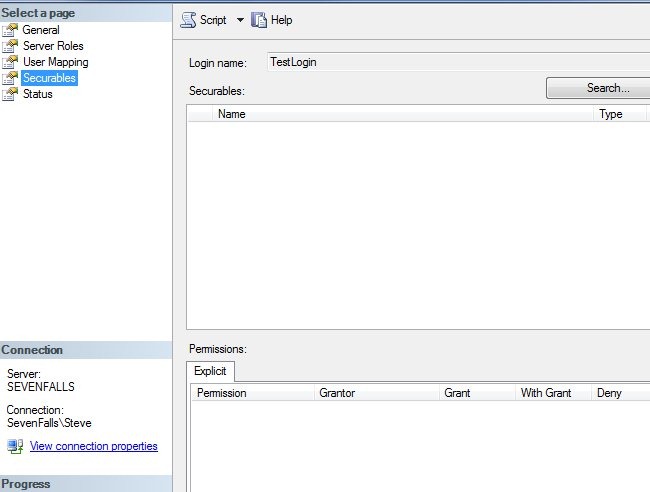
    Next is the explicit securables tab. Don’t use this unless you know what it means. I never use it, and most of the time you shouldn’t. Leave it along until you learn why, and more importantly, why not to use it.

    newlogin9

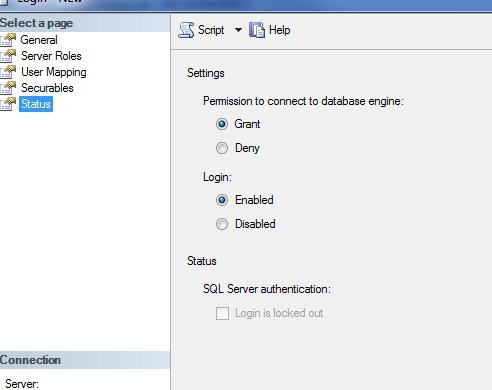
    That last tab isn’t one you normally need, but you might come here if a user has locked themselves out.

    newlogin10

    Leave these defaults alone unless you need to disable the user or prevent them from accessing this database for some reason. You can switch the radio buttons. If the user is locked out, the bottom checkbox will be selected and you can uncheck it.

    That’s the basics of creating a user in SSMS. For the most part, stick with defaults and keep your security simple, and restrictive. Don’t grant more rights than you need to.

  • From Vandalism to Serious Crime

    It seems that there are relatively few very talented hackers that can break into your systems. The vast majority of data breaches and issues are from one of two attack vectors: social engineering or script kiddies. Social engineering is hard to fight, especially in large companies where everyone doesn’t know everyone. Script kiddies are more numerous since they don’t need any talent and merely deploy scripts written by others to attack your systems.

    Recently it seems that there have been quite a few hacker attacks on systems, often using fairly simple SQL Injection techniques, that aren’t vandalism, and aren’t for profit. These attacks are motivated by hackers who are offended by the companies or organizations and are standing up for customers. That might be worrisome to DBAs and data professionals since you can’t hide data breaches if the attackers publicly post the data they’ve copied and you will certainly receive some of the blame for any breach of security.

    In the past it seemed most attacks were DDOS attacks, which were embarrassing for IT folks, but not overly damaging in the long term. The last year or two, however, the attacks have turned to the copying of data and its release. Embarrassing for the company and potentially costing it business, but also worrisome for the system administrators who might be held accountable and possibly lose their jobs.

    These days when there is never enough time to test and resources for security are sparse, what is a technical professional to do? One would hope that we would not be held responsible when we cannot perform adequate testing of applications, or we cannot implement strong security, but that is not what happens. We are blamed for being too slow to deploy applications, blamed if security impedes access in any way, and assuredly blamed if there is any successful hack of our systems.

    In my mind each technology worker should educate themselves on recommended security techniques and request those techniques be implemented. They might not be, but the documentation that you attempted to do so might save your job.

    Steve Jones


    The Voice of the DBA Podcasts

  • The Principle of Least Privilege – Skill #3

    This series of blog posts are related to my presentation, The Top Ten Skills You Need, which is scheduled for a few deliveries in 2011.

    Secure by Default

    SQL Server doesn’t give logins or users any rights by default. That means when you add a login or user to the SQL Server instance, the user cannot access any of the data or objects in the instance until you grant rights.

    That’s not the model that so many people have learned in many applications where once a user has access, they can view anything. This leads to many administrators and developers thinking something is wrong when they create a new login and data cannot be accessed.

    So they start by granting one of two rights initially: sysadmin or db_owner.

    That’s a huge mistake, and leads to security issues down the road if the database contains any type of sensitive information.

    The Principle of Least Privilege

    There’s a security tenet that is known as the principle of least privilege. This essentially means that any user is only allowed to the minimum amount of access needed to accomplish their job. A few examples of what this means in practice:

    • If a user is supposed to only use the HR application to add new employees, they shouldn’t have administrator access.
    • If a web application provides read only views of sales data, the account it uses to access SQL Server should only have read (SELECT) access, and no rights to change data (no INSERT/UPDATE/DELETE)
    • A manager that only maintains an employee’s address information in a self service situation should have read/write access to the address data, but not the salary data, name data, or any other employee data.
    • A developer that is allowed to back up a particular database from the production systems to restore this on the development server should not have system administrator access to production. They should have backup rights only for the database(s) the developer needs.
    • An auditing application that writes to an audit table needs INSERT rights on the table, but not UPDATE, DELETE, or SELECT.

    There are many more examples, but the basic idea is that you grant the rights needed, not every right.

    In Practice

    It feels like a lot of work to deal with roles, or think about the rights needed. It’s really not. Set up a role when someone needs access and grant the rights they need to that object. If they need more rights, grant more rights.

  • The Special Cloud

    A new Amazon cloud for the US government

    It’s not a short yellow bus special cloud, at least I hope not. Amazon is introducing a cloud for the US government, designed to meet their regulatory and compliance requirements. The idea here is that there are different needs for some sensitive information that the US government deals with, or at least some departments. I think most of us recognize this might be the case, and the same cloud infrastructure that some company like SQLServerCentral needs wouldn’t be appropriate for OSHA or some other department.

    Amazon introduced this US only cloud that is physically and logically accessible in the US only and adheres to some alphabet soup of regulatory requirements. It should allow more government organizations to store or process data in a cloud environment. I think this is a good move on Amazon’s part, and a potential benefit for some US agencies that might process lots of data at times, but not want the overhead of a large IT infrastructure to maintain permanently.

    This is a good step in the evolution of cloud computing, and I hope that Microsoft and other vendors start to develop specialized clouds as well. There are PCI compliant hosting services, but I can imagine that there might be semi-private clouds for medical, research, or other specialized data sets, which conform to the specific security and regulatory need of that industry. At some point I can imagine that Amazon or Microsoft might have parts of their data centers partitioned into different industry verticals that provide services according to different criteria.

    The cloud can provide a great place for periodic and bursty workloads for many applications and companies, but there are definitely security concerns that need to be addressed. The development of specific clouds for specialized needs seems to be a positive step in allowing more companies to take advantage of cloud computing in the future.

    Steve Jones


    The Voice of the DBA Podcasts