Tag: security

  • Removing Weak Security from SQL Server

    I was checking some arguments in the RESTORE command for SQL Server and saw that the MEDIAPASSWORD option was deprecated and marked as being removed at some point. That made sense, and I assumed that PASSWORD was the option to be used moving forward. However, that option is also marked as deprecated.

    What should we do?

    Well, we need to better secure our backup files for sure. Disk encryption and limits on AD/directory permissions ought to be set. Of course, we need to use care when handling or moving these files, especially when they cross the secure boundary in production systems to other dev/test/etc. networks.

    The security section of the document explains the reasoning here. The protection provided is weak and isn’t intended to protect data. You can still read data in the backup file. This is mainly to prevent an incorrect restore when using tools, meaning the human picking the wrong file. This isn’t to protect your data.

    I suspect most people dealing with SQL Server backups that use either of these options don’t know this. They think the password secures their data. I know because I’ve seen people use this to send a backup file through email or file transfer to another party. However, if you’ve ever opened a backup file in XVI32 or another editor, you will see that your data is in plain text. If you’ve never done that, give it a try today and search for strings that you know are stored in the database.

    Some security is better than no security and layers of security that build on each other are useful. However, depending on weak security isn’t good. It leads people to count on something that doesn’t work and ignore more serious issues.

    I’m glad that Microsoft is (supposedly) removing these options. I understand that backwards compatibility and preventing existing scripts from failing are important. At the same time, we need to move forward. I’d like these password items to become a no-op, and not cause errors, but I would hope that their use in scripts would also generate a message to the user that these options don’t work and need to remove removed. Perhaps with a direct message and a note in the error log, we’d start to see people embracing other security practices that will provide more protection.

    Steve Jones

    Listen to the podcast at Libsyn, Stitcher, Spotify, or iTunes.

  • Which Schema is Queried First?–#SQLNewBlogger

    I had to test something for a customer, and as a part of this there as a need to have a different default schema for a user. I wrote about that, but one of the things that occurred to me is the need to know how security works with schemas and the priority of queries.

    The Scenario

    A user in a database needed to access certain objects, which were going to be located in a separate schema. The previous post looked at the setup of the user, but what happens with queries. Let’s set up a few tables that will help us learn.

    I’ll create two tables, one in each schema.

    CREATE TABLE dbo.Location (locationname VARCHAR(20))
    GO
    INSERT dbo.Location (locationname) VALUES ('dbo schema')
    GO
    CREATE TABLE webapi.Location (locationname VARCHAR(20))
    GO
    INSERT webapi.Location (locationname) VALUES ('webapi schema')
    GO

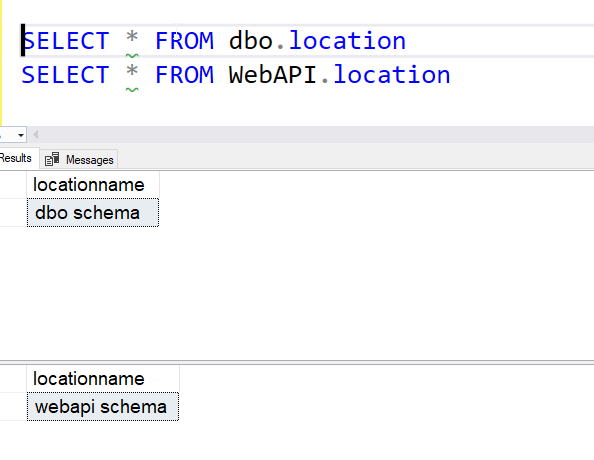
    Let’s see what happens when we query the tables. If I write a query that qualified objects, I get what expected. I’ll login as APIUser and then run this code.

    SELECT * FROM dbo.location
    SELECT * FROM WebAPI.location

    When I do this, I get the results expected.

    2023-06-27 09_48_54-SQLQuery3.sql - ARISTOTLE.test (ApiUser (56))_ - Microsoft SQL Server Management

    If I don’t qualify the table, do you know what happens? You should, and this post shows the results that the default schema is queried first.

    2023-06-27 09_50_13-SQLQuery3.sql - ARISTOTLE.test (ApiUser (56))_ - Microsoft SQL Server Management

    If I didn’t have a WebAPI.Location table, the dbo.location result would be shown. It is important that you understand SQL Server security if you manage instances or write queries, as you could otherwise feel you need to grant far too many permissions.

    SQL New Blogger

    This was a minor part of something else I was doing. I noted this in the previous post, but also realized the ALTER was a good second post and verifying the permission hierarchy was a good third post. I could have added this to the first one, but I like separating and focusing posts. Better for SEO if you care, but better for your workload and producing most posts.

    Outside of the work I was doing, the sketch of these notes took about 2 minutes, and then the entire post was a little longer, with more code to write. This was about a 15 minute post.

    You can do this.

  • Altering the Default Schema for a User

    I had to test something for a customer, and as a part of this there as a need to have a different default schema for a user. I wrote about that, but since this isn’t something that I (or many people) do often, I wanted to make a second post about changing the schema.

    The Scenario

    A user in a database needed to access certain objects, which were going to be located in a separate schema. The previous post looked at the issue for a new user, but for this one, I wanted to show how to change a schema for an existing user.

    This post shows how to alter a user’s default schema.

    The Solution

    When you add a user, this is a simple parameter as part of the CREATE USER DDL. In this case, you use the DEFAULT_SCHEMA parameter. The ALTER is the same, which isn’t the case with all parts of the T-SQL language. Sometimes there are procedures instead of true DDL.

    In my case, we wanted to change the default schema for a user. In the first post, the APIUser had the default of the WebAPI schema. Let’s move them to the Sales schema with this code:

    ALTER USER APIUser WITH DEFAULT_SCHEMA=Sales
    
    GO

    That’s it and now if objects aren’t schema qualified, the APIUser will query the Sales schema first, then the dbo schema. If this user wants to query the WebAPI schema, they must schema qualify things.

    SQL New Blogger

    This was a minor part of something else I was doing. I noted this in the previous post, but then realized the ALTER was a good second post. I could have added this to the first one, but I like separating and focusing posts. Better for SEO if you care, but better for your workload and producing most posts.

    Outside of the work I was doing, the sketch of these notes took about 2 minutes, and then the entire post was < 10 minutes.

    You can do this.

  • Assigning a Default Schema to a New User–#SQLNewBlogger

    I had to test something for a customer, and as a part of this there as a need to have a different default schema for a user. Since this isn’t something that I (or many people) do often, I wanted to make a note about how to do this.

    Another post for me that is simple and hopefully serves as an example for people trying to get blogging as #SQLNewBloggers.

    The Scenario

    A user in a database needed to access certain objects, which were going to be located in a separate schema. There was a possibility that there would be objects in the new schema and in the dbo schema with the same name, so the concern was with developers writing code that might access the wrong object.

    The Solution

    When you add a user, this is a simple parameter as part of the CREATE USER DDL. In this case, you use the DEFAULT_SCHEMA parameter. I didn’t look this up at SQL Prompt hinted me to the WITH and the parameter.

    In my case, we wanted to add a new user, which we will call APIUser and assign them to the WebAPI schema. We use this code:

    CREATE USER APIUser FOR LOGIN APIUser WITH DEFAULT_SCHEMA=WebAPI
    GO

    Note a couple things. First, the schema name isn’t quoted. It’s treated as an identifier. Second, the WITH is used to add this parameter to the statement. Once we do this, if they user does not include a schema in an object reference, like the one below, they will still get data from the object in the WebAPI schema.

    SELECT * FROM location
    

    SQL New Blogger

    This was a minor part of something else I was doing. In this case, setting up a different scenario, but I captured this slice of code, edited the names slightly, and then pasted them in here.

    Outside of the work I was doing, the sketch of these notes took about 2 minutes, and then the entire post was < 10 minutes.

    You can do this.