Tag: security

  • Backup Data Security

    It seems there is no end to the insecure ways in which people manage data. I haven’t seen this one before, but I’m sure it’s happened. In fact, I bet it’s happening right now in more than one company. A company was using rsync to keep data files copied between two insecure servers. Insecure because of a lack of username and password on the systems. In this case, the problem was a subcontractor that dealt with confidential US military personnel data.

    I appreciate that many of you are talented scripters that solve problems and build great solutions. I wonder how many of you actually think about security and the potential implications of small mistakes in configuration that others might make. When you build that PoSh script to copy backup files, are you ensuring the transfer takes place in a secure manner? Do you assume that because you use an IP address or server with no DNS entries to receive data that no one else can find it?

    All too often I find that sysadmins and developers make assumptions about the security of their process. They think because discovering the process or information would be hard for them or they wouldn’t bother, the data will be secure. And we find that time and time again that the ways in which we build systems without considering security aren’t secure. Someone will find a way to access the data, often with a fairly simple technique. Steal a laptop that’s unencrypted. Get a user to click on a link that installs keystroke logger or uses phishing to gain credentials. Scan a server for known software running with un-patched vulnerabilities or default accounts. I can’t tell you how many times I’ve logged into Oracle database servers with “System” and “Manager” in various organizations.

    Certainly our software platforms haven’t been well designed with security in mind. All sorts of expected, happy path behaviors are assumed by software developers, many of which are susceptible to attacks. While modern platforms are better designed and patches are becoming widely available, far too few companies apply these patches and consider security in the software they build on top of the OSes, databases, and other frameworks used for software. As an industry, we are far too guilty of granting more security than needed, opening more ports than necessary, re-using accounts too often, and assuming that our network paths are secure.

    Good security comes from having layers that don’t open our systems to a single mis-configuration or simple attack. Disks should be encrypted, minimal privileges granted, accounts not re-used across systems, and network communications, even for simple copies, secured. I know this can slow some development and be painful to implement, but as we become used to using secure credentials and techniques in all of our work, the complexity will fade into the background, and it will be as easy to deploy a secure system as an insecure one.

    Steve Jones

    The Voice of the DBA Podcast

    Listen to the MP3 Audio ( 4.2MB) podcast or subscribe to the feed at iTunes and Libsyn.

  • Post TDE–Getting Unencrypted Backups

    I saw a question posted recently about someone that had disabled TDE and was still having issues restoring a backup. This doesn’t seem like that should be an issue, but it can be. A little testing shows how.

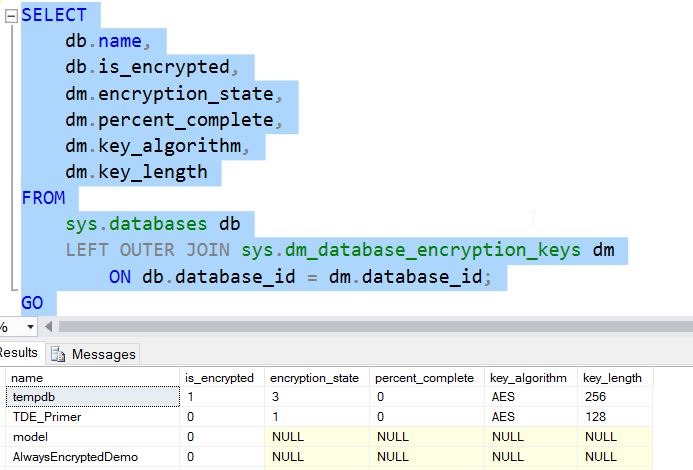
    Let’s assume I have an encrypted TDE database. If I run a query, I can see the status as 3, which is encrypted.

    2016-11-23 11_16_07-11_TDE_Demo.sql - localhost_SQL2016.TDE_Primer (PLATO_Steve (64))_ - Microsoft S

    If I take a backup at this point, the backup will be encrypted, and to restore this on another instance, I’d need to first restore the certificate. I don’t want to do that, so let’s remove encryption. This is a simple command

    ALTER DATABASE TDE_Primer

      SET ENCRYPTION OFF;

    This runs quickly.

    2016-11-23 11_18_08-11_TDE_Demo.sql - localhost_SQL2016.TDE_Primer (PLATO_Steve (64))_ - Microsoft S

    If I now query for encryption, I see this.

    2016-11-23 11_19_00-11_TDE_Demo.sql - localhost_SQL2016.TDE_Primer (PLATO_Steve (64))_ - Microsoft S

    A one means that this is an unencrypted database, but a DEK (Database Encryption Key) exists. If I were to detach and examine this database file with a hex editor, the pages would be decrypted.

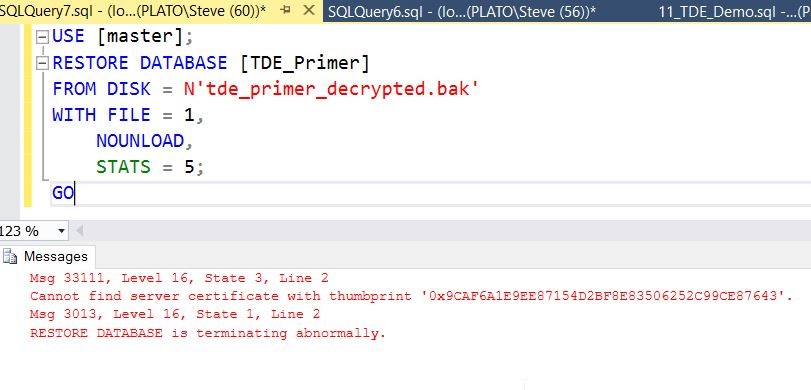
    I’ll now take a backup and move that to another instance. Once I’ve copied that over, I’ll try to restore the backup. In T-SQL, I’ll see this:

    2016-11-23 11_21_43-SQLQuery7.sql - (local)_SQL2016_qa.master (PLATO_Steve (60))_ - Microsoft SQL Se

    Why is this? The database was decrypted, as was the backup. In fact, if I open my backup file in a hex editor, I can see row data.

    2016-11-23 11_23_12-XVI32 - tde_primer_decrypted.bak

    The Problem

    When SQL Server goes to restore the file, it reads part of the header. In here, the process must detect the DEK and try to decrypt that key. However, since this new instance does not have the certificate, this doesn’t work and an error is thrown, despite not needing the key since the data isn’t encrypted.

    The issue here is the DEK still exists in the source database.

    The Solution

    Let’s fix this. I’ll return to my first instance and the original database that was TDE encrypted and now is not. I can issue this:

    DROP DATABASE ENCRYPTION KEY

    Once I do this, it completes quickly. This is a standard DDL command, but one that’s not often used.

    Once I do this, I’ll take another backup and return to the second instance. Now when I try the restore, I see this:

    2016-11-23 11_27_28-SQLQuery8.sql - (local)_SQL2016_qa.master (PLATO_Steve (58))_ - Microsoft SQL Se

    If you’re having issues restoring a database that used to be TDE encrypted, try removing the DEK and then backing it up.

  • Wow. Just Wow

    Wow. Just Wow.

    Yes, I meant to use a capital letter there. The Red Cross’ Blood Service in Australia had database backups on a website that anyone could access. That means that anyone could download the backup, which contained PII (Personally Identifiable Information) about donors. This was a mysql dump file, which is shockingly easy to restore, so anyone could have read the file inside of an hour.

    To be fair here, this wasn’t the Red Cross’ fault. A partner had put the file on a website, perhaps for developers or an analyst to download, but the web server had directory browsing available and was serving data on a public IP. That’s three major faults, and perhaps a fourth since the backup file wasn’t protected at all.

    How many of us have innocently taken a backup, put it in a location for someone else to download inside our company, and not thought anything of the action? If you have done this, would you know if the file were accessed and downloaded by the wrong person? In most cases we wouldn’t because the correct person might download the file as well and we wouldn’t think anything had ever gone wrong.

    That’s a problem with data. We don’t get necessarily notified if someone makes a copy. We certainly have no way of knowing if the backup files we create are ever restored by an unauthorized user, much less just copied. We often just assume that data at rest is just at rest and isn’t ever mishandled without our knowing about it.

    This is a good reason why we should be practicing security by default in most every case. All our backups should be protected at the very least with passwords. Even if everyone in the organization knows the password, some random person that might steal a laptop or browse an unsecured web server won’t know it. The password also shouldn’t be easily guessed, and if possible, the data should be encrypted. Always.

    What’s more, I would hope that we would use secure ways of moving information around with our fellow employees and partners. I know Dropbox is a very convenient and tempting mechanism to use, but is it really appropriate? It might be good enough if you’ve protected the data in other ways, but I’d be very, very wary of using any public service that doesn’t allow for some sort of security that can be tied to individual, authenticated users.

    No matter how you choose to protect and transfer database backups, I’d also be sure that you don’t leave the information there indefinitely. Have expiration times where files are removed. All encryption and protection can be cracked, given enough time and resources, so don’t leave your files there forever.

    Steve Jones

    The Voice of the DBA Podcast

    Listen to the MP3 Audio ( 3.8MB) podcast or subscribe to the feed at iTunes and Libsyn.

  • Creating a Logon Trigger–#SQLNewBlogger

    Another post for me that is simple and hopefully serves as an example for people trying to get blogging as #SQLNewBloggers.

    Suppose you want to audit logins for your SQL Server instance. There are multiple ways to do this, but Logon Triggers have a few advantages. First, they get data into a table that most of us are familiar with, SQL Server. Second, they guarantee that the event is captured on the instance if the trigger is enabled.

    There are plenty of other uses for these triggers, but beware that you can cause problems if your code doesn’t execute flawlessly.

    I’ll show you how to create a basic logon trigger here. Note, these are server level items, and you’ll need to be able to create the trigger in the master database.

    The structure of this code is similar to other triggers. We’ll use the CREATE TRIGGER DDL. Where this differs from DML triggers is that we use the ON ALL SERVER command. For auditing, I tend to set this as an EXECUTE AS ‘sa’, but you may choose a different type of account.

    Here’s my basic code:

    CREATE TRIGGER LogonTrigger
    --ALTER TRIGGER LogonTrigger
    ON ALL SERVER
    WITH EXECUTE AS 'sa'
    FOR LOGON
    AS
    BEGIN
        INSERT DBAAdmin.dbo.LoginAuditing
        SELECT SYSDATETIMEOFFSET(),
            ORIGINAL_LOGIN(),
            HOST_NAME(),
            APP_NAME();
    END;
    GO
    Note in this code  I’m specifying a specific table to store data in. This has to exist.

    I also use the FOR LOGON event. You can scope triggers for other events, at the server or database levels, and read more about DDL triggers in BOL.

    Once a user attempts to logon, the trigger fires and a simple insert takes place. If there are errors in inserting this data, the user may not be able to logon.

    There is a lot to write about logon triggers, but for this short piece, I’m just showing hot to get started. Please, please, please, be careful with these and read the documentation carefully. Be sure you understand how they work and how to disable them. If you implement one, test it extensively.

    SQLNewBlogger

    I had a small issue building a logon trigger, and thought I’d get a few posts written on the topic. This was 5 minutes work since I had the code and just wanted to describe things, but I’ve got a few more posts sketched on this topics  as I’ve learned more.

    Learning something, solving a problem, writing about it. This is a good way to show someone you are learning about a topic and developing some skill.