Tag: security

  • Where’s My Certificate Backup?

    If you’re like me, you take advantage of the default backup paths in SQL Server. It makes my code cleaner, and if I need to move the instance somewhere else, all my code works. No pathing issues.

    A certificate backup might look like this for me:

    USE master
    ;
    go
    BACKUP CERTIFICATE SteveCert
    TO FILE = 'SteveCert'
    WITH PRIVATE KEY 
    (
        FILE = 'SteveCertPrivateKeyFile',
        ENCRYPTION BY PASSWORD = 'R@ndomP3ssW0rd'
    );
    GO
    

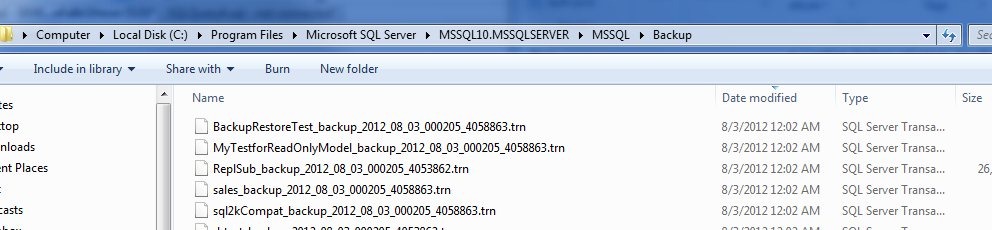
    If I run this, and immediately go to my backup folder, sorting by the last modified date for files, I see this:

    backupcert1

    No certificate backup file. What happened?

    The answer is actually documented, and you should be aware of this. In the BACKUP CERTIFICATE page, it says this: “The default is the path of the SQL Server DATA folder. “

    That’s interesting, and it makes sense to me. This folder is more likely to be secured than the backup folder, where developers and who knows who else may have access to the folder. By limiting it in the data folder, you provide a little obfuscation, perhaps more protection, and you force the administrator, the DBA, to get the files.

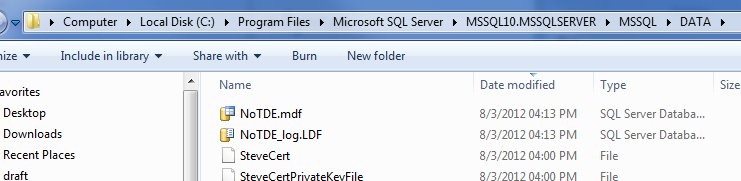
    However the files are also ACL protected. If I go to my data folder, I see the files.

    backupcert2

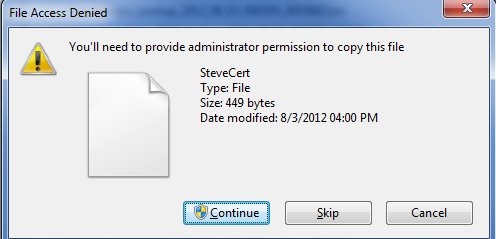
    If I select the certificate and CTRL+C (copy) it, and then go to the backup folder and try a CTRL+V (paste), I get this:

    backupcert3

    The service account has permissions to this file, not administrators by default. This action invokes the UAC command to require me to make a conscious decision to make this copy.

    Of course, I can just provide a path to make sure I can find the file.

    BACKUP CERTIFICATE SteveCert
    TO FILE = 'c:\SQLBackup\SteveCert'
    WITH PRIVATE KEY 
    (
        FILE = 'c:\SQLBackup\SteveCertPrivateKeyFile',
        ENCRYPTION BY PASSWORD = 'R@ndomP3ssW0rd'
    );
    go

    Whatever you do, make sure you backup your certificate files and keep them safe. If they go, you do lose data.

  • Separate Accounts

    Separated Strawberry
    Is separation that much of a hassle? I don’t think so.

    Many years ago I worked in a small company that only had about 5 or 6 servers. We had one system administrator whose job it was to manage all the servers. One day our sysadmin was on vacation when there was a problem with the Exchange server. One of the other developers worked on the system and ended up fixing it, but changed the service account password while doing so. The next day I walked into the office to find a group of people stymied as to what was wrong with the development server and version control system. Everyone claimed they hadn’t changed anything on that server, and they were right. However our admin used the same domain account for all servers, including my SQL Servers. I changed the SQL service account that day.

    One of the recommendations that I learned a long time ago, and one that I make regularly, is that every SQL Server instance should have a separate security account. In that case, I had separate accounts created for each database instance, and for each SQL Agent instance. We used long, random passwords that were never stored, and if we needed to access a password, we just changed it. That kind of flexibility and separation prevented any crosstalk issues between services, and it allowed us to easily alter permissions or passwords for one service without affecting any others.

    The other day I saw someone recommending a single service account for all SQL Servers. Someone else recommended a single account for each version of SQL Server, using separate accounts where it’s really needed. That’s a better recommendation, but I still prefer completely separate accounts. I know that some security groups don’t like that, but is it that big a problem? This Friday I wanted to ask you about your experiences.

    Do you find separate accounts for each instance (or Agent) to be a security or administrative issue?

    I’m not sure why this is unwieldy. Service accounts rarely change, and you could easily script changes to a group of accounts with PowerShell or some other tool. Once I set a service account, the only thing I might ever do later is alter the permissions to add access to a folder. When that happens, I definitely want to have separate accounts for each instance.

    Let us know this Friday how you feel and what works for you.

    Steve Jones


    The Voice of the DBA Podcasts

    We publish three versions of the podcast each day for you to enjoy.

  • Who’s Responsible

    This is really scary. Someone being sued for downloading a porn movie illegally. I have nothing against porn, and I certainly think that downloading stuff that’s a copyright violation shouldn’t be mainstream as in Amazon giving away movies for free without compensating owners of the copyrights.

    Setting that aside, there’s something fundamentally disturbing about our computing devices, which are assumed to be under our control, but may not be, even when they are.

    I need to write more, but as a quick analogy, if I’m using my car, no one else can use it. At least not without me being somewhat aware of the actions. Someone could hide contraband in my trunk, where I rarely look, but they’re not going to get it transported anywhere I’m not going.

    Contrast that with your computer. You could be infected with a virus (as an all-encompassing term for rouge processes) that could potentially be downloading (or uploading) something you don’t expect, including copyrighted content, or even attacking other computers (for example, as part of a DDOS botnet). It could do this while you were working on a flyer for your kid’s birthday party in Word, or checking your email.

    Is that your fault? If you use an A/V program? If your kids hit a site returned in a Google search that installed malware? If you bought a piece of software that had it embedded? I’m not avoiding responsibility here, but it’s a thorny issue as to who’s at fault, and more importantly, to what extent do we expect people to be aware of what’s happening?

    Tough times ahead if we don’t get a handle on security and digital laws.

  • Password Resets

    I read this piece from Troy Hunt, which is a long look at the password reset process for a web application. It’s one of the first that I’ve seen which talks about the different implementations, along with the pitfalls and advantages of each.

    It’s a great look at passwords, and there are definitely a few things in there I think should be built into authentication frameworks. I know we need to change a few things at SQLServerCentral and I’ve added them to the list.

    Pass this one along to your developers. They should be aware of this stuff.