Tag: software development

  • A Quick Export with SQL Packager

    Disclosure: I work for Red Gate Software

    Someone asked me the other day if I’d ever used SQL Packager to export a table to send to another person. I hadn’t, and in fact hadn’t even ever run the tool, but this individual said it worked great.

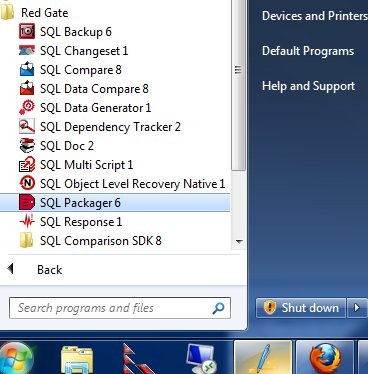
    Since Red Gate tools are designed to be simple and intuitive, I thought I should give it a try and see what happens. I went through the Start Menu and found SQL Packager in my toolbelt installation:

    packager0

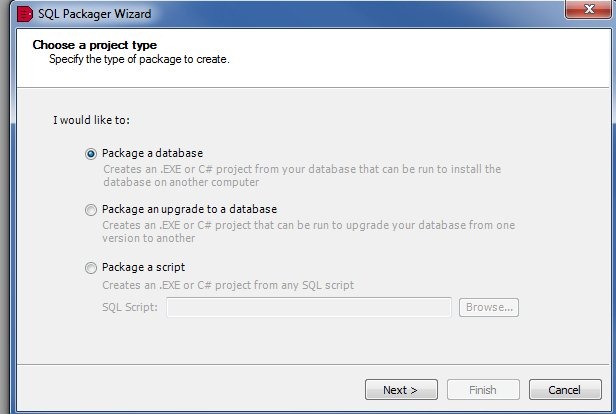
    I documented this as I went, shooting this images as I went through the process for the first time. As soon as Packager started, it began the packing wizard.

    packager1

    SQL Packager is designed to help you bundle up a database, or part of a database, as a part of an installation in your application. It can produce an .exe, a C# project, or a set of scripts that you can include as a distributable item in your application installation (or upgrade). The information can be compressed, so you reduce the requirements for your customers.

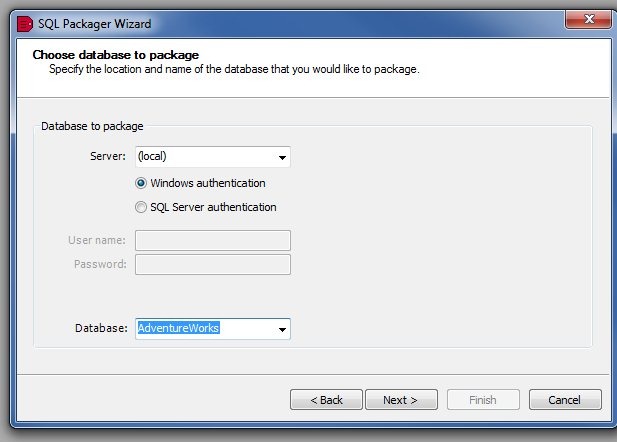
    In my case, I decided to just package up a table. I first signed into my local instance, and chose the AdventureWorks database.

    packager2

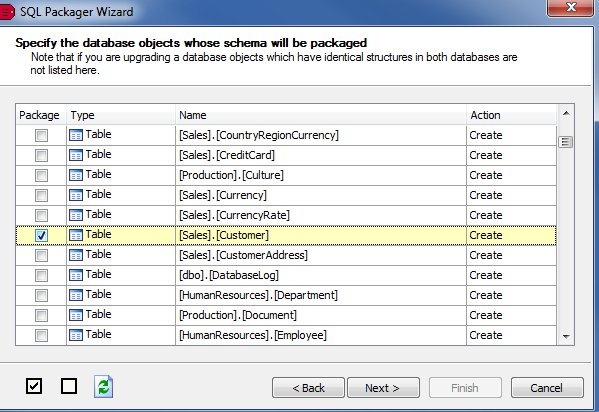
    Next, I chose just one table, the Customers table. The Red Gate tools tend to follow a similar, intuitive design, and try to do the most common things for most customers. In this case, the entire database was selected (this is a database packaging tool), so I deselected all, and then chose the Customer table.

    packager3

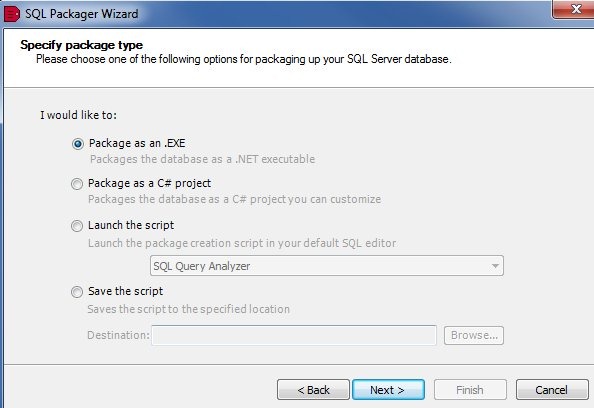
    Once I choose the table and click next, and confirm the selection, the packaging begins. I get some options as to how I might choose to build my package.

    packager6

    The options are shown, and in this case I choose to save the script. Once I clicked next, I had a change to see the final script. First there was the schema tab:

    packager4

    On this tab, all the DDL for my table is there, including a couple dependent tables, and some functions needed for defaults or computer columns. Keys and indexes were included.

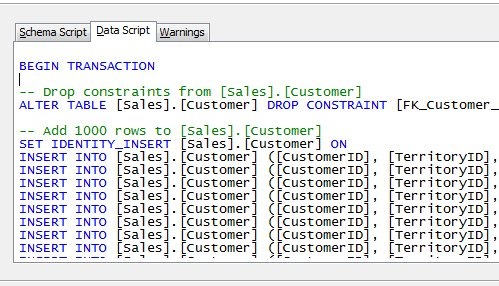
    On the data tab, I had the DML for the actual data.

    packager5

    The comment says “Add 1000 rows”, which seems like a default. However I went back and checked in SSMS, and sure enough, my table had 1000 rows.

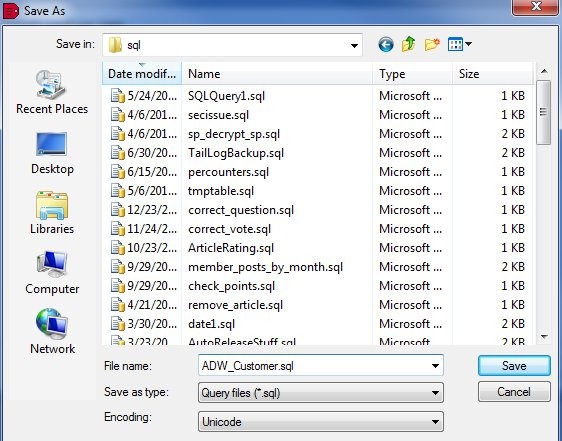
    I clicked next, and had the chance to specify a save location.

    packager7

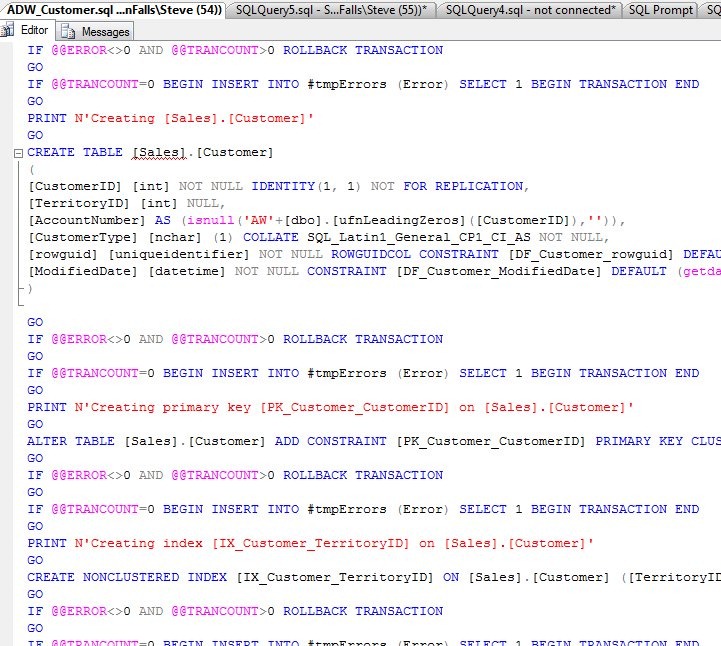
    After saving, I opened the script in SSMS, just to check. Sure enough, the DDL was at the top:

    packager8

    and the data at the bottom:

    packager9

    Simple, and easy.

    If you are looking for a way to move certain sections of your database for a deployment, like all the lookup tables, give SQL Packager a try.

    If you need to send some stuff to a client or friend, it might be a simple way as well to export the DDL and DML into one package.

  • Jiggly Code


    jiggly, jiggly, jiggly

    This discussion is a little funny, an exchange on a Linux board in which Linus Torvalds writes: “This kind of “I broke things, so now I will jiggle things randomly until they unbreak” is not acceptable.”

    I’d hope that most people would not attempt to write code in this method, but I’ve seen many developers do just that. They start trying other solutions until one works, often implementing the solution without understanding how it works. The fact that it works, even in a limited way, is often good enough for most people.

    I like that the people in the discussion do not get too distracted and instead dive further into understanding the problem. Not enough people dig into the root cause analysis of issues to fully understand the issues. I know time is tight, and I’ve often been too busy to spend much time uncovering every issue. I also think that often subsequent issues, or chronic problems, are often the result of the lack of understanding of the root causes.

    The software we write gets more and more complex. We incorporate new technologies like virtualization, and some of us will even work with distributed applications that might make use of calls to other systems through messaging or even with communications with cloud databases. Learning to trace the data flows, troubleshoot communications,and thoroughly understand the mechanics of how our applications interact becomes more and more important. Especially as our applications seem to reach wider and wider client bases, with high expectations that things “just work”.

    Many people in our SQL Server community preach a continuous improvement of one’s skills and the goal of writing better and better code over time. It takes some effort, but we all ought to be putting forth that effort to improve regularly, at whatever rate we can sustain in our lives. As long as it’s some effort to get better each month.

    Steve Jones


    The Voice of the DBA Podcasts

  • Coding More Carefully

    TRS-80
    Compiling code on one of these was a chore.

    When I wrote computer code in school, programming as we kids called it, I could literally watch my programs compile on the screen. Working on a Radio Shack TRS-80 in PASCAL, we would see the lines of code scroll by, 3 or 4 a second, as they compiled into executable code. When that is the speed of the computer building your work, you learn very quickly to proofread your code from syntax or logic errors. A simple semicolon on the wrong place can result in quite a bit of lost time.

    At some point we transitioned to Turbo Pascal, which compiled hundreds of lines in a split second, on par with the speed of today’s compilers, which are often working through thousands of lines of code. Is that a good thing, however? Has this speed improvement ended up building poor habits in developers?

    I ran across this post on the times when the author had one compile a day. That’s slower than I had, but we did have time limits on the computer, as well as printer limits, when I was in college. The compile/fix a syntax error/recompile/test cycle  that we have now wasn’t an option. Making too many simple mistakes would result in missed assignments.

    Limiting developers to one compile a day wouldn’t work these days, but I wonder if limiting the number of compiles might result in developers spending a little more time thinking about their code, their logic, and writing applications with a little more care?

    Or would they follow the same process they follow now, only slower?

    Steve Jones


    The Voice of the DBA Podcasts

  • Are Auto-Updates Good?

    I don't use IE, but I am glad auto updates are coming.

    There has been news recently about automatic updates coming to Internet Explorer. I haven’t paid a lot of attention for the simple reason that I almost never use IE. Since most every site I use these days support Firefox and Chrome, including many Microsoft ones, I use those browsers. While IE might have improved, I’m not sure that’s a reason for me to switch from the Firefox browser that I am very comfortable with.

    On one hand, I think this is a great idea for the browsers. It has the potential to not only ensure better security on the desktop, but potentially also making life easier for developers. If the browsers automatically update to the latest code, that means that the majority, or maybe all, of your clients will be running the same browser. That would greatly simplify the testing and coding requirements for developers.

    It might also greatly enhance the application experience for clients since every IE9, or Firefox 4, or Chrome 15 browser will be the same. I don’t know that I would want this for SQL Server, but for the browser, and potentially other software, I think it’s great.

    However silent updates could also break applications. That could result in a mad scramble when an update occurs by software developers that race to fix problems. I’ve always preferred to apply updates regularly, but not too aggressively. I like to be able to test changes before I deploy them to all my clients. This doesn’t give me that flexibility, but there is one benefit that I do like: my clients won’t have excuses for delaying updates.

    Now when I get an update on a developer’s machine, and they perform a build, I can be confident that the client will have installed the same updates.

    Steve Jones


    The Voice of the DBA Podcasts