Tag: software development

  • Teams Security Issues

    At some point during my career sharing files and links in email became a security concern. There were all sorts of malware problems and issues that spread throughout organizations because someone unknowingly clicked on or forwarded a malicious item. At a couple of large organizations, we had to turn off email for days while we cleaned out systems. Fortunately, antivirus and other types of scanning software improved to prevent most of these problems.

    It seems that not all developers learned the lessons of the past. Microsoft Teams has a few vulnerabilities inside it based on link sharing in the chats. One of the issues is that the preview features aren’t well implemented, though Microsoft security doesn’t think this is a problem as a user would notice the link would be incorrect. I think that’s a huge leap and not a very safe one to make.

    I don’t use Teams often, and as a Slack user, I find it rather confusing, busy, and unintuitive. I know lots of others that like Teams and find it very productive in the Microsoft world, and I’m glad we can have the choice of a way to collaborate with others. However, no matter which type of communication mechanism is used inside of your organization, the security protections ought to be very strong. We are often busy with work and distracted. We are often expecting the information in Slack or Teams to be safer than browsing sites on the public internet. Perhaps that’s not the way things should be, but it is.

    Attack vectors that use code inside a webpage are very common, and I dislike many of the “preview” features that I’ve seen in various pieces of software. They slow down the application, especially on a mobile network, and take up unnecessary space. As someone that often can see bandwidth constraints, I’ve prefer that all of these features were optional. Let me decide if I want a preview.

    The trend to build richer experiences in applications and pre-fetch data can make the experience better, but there is a tradeoff. There are potential security concerns, but apart from those, these features can make the experience more enjoyable or unnecessarily slow things down and interfere with the way we use an application. More isn’t always better, especially when the pattern for an individual user might not match what the majority does. If 51% of users often use a feature, I’m not sure the other 49% view this as a positive way of architecting the system.

    Steve Jones

    Listen to the podcast at Libsyn, Stitcher, Spotify, or iTunes.
  • Getting Up and Running with Dapr

    I’ve heard about Dapr a few times from developer friends, but hadn’t really understood it that well. I had a webinar coming up, so I decided to spend a bit of time working with it to understand how it might function with an application.

    I went to https://dapr.io/, and saw the basic outline of Dapr is in this video from their site. I also found this getting started video from Donovan Brown.

    What I gathered from this research is that Dapr is really a set of containers that run alongside your app or act as middleware between different components, including state stores. Most of us might think of a state store as a database.

    As a part of my learning, I went through some of the getting started tutorials.

    The Tutorial

    I followed the getting started tutorial. The first thing was to open a cmd prompt with administrative privileges and run this:

    powershell -Command "iwr -useb https://raw.githubusercontent.com/dapr/cli/master/install/install.ps1 | iex"

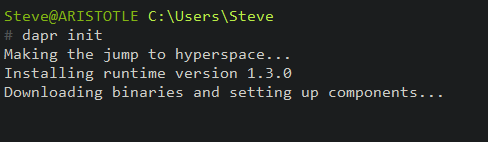
    Next, I needed to update. I ran the “dapr inti” in an elevated cmd line. I love the first part of this:

    2021-09-13 15_58_38-cmd - dapr  init (Admin)

    I already have Docker installed, with Linux containers, so I can quickly continue.

    I need to start an app so that dapr can run as a sidecar. I don’t have an app configured, but I can run this as a blank one, according to the docs:

    dapr run --app-id myapp --dapr-http-port 3500


    The next step is to test this. I am supposed to use curl to post an http request with this command:

    curl -X POST -H "Content-Type: application/json" -d '[{ "key": "name", "value": "Bruce Wayne"}]' http://localhost:3500/v1.0/state/statestore

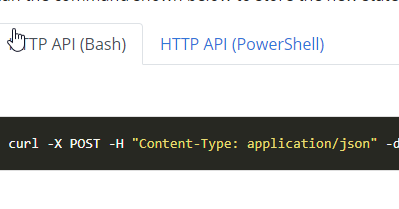
    When I do that, I get an error. Apparently, this doesn’t work in Windows, and really, it’s a bash request. Since I’m using the Windows CMD Prompt, I’m unable to read the instructions.

    2021-09-13 16_12_30-Use the Dapr API _ Dapr Docs

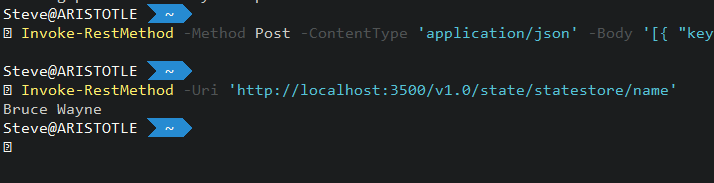
    I need to click the PowerShell option and get the Invoke-RestMethod cmd. When I do that, I see that the state is working.

    2021-09-13 16_13_16-C__Users_Steve

    I can also test this with an interactive connection to Redis. Again, in the tutorial, this lets me get to the data store.

    2021-09-13 16_14_40-cmd - docker  exec -it dapr_redis redis-cli

    That was most of the tutorial. I worked with the config file, and then looked at the Hello, World tutorial. Overall, this was pretty simple and worked well for me.

    My Thoughts

    There is a lot of stuff going on here. The concept of a sidecar, is really a container that gets a network call from your app to do something. Then the sidecar does something else. It’s like middleware, or an app server in the older client/server or 3 tier architecture, but without the tight coupling and dependency. More importantly, this allows dapr to scale out and run as a separate process rather than being part of a monolithic entity.

    More work, but also more consistency and this gest you used to building an API rather than having developers inconsistently connecting things together.

    The goal here is really to think about microservices.  I don’t know if I think that’s the best way to build thing, but it is a trend, I like the cloud native focus, and it’s helpful to understand something about this when talking with developers about pros and cons.

    By the way, after my webinar with Donovan Brown and Mark Fussell, I learned this doesn’t require microservices or containers. It can run in many different software models, but abstracts away a lot of the SDK and API struggled with different technologies.

  • Do as I say, not as I do

    A common saying from parents, teachers, and many managers, is that you should follow their instructions and not necessarily their behavior. This is a very human thing to do, with many of us struggling to follow the behavior that we ourselves want. Instead, we follow the vagaries of our moods and desires. We do this even as we tell others to do things that we don’t bother to do.

    It’s not just human behavior, but it applies to how many companies deal with their customers. Microsoft talks often about taking advantage of new features in code and using the platform to solve problems. They dislike adding simple “syntactic sugar” (like a numbers table), and instead prefer you build the code to handle some of these simple tasks.

    However, they don’t really follow this advice, as Andy Mallon showed with a recent post on why not to use a couple of their “recommended” stored procedures. They’re not well written for modern code, they have limitations (or bugs), and could be considered a security risk.

    To be fair, I know that changing code in something that works is always dicey, but at the very least, moving from varchar() to nvarchar() shouldn’t break anything. If there are edge cases, then write some tests and rebuild the code to work better. Maybe, more importantly, these procedures ought to model good code, as Microsoft would recommend to their customers.

    There are a lot of places where different products at Microsoft might not use SQL Server well, and I understand. These might be software developers that don’t know a lot about how to perform good data modeling or even how to take advantage of SQL Server code. However, at a company with the resources Microsoft has, I’d expect them to form teams to handle these tasks and then review and suggest changes to software like Dynamics, Sharepoint, etc. Even if they can’t use the latest features in the SQL Server codebase, they ought to model good practices for all versions.

    For many of us, we might act similarly inside a company. Often we write code out of habit, and perhaps, to expeditiously get work completed, even when we know better. Using SELECT *, leaving out error handling, and more are habits that far too many of us embrace, far too often.

    Start making some changes today. If you know there are better practices you should follow, then take the few extra moments to implement them. If you don’t know of good practices, start compiling a list, asking questions, even post an idea or question in the discussion for this editorial. We all could write better code, and that starts with us actually making an effort to model the behavior we might preach to others.

    Steve Jones

    Listen to the podcast at Libsyn, Stitcher, Spotify, or iTunes.
  • T-SQL Tuesday #138–Technology Changes

    tsqltuesdayThis month the topic for T-SQL Tuesday comes from Andy Leonard, whom I reached out to be a host. I was running low on hosts last year, and Andy agreed to help me out. I had expected something on ETL, but I was surprised with this one.

    Andy asks us about managing technology change. He does mention how SSIS changed as he was writing a book, meaning that things he’d learned while a project was underway no longer applied. That’s a scary place to be, and it’s one I’ve rarely experienced.

    Avoiding Shifts

    One reason I don’t like to test beta software, especially from Microsoft, is that the APIs, the functionality, the effects can change. I prefer to have something fairly well settled before I spend time on it.

    I took a chance early on with Windows 7, when they had the “skydrive”, which become OneDrive. I could sync files from my desktop to laptop, and for someone that travels a lot, this was fantastic. It worked through the beta and until a few years later. At some point it stopped and I moved to Dropbox. I still use DropBox, even though this was reborn as OneDrive and enhanced to allow me to have  personal and business “OneDrive” running at the same time.

    Moving on from Immature Software

    I don’t like to abandon software, and sometimes I can’t. For me, I’ve been involved with some of the products that Redgate Software has built. I often see things early and test them to give feedback to developers. This means I sometimes see things before they work well, or even before the development teams might know what they want to build.

    This has happened a few times, but a couple years ago we were evolving one of our products to expand capabilities for customers. I thought we were moving in a good direction and spend quite a bit of time evaluating how the software worked. I was even starting to incorporate this into some automation pipelines and build demos, when the product direction shifted.

    A fair amount of code I’d written had to be abandoned. I felt as though I’d wasted some time, but as I stopped to think, I realized that I’d been learning and growing in this area. I’d understood how things worked, and while I had to write new code, I was able to write it quicker because I understand the general problem space already. Even though I had to expend other effort, I’m not sure my early work was wasted.

    Fortunately, I didn’t have deadlines for a deliverable. If I did, I might have been more upset. If it happened in the future, while needing to work more to get things done might annoy me, I’d likely understand that the growth and knowledge mean I don’t have to double my investment, and likely I’d be better positioned to write better code the second time around.