Tag: speaking

  • Customizing SSMS – Hiding the panels

    This is a short series on some customizations in SSMS to make it visually more appealing.

    As a presenter, I’ve learned how to change the way Management Studio (SSMS) looks to make it easier for people to see the screen on a projector. I had wrongly assumed that so many people knew many of these tricks, which is a poor attitude on my part. That should be especially apparent as I saw a presentation recently where the speaker didn’t know how to make things easier to see.

    Note that I often caution writers not to assume too much from the reader, and here I took it one step further, assuming some topics weren’t worth writing about.

    Here’s one that I heard asked recently: how do you hide the side panels in SSMS?

    The Default View

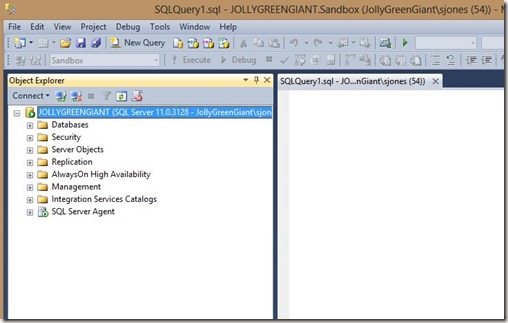
    Here’s what SSMS looks like for most people.
    ssms_a

    The Object Explorer takes up a good portion of the screen on the left. For some people, they may have this:
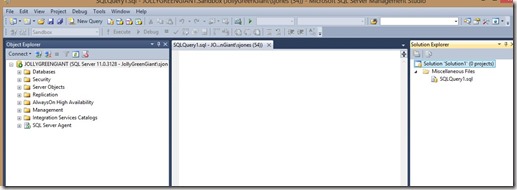
    ssms_b

    Or even this:

    ssms_c

    In the last two images, the Solution Explorer and Properties panes are on the right. If you have these panes open, you might find yourself squeezing a query into a small space in the middle. If your resolution is 1024×768 (standard for many projectors), you might get very little on the screen.

    Customizing

    There’s a way to clean things up quickly and easily. All of these panes have this item in their upper right sides:

    ssms_d

    If you click the middle, pin icon, the “Auto Hide” will be enabled, and the panes will slide to the side. They’ll still be there, but now they’ll be in a side bar, like the Object Explorer is below:

    ssms_e

    If I hover the mouse over the “Object Explorer” button on the side, it will appear, or I can click it.

    I can always use the “View” menu at the top as well (or a shortcut) to expose any of these panes. However when I’m presenting, or want to make a quick change, the “auto hide” feature works very well for me.

  • The Gambler

    I'll be speaking here. Come shake my hand if you can come and register with the code "Jones"
    I’ll be speaking here. Come shake my hand if you can come and register with the code “Jones”

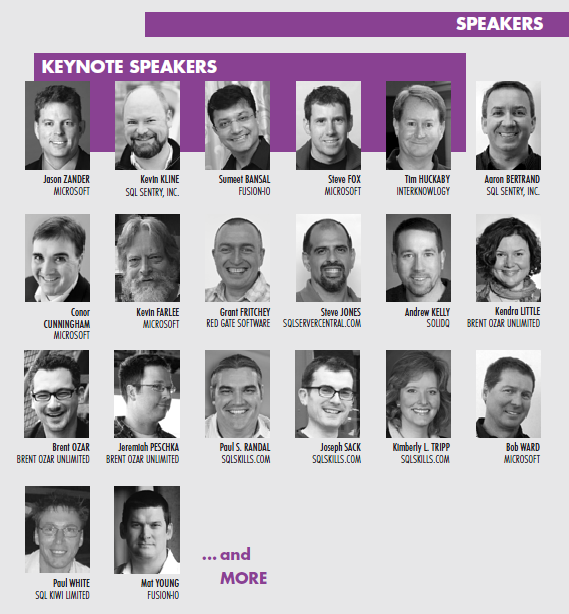
    In April of this year, the SQL Intersection conference is coming to Las Vegas. I’m speaking, along with Grant Fritchey and many others. It’s a fun event, in a city with a huge variety of things to do in the evenings after a full day of SQL Server sessions. At night I tend to look for networking chances to met new people and catch up with friends at night, though there have been a few times a comedy show has enticed me away from my hotel. I like Las Vegas, though I’m not a gambler. Despite the fact that most people think of visitors looking for their chance to sit at a table with dice or cards, there are many of us that go for other activities.

    I was at in a session recently and heard a speaker recommend that the audience run DBCC checks regularly. That’s good advice, and it’s what I recommend in my sessions as well. A person in the audience raised their hand and politely disagreed, saying that they almost never run DBCC CHECKDB. This person found it to be a waste of resources since they’d never encountered corruption in their career, and hadn’t known anyone in over a decade that had experienced on a SQL Server system. This person asked the speaker how many times the speaker had seen corruption (five was the answer) and then said across thousands of days of backups, it just wasn’t worth the resources to run DBCC CHECDB.

    If you feel that way, then you’re a gambler. You are accepting a higher level of risk than I do, and higher than I recommend. Consistency checks are designed to help us catch corruption. Since we never know when it will occur, we want to detect is ASAP so that we avoid, or at least minimize, data loss. If you run those checks and never experience corruption, those checks are insurance payments you’ve made and never needed to file a claim. However if you don’t run those checks, and experience corruption, you’ve placed a bet you’ve lost. Whether or not that cleans you out depends on the data loss your organization experiences and their tolerance for that loss. I’d seriously consider this a career limiting, or employment terminating, event, especially if the best practice recommendation from Microsoft and many experts is to run DBCC checks.

    I don’t recommend skipping your DBCC checks, but if that’s how you feel, think about coming to SQL Intersection (register with the code “Jones” to support me). You might enjoy that gaming tables at night, and I know the other speakers and myself would welcome the chance to change your mind about skipping DBCC checks during the day.

    Steve Jones


    The Voice of the DBA Podcasts

    We publish three versions of the podcast each day for you to enjoy.

  • Off to the Richmond User Group, a Red Gate Experiment and SQL Saturday #187

    This weekend is SQL Saturday #187 in Richmond, VA. Today’s a travel day for me, as I head out early because Red Gate Software is sponsoring a half day event tomorrow, Friday, where myself and Grant Fritchey (b | t) will be speaking. This is an experiment for us, and I’m hoping it goes well. If so, you might find us doing a number of these events around the country.

    Today I travel, speaking on encryption at the Richmond SQL Server Users Group, then tomorrow at our Red Gate event, and Saturday at SQL Saturday. Then two days off, hanging with my brother, his wife, and my nephews in Maryland before coming back next week.

    A busy few days. Four different talks, on four subjects. Fortunately I’ve been rehearsing this week.

    Hope to see some of you there.

  • Come Learn at SQL Intersection, Get a Surface Tablet

    This spring I’m speaking at the SQL Intersection conference. It’s a new conference, managed by SQLskills founders Kimberly Tripp and Paul Randal. It’s April 8-11 in Las Vegas, and it’s got a slew of amazing speakers that I’ll be alongside, including Brent Ozar, Grant Fritchey, and more.

    If you register today, and attend one of the pre- or post-conference sessions, and there are some great ones in the SQL Server space, you’ll get a Surface RT Tablet. It’s a great tool to use for mobile work, taking notes at events, in meetings, or even walking around your office.

    The tablet isn’t a reason to attend the conference, but it’s a nice bonus. And it will help you, since you’ll want to take lots of notes in the sessions. All of the speakers are experienced professionals, working with SQL Server and bringing a ton of experience to their talks. There are talks about new features and old ones, best practices, and practical advice.

    If you’re looking to learn this spring, think about coming to SQL Intersection this spring.

    Learning by day, Entertainment at night.