I had a new presentation to give this week at IT/DevConnections. This is a paid for conference, and I want to be well prepared and ready for the events. It’s the least I can do for people who have spent money to attend an event.
I enjoy IT/DevConnections, and it’s probably my favorite US event. Others are good, and SQL Bits is amazing, but I enjoy the variety of topics and speakers at this one, so if you want to try something different, think about this event next year. I hope I’ll be speaking again, and I’m planning on submitting. I believe the event is mid-October 2017, if you want to plan.
However, I digress. In this case, I was delivering a presentation that I had never publicly presented before. I began speaking, and as usual, I started walking around a bit. I was on slide 7 when the projector went out. I assumed there was an A/V issue, and since I’d already asked someone to get a tech for my microphone feedback, I covered by continuing on with the items on my slide from memory.
A few minutes later I walked back to the podium to see this:
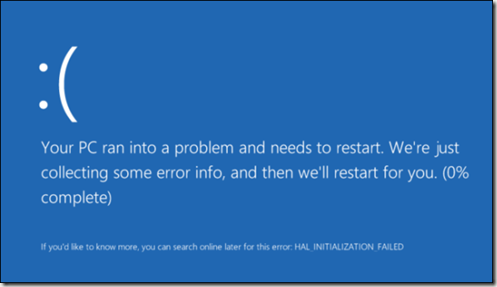
The system was actually at 25% in my case, but moving slowly.
That’s a presenter’s nightmare. I had SSMS running, with multiple queries set up, a few Explorer windows, a VS session, and more. I knew it would take my system at least 5 minutes to restart and get ready.
The only think I can do is proceed. Fortunately, I’d practiced this talk a few times and could remember what was on the next few slides. I’d be stuck at getting to a demo until things were running, but I could talk.
I don’t like doing presenting new sessions at the PASS Summit, SQL Bits, or any paid event. I prefer to practice at a user group or SQL Saturday. Sorry, but user groups usually get unpolished, semi-rehearsed sessions. In this case, I hadn’t been able to get this one done before a user group session, so I was stuck practicing on my own.
Here was my prep, most of these sessions about 1-2 hours:
- Thur (12 days to presentation) – Outline of talk done, most slides done, demos sketched but not all working. Practice the talk twice, fixing slides and flow.
- Friday (11 days to presentation) – only working on demos. setup, run, correct items.
- Saturday (10 days to presentation) – practice demos on laptop (first time on this machine). Fix some issues.
- Sun – Wed – Speaking at another event, different talks, prep for these talks and practicing them.
- Thur (5 days to presentation) – Walk through demos on plane flight home. Build up/tear down multiple times on a VM to test the code.
- Friday (4 days to presentation) – Walk through entire presentation, including demos. Apart from interruptions, goes fairly well.
- Sunday (2 days to presentation) – refine some demos and slides that don’t seem clear. The flow has been a little off, so I move a couple demos around to separate the concepts.
Monday (1 day to presentation) – Quick run through before leaving for the airport. Land in Vegas, check in, go through 2nd presentation as a quick reminder from 5-7. Hit the gym at 7. Dinner around 8:30. Final run-through of new talk from 9:30-11.
Tuesday (day of presentation) – Up early, flipping through entire slide deck, practice opening, but not running code. Double check that all items have been removed and cleaned from the instance. Realize I have 60, note 74 minutes. Make a couple mental notes about what to cut when I’m live.
A lot of prep for this talk, which I may or may not do again. I had some good feedback from people and a packed room. Quite a few people said they learned a lot and we had a lively discussion.
Note: my timing was poor for two reasons. One was that I had assumed all my talks were 75 minutes, but this one was 60. My fault, no excuse for not checking. Two, because I hadn’t delivered this before, I had no idea what questions to expect, and how the discussions might go. I let the session get slightly interrupted because I was answering questions. I was unsure I had explained things well, so I chose to answer items.
My apologies for those that might not have enjoyed the session, and certainly for a couple code items. I must not have cleaned something appropriately as I had a couple errors. Also, I didn’t run all samples because of time, so perhaps I broke something else.
In any case, next week will be a bit of review of the talk. I have some notes, but I’ll go back through code and try to ensure everything runs correctly and upload corrections.
Presenting is hard, and I work at it to ensure people enjoy the talks. I think it’s worth the time, but it is an effort. In this case, I was glad I had made that effort.
And, for the record, after the Meet the Speakers event on Tuesday, I went to the gym at 6:30 for an hour and then reviewed the presentation for Wednesday, despite the fact I’d delivered a similar talk the week before.
Be Prepared. That’s the motto I try to stick to.


