Tag: speaking

  • Making Better Presentations–Organize Things

    This is part of a series of tips for speakers on how to make your presentations better.

    Organization matters, and it makes a difference to how your presentation goes. The more organized you are, the better the experience for attendees. If you are very unorganized, then it becomes hard for the audience to follow what you are doing.

    I’m am giving a few tips and tricks here, not for the actual outline and focus of your talk, but a few items that can help you smoothly move through your presentation.

    Startup

    Most of us don’t present a talk exclusively from Powerpoint. If you do, that’s great, but often I find people need to move from Powerpoint to Management Studio, or switch to a VM, show code in Visual Studio, run a browser (for Azure), etc. I personally need to sometimes run Red Gate tools as part of my talks, so I’ve learned to get organized.

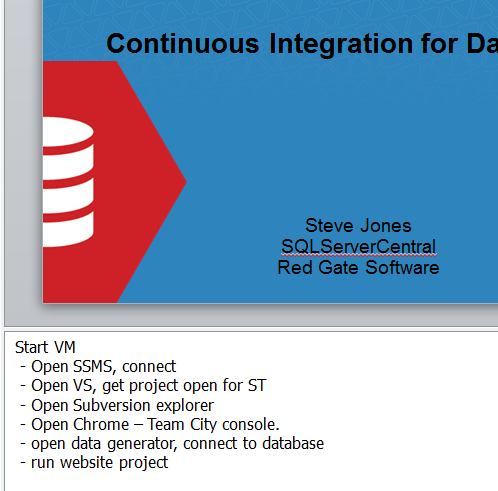
    I actually got this trick from Brad McGehee and I think it’s great. As I’ve written and organized my talks, I’ve learned to make notes in Powerpoint. Every time I need to run some tool or application, I put a note in the first slide of my deck. These are a few things I need to run, and when I get ready for a talk, I have a list of items to start right away.

    Here is the first slide from my Continuous Integration for Databases talk.

    betterpresent_a

    Even if you only have one talk, it’s easy to forget things. I’ve seen lots of presenters forget to run Zoomit, start Visual Studio, or even SSMS. As someone that watches dozens of talks a year live, I can tell you it’s less than impressive or exciting when I get to watch Visual Studio start up on a projector.

    Code

    I’ve tried different methods for organizing my presentations. I’ve put all the code in separate folders. I’ve numbered the files; I’ve named them. I’ve put everything in one long script file with comments.

    All of those have worked, and all of them have failed. The important thing is that you have some organization. When you’re speaking in front of people, you’re concentrating on your topic and flow. Anything that distracts you is PAINFULLY obvious for attendees.

    It will happen, no matter what, but minimize it. Get some sort of organization and ensure that what you’re showing on the screen smoothly transitions from one section to the next.

    Comments

    In line with having code organized in files, I would highly recommend that you include comments and notes in your code for both you and the audience. We are trying to teach and explain our code and concepts. There’s no mystery or magic that we need to keep people from knowing, so the more we can disclose, the better.

    Your attendees will appreciate some instructions in the code when they try to duplicate your efforts on their own machines. However these same instructions can be very helpful for you during a talk. The instructions will guide you alone, allowing you to continue to speak and explain things, without trying to multi-task and remember the flow of your presentation.

    Think Ahead

    All of the organizational items really come down to you thinking ahead. Just as you might do as a DBA or administrator, considering what might go wrong, or what might interrupt your “uptime” as a presenter will help you prepare for a smooth delivery in front of an audience.

  • Back from DevConnections

    I spent a few days at DevConnections this week and really enjoyed the conference. The location was Aria in Las Vegas, where I’ve never been, but it was a new, really nice hotel and there was one amazing thing:

    The wi-fi worked.

    Not on and off, pretty much the entire time I was sitting in sessions, I had access from my devices. I think that was the first time this worked for me at a conference. Congrats to DevConnections and Aria.

    The conference itself was short for me, with too many other commitments for presentations and talks, I had to cut short my time there. Tues afternoon – Thur morning, which mean I saw a couple talks on Tues, only one on Wed, and gave two Wed.

    That’s disappointing. There were other things I wanted to see, and I wish I had the chance to do more. I’ll be looking to schedule less trips next year as more and more I am finding myself picking up things from really interesting sessions.

    One of the great things about DevConnections is that I can get a variety of knowledge from the event. I watched a session on Azure diagnostics, as I’m curious how to actually track the performance and issues of your application. I still hope to port some (or all) of SQLServerCentral to Azure, so understanding the telemetry is something I’d like to have.

    From there, I went to an interesting logical query processing talk from Itzik Ben-Gan, which I really enjoyed.  If you get the chance to see Mr. Ben-Gan talk, you should take it.

    That’s hard to do at many events, where we often have the focus on one technology. There’s nothing wrong with that, and we have some amazing events in the SQL Server community. However there are times that I want to learn a bit more about development, Sharepoint, Azure, or something else. DevConnections gives you the chance to do so, as does DevIntersection/SQLIntersection (coming in November).

    If you wear multiple hats, think about coming to one of these conferences in the future.

  • Better Presentations–Zoom

    This is part of a series of tips for speakers on how to make your presentations better.

    I’ve given around 30 presentations a year for the last few years, and easily a dozen a year for a number of years before that. I visit events all over the US and in the UK at schools, conference centers, churches, youth centers, and more. I usually sit and watch a few presentations in addition to speaking, at all hours of the day or night.

    If there’s one thing I’ve learned across all those events, it’s that the screen with your slides and code on it is hard to see. Not always, but often.

    I’ve talked about fonts, now let’s look at visual display.

    Zoom

    Buck Woody mentioned this in a rant, as does Paul Randal in his post on speaking. It can be difficult for attendees to read words or follow the action on the screen. Sometimes it’s so bad you can’t od anything about it. A weak projector and nearby windows can cause the display to wash out. However you can help by using some sort of zooming technology on your machine.

    ZoomIt

    Please, please, please download Zoomit. It’s free and it’s well written, so use it. Practice learning how to zoom in and out. It’s easy, but learn how to do it so you’re not fumbling. When you practice your presentation, zoom in on that laptop screen in front of you.

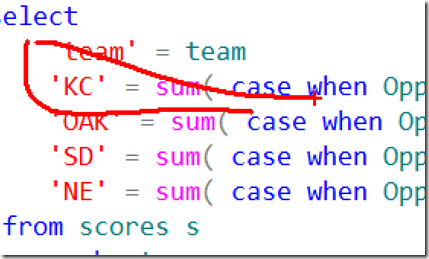
    Also learn how to highlight things. The audience doesn’t always know where you’re looking or what part of the screen you are emphasizing, so help them. If you can’t draw, like me:
    zoomit1

    then learn to box things in.

    zoomit2

    I think Zoomit is easy to use, but I’ve used it for years and practiced.

    Magnifier

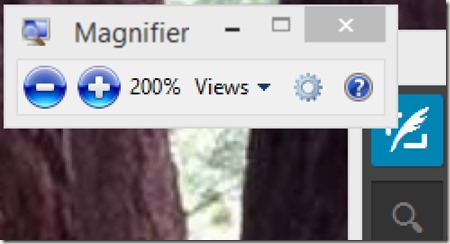
    Windows 7 and 8 include the magnifier in the OS. If you hit the Windows key and hold it while you hit the + and – keys, the screen will magnify in or out. There will be a little window that gives you the size, but rather than hit these buttons, just hit + and –.
    magnifier

    Yes, I’m aware that the + is above the = on US keyboards, but just hit the key. No shift needed. Go ahead, try it now. Learn how to zoom in and out.

    Explain Yourself

    If it’s really hard to see, it is helpful to explain what you’re doing on the screen. Make sure that you avoid pronouns. Don’t point at your screen (yes, I’ve seen people do this). Describe what you are doing.

    “ I’ll copy this text.” – You’d be surprised how many people forget we can’t tell you hit CTRL+C or CTRL+V.

    “The first CASE statement in the query is the one that is used to calculate the SUM for certain rows.” – Give visual cues, use numbers and locations. Use the names of operators, windows, buttons, etc.

    The more you can clearly explain what you are doing in addition to how it works, the better the session for attendees.

    Even if they can’t see the screen.
  • The BBQ Crawl at SQL Saturday #300

    This weekend is SQL Saturday #300 in Kansas City. I’ll be traveling Friday for the event, hoping to arrive in time to go on the pre-event barbeque crawl that the organizers set up every year. It’s hard to believe it’s been 4 years since I was last in KC. I still have, and often wear the shirt I got from SQL Saturday #53 when I travel and was surprised to note recently that it’s a 4 year old shirt. How time flies.

    Kansas City is a neat city, and the event is a lot of fun in a very unique setting. An old river casino, converted to a training center. I still remember driving up and being unsure if it was the right place, and then enjoying the view inside.

    This week I’ll be talking about Continuous Integration for Databases, so if you’re in the area and have time Saturday, then register and come by,