Tag: SQL Clone

  • Virtual Data

    Yesterday I republished an editorial from 2014 for the holiday. The topic was production subsets of data, which has been something that many data professionals have struggled with for years. Many of us have built scripts to delete, change, obfuscate, or alter production restores as a way of providing useful, but manageable development database sets. Or maybe it’s just some of us. I’m sure more than a few of us have given up on this task and just restored production databases in entirety to test and development systems.

    I changed over my career to become a fan of additively building a known dataset rather than deleting extra data. I advocate adding rows from production (properly masked/obfuscated) and maintaining this set over time as requirements change. However, this isn’t without it’s own administrative headaches. I think it’s easier, but this does require commitment from everyone to keep going over time. It’s certainly better than each developer adding their own 10 rows of data to a table for testing.

    A year ago, Redgate released SQL Clone, designed to solve some of these issues. Once an image is created, new databases for test and development and be provisioned in seconds. I found this to be an amazing product that really changes how I develop against databases, though it does require me to stop getting caught up trying to undo changes or manage a single database. Instead, I need to ensure I am saving code to version control and then build the habit to drop and rebuild a baseline database.

    As we’ve worked on SQL Clone, I’ve found that there are lots of companies that offer similar ways of virtualizing your data, giving you access to large, production scale systems in seconds. Data masking, obfuscation, and more are features, with some vendors requiring specific hardware. Others, like Red Gate, have software add-ons (Data Masker).  All of these products cost money, which can be an issue for many organizations, but I’m glad that this technology is growing and advancing. With GDPR and other draft legislation, many of us need to take better care of our data and build more secure architectures.

    Containers are another interesting way to virtualiza data, though they don’t solve the scale issues. If you can work with a smaller data set, and maintain that, then containers might provide a fantastic way for you to learn to build, teardown, and rebuild databases in seconds.

    The world of databases hasn’t changed a lot in some ways across my career, but in others, I’m amazed. Data virtualization is one of these areas, and if you haven’t trialed the technology, maybe you should give it a whirl this year.

    Steve Jones

    The Voice of the DBA Podcast

    Listen to the MP3 Audio ( 3.6MB) podcast or subscribe to the feed at iTunes and Libsyn.

  • My Second Pester Test

    I should write about my first one, but I just copied Rob’s test, so that’s not so exciting. Instead, I decided to take his advice and write some code, then decide how I test it. This isn’t really TDD, but I need to understand how Posh returns things, so I’ll figure that out first.

    I decided to work with SQL Clone, since that’s an area I’m working in a bit already. SQL Clone has a set of PoSh cmdlets that you can use to create database clones, so I thought that would be a good test.

    What do I test?

    My process is to remove a clone if it exists and then add one back. For testing, I need to consider what actually is happening here.

    • If a cloned database exists, remove it
    • Create a new cloned database

    The result of this process means that I’ll have a Clone, no matter whether I created a new one or had to remove one and recreate a new one. Or, if I had a Clone already and my script failed. This last one is something a tester needs to be aware of.

    In my case, I can determine if there is a new clone by looking at the created date of the database object. If that was later than the beginning of my test, then I could likely assume my clone was new.

    To start with, I created a function that would destroy and create a simple clone. Once I had that, I could now write my Pester test.

    I started with a “describe” element, in which I loaded my function and set a starting time.

    Then in the “it” section, I run my function and then check the instance, getting the CreateDate property of my clone database. If my function has worked, this will be a new clone, created since my test started. I compare that to complete the test.

    I ran this with Invoke-Pester, and it worked.

    2017-11-28 14_58_31-powershell

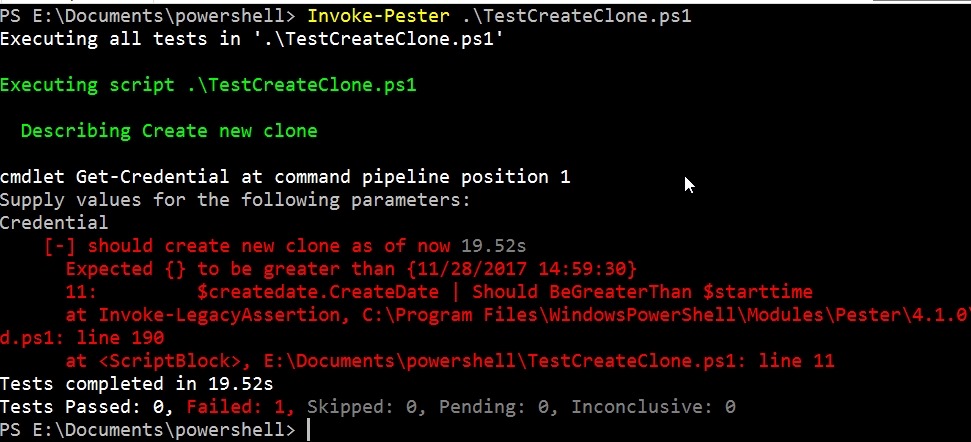
    This wasn’t simple. I had to test my test a few times, and use PoSh commands to verify it was doing what I thought. I also changed my function with a hardcoded db clone name to ensure the test fails. Results for that one here:

    2017-11-28 14_59_55-powershell

    Of course, I changed things back and tested again. Now, as I update my function to include adding in the instance name and image name,  this test should still pass. Of course, I can add in other tests, or change this one, to allow me to test on different images and instances as well.

    A simple test, maybe a silly one, but I learned a few things about my PoSh code (and how to write it cleaner) as well as Pester and adding in another unit test framework. Now I can expand this to test other PoSh items I have and practice writing better tests that will give me confidence my code works in a variety of situations.

  • Automating SQL Clone Creation with PoSh

    I think SQL Clone is one of the game changing products from Redgate. This product really fits into a DevOps mindset, allowing me to quickly and easily build (and rebuild) a dev database.

    While the agent web pages make this easy, they’re slightly cumbersome and the PowerShell cmdlets fit better with a DevOps flow. In setting up a Query Store demo, I found myself changing some data and needing to reset my database rapidly, so I built a quick PoSh function to do this for me.

    Here’s my function:

    function Add-ADWClone {

    param([Parameter(Mandatory=$true)][string] $CloneName)

    $mycredential = Get-Credential

    Connect-SqlClone -ServerUrl ‘http://socrates:14145’ -Credential $mycredential

    # remove the image if it exists

    $SqlServerInstance = Get-SqlCloneSqlServerInstance -MachineName Plato -InstanceName SQL2016

    $Clones = Get-SqlClone -Location $SqlServerInstance

    if ($Clones.Name -contains $CloneName) {

    $CloneToDelete = Get-SqlClone -Location $SqlServerInstance –Name $CloneName

    Remove-SqlClone -Clone $CloneToDelete | Wait-SqlCloneOperation

    }

    # Create the new image

    $image = Get-SqlCloneImage -Name ‘Adw2014Base’

    $sqlServerInstance = Get-SqlCloneSqlServerInstance -MachineName Plato -InstanceName SQL2016

    $image | New-SqlClone -Name $CloneName -Location $sqlServerInstance | Wait-SqlCloneOperation

    }

    In this function, I’m taking the name of a cloned database. I’ll use that to check if the clone exists, and if so, remove it. I do this by using Get-SqlClone. Once that’s done, I get the image, which is static here (this is a function for a specific project) and then I’ll create the new clone.

    This works great. If I run the command, I’ll get a clone being created. You can see my client in the back creating the clone database.

    2017-11-28 14_46_08-SQL Clone

    If I re-run the command, I’ll see the delete.

    2017-11-28 14_48_22-SQL Clone

    And then the clone create again.

    Changing Development

    When I first saw a prototype a few years ago, I could immediately think back to being a full time developer and the hassles of manipulating my development database, making data changes to test code, trying to reset them, writing scripts to undo changes and more. At some point I tried to perform backups and restores of a standard database, but I’d keep forgetting to update things.

    SQL Clone makes this easier, and together with some way to push/pull code from a VCS to your database, it means that I can quickly reset a database back to a known state. One of the things that I’d like to easily do is whack my development database, recreate a new one, and then move on with writing code. If I make a mistake, I repeat the process.

    Moving On

    This is a basic Proof of Concept, something I just whacked together for a project, so I’ve coded in the image name, and I get the credentials from the user. I could clean this up, and have it as a simple up-arrow, enter from the  PoSh command line that I use as I need to reset my system. Or code in a saved, secure credential that lets me double click some batch file to run this for me.

    Automation speeds up development by removing simple tasks from the developer. SQL Clone makes it easy to reset my database to a known state (the image) and create new databases as needed.

    If you haven’t tried SQL Clone, give it a try today by downloading an evaluation.

  • SQL Clone Server Service Permissions

    SQL Clone is amazing, and it can really save time and disk space for many organizations. I’ve got a series posted here on various little things I’ve learned about the product. There are also a number of articles on the Redgate Community Hub.

    I was working on helping a customer install the SQL Clone server recently and one of the things that the client wanted to know was what are the minimum permissions needed for the SQL Clone Server.

    When you install the SQL Clone server, the configuration dialog asks you for a Windows account and password. This is noted in the documentation as the account that configures and starts the server.

    sqlcloneserver

    This means that during the configuration, this account will:

    • Create a local service on the Clone Server OS
    • Connect to the SQL Server specified
    • Create a new database (or use the one that exists)
    • Map itself to dbo in the new database

    If the SQL Server can be a remote SQL Server from the SQL Clone server, a domain account is needed. If this is a local SQL Server, then you can use a local account. The account does need to have local administrator privileges.

    With that in mind, here’s what I did as a minimum permission set:

    • Create a new domain account, SQLCloneServer (I want to be able to use a remote SQL Server. I left this as just a member of Domain Users.
    • Add this account as a local administrator on the SQL Clone server host.
    • Add this AD user as a login to the SQL Server that will host the configuration databse
    • Give the SQL user the dbcreator role (you can remove this later and leave them with permissions inside the db)

    That’s it.

    Scripting

    It’s always better to script. Here’s the AD part in PowerShell:

    New-ADUser -Name “SQL Clone Server” -GivenName “SQL” -Surname “Clone Server” -SamAccountName “SQLCloneServer” -UserPrincipalName SQLCloneServer@mydomain.com

    Here’s the local SQL Clone, web server permissions part, using local commands. This could be in PoSh, but it’s not as clean (to me).

    net localgroup Administrators "MyDomain\SQLCloneServer" /add

    Here’s the SQL Part

    USE [master]
    GO
    CREATE LOGIN [MYDOMAIN\MySQLCloneUser] FROM WINDOWS WITH DEFAULT_DATABASE=[master]
    GO
    ALTER SERVER ROLE [dbcreator] ADD MEMBER [MYDOMAIN\MySQLCloneUser]
    GO