Tag: SQL Saturday

  • Speaking at SQL Saturday #389 – Huntington Beach

    I’ll be traveling to CA next month for SQL Saturday #389 – Huntington Beach as well as a Red Gate DLM training session run by Ike Ellis. I’m assisting Ike in running a Database Continuous Integration class. It’s a paid for event, but you’ll learn how to set up and run a CI process with your database.

    Come.

    CI is all the rage and companies are improving their development processes, building applications faster with it. We go into depth, using Red Gate tools, on how you can get your database development working in a CI environment, and integrate it closely with your application development work.

    I don’t have details on my SQL Saturday session, but that should be coming soon. I will do a Red Gate presentation during lunch, so if you want to know how we can help you or have questions, come by at lunch.

  • Parsing SQL Saturday Data – Getting Titles from the XML document

    I’m continuing on with my project to grab SQL Saturday data and automatically insert it into a SQL Server database. In this piece, I’m picking up from the last one where I had a loop to load all XML documents in a folder based on a pattern.

    This time I want to query the XML and get out specific elements and capture them.

    The Source

    The XML source looks like this for the sessions:

    </event>
    <event>
      <importID>2102</importID>
      <speakers>
        <speaker>
          <id>2102</id>
          <name>Jason Strate</name>
        </speaker>
      </speakers>
      <track>Track 3</track>
      <location>
        <name>2520C (Conference room)</name>
      </location>
      <title>Using XML to Query Execution Plans </title>
      <description>SQL Server stores its execution plans as XML in dynamic management views. The execution plans are a gold mine of information. From the whether or not the execution plan will rely on parallelism to what columns are requiring a key lookup after a non-clustered index seek. Through a the use of XML this information can be available at your fingertips to help determine the value and impact of an index and guide you in improving the performance of your SQL Server databases. In this session we’ll look at how you can begin to understand and query the structure of the execution plans in the procedure cache. Also, we’ll review how to uncover some potential performance issues that may be lurking in your SQL Server.</description>
      <startTime>9/18/2010 12:15:00 PM</startTime>
      <endTime>9/18/2010 1:30:00 PM</endTime>
    </event>
    <event>
      <importID>2109</importID>
      <speakers>
        <speaker>
          <id>2109</id>
          <name>Jason Strate</name>
        </speaker>
      </speakers>
      <track>Track 4</track>
      <location>
        <name>2520D (Seminar room)</name>

    I’m showing the end of one element, one whole one, and the start of a third. There is a lot of extraneous information in the document that I don’t want (for now). As a result, it’s not as simple to query this as I’d thought before. Especially as I’ll want to capture each session title and insert it into a database.

    I decided to use a SelectNodes to get to the <event> nodes and then loop through them. The code looks like this:

    # get the event node
    $sessions = $doc.SelectNodes("//event")

    # loop through the various //event nodes
    foreach ($session in $sessions) {

    Note that this is inside of the code from the previous post.

    Inside of this loop, I decided to create another loop. Initially I didn’t, but that made it more difficult to determine the end of the event node and capture the values, especially the speakers. As a result, I have a sub loop at well:

    # probably a better way, but I wanted to loop through the various elements and only pick out certain ones
    foreach ($detail in $session.ChildNodes) {

    If anyone has a better way, let me know. I’ll have all the code below, but this technique allows me to look for specific nodes. I know I could query for them, but since I’m looking for a few specific items, I thought I’d do this rather than multiple queries later.

    Get the Title

    I actually need the title and the speaker child node, but I’m doing titles only here. Here’s the whole node loop code:

    foreach ($detail in $session.ChildNodes) {

      # If we’re on the title node, get the value
      if ($detail.Name -eq "title") {
        $title = $detail.’#text’
       }

      if ($detail.Name -eq "speakers") {
        #placeholder
       }
    #end foreach for $detail
    }

    Here if I have the title element in the foreach loop, I capture it. This allows me to use this variable later. I’ll go into the speaker code later, but for now, I left a placeholder.

    That’s really it. At the end of the outer foreach, I write out the $event and $title variables. This gives me a nice output to the screen. From here I can easily substitute some ADO code to send this to SQL Server instead of the write-host, but that’s a good programming technique for me to see if I’ve got the data I want.

    sqlsatloop_d

    As you can see, there are sessions that I don’t want, but there’s nothing in the data for me to tag them as non-educational sessions. I’m not sure I care, since the speakers associated with these won’t impact my results for reports, so I’ll leave them.

    Next Steps

    From here I need to extract the speakers before I insert data into SQL Server. That will be the next step before I create the database and then insert data.

    The Code

    Here’s the entire code:

    #ViewXML_Basic
    # View XML file data from a website

    $debug = 0;
    # counter for events
    $i = 1

    #when do we stop?
    $loopend = 400
    $baseURL = "E:\SQLSatData\SQLSat"
    $loop = 1
    $doc = New-Object System.Xml.XmlDocument

    do {
    #start large loop

      # get the filename
      $sourceURL = $baseURL + $i + ".xml"

      # debug information
      if ($debug -eq 2) {
        Write-Host $sourceURL
        }

      #test the path first. If it exists, load the XML
      if (Test-Path $sourceURL) {
        $doc.Load($sourceURL)

        #trap the event number. This will be the ID I use in the database table.
        $event = "SQL Saturday #" + $i

        # get the event node
        $sessions = $doc.SelectNodes("//event")

        # loop through the various //event nodes
        foreach ($session in $sessions) {
     
        # probably a better way, but I wanted to loop through the various elements and only pick out certain ones
        foreach ($detail in $session.ChildNodes) {

          # If we’re on the title node, get the value
          if ($detail.Name -eq "title") {
            $title = $detail.’#text’
           }

          if ($detail.Name -eq "speakers") {
            #placeholder
           }
         #end foreach for $detail
         }

        write-host $event ": " $title
       
        # placeholder – insert into table here. $i, $title

        $title = ""
        $speakers = ""

       #end foreach for $sessions   
       }

       # end test path
       }
      # increment loop
      $i++

    #end outer loop
    } while ($i -lt $loopend)

    write-host "end"

  • Parsing SQL Saturday Data – Looping Through And Loading All XML Files

    After my last post on parsing the XML, I decided to continue forward and get ready to put the data in a database. For that, I’m really looking for this data:

    • event ID
    • session title

    With this, I can easily insert data into a table. I’ll have separate tables for the events themselves and the speakers, but for now, I can easily showcase the titles of the sessions.

    With that in mind, I decided to start expanding my efforts and building a series of loops that get all the data from the XML documents.

    Looping through all files

    The first thing I needed to do was loop through all the files I’d downloaded and get the documents loaded. I decided to use a DO loop for this, since I should be doing this at least once each time. Eventually I’ll add logic to avoid downloading files I’ve downloaded already.

    Here’s the basic code:

    $loop = 1

    $loopend = 450
    $doc = New-Object System.Xml.XmlDocument

    do {
    #start large loop

      # get the filename
      $sourceURL = $baseURL + $i + ".xml"

      # do other stuff

      $i++

    #end outer loop
    } while ($i -lt $loopend)

    This is the basis for looping through all the file names, based on my downloads. A quick test shows this is building all the filenames I need.

    Loading files

    The next step is to actually load each XML file in and start querying it. I changed from the parsing code to use a loop since I’ll need to insert each item separately and I don’t think the code I had from the previous article will work. At least, I haven’t found a way.

    If you know of one, let me know.

    I used the Test-Path method to be sure that the XML exists, as there was at least one lost event in my initial download. I think that’s fixed now, but in any case, I added this code:

    #test the path first. If it exists, load the XML
    if (Test-Path $sourceURL) {
      $doc.Load($sourceURL

    #trap the event number. This will be the ID I use in the database table.
        $event = "SQL Saturday #" + $i

    That seems to work fine, and with with $event variable, I know which event the sessions are associated with.

    Next Steps

    That’s all I wanted to put here, giving me a nice, simple way of going through a series of files in a pattern. From here I’ll add more detail to the inner loop that gets the session titles out of the XML document and displays it.

  • Parsing SQL Saturday Data – Getting the Titles

    I wrote about downloading the SQL Saturday data with Powershell, and that has worked well. However, I also need to parse this data. You can look at a sample XML file from the site with this link, and examine the structure.

    Essentially, it’s something like this:

    <event>

      <title>x</title>

      <speakers>

         <id>1</id>

         <speaker>a</speaker>

      </speakers>

    </event>

    I’ve left a lot out, but it’s not important. For my purposes, this is the main stuff I’m concerned about.

    As a first step, I wanted to print out some information. I’m tackling this in stages, so this is the first step.

    SelectNodes

    I found a number of ways to do this, but I liked the SelectNodes method. I won’t include all the code, since the loading of the XML file was covered in the previous post. I have the XML data in the $doc variable, so I did this:

    $doc.SelectNodes("//guide/name")

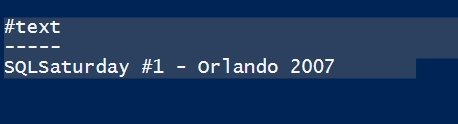
    That gives me this:

    sqlsatloop_b

    This is the path to an element in the document. However this isn’t what I care about here. I’ll need this later as I store other data, but for now I want session titles.

    If I change my code to:

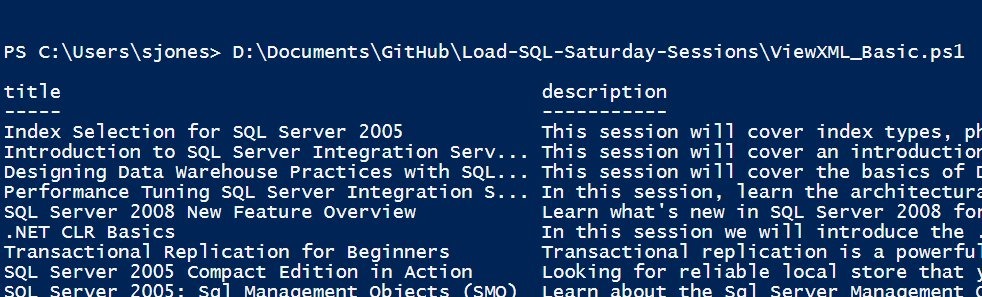
    $doc.SelectNodes("//event") | Format-Table title, description

    I get this:

    sqlsatloop_c

    That’s a good start. I didn’t need the description, but I wanted to show multiple values in the table as a test.

    My plan was to get the speaker, but speaker isn’t an element below event. It’s below "Speakers", which is separate.

    That’s somewhat OK, as I’ll need to parse those out appropriately. The next step is getting the speakers. A little more complicated. The speakers are a child element below the event.

    I’ll tackle that in another post, because it’s slightly more tricky and I want to be sure I can devote a bit more time to discussing a way to do this.

    In the meantime, I cleaned up the code to be simpler and used the

    References