Tag: sql server

  • Adding SQL Server 2025 to my Laptop

    I wanted to do some testing of SQL Server 2025 on my laptop. I have written before how I avoided installing SQL Server on the laptop and use containers instead. This post looks at adding a new version on the default port.

    This page on MSLearn shows how to run the SQL Server 2025 container. I started here, when searching for “SQL Server 2025 container” on Google.

    2025-06_line0100

    It was nice to see this updated for 2025, and if I scroll down, I can see the docker container to pull. This is the important thing for me to add a new version of SQL Server.

    2025-06_line0101

    I could go to this URL to see all the tags, since I don’t want just latest. I want to know what version to run: https://mcr.microsoft.com/en-us/artifact/mar/mssql/server/tags

    In this case, I want this tag: 2025-CTP2.1-ubuntu-22.04

    Installing the New Version

    If you read my previous article, I put a folder for each version on my system. In my case, I use c:\data. I’ll make a new folder for SQL 2025.

    Note: I tried to copy this folder and subfolder and then delete files, but got permission errors on stratup. I made new folders and things worked.2025-06_line0104

    Once in here, I’ll create sub folders for my mappings.

    2025-06_line0105 

    I will then copy over the docker-compose.yml file. In my case, I have all the 2022 stuff. I need to edit things.

    2025-06_line0106\

    Most things are fine here, but I’ll update the name and image. These need to use the 2025 values. Here are my edits.

    2025-06_line0107

    I save this, and then I copy/paste the two stop/start batch files. I’ve opened these in code and changed 2022 to 2025. I’ll show one file below, but basically I change the CD command in both.

    2025-06_line0108

    That’s it. If my SQL 2022 container that runs on the default port is stopped, I can double click the start2025.cmd file. Once I do that, I see the image coming down.

    2025-06_line0110

    As soon as that completes, the container starts. I can connect with SSMS to the local host. Same as my 2022 instance, whose container is stopped.

    2024-07-16 20_35_33-000012

    Once I connect, I see the new, default, instance of SQL Server 2025.

    2025-06_line0113

    I do have to remember to start/stop containers, but I love having multiple default instances Winking smile

  • Who is Using Standard Edition?

    For many years, most of the SQL Server installations I managed or deployed to were Standard Edition. Even in large companies that had agreements with Microsoft, since each instance had a cost (even at a discount), we were careful about where we installed Enterprise Edition.

    These days with Microsoft wanting to charge everyone for every core, it makes sense to use Standard Edition wherever you can.

    One great change for those of us that need to develop for Standard Edition is what Joey calls the most requested feature for SQL Server 2025. We can now install a Standard version of the Developer Edition. This is something many teams have desired since developers tend to use the features available to them, and until now, every Developer Edition has been equivalent to Enterprise Edition (EE). This has resulted in lots of scripts that use EE features, which won’t run on production Standard Edition servers.

    I’m wondering how many of you out there are running standard edition? Leave a comment and let us know. I suspect there are plenty of organizations who have simple apps and run Standard to save money. I know I’ve had many employers that wanted to do this, especially for systems that didn’t need large numbers of cores.

    I wanted to write about a Standard version of Developer edition as an April Fool’s joke in 2024 but was told not to do it. I suspected this version was coming, and I’m glad that it’s finally announced. As long as we have different features in different editions, we need a developer version of each edition.

    Steve Jones

    Listen to the podcast at Libsyn, Spotify, or iTunes.

    Note, podcasts are only available for a limited time online.

  • Upgrading SQL Server in a Container

    I decided to update software on my laptop recently during a trip. I’m loathe to do this on most trips, as I don’t want any instability before a presentation. Usually once I hit the airport, I don’t change anything.

    This time I’m visiting a few customers and don’t need to use my computer. I’ll be taking notes on paper, and while working in the hotel, I decided to upgrade Rancher Desktop after a notification, as well as SSMS, VS, and a few other pieces of software. I decided to patch my SQL Servers as well, which was easy. This post shows how.

    Update: the original screenshot below was the wrong one. That has been updated.

    Upgrading SQL

    I don’t have SQL Server installed on my laptop. Instead, I have a few container instances running under Rancher Desktop. Each of these has a docker compose file and a batch file to start and stop the containers. I’ve written about this before, but I didn’t cover upgrades.

    Here is the upgrade process. First, I find the docker compose file, which is in c:\data\xxx where xxx is the instance. Here is the file for my SQL 2019 instance.

    2025-06_line0015

    I open this in VS Code, and it looks like this.

    2025-06_line0016

    I next check the build list for 2019 on SQL Server Central. It shows me that CU32 is the latest, which means I haven’t patched this in some time. I also haven’t used this instance much. I need to change this.

    Here’s the change: in the file, I update line 5 to say 32 instead of 27.

    2025-06_line0017

    I save this and then double click the batch file to start my 2019 instance. When I do that, I see the new image being pulled down.

    2025-06_line0018

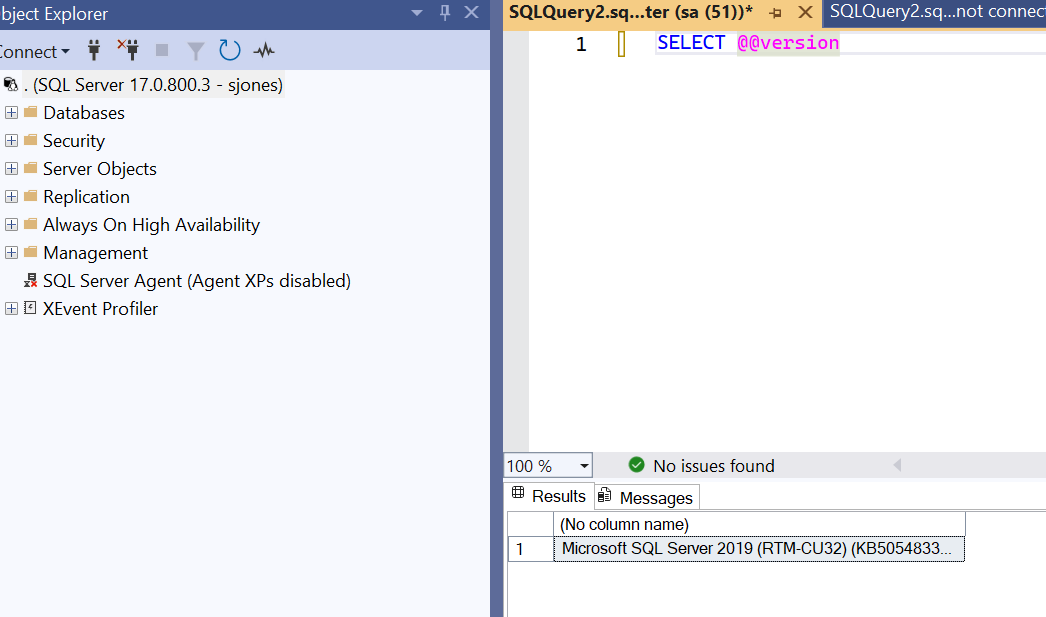
    Once this completes, the container starts and I can connect. When I do that, I see this:

    Upgrade complete.

    Now to edit the other docker files.

  • SQL Server 2025 Excitement

    Are you looking forward to SQL Server 2025? Or perhaps you think this is just another release, or perhaps you are not looking for new features or capabilities in your environment. Maybe you don’t care about new things, but are looking for enhancements to features introduced in 2017/2019/2022. There is certainly no shortage of things that can be improved from previous versions (cough graph *cough).

    I ran across an article on the five things that one person is looking forward to in SQL Server 2025. It’s a good list, and the things included make me consider an upgrade. Certainly, any improvements in the performance area, especially with all the investments made in Intelligent Query Processing over the last few versions, are worth evaluating. They might help your workload, or they might not, but if they do, then upgrade.

    However, test, test, test. I can’t stress that enough. Test with your workload, not some random queries. Spend some time setting up WorkloadTools or find some other way to replay a set of queries from multiple clients to see if performance improves. It’s far too easy to look at a query in isolation and make a snap decision. With a load, sometimes performance looks different.

    The HA improvements are also enticing, especially the idea of offloading backups more easily. Of course, this means you need to ensure you can and know how to, restore a complex set of backups in an emergency situation. Distributed systems are complex, and backups from multiple nodes (remember, you might get unexpected failovers) are a distributed system. Make sure you consolidate those, and plan for potential disruptions if your backup system/share/location is gone. Local backups are always nice, but Murphy’s law might cause you problems in multiple ways with multiple nodes and backups moving across them.

    Again, test, test, test, and consider weird situations taking place. They will occur, and you should ensure your staff has a simple way to deal with them.

    We’ve had a few SQL Server versions that leaped forward. SQL Server 2005 changed the paradigm, and I think SQL Server 2016 was another time of dramatic growth. Will SQL Server 2025 be one of those versions, or is it one that has a few incremental improvements?

    Let me know your thoughts today.

    Steve Jones

    Listen to the podcast at Libsyn, Spotify, or iTunes.

    Note, podcasts are only available for a limited time online.