Tag: sql server

  • Containing the Work

    Containment is becoming more prevalent in the computer world. We have containers coming to Windows Server 2016 (or earlier versions with WinDocks), a concept that’s been embraced in the Linux world for some time. If you haven’t looked at containers, they are a great way to isolate and stabilize your application environment. They can also be great for dev/test environments. You might do a little reading to understand how they can be used.

    While containers might be good for SQL Server (or maybe not), we’ve had other types of containment in SQL Server. We got partially contained databases in SQL Server 2012, with little change since then. That is susprising to me since I expected that all Azure SQL Databases would be contained, and we would want more functionality inside of them. However, those have opened up slightly and I’m not sure where containment is going.

    Personally I’d like to see jobs contained inside of a database. The vast majority of processes I’ve written over the years for application or system work on a database pertained only to that database. I’d like to see things like backups, maintenance, etc. contained as jobs inside a database, that travel with the database as I detach/attach it, backup/restore, and more. That might eliminate some of the issue with clusters and AGs if most jobs moved with a database.

    That got me thinking. What else would we want to contain? The thing that comes to mind is a distributor. I’d like to have a distributor somehow contained with all the information about replication processes contained inside of this database (including the jobs). The database would need a way to register with the instance so the publisher and subscribers could find it, but wouldn’t that make replication administration easier?

    How about the SSIS Catalog and ETL information. Having more information here as a contained database might make managing ETL operations easier, especially if we need to move the load to another instance.

    I’m sure there are other ways in which having information, metadata, and job functions contained inside of a database would be helpful, and easier on the administration of the system, whether by humans or automated systems.

    Steve Jones

    The Voice of the DBA Podcast

    Listen to the MP3 Audio ( 3.8MB) podcast or subscribe to the feed at iTunes and Libsyn.
  • Upgrading SQL Server on Linux

    I saw this week that there was a new CTP (v1.3) of SQL Server v.Next. I haven’t had a lot of time to work on the Linux version lately, but I thought I’d try and see how well the upgrade went.

    There’s an install and upgrade page at Microsoft you can use, but on Ubuntu, things are easy. First, connect to your system and run this:

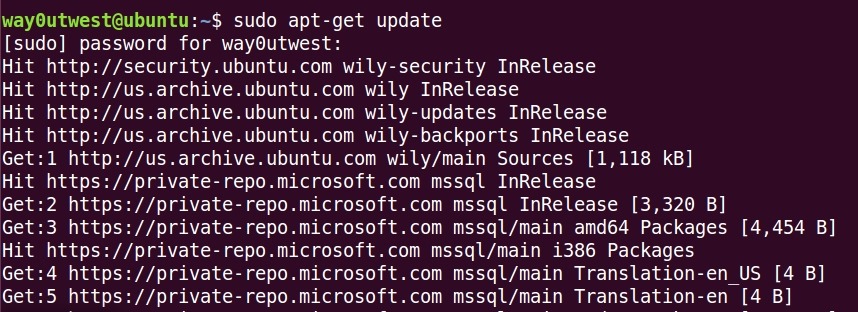
    sudo apt-get update

    That will download updated packages and get the system ready. you can see that I have a lot of stuff to update on this particular system.

    2017-02-22 15_06_08-Ubuntu 64-bit SQL Server .210 - VMware Workstation

    Once this completes, you just run

    sudo apt-get install mssql-server

    This will actually perform the install. That takes a minute, and in my case, I walked away, letting this run. When it finished. I tried to connect from a local machine, but got an error. So I ran this:

    systemctl status mssql-server

    This should give me the status, which was that things had stopped.

    2017-02-22 15_07_39-Ubuntu 64-bit SQL Server .210 - VMware Workstation

    OK, no problem. This starts the service.

    systemctl start mssql-server

    Once this completed, I could connect.

    2017-02-22 15_08_26-Ubuntu 64-bit SQL Server .210 - VMware Workstation

    I’ve done this a few times over the last year, but not since CTP 1.0, so I reminded myself of the process.

    So far, in my testing, most everything I’ve done with the core database engine, all scripts, etc., seem to work. More and more work is being done, and I’m interested to see how this version progresses.

    If you like Linux, maybe you want to give this a try.

  • What’s a DACPAC and a BACPAC?

    Another post for me that is simple and hopefully serves as an example for people trying to get blogging as #SQLNewBloggers.

    If you’ve worked with SQL Server development and database projects, you might have heard about DACPACs. However, if you haven’t, this was a concept that didn’t seem to catch on with many companies. I’m not a fan of the format, but it works and you should be aware of what a DACPAC is and how it can be used.

    The DAC part of the moniker is show for Data-tier Application.  This is the container that includes all of the object definitions for the objects that are contained inside of the DACPAC. The PAC part is just an easy way to note this is a contained in a compressed format.

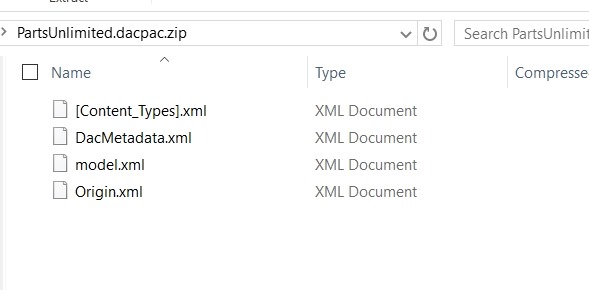
    In fact, the .DACPAC is a zip file. If I rename one of them, I can open is like any other zip file. Here’s one I’ve added a .zip to the end of and opened in Windows Explorer. There are a few files in here.

    2017-02-21 14_30_31-PartsUnlimited.dacpac.zip

    The only really important one is the model.xml, which is a model of my objects. If I look inside, it’s a cumbersome XML format, but I can easily see my Order table as a part of the file.

    2017-02-21 14_25_38-Lab Setup.docx - Word

    These are useful files for having a machine read the format and reproduce database objects in a live database. SQLPackage.exe will do this, as will other tools such as a the DacFX (Data-tier Application Framework).

    I don’t love the format, but it is machine readable and can allow you to package and deploy database changes. There are limitations, especially between versions, and I think that it’s harder to understand than the formats that SQL Compare (From my company, Redgate Software) uses, but that’s me. I’m biased, but I don’t love DACPACs.

    In any case, you can right click and “Unpack” this, or use SSMS to create and read them into a database. In the next post, I’ll show how that works.

    What’s a BACPAC?

    That’s easy. It’s a DACPAC with the data included.

  • Let NonAdmins Get Logins

    I saw a question recently about how to allow some users to see the logins on a server without being a sysadmin or securityadmin. This was in support of a migration effort, so users needed read rights without being able to change anything.

    This appears to be a good place to use the WITH EXECUTE AS option for a stored procedure. I decided to try. I have a normal, non privileged user, JoeDBA, with rights to connect to my Sandbox database. I decided to create a proc as a sysadmin user.

    Here is my code. Notice the WITH EXECUTE AS option. Since I created this with my sjones, sysadmin, account. This should be able to call into master and get the data.

    CREATE PROCEDURE GetLogins_NonSA
    WITH EXECUTE AS OWNER
    /*
    Description:

    Changes:
    Date       Who         Notes
    ———- —         —————————————————
    1/24/2017  PLATO\Steve Initial proc to get server logins
    */
    AS
    BEGIN
    SELECT name
         , principal_id
         , sid
         , type
         , type_desc
         , is_disabled
         , default_database_name
    FROM master.sys.server_principals

    RETURN
    END
    GO

    GRANT EXECUTE ON GetLogins_NonSA TO MigrationRole
    go
    ALTER ROLE MigrationRole ADD MEMBER JoeDBA

    Now, I can log in with a low privileged user. By default, a query against sys.server_principals should only return my login. If I query the DMV, I get this:

    2017-01-24 10_08_56-SQLQuery2.sql - (local)_SQL2016.sandbox (JoeDev (71))_ - Microsoft SQL Server Ma

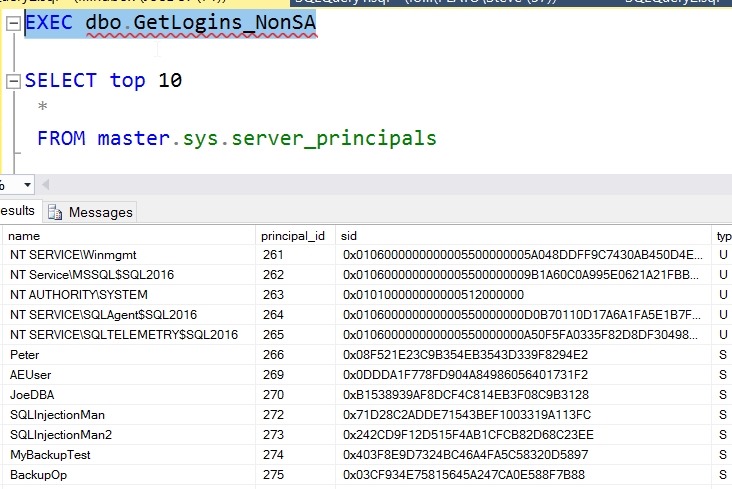
    Now, I can execute the procedure. I’ve scrolled the results a bit, but you can see I view other users.

    2017-01-24 10_09_30-SQLQuery2.sql - (local)_SQL2016.sandbox (JoeDev (71))_ - Microsoft SQL Server Ma

    Certainly I could limit the columns returned, or transform them to provide more data, but this is a good way to give read-only access to a login about other logins.