Tag: sql server

  • The Decline of SQL Server

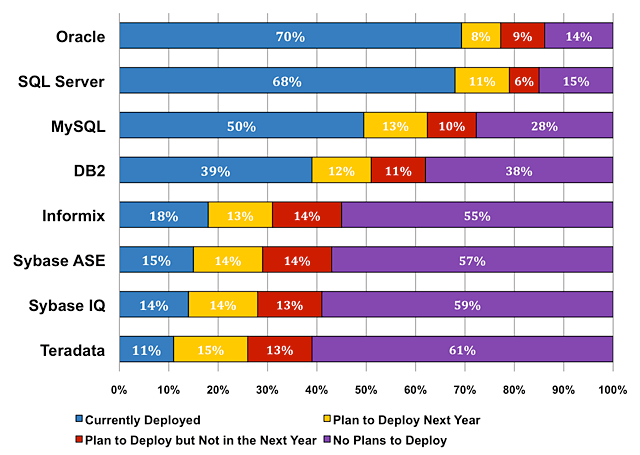
    For many years in my career, SQL Server was the runner up. Both Oracle and DB2 were in much wider use and more popular among all sizes of companies. Serious applications used one of those platforms, according to many technologists, the DBAs on those platforms made more money, and most companies were willing to pay for the software. That changed, and over the years I’ve seen SQL Server grow close to Oracle, while DB2 has declined (and MySQL has grown). Here’s the 2014 chart from Gartner, on of all places, the MySQL site.

    I see other charts and reports, showing various percentages, so it’s hard to be sure where things stand. Many of them agree that for total market share, it’s still Oracle and DB2 (mostly on larger hardware), but SQL Server rounds out the big 3. However is that the case for jobs and opportunities? I read a piece from Thomas Kejser that pointed out that the popularity of SQL Server may be declining (there’s also an update).

    I see lots of jobs posted, and so many companies using SQL Server. SQL Saturdays continue to have great attendance, so I wanted to ask you this week:

    Is SQL Server being used less, or are other platforms being implemented, in your experience?

    Are you seeing a trend away from new, or additional, SQL Servers in your organization? I haven’t heard of any large trends, though I certainly do know that some organizations are considering other relational platforms. I think that’s healthy and expected. The technology for managing transactions is well known, and I think that all three major platforms, as well as MySQL and PostgreSQL are maturing to the point that any of them can handle the load for most applications out there.

    I think it’s only natural that other platforms will be used to solve problems that they are well suited for. However just as I don’t think SQL Server will grow to dominate the RDBMS space, I don’t think that NoSQL platforms will dominate over RDBMSes in many applications.

    Steve Jones

    The Voice of the DBA Podcast

    Listen to the MP3 Audio ( 2.9MB) podcast or subscribe to the feed at iTunes and LibSyn. 

  • The Final Service Packs

    There was an announcement recently that Service Pack 3 for SQL Server 2008 R2 was released. This is the final SP for that version and is mostly a rollup of all the previous cumulative updates (CU), though there are a couple additional items included.

    This is good news, and if you are running the “R2” version, I’d test this and install it. No more CUs will be released, though you’ll want this SP installed in case additional security patches are released during extended support. The last thing you’ll want is a crisis situation where you need to install a security patch based on SP3, and you haven’t tested this update.

    Earlier this year, Microsoft announced that we’d get one last SP for both SQL Server 2008 and 2008 R2. That was good news as many people are running these versions, and they haven’t installed all the previous CUs. I can understand this situation, and it would be good to bundle all the changes together in one final patch for companies that find the platform suits their needs. It’s also a fair request for customers that paid Microsoft for  a platform and should receive all patches developed during its lifecycle. Including a final patch that closes out support.

    I’m still waiting for an SP4 for SQL Server 2008 and I hope we get one soon. I’m not sure what the plans are for SQL Server 2012, 2014 and future releases, but I’d like to continue to see the bi-monthly CUs, an annual SP, and a final SP when each version transitions from mainstream to extended support.

    Steve Jones

    UPDATE: SQL Server 2008 SP4 was released just after this was written. It is available here: http://www.microsoft.com/en-us/download/details.aspx?id=44278

    The Voice of the DBA Podcast

    Listen to the MP3 Audio ( 2.3MB) podcast or subscribe to the feed at iTunes and LibSyn. feed

  • Database Checkups

    I am most definitely a fan of continuous delivery (CD) and the idea that we have the ability to both release our software at any time, for any change, but also have the process and mindset in place to rapidly push enhancements and patches through our development process. However I’m also no naive enough to think that the processes of Agile, Lean, Scrum, Continuous Integration, or any other methodology make this happen. It requires belief and effort by your entire team, including management, to evolve your software quicker.

    There is a downside. The faster, and more often, you release changes to your production system, the more likely you are to cause an issue. This isn’t really any different from traditional waterfall processes, which also cause issues in production, but it does mean that the perception of issues is a bit changed. People expect higher quality when they implement a CD process, and while quality might be higher (there is debate on this), it certainly isn’t perfect.

    Walgreens has implemented a CD process, and they rapidly deploy changes, but they’ve also had issues. In fact, there’s a piece that talks about an issue during a database deployment, and offers some guidance on preparation to deal with problems in your deployment process. The ideas of monitoring (which is critical), planning for recovery, coordinating development, etc are all things that we need to do in any production environment, but they are especially important in a CD process where people expect changes quickly. Whether those changes are enhancing the application, or rolling back a problematic deployment, they need to happen quickly.

    Over time, which may be decades, I expect that more and more organizations and end users will expect patches and changes to their software to happen in the background, while the system is being used. This might mean we need to plan for application architectures with sections that can be upgraded separately, or maybe we will develop ways to modify executable code without ending the process. In either case, the ideas behind CD will become more and more useful, and the more you understand them, the better off you’ll be.

    Steve Jones

    The Voice of the DBA Podcast

    Listen to the MP3 Audio ( 2.5MB) podcast or subscribe to the feed at iTunes and LibSyn.

  • Is SQL Server Mature?

    When I asked recently what compelling reasons there are, or aren’t, for upgrading SQL Server, it seems cost was the issue for most people. I can understand that, especially as licensing for VMs has made it an expensive endeavor to upgrade their systems. Many, many companies have started to revisit their policies regarding upgrades and seriously evaluate the decision to undertake a version change. While I’m not sure if many companies are starting to look at keeping all instances of SQL Server for ten years, I know many are looking to keep their noncritical systems on the existing versions as long as possible.

    As I read through the posts on my piece, I found this great quote from one of the commenter: “I’m a great believer in “If it ain’t broke, don’t fix it” and so if a system is running acceptably for it’s purpose, I’ll leave it alone.” To a large extent, that’s how I’ve viewed systems. If things are working, it becomes hard to justify an upgrade. In fact, I had a client that was running a SQL Server v6.5 instance in 2005, a full ten years after that version was released. Why? Mostly because the database backed a card key system that worked. While the database wasn’t supported, neither was the card key system, and since an upgrade would have been close to $100,000, it wasn’t worth performing. We did upgrade to a virtual server to remove hardware dependencies, but otherwise left the system alone.

    That brings me to this week’s question, which is one that I’ve asked myself for years: Is SQL Server mature?

    If a version of SQL Server can handle the load placed on it, is there any good reason to upgrade. I suspect that for many applications, the base features of SQL Server are good enough. If these features have performed well for a number of versions, then why change? While I like the changes in T-SQL, especially error handling, I’m not sure those changes are worth paying tens of thousands of dollars for. I’m not sure the improvements are really justified for many applications, and I’m not sure many developers can even find the time to implement them.

    More and more I think that key to continued adoption and growth of SQL Server is licensing by scale, not edition, and not by feature. Just like Azure, let me pay for the cores and RAM I need, and let me easily grow that as needed.

    Steve Jones

    The Voice of the DBA Podcast

    Listen to the MP3 Audio ( 2.8MB) podcast or subscribe to the feed at iTunes and LibSyn.