Tag: SQLNewBlogger

  • Assigning a Default Schema to a New User–#SQLNewBlogger

    I had to test something for a customer, and as a part of this there as a need to have a different default schema for a user. Since this isn’t something that I (or many people) do often, I wanted to make a note about how to do this.

    Another post for me that is simple and hopefully serves as an example for people trying to get blogging as #SQLNewBloggers.

    The Scenario

    A user in a database needed to access certain objects, which were going to be located in a separate schema. There was a possibility that there would be objects in the new schema and in the dbo schema with the same name, so the concern was with developers writing code that might access the wrong object.

    The Solution

    When you add a user, this is a simple parameter as part of the CREATE USER DDL. In this case, you use the DEFAULT_SCHEMA parameter. I didn’t look this up at SQL Prompt hinted me to the WITH and the parameter.

    In my case, we wanted to add a new user, which we will call APIUser and assign them to the WebAPI schema. We use this code:

    CREATE USER APIUser FOR LOGIN APIUser WITH DEFAULT_SCHEMA=WebAPI
    GO

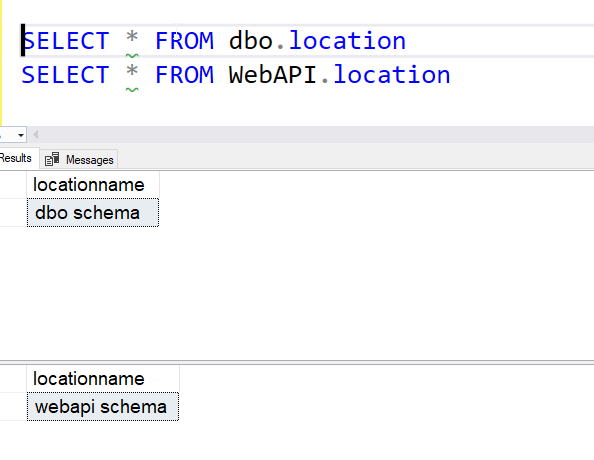
    Note a couple things. First, the schema name isn’t quoted. It’s treated as an identifier. Second, the WITH is used to add this parameter to the statement. Once we do this, if they user does not include a schema in an object reference, like the one below, they will still get data from the object in the WebAPI schema.

    SELECT * FROM location
    

    SQL New Blogger

    This was a minor part of something else I was doing. In this case, setting up a different scenario, but I captured this slice of code, edited the names slightly, and then pasted them in here.

    Outside of the work I was doing, the sketch of these notes took about 2 minutes, and then the entire post was < 10 minutes.

    You can do this.

  • Typing Strange Characters–#SQLNewBlogger

    I’ve had to type a few non-English characters lately, and this blog talks about how to do this.

    Another post for me that is simple and hopefully serves as an example for people trying to get blogging as #SQLNewBloggers.

    The Need for Non-English Characters

    Recently I wrote a blog on using Chinese characters. While you can copy/paste from Google, perhaps you want to actually type something regularly. For example, I have been learning French, and I sometimes need to

    Another one I’ve used fairly often is the British pound symbol.

    Typing Unicode characters

    There are Unicode characters for these symbols. While some keyboards may include these, the US ones do not. I can switch keyboards, and I have a Japanese keyboard, but

    A few commons ones for me are:

    • é (French e with acute (forward) accent) – 0233
    • è (French e with the grave accent) – 0232
    • ô (French o with the circumflex) – 0244
    • ç (French c with the cedilla,hanging thing) – 0231
    • £ (British pound symbol) – 0163
    • はい (Japanese yes, hai) – a little harder

    To type these, I press the ALT key and hold it. Then I enter the number. So, holding ALT and entering 0163 gives me this: £

    The Japanese is a little harder. There I needed to enable the Microsoft IME keyboard that lets me type the phonetics for Japanese characters. There are other ways to do this, but that’s what I did.

    Learning to work with other languages and characters has been interesting to me, and it’s nice to be able to type São Paulo instead of Sao Paulo. Especially when I communicate with people whose names contain non English letters.

  • Restore One Backup From Many in a Device–#SQLNewBlogger

    I wrote recently about finding multiple backups in a file. This post looks at how to restore one of those. The one you choose.

    Another post for me that is simple and hopefully serves as an example for people trying to get blogging as #SQLNewBloggers.

    Setup

    In the previous post, I did these things:

    • took a backup
    • added a table and data
    • took a second backup
    • truncated the table
    • took a third backup

    If I restore the default last backup, I get my table without data. You can read that post to see how I got here.

    Let’s restore things.

    Restoring a Backup

    I cheat with restores. I remember some syntax, but typing it in and trying to remember the order is a pain, even with SQL Prompt. So I click restore database in SSMS and fill out the dialog. I pick the device and when I change the name in the Destination database, the file names change. Once I have the dialog below, I click “Script” at the top.

    2023-05-03 10_46_36-Restore Database - sandbox2

    This gives me code in a new window. In my case, I get this code:

    USE [master]
    RESTORE DATABASE [sandbox2]
    FROM  DISK = N'D:\SQLBackup\sandbox.bak'
    WITH  FILE = 3, 
    MOVE N'sandbox' TO N'C:\Program Files\Microsoft SQL Server\MSSQL15.MSSQLSERVER\MSSQL\DATA\sandbox2.mdf', 
    MOVE N'sandbox_log' TO N'C:\Program Files\Microsoft SQL Server\MSSQL15.MSSQLSERVER\MSSQL\DATA\sandbox2_log.ldf', 
    NOUNLOAD,  STATS = 5

    By default, this gives me file=3, which is the third backup. If I run this and then query the new database, I see this:

    2023-05-03 10_48_41-SQLQuery11.sql - ARISTOTLE.sandbox2 (ARISTOTLE_Steve (55))_ - Microsoft SQL Serv

    That’s what I expect. The third backup had the table with no data. Let’s restore the second one. First delete the database and then change File=3 to File=2. Once I run the restore and the same query, now I see data:

    2023-05-03 10_51_49-SQLQuery11.sql - ARISTOTLE.sandbox (ARISTOTLE_Steve (55))_ - Microsoft SQL Serve

    If I restore file=1, then there is no table.

    2023-05-03 11_04_47-SQLQuery11.sql - ARISTOTLE.sandbox (ARISTOTLE_Steve (55))_ - Microsoft SQL Serve

    Alter the FILE parameter to pick the backup in the file.

    SQL New Blogger

    This post took less than the 10 minutes of the previous post. I basically restored my database a few times with a query. The code was a couple minutes to generate and modify in SSMS, and this writeup was short.

    The key was doing this immediately after the previous post and reusing the setup and code. Plus, the concept was in my mind.

    As with the previous post, this is a good way to show knowledge and learning, and in this case, 20 minutes got me two posts.

  • What Backups Are In This File?–#SQLNewBlogger

    I had a question on multiple backups in a file and had to check my syntax. This post shows how to see which backups are in a file.

    Note: Don’t do this. Put backups in separate files.

    Another post for me that is simple and hopefully serves as an example for people trying to get blogging as #SQLNewBloggers.

    Setup

    I have a sandbox database. I made a backup of this.

    BACKUP DATABASE [sandbox] TO  DISK = N'D:\SQLBackup\sandbox.bak' 
       WITH NOFORMAT, INIT,  
       NAME = N'sandbox-Full Database Backup', 
       SKIP, NOREWIND, NOUNLOAD,  STATS = 10
    GO

    Note I used INIT, which will ensure this is the only backup in this file.

    I then changed something, in this case, I made a new table (I was testing things for Rich).

    CREATE TABLE testforrich (myid INT)
    GO
    INSERT dbo.testforrich (myid) 
    SELECT ROW_NUMBER() OVER (ORDER BY (SELECT NULL))
      FROM sys.columns AS c
    GO

    I then ran another backup. However, this time I wanted to append to the existing file.

    BACKUP DATABASE [sandbox] TO  DISK = N'D:\SQLBackup\sandbox.bak'
      WITH NOFORMAT, NOINIT,  
      NAME = N'sandbox-Full Database Backup', 
      SKIP, NOREWIND, NOUNLOAD,  STATS = 10
    GO

    The NOINIT keyword is in here, which appends the backup to the same file. In essence, sandbox.bak will then contain two different backups in one file. For this test, I then made another change and another backup.

    TRUNCATE TABLE testforrich
    GO
    BACKUP DATABASE [sandbox] TO  DISK = N'D:\SQLBackup\sandbox.bak'
      WITH NOFORMAT, NOINIT,  
      NAME = N'sandbox-Full Database Backup', 
      SKIP, NOREWIND, NOUNLOAD,  STATS = 10
    GO


    Now I have three backups in the file.

    Checking Contents

    If I were to click the restore item in SSMS and pick the file, I see this:

    2023-05-03 10_15_53-Restore Database - sandbox

    Note that the position is listed as “3”, which means this is restoring the newest (most recent) backup by default. I don’t seem to be able to edit this, though if I click timeline and change the time, I can get a different backup. I see different backups in there:

    2023-05-03 10_30_16-Backup Timeline_ sandbox

    However, when are those backups? This timeline isn’t great.

    I can use RESTORE HEADERONLY. The command I ran is:

    RESTORE HEADERONLY FROM DISK = 'd:\sqlbackup\sandbox.bak'
    GO

    This gives me all three backups, which are shown as different positions in the file.

    2023-05-03 10_31_38-SQLQuery7.sql - ARISTOTLE.sandbox (ARISTOTLE_Steve (72))_ - Microsoft SQL Server

    From here, I could perform a restore with a different backup if I needed to.

    SQL New Blogger

    This was a quick post that I wrote after I spent 5 minutes creating a test for something. I grabbed my code, took a few screen shots, and it took about 10 minutes to assemble this.

    Easy for you, and this shows a potential interviewer or manager that you can dig into a small issue, learn, and solve it. Try it for yourself and write a blog post.