Tag: SQLNewBlogger

  • A Monthly Running Total–#SQLNewBlogger

    Another post for me that is simple and hopefully serves as an example for people trying to get blogging as #SQLNewBloggers.

    Recently I was looking at some data and wanted to analyze it by month. I have a goal that is set for each day and then an actual value. I wanted to know how I was tracking against the goal, as a running total. If my goal is 10 a day, then I ought to actually get to 10 the first day, 20 for the second day (10 + 10), etc.

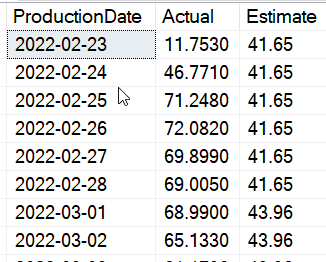
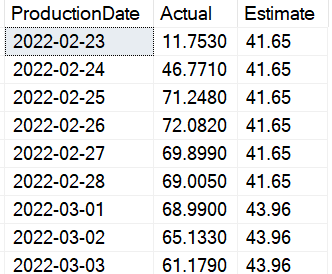
    Here is some data that I am using, showing the date, the actual, and the estimate:

    2022-04-18 08_54_02-SQLQuery1.sql - ARISTOTLE_SQL2017.way0utwest (ARISTOTLE_Steve (53))_ - Microsoft

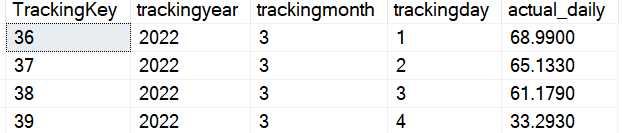
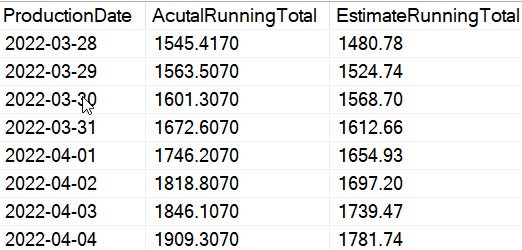
    The estimate is constant, so a running total is just the sum of all previous rows. The actual is similar, though in both cases, I want to reset this for each month. If I did a straight sum of all previous rows, I’d see something like this:

    2022-04-18 08_56_31-SQLQuery1.sql - ARISTOTLE_SQL2017.way0utwest (ARISTOTLE_Steve (53))_ - Microsoft

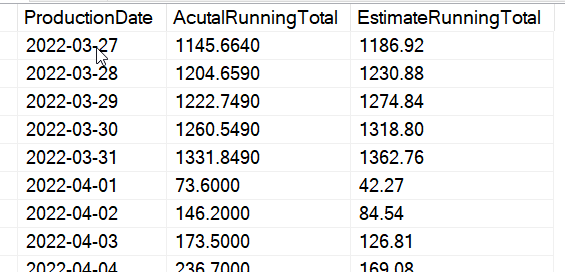
    I don’t want this. Instead, I want something that’s like this:

    2022-04-18 08_57_25-SQLQuery1.sql - ARISTOTLE_SQL2017.way0utwest (ARISTOTLE_Steve (53))_ - Microsoft

    This is fairly easy to do with window functions in T-SQL. I use a SUM() for each column with an OVER() clause. In this case, I partition by the year and month, which means that when those items change, we reset a new set of values. Here is the query that produces the correct data above:

    SELECT
       spt.ProductionDate
    , SUM (spt.Actual) OVER (PARTITION BY
                                YEAR (spt.ProductionDate)
                              , MONTH (spt.ProductionDate)
                              ORDER BY spt.ProductionDate
                     ROWS BETWEEN UNBOUNDED PRECEDING AND CURRENT ROW) AS AcutalRunningTotal
    , SUM (spt.Estimate) OVER (PARTITION BY
                                  YEAR (spt.ProductionDate)
                                , MONTH (spt.ProductionDate)
                                ORDER BY spt.ProductionDate
                     ROWS BETWEEN UNBOUNDED PRECEDING AND CURRENT ROW) AS EstimateRunningTotal
    FROM dbo.SolarPowerTracker AS spt;

    This creates a window for each month (based on year and month) and groups all the data with the same values together. Then I get the sum as a running total. I also want a rows clause to be sure this works as intended.

    Update: Someone noted this might not be clear how this works, so I’ll do another post on more details of the query itself. FWIW, another good way to get moving with SQLNewBlogger and add new posts to add detail.

    I’ve added the CREATE and INSERT statements here:

    CREATE TABLE [dbo].[SolarPowerTracker]
    ( ProductionDate DATE CONSTRAINT SolarPowerTrackerPK PRIMARY KEY
    , Actual NUMERIC(10, 2)
    , Estimate NUMERIC(10, 2));
    GO
    
    INSERT INTO dbo.SolarPowerTracker
    (ProductionDate, Actual, Estimate)
    VALUES
    ( N'2022-02-23', 11.7530, 41.65 ), 
    ( N'2022-02-24', 46.7710, 41.65 ), 
    ( N'2022-02-25', 71.2480, 41.65 ), 
    ( N'2022-02-26', 72.0820, 41.65 ), 
    ( N'2022-02-27', 69.8990, 41.65 ), 
    ( N'2022-02-28', 69.0050, 41.65 ), 
    ( N'2022-03-01', 68.9900, 43.96 ), 
    ( N'2022-03-02', 65.1330, 43.96 ), 
    ( N'2022-03-03', 61.1790, 43.96 ), 
    ( N'2022-03-04', 33.2930, 43.96 ), 
    ( N'2022-03-05', 10.1330, 43.96 ), 
    ( N'2022-03-06', 0.6170, 43.96 ), 
    ( N'2022-03-07', 4.2670, 43.96 ), 
    ( N'2022-03-08', 47.7440, 43.96 ), 
    ( N'2022-03-09', 11.5580, 43.96 ), 
    ( N'2022-03-10', 0.6470, 43.96 ), 
    ( N'2022-03-11', 15.4400, 43.96 ), 
    ( N'2022-03-12', 70.3260, 43.96 ), 
    ( N'2022-03-13', 61.3710, 43.96 ), 
    ( N'2022-03-14', 74.5110, 43.96 )


    SQL New Blogger

    As I was working on this query, I realized it wasn’t complex, but it was something unusual. Often I’ve done totals for a time period that a user supplies, not a set one like a month with a reset each month. I thought this was a good way to showcase how to solve this relatively simple problem.

    I spent about 15 minutes taking my code and then writing this post to show how I solved a a problem. This is something you could add on your blog to showcase your knowledge on solving a specific problem, not a general one.

  • Removing a LocalDB Instance

    Another post for me that is simple and hopefully serves as an example for people trying to get blogging as #SQLNewBloggers.

    This might be obvious and easy, but I spent a couple minutes learning how to remove a LocalDB instance.

    I tried to use remote, but that didn’t work:

    2022-03-03 09_17_39-C__Windows_System32_cmd.exe

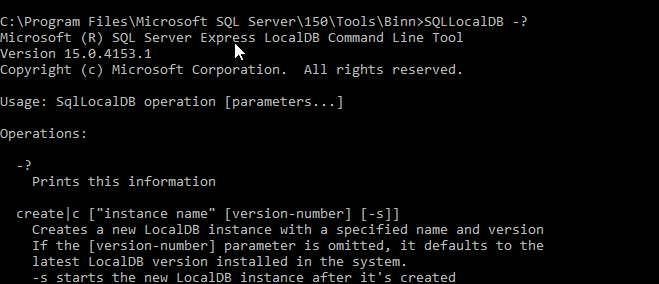
    There error reminded me that in my day, most commands use –? or /? to get help. A lot of CLIs these days use –help (two dashes). That doesn’t work here. But /? does.

    2022-03-03 09_18_33-C__Windows_System32_cmd.exe

    This shows me the delete option is the one to use. I tried that, but I needed to stop the instance.

    2022-03-03 09_19_55-C__Windows_System32_cmd.exe

    Running stop and then delete allowed this to succeed.

    2022-03-03 09_20_51-C__Windows_System32_cmd.exe

    SQL New Blogger

    After writing a previous post, which took me 10 minutes or so, I went to clean up my environment. I realized this was easy, but also worth a post about how I learned this.

    Just 5 minutes. You could write posts like this to further your knowledge and help your career.

  • Starting LocalDB–#SQLNewBlogger

    Another post for me that is simple and hopefully serves as an example for people trying to get blogging as #SQLNewBloggers.

    Lots of people have never worked with LocalDB, which is an in-process version of SQL Express. No service account, just a SQL Server instance running with your app. It’s a nice lightweight way to get SQL Server running quickly without a hassle.

    This is a SQL Server Express version, but the bare bones for development. This post looks at how you can get this running.

    This version of SQL is installed with SQL Express, and with Visual Studio. If you look in this path: C:\Program Files\Microsoft SQL Server\150\Tools\Binn, there is a SQLLocalDB.exe. You can see that here.

    2022-03-03 09_08_00-Binn

    This is my SQL Server 2016 version of LocalDB. I can start a new instance by calling this with the CREATE option. I can give this a name as well, as I might want to stat multiple instance for different apps. Here I’ll create an instance called app1.

    SQLLocalDB create app1

    I then call the same command, but use START instead of CREATE. You can see this reports as started from the CLI. I also add the INFO call to get status.

    2022-03-03 09_10_35-C__Windows_System32_cmd.exe

    Now I can connect. I use (LocalDB)\app1 to connect:

    2022-03-03 09_11_39-Connect to Database Engine

    I see I’m connected to a version of LocalDB then:

    2022-03-03 09_12_03-SQLQuery2.sql - (localdb)_app1.master (ARISTOTLE_Steve (70))_ - Microsoft SQL Se

    Now it’s just an instance of SQL Server I can use.


    SQL New Blogger

    I needed to check something for a customer and realized I hadn’t started LocalDB in a long time, so I needed to check the docs. I spent 10 minutes putting this post together.

    An easy type of post for any of you out there. Learn something, try something, write something.

  • Changing the Owner of a Database #SQLNewBlogger

    Another post for me that is simple and hopefully serves as an example for people trying to get blogging as #SQLNewBloggers.

    I had an authorization issue with my account, and I decided to delete it and re-add it. That’s the subject for another day, but before I could delete it, I had to remove the ownership of some databases. You can’t delete a login that owns databases.

    I realized I wasn’t sure how to do this, so I wrote this post.

    A Deprecated Proc

    There used to be a dbo.sp_changedbowner proc that was used, but I know this is deprecated and it shouldn’t be used. It likely would work fine in SQL Server 2019, but I also know there should be more modern code. I decided to look, as I ought to know what is recommended these days.

    In searching around MS Docs, ALTER AUTHORIZATION comes up in the list. I checked, and this allows me to transfer the ownership of a securable, which a database is one of the items in the list. Example F shows what I want to do and uses this code:

    ALTER AUTHORIZATION ON DATABASE::dbname TO [login]

    I can replace dbname and login with the values I need.

    Which Databases?

    I have a lot of databases, and I don’t need to change them all, though I could. In my case, I decided to get a list of databases and owners. If you query sys.databases, there is an owner_sid column. If you join that with sys.server_principals, you can do so on the SID column. This query shows me what I need:

    SELECT d.[name], sp.[name] FROM sys.databases d
      INNER JOIN sys.server_principals AS sp
       ON d.owner_sid = sp.sid

    The results are here:

    2022-02-25 12_34_10-SQLQuery1.sql - ARISTOTLE_SQL2017.master (sa (54))_ - Microsoft SQL Server Manag

    In some sense I hate that “sa” isn’t the default owner, but I get it. There might be a need for other accounts. However, my account is a sysadmin, so my view here is that “sa” ought to be listed.

    I digress. Now that I have a list, I can limit it to my account with a WHERE clause. I can take that list of items and build the code. I could use a cursor, but this is a one-off task, so this works:

    SELECT
                    'ALTER AUTHORIZATION ON database::' + d.[name] + ' TO sa;'
                  , d.[name]
                  , sp.[name]
    FROM
                    sys.databases d
         INNER JOIN sys.server_principals AS sp
             ON d.owner_sid = sp.sid
    WHERE          sp.name = 'ARISTOTLE\Steve';
    GO

    This gives me the code in the results I want to run. I copy paste this and I have a bunch of statements to run. 

    2022-02-25 12_41_07-SQLQuery1.sql - ARISTOTLE_SQL2017.master (sa (54))_ - Microsoft SQL Server Manag

    Despite Grammarly not being happy, this worked fine.

    SQL New Blogger

    As soon as I realized I needed to do this, I knew there were two posts here. One on the removal and adding back of my Windows account, and the second on this topic (when the first didn’t work).

    This took about 15 minutes extra, finding the docs and writing some code, but it’s a good example of where a small situation that occurred helped me find something to write about. Easy for you to take little tasks like this and document your knowledge when you learn something.