Tag: SQLNewBlogger

  • Finding the First Day of the Year–#SQLNewBlogger

    Another post for me that is simple and hopefully serves as an example for people trying to get blogging as #SQLNewBloggers.

    While working on the question from Monday, I had to do a bit of date math. I remember this blog post from Lynn Pettis, and every new year I think of it.

    I decided to decode the question a bit and work through the T-SQL myself as a good exercise for explaining what happens.

    Here’s the code (setup and query):

    CREATE TABLE dbo.Resolution
    ( ResolutionDate DATETIME
    , ResolutionText VARCHAR(200)
    )
    GO
    INSERT dbo.Resolution
    (
         ResolutionDate,
         ResolutionText
    )
    VALUES
       ('2020-01-01 0:00', 'Do not travel by airplane this year'),
       ('2021-01-01 0:00', 'Go on vacation on a plane'),
       ('2022-01-01 0:00', 'Visit a new country')
    GO
    SELECT ResolutionText FROM  dbo.Resolution
    WHERE ResolutionDate = DATEADD(YEAR, DATEDIFF(YEAR, 0, GETDATE()) , 0)

    In this code, the final query is designed to find the first day of the current year. Here are a few examples:

    2021-12-01 09_45_54-SQLQuery3.sql - ARISTOTLE_SQL2017.sandbox (ARISTOTLE_Steve (56))_ - Microsoft SQ

    How does this work? Let’s decode things.

    Digging Into the Algorithm

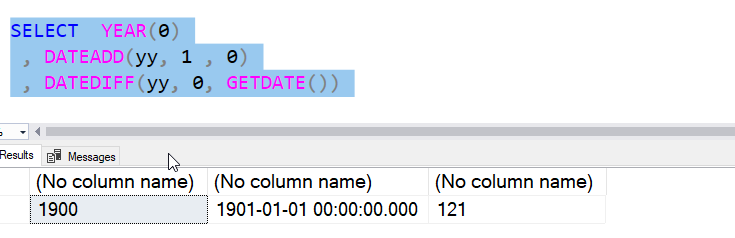
    Let’s start with a simple thing. I use a 0 for a parameter in the DATEADD and DATEDIFF. What does that mean? Well, let’s go with the YEAR() function. If I use a 0 there, I see the base year in SQL Server, which is 1900.

    2021-12-01 09_47_42-SQLQuery3.sql - ARISTOTLE_SQL2017.sandbox (ARISTOTLE_Steve (56))_ - Microsoft SQ

    This doesn’t mean I can’t use other years, but this is the basis for calculations. What if I add to this? I can add one, and I see a different date.

    2021-12-01 09_48_45-SQLQuery3.sql - ARISTOTLE_SQL2017.sandbox (ARISTOTLE_Steve (56))_ - Microsoft SQ

    This is the key. I’ve gone from 0 to 1901-01-01-00:00:00. Let’s see the difference from this year, well last year when I wrote this, to 0.

    2021-12-01 09_49_44-SQLQuery3.sql - ARISTOTLE_SQL2017.sandbox (ARISTOTLE_Steve (56))_ - Microsoft SQ

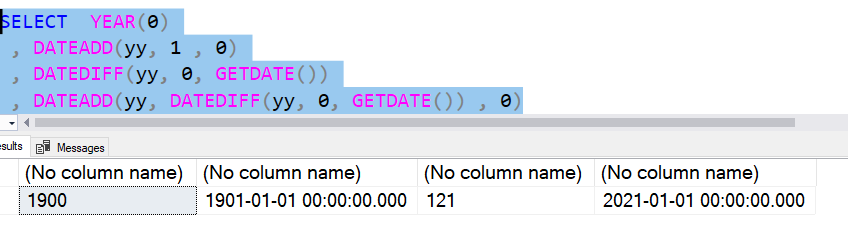
    The result above shows me 121. Which makes sense. 1900 to 2021 is 121 years. Now, when I use the dateadd, and add 121 to 0, I get the first day, actually the first DATETIME moment, of the current year.

    2021-12-01 09_50_41-SQLQuery3.sql - ARISTOTLE_SQL2017.sandbox (ARISTOTLE_Steve (56))_ - Microsoft SQ

    I get 2021-01-01 00:00:00.

    I can change the GETDATE() to any date time of any year, and this code returns the first moment of that year, essentially stripping off the other parts.

    SQLNewBlogger

    I was working on something and used a trick I learned from someone else. I decided to write this post, which only took about 15 minutes to write. The demo was simple, and I just broke apart the code, slowly putting each section in its own SELECT and then explaining it.

    This is a good example of how to structure a blog post based on some knowledge you have and use in other work. You should try this.

  • Searching dbatools–#SQLNewBlogger

    Another post for me that is simple and hopefully serves as an example for people trying to get blogging as #SQLNewBloggers.

    I learned something new about dbatools. That’s using the Find-DbaCommand cmdlet, which is handier than Get-Command. I’ll show you why in this post.

    Searching PowerShell

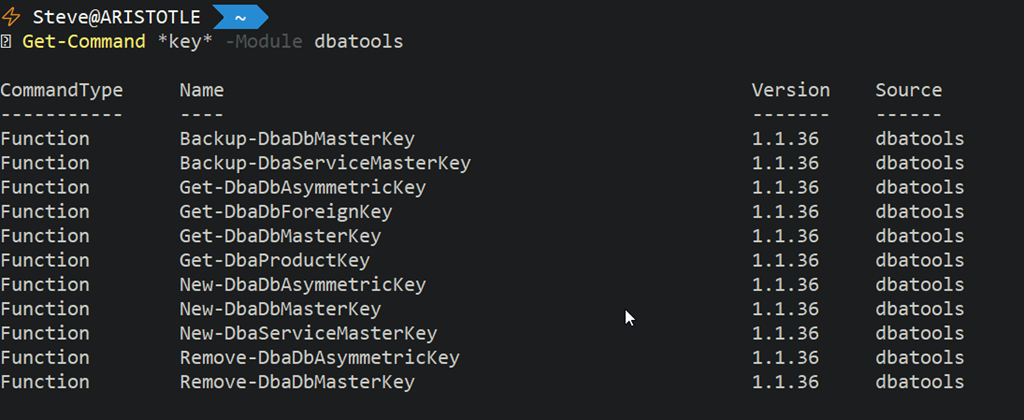
    You can search for commands with Get-Command. If I search for “key” in the dbatools module, I’d run this:

    Get-Command *key* -Module dbatools

    This returns me a number of items. In fact, it returns 11 items.

    2021-11-20 11_56_58-C__Users_Steve (Admin)

    That’s not bad, and this is how I’ve often been looking for command when I’m coding. This is faster than going to the index page on the site.

    Find-DbaCommand

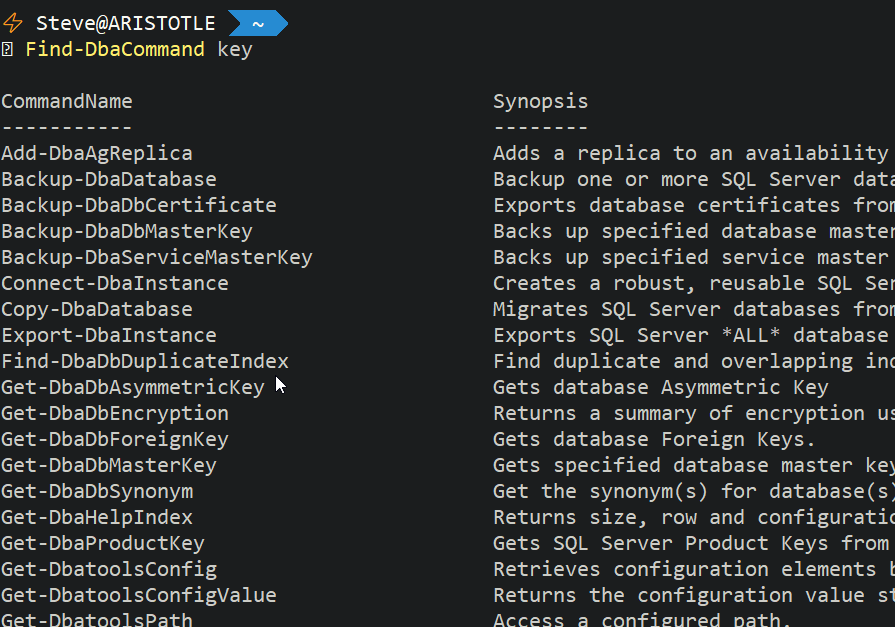
    I was reading the upcoming dbatools in a Month of Lunches, and saw the Find-DbaCommand listed. If I use this, and include “key”, I get different results.

    2021-11-20 11_59_14-C__Users_Steve (Admin)

    This might be more than I want, but I thought this was a neat addition to the dbatools module to help someone find commands quickly.

    It is definitely easier than going to dbatools.io and trying to search for a command in the command list.

    SQLNewBlogger

    I learned something, and I sketched out how to explain it to someone. I took 5 minutes to knock this post together. You could do the same thing, but expand on a way that you actually use this to find a command.

    Might teach someone how a skill. Might even teach someone that wants to interview you.

  • Saving PowerShell Results to the Clipboard–#SQLNewBlogger

    Another post for me that is simple and hopefully serves as an example for people trying to get blogging as #SQLNewBloggers.

    Working with results and manipulating them is always something I struggle with a bit in PowerShell. I’ve slowly been learning how to limit results to what I want and then save those out.

    Recently, I was reading Learn dbatools in a Month of Lunches, and I learned something new. I can save results to the clipboard easily. Here’s an example:

    Let’s say I want to get backups status. I’d run something like this, using the Get-DbaDbBackupHistory cmdlet:

    2021-12-07 09_44_04-C__Users_Steve

    I see results, but I might want to put this into a report or email that I send to others. I can certainly highlight this in the cmdline and copy it, but there’s an easier way.

    I can pipe this to clip, and then I don’t see the results.

    2021-12-07 09_44_08-C__Users_Steve

    Then I can CTRL+V and paste this into notepad (or anywhere).

    2021-12-07 09_44_12-_Untitled - Notepad

    Super handy way to take information from the PoSh cmdline and ensure I get everything. Miss-highlighting when not paying attention has caused me problems before, especially when the results scroll off the screen. Highlighting a lot of information is hard, so using clip is a good trick.

    SQLNewBlogger

    This was a quick trick I learned while doing something else, so I decided to write a quick post. This took me about 5 minutes to put together.

    You could do the same thing, showing how you’d use this in your job.

  • Changing Case in SSMS–#SQLNewBlogger

    Another post for me that is simple and hopefully serves as an example for people trying to get blogging as #SQLNewBloggers.

    I never knew I could change case for objects in SSMS easily. This actually was something that another individual pointed out to me, but once I tried it, I liked it and know I’ll use it at times.

    CTRL+Shift+L will lowercase whatever text is selected in SSMS. A quick gif to show this below, where I select a portion of the code and then CTRL+Shift+U to upper case it, which is what I’d want. I then CTRL+Shift+L to put it back.

    Untitled Project

    Normally I use SQL Prompt to do these types of things, but that reformats the entire section of code. I don’t always want to do that. I could certainly CTRL+K, Y, which would upper case this according to my current format, but I can’t change to lower case easily. Knowing these shortcuts makes it easy for me to match case if needed.

    SQLNewBlogger

    When I ran across this and realized it was new, I just wrote this post. It took about 5 minutes and I spent more time deciding if I should record the screen than it took to just do it.

    You could easily write this type of post as you learn small things. Tag them with SQLNewBlogger as well to encourage others.