Tag: SQLNewBlogger

  • Using NULLIF–#SQLNewBlogger

    Another post for me that is simple and hopefully serves as an example for people trying to get blogging as #SQLNewBloggers.

    I ran across the NULLIF() function recently, and I realized I’d never used it in code. It’s an interesting function, one that I didn’t think would be useful, but I found a couple places.

    NULLIF Behavior

    This function is essentially short for “return a null if these two values are equal.” There are two parameters you pass in and if they are equal, you get a NULL back. Somewhat strange function, but here are a few examples:

    2021-09-20 15_42_19-SQLQuery2.sql - ARISTOTLE_SQL2017.sandbox (ARISTOTLE_Steve (62))_ - Microsoft SQ

    The interesting one is that 1 and NULL come back with the first value. We can’t determine if NULL is equal to 1, so we assume not.

    Using This Function

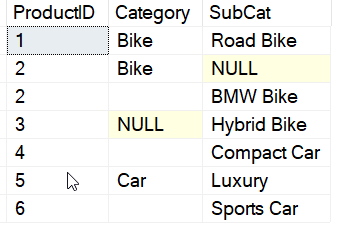
    When would you use this? As I said, I have never thought to use this, but I did find a couple interesting items. A mixture of NULL and a certain value is one place, if you can use the NULL. For example, let’s say I have some data in a table:

    2021-09-20 15_44_46-SQLQuery2.sql - ARISTOTLE_SQL2017.sandbox (ARISTOTLE_Steve (62))_ - Microsoft SQ

    I have some blanks and some NULL values. Suppose I want to query and show the category, but if that is a NULL or blank string, show the SubCat instead. I can do this with a CASE, but that get’s ugly. NULLIF makes this easy to read.

    2021-09-20 15_45_56-SQLQuery2.sql - ARISTOTLE_SQL2017.sandbox (ARISTOTLE_Steve (62))_ - Microsoft SQ

    The other interesting place I thought of here was with aggregates and potentially filtering out some values. Aggregates tend to ignore NULL, so what if I have this data:

    2021-09-20 15_48_24-SQLQuery2.sql - ARISTOTLE_SQL2017.sandbox (ARISTOTLE_Steve (62))_ - Microsoft SQ

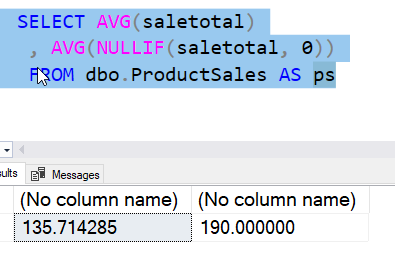
    Suppose I want the average sale, but not with the zero values. Those might be returns, and we don’t want to skew our average. I could use NULLIF to make this easy to code. Notice the short code below and the difference from the straight average:

    2021-09-20 15_49_03-SQLQuery2.sql - ARISTOTLE_SQL2017.sandbox (ARISTOTLE_Steve (62))_ - Microsoft SQ

    I could use CASE, but which is easier to read?

    2021-09-20 15_50_20-SQLQuery2.sql - ARISTOTLE_SQL2017.sandbox (ARISTOTLE_Steve (62))_ - Microsoft SQ

    I think NULLIF is, if you know how the function works.

    SQLNewBlogger

    This was a function I stumbled on and wasn’t sure how to read. I spent about 10-15 minutes searching around the Internet looking for a reason to use this code. I saved the link for them and added it into the post. I spent about 10 minutes creating a little code example and then running it.

    I then wrote this post, which was about 10 minutes, mostly because I used screen shots for code, which were quick to grab and paste in.

    This is a nice example of learning something, understanding how it works, and then thinking where it could be useful.

  • Delaying Code Execution with Waitfor–#SQLNewBlogger

    Another post for me that is simple and hopefully serves as an example for people trying to get blogging as #SQLNewBloggers.

    One of the rarely used commands for me is the WAITFOR command. This is a command that intentionally introduces a delay in the execution of your code. I sometimes use this when I need to pause code for a brief time, but I never remember how this structure works.

    Hopefully this quick post helps me remember this in the future.

    WAITFOR

    This command does what it says; it waits for something. You have two choices here in what to wait for: a period of time or a specific time. The structure of the command is:

    waitfor <type> <time>

    The type can be either of the keywords TIME or DELAY. I often use DELAY, which is a period of time to wait for. When you use TIME, the execution stops until that specific time of day.

    As an example, if I want to pause code for 5 seconds, I use this:

    WAITFOR DELAY ‘00:00:05’

    If I run this in SSMS or ADS, the query time for this will be 5 seconds. The default is ‘hh:mm’, so remember that if you want seconds, you need to include the hours and minutes.

    For time, the parameter is a datetime format, so enter this as the time you would want to start code execution again.

    Practical Usage

    The main place I used this recently was in this code:

    EXEC msdb.dbo.sp_start_job @job_name = ‘Second Job with Two Errors’, @step_name=’Fourth Step’
    WAITFOR DELAY ’00:00:02′

    I was testing some job tracking, and needed a job that failed. It usually runs in less than a second, but without the delay, sometimes the failure isn’t picked up from the job history table.

    This is the type of place, often in testing or in some dependent process, where I want a delay.


    SQLNewBlogger

    This post too my about 10 minutes to write. I couldn’t remember how WAITFOR works, but SQL Prompt helped. As I worked through my testing, I stopped and took 10 minutes to write this up.

    You can do the same thing. Show your example, and how you use it. Be creative and impress someone who might read your blog before they interview you.

  • Using Framing for a Running Total–#SQLNewBlogger

    Another post for me that is simple and hopefully serves as an example for people trying to get blogging as #SQLNewBloggers.

    I’ve been writing about window functions, which I find very handy. In this post, I want to build a running total using the framing of the window. This continues from my last post on aggregates.

    I’ve been looking at baseball data. Imagine that someone wants to know how many total home runs a player had at each stage of his career. In this case, if a player hit 1, then 4, then 5 home runs, we’d expect a running total to show:

    • Year 1: 1
    • Year 2: 5
    • Year 3: 10

    This is a cumbersome query without window functions, and inefficient, as I really need a subtotal query for each of the main rows. It’s difficult to write, read, and it’s slow. With a window function, however, I can use this query. You can see the framing with the ROWS section in the OVER() clause.

    SELECT
              yearid
            , hr
            , SUM (b.hr) OVER (ORDER BY b.yearID
                               ROWS BETWEEN UNBOUNDED PRECEDING AND CURRENT ROW) AS TotalHR
    FROM     dbo.batting AS b
    WHERE    b.playerID = 'griffke02'
    ORDER BY b.yearID;

    This gives me results that look like this:

    2021-07-23 15_53_08-window_queries.sql - ARISTOTLE.BaseballData (ARISTOTLE_Steve (57))_ - Microsoft

    Simple and easy to see and read.

    This works as the window is scanned and totaled using the OVER() clause. In this case, the partition is the entire window, meaning all rows for this player. I’ve set the ordering to be the year, so as we move through the years, the SUM() is calculated using the part of the window that goes from the beginning, with the UNBOUNDED PRECEDING marker, until the current row.

    You can think of this as we scan from year 1989 first. In this case, the entire preceding section is nothing, and the current row is 1989. Therefore the sum is 16.

    Next we look at year 1990. There is a preceding row (1989) and this current row. We sum those to get 16+22=38. We repeat this with each row, always going back to the first row.

    For the ROWS clause, we can use the between to determine the start and end portion of the partition that we scan. This means we can use:

    • unbounded preceding
    • unbounded following
    • current row
    • an integer

    We can combine these 4 choices to get what we need. If we were looking only for a best 3 year time frame of home runs, we could get a sum like this:

    SELECT
              yearid
            , hr
            , SUM (b.hr) OVER (ORDER BY b.yearID
                               ROWS BETWEEN 1 PRECEDING AND 1 FOLLOWING) AS TotalHR
    FROM     dbo.batting AS b
    WHERE    b.playerID = 'griffke02'
    ORDER BY b.yearID;

    This gives me a grouping of the SUM for the current 1, as well as 1 before and after, for each row.  My results are shown below. For the first year, there is no preceding row, so we sum the current and next row, 16+22 for 38. For the second row, we have 16 preceding, 22 current, and 22 next, which sum to 60. You can check the math for others.

    2021-07-23 16_01_12-window_queries.sql - ARISTOTLE.BaseballData (ARISTOTLE_Steve (57))_ - Microsoft

    There’s more to this, but for now, a quick running total is using SUM() and then the ROWS BETWEEN UNBOUNDED PRECEDING and CURRENT ROW clause.

    SQLNewBlogger

    This was a quick 15 minutes to write. I took part of what I’d done in the last post, changed the query quickly, and then started to explain part of a clause. I’ll keep this around and use it to expand on some other places where the framing can be useful and affect how I work with data.

    A good chance for you to also show how you might build a running total, or even running count, with your own data.

  • Using Aggregates in Calculations with Other Columns Functions–#SQLNewBlogger

    Another post for me that is simple and hopefully serves as an example for people trying to get blogging as #SQLNewBloggers.

    In the last post on Window functions, I looked at ROW_NUMBER, and how I can use this to order rows. In this one, I want to look at one of the advantages of Window functions in trying to combine data and aggregates together.

    A Scenario

    In the last post, I examined the career of Ken Griffey, Jr., showing his home runs with some ordering. That wasn’t a very realistic case of using data, so let’s look at another one. Suppose I want to know the percentage of his career home runs he hit during each one of his seasons. That’s an interesting question, showing some idea of how much he improved or declined. If I try a to start combining a “normal” aggregate with other data, I can’t do it without a GROUP BY.

    2021-07-19 15_27_35-window_queries.sql - ARISTOTLE.BaseballData (ARISTOTLE_Steve (57))_ - Microsoft

    Not a huge big deal, as I can put the sum in a CTE and use it later. Here’s the code:

    WITH cteHR (PlayerID, TotalHR)
    AS (   SELECT
                     b.playerID
                   , SUM (hr)
            FROM     dbo.batting AS b
            WHERE    b.playerID = 'griffke02'
            GROUP BY b.playerID)
    SELECT
                    b.yearID
                  , b.teamID
                  , hr
                  , TotalHR
                  , ROUND((hr * 1.0) / TotalHR * 100, 2) AS percentofCareer
    FROM
                    dbo.batting AS b
         INNER JOIN cteHR
             ON cteHR.PlayerID = b.playerID
    WHERE          b.playerID = 'griffke02'
    ORDER BY       b.yearID;

    And the results.

    2021-07-19 15_30_52-window_queries.sql - ARISTOTLE.BaseballData (ARISTOTLE_Steve (57))_ - Microsoft

    That’s OK, but the code is complex, and if I wanted to break the home runs by team or some other group, it would get more complex quickly.

    Window Functions Simplify Things

    Here’s a simpler query. I’ve just added the SUM with an OVER() clause, without any order. I just want all rows summed. I added this to the query to see the value.

    SELECT
              b.yearID
            , TeamID
            , HR
            , SUM (b.hr) OVER (ORDER BY (SELECT NULL)) AS TotalHR
            , ROUND ((b.HR * 1.0) / SUM (b.hr) OVER (ORDER BY (SELECT NULL))  * 100, 2) AS TeamPercentofCareer
    FROM     dbo.batting AS b
    WHERE    b.playerID = 'griffke02'
    ORDER BY b.yearID;

    The results are the same as the other query, but it’s easy to see.

    What if I wanted to change this and order this by the highest percentage years of his career. In other words, when was he the most productive. I can easily add an ORDER BY to both queries to see this, but I lose some context.

    Look at these results. How do I know if 1997 was closed to the beginning or end of his career?

    2021-07-19 15_35_33-window_queries.sql - ARISTOTLE.BaseballData (ARISTOTLE_Steve (57))_ - Microsoft

    I want to add some context with the span of his career. I can do that easily with a few more Window functions. Here’s the result I want, with the years showing his career first. I moved some of the other data to the end.

    2021-07-19 15_38_57-window_queries.sql - ARISTOTLE.BaseballData (ARISTOTLE_Steve (57))_ - Microsoft

    Without window functions, this would be complex, as the MIN() and MAX() would be from different columns, so I’d need another CTE. Here, I can use this code:

    SELECT
            CAST(MIN (b.yearID) OVER (ORDER BY (SELECT NULL)) AS CHAR(4)) 
            + '-'
            + CAST(MAX (b.yearID) OVER (ORDER BY (SELECT NULL)) AS CHAR(4)) AS CareerSpan
            , b.yearID
            , ROUND ((b.HR * 1.0) / SUM (b.hr) OVER (ORDER BY (SELECT NULL))  * 100, 2) AS TeamPercentofCareer
            , TeamID
            , HR
            , SUM (b.hr) OVER (ORDER BY (SELECT NULL)) AS TotalHR
    FROM     dbo.batting AS b
    WHERE    b.playerID = 'griffke02'
    ORDER BY TeamPercentofCareer desc;

    If I wanted to add some math, like how many years into his career was he, I could easily do that. Here I’ve added the year number to his career, which comes from ROW_NUMBER().

    2021-07-19 15_42_31-window_queries.sql - ARISTOTLE.BaseballData (ARISTOTLE_Steve (57))_ - Microsoft

    The code? I just add the aggregates I need, which in this case are ones containing the entire set. I mix MIN(), MAX(), COUNT() and ROW_NUMBER(), and use a partition of the entire data set.

    SELECT
            CAST(MIN (b.yearID) OVER (ORDER BY (SELECT NULL)) AS CHAR(4)) 
            + '-'
            + CAST(MAX (b.yearID) OVER (ORDER BY (SELECT NULL)) AS CHAR(4)) AS CareerSpan
            , b.yearID
            , ROUND ((b.HR * 1.0) / SUM (b.hr) OVER (ORDER BY (SELECT NULL))  * 100, 2) AS TeamPercentofCareer
            , RTRIM(CAST(ROW_NUMBER() OVER(ORDER BY (SELECT NULL)) AS CHAR(2)) )
            + ' of ' 
            + CAST( COUNT(yearid) OVER(ORDER BY (SELECT NULL)) AS CHAR(2))
            AS YearInCareer
            , TeamID
            , HR
            , SUM (b.hr) OVER (ORDER BY (SELECT NULL)) AS TotalHR
    FROM     dbo.batting AS b
    WHERE    b.playerID = 'griffke02'
    ORDER BY TeamPercentofCareer desc;

    Try doing that without window functions. It’s a nightmare to write in T-SQL.

    SQLNewBlogger

    This was pretty easy to write. The hard part was thinking of the questions I might ask of this data set and setting up the queries. Duplicating this without window functions was fun, and took more time. But it was good practice for me, and helped me to better understand why I like window functions.

    This took me about 30 minutes, and it’s a good showcase of learning a new technique and applying it. You should do this if writing reports and aggregates is part of your job and you might want to showcase this to your next potential employer.