Tag: SQLNewBlogger

  • Getting Row Numbers with Window Functions–#SQLNewBlogger

    Another post for me that is simple and hopefully serves as an example for people trying to get blogging as #SQLNewBloggers.

    In a recent post, I started looking at some basics for window functions. This post continues with a look at one of the most commonly used ones: row_number().

    Rows in a table aren’t in any particular order. They can be physically stored in order by the clustered index, but in a SELECT, there is no guarantee of any particular order unless you have an ORDER BY clause. However, even when you get a set or rows, there isn’t any number for the rows that is given.

    Many of us would like to have some number that allows us to know this is row 1, row 2, etc.

    We can do that with ROW_NUMBER(), which is a window function that assigns sequential numbers to rows. In the previous post, I used some baseball data, so I’ll continue with that today, but I’ll use another amazing batter, Ken Griffey Jr.

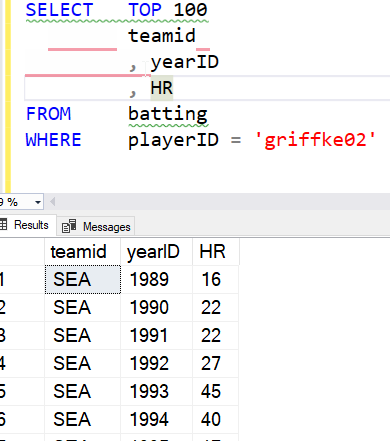
    If I just get the list of batting records for Ken, I see this results (abbreviated) below. Note that there is no ordering I can count on here. The row number to the right is added by SSMS, but isn’t in the result set:

    2021-07-13 11_34_04-SQLQuery1.sql - ARISTOTLE.BaseballData (ARISTOTLE_Steve (75))_ - Microsoft SQL S

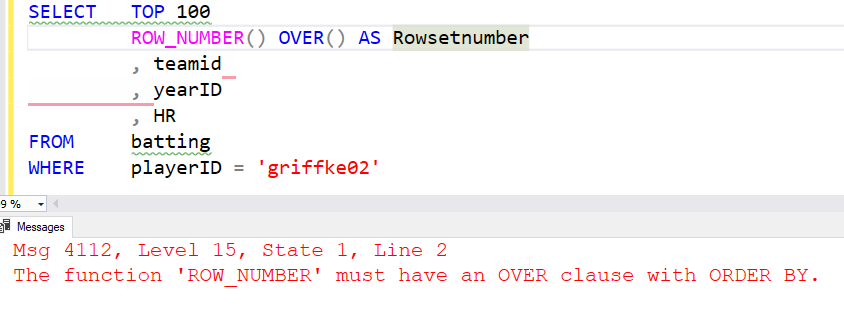
    If I want to ensure every client has a row number, I can use that function with an OVER() clause. Note that I need to include something in the OVER() clause.

    2021-07-13 11_35_33-SQLQuery1.sql - ARISTOTLE.BaseballData (ARISTOTLE_Steve (75))_ - Microsoft SQL S

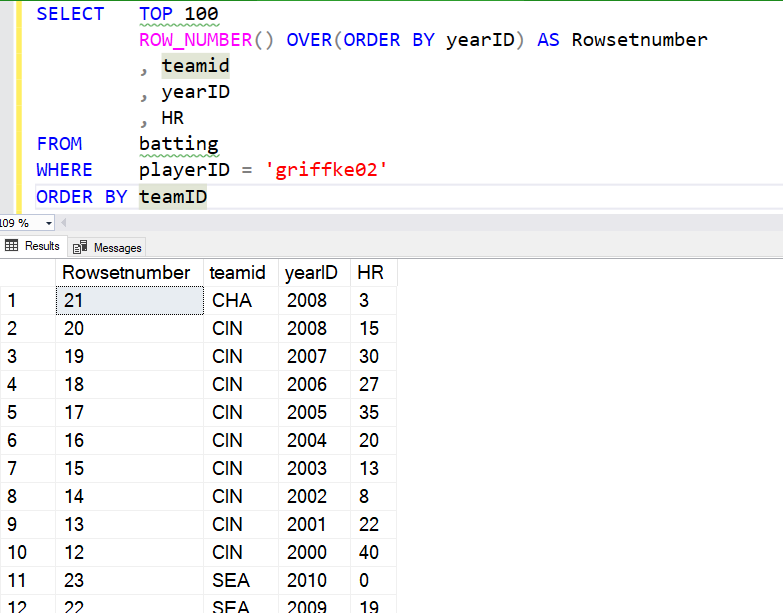
    Let’s fix that. I’ll order by year and then ensure I show the SSMS number added by the GUI. I see the numbers seem to correspond to the years. What if I order the entire query by team?

    2021-07-13 11_38_32-SQLQuery1.sql - ARISTOTLE.BaseballData (ARISTOTLE_Steve (75))_ - Microsoft SQL S

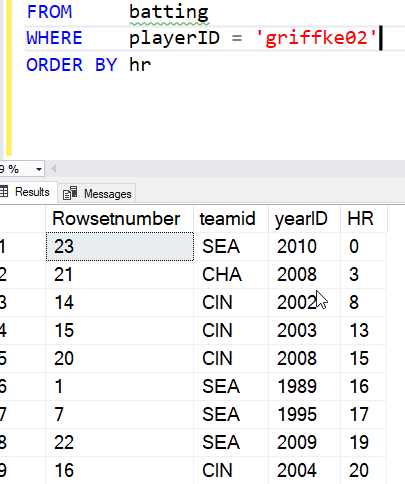
    This appear to have reversed the numbers. However, note that rows 11 and 12 are the 22 and 23. The window function applied the numbers based on the ordering of years for the entire set, then the rows were re-ordered for the query based on the ORDER BY. We see this more clearly with an ORDER BY using the HR column.

    2021-07-13 11_41_59-SQLQuery1.sql - ARISTOTLE.BaseballData (ARISTOTLE_Steve (75))_ - Microsoft SQL S

    What about just an ordering for the results? I do need an ORDER BY I can use this trick.

    SELECT   TOP 100
              ROW_NUMBER() OVER(ORDER BY (SELECT NULL)) AS Rowsetnumber
              , teamid
              , yearID
              , HR
    FROM     batting
    WHERE    playerID = 'griffke02'
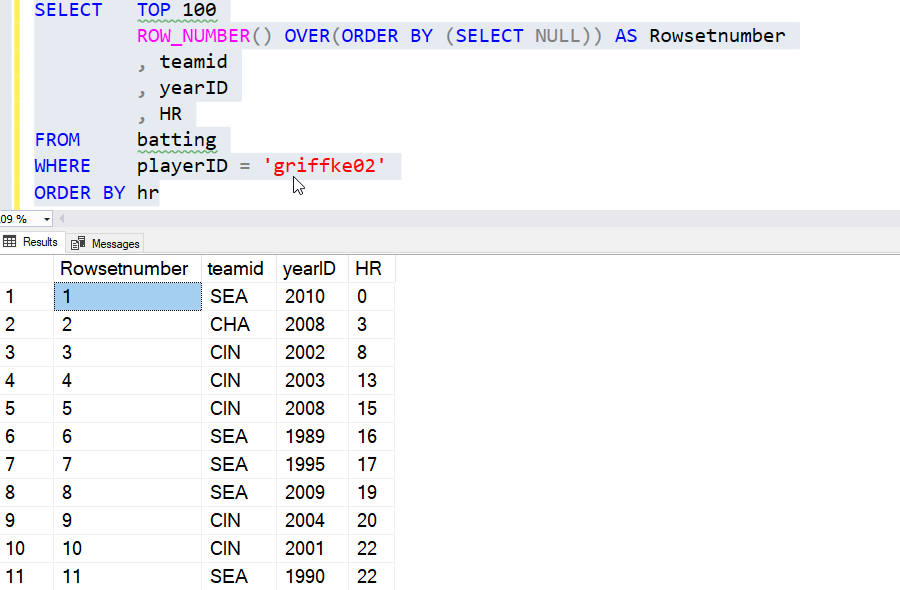
    ORDER BY hr

    This allows me to just apply the ROW_NUMBER to whatever the query is doing. Here’s the result, ordered by HR.

    2021-07-13 11_45_14-SQLQuery1.sql - ARISTOTLE.BaseballData (ARISTOTLE_Steve (75))_ - Microsoft SQL S

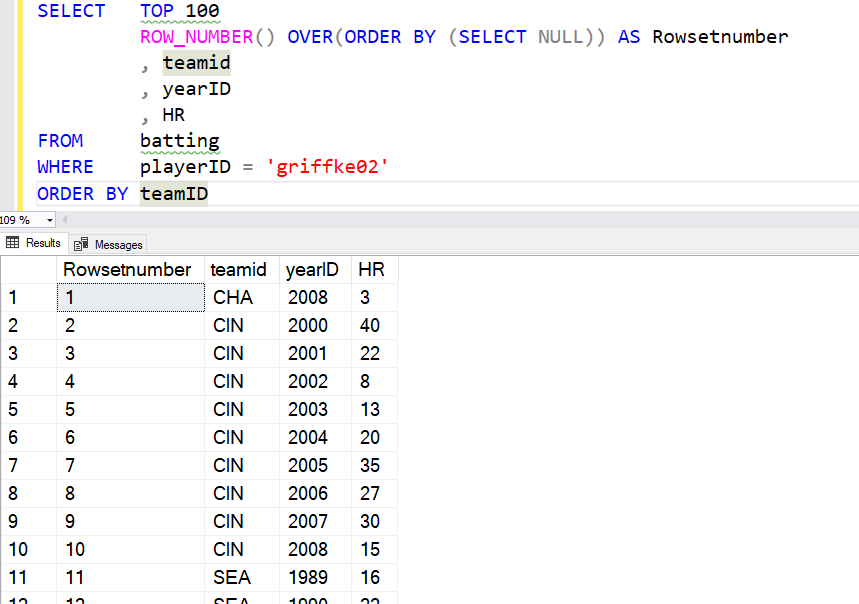
    If I go back to my ordering by team, I see this:

    2021-07-13 11_46_48-SQLQuery1.sql - ARISTOTLE.BaseballData (ARISTOTLE_Steve (75))_ - Microsoft SQL S

    I can also add a PARTITION BY, and get numbering inside the partition or group. Here I’ll partition by team. I’ll go back to ordering by year, since that makes sense. I’ll use this query.

    SELECT   TOP 100
              ROW_NUMBER() OVER(PARTITION BY teamID ORDER BY (SELECT NULL)) AS Rowsetnumber
              , teamid
              , yearID
              , HR
    FROM     batting
    WHERE    playerID = 'griffke02'
    ORDER BY yearID

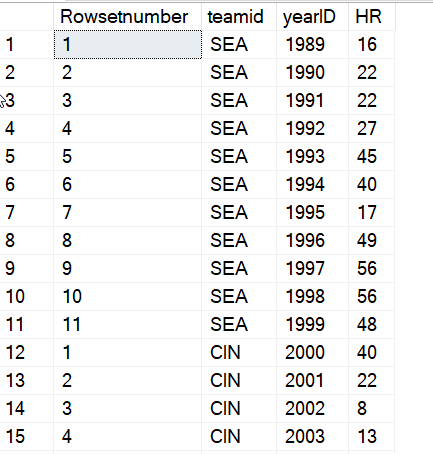
    The results are then shown with the numbering restarting with each team.

    2021-07-13 11_49_01-SQLQuery1.sql - ARISTOTLE.BaseballData (ARISTOTLE_Steve (75))_ - Microsoft SQL S

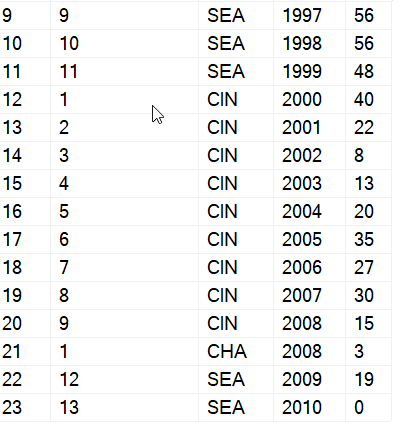
    The one strange thing to note here is that since Ken went back to Seattle late in his career, the numbering for his final two years show a continuation of the numbers from earlier with SEA.

    2021-07-13 11_49_12-SQLQuery1.sql - ARISTOTLE.BaseballData (ARISTOTLE_Steve (75))_ - Microsoft SQL S

    The ROW_NUMBER() function is very powerful and useful when you need some ranking and ordering to show to the client for the rows. As with all data, you need to ensure you understand the data set and be aware of how your partition (grouping) and ordering in the OVER() clause apply to the data, but the final results are dependent on the query’s ORDER BY. This can cause some confusion, so be sure you understand the difference and inform your clients.

    SQLNewBlogger

    This was a quick 10 minute post. I’ve done a lot of work with Window functions and presented on them, so this was a portion of a presentation I’d given, where I took part if a demo and wrote it up.

    However, you can experiment in 15-20 minutes and then spend 10-15 minutes structuring a post on this topic. How have you used ROW_NUMBER(), or if you’ve just learned it, what does it mean to you. Come up with some examples, ensure you understand them, and then explain them back. Might be an easy interview question to answer at some point if they find it on your blog.

  • Basic Window Functions–#SQLNewBlogger

    Another post for me that is simple and hopefully serves as an example for people trying to get blogging as #SQLNewBloggers.

    Window functions are a class of functions that dramatically improve the performance of certain types of queries. We often think of these as aggregates, but there are ranking and analytic functions that can be used as well.

    This is a basic post looking at the outline of these functions and their structure. I’ll look at a few more details in future posts.

    The OVER() Clause

    The idea in many of these functions is to create a window on which a function can operate and perform some computation over a row in the window. When I first heard of this, I wasn’t sure this was that powerful, but now I find these functions to be incredibly useful for many aggregates, especially because I can get things like a SUM() without requiring a GROUP BY.

    The main way we define the window is with the OVER() clause. This comes after the function and defines a partition and ordering for the rowset, one which the window is then applied. That sounds more complex than it really is, so let’s look at a simple example.

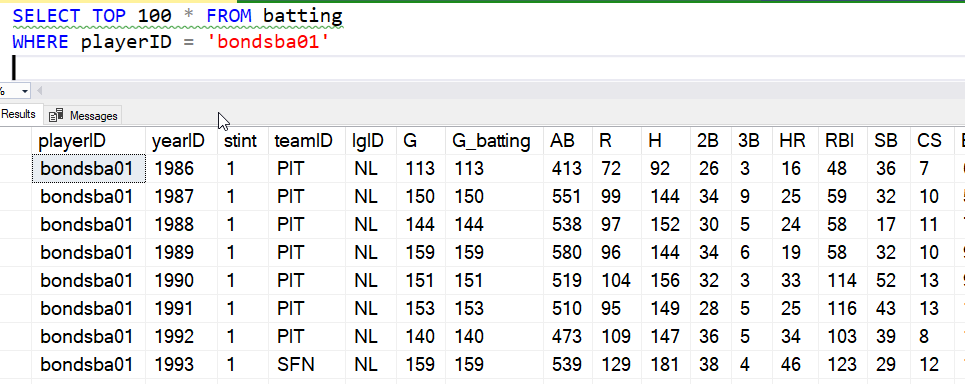
    I have a number of baseball statistics in a table. I’ll look at one player, Barry Bonds, and his career across a couple teams. If I look at the data, I see:

    2021-07-06 12_58_18-SQLQuery1.sql - ARISTOTLE.BaseballData (ARISTOTLE_Steve (51))_ - Microsoft SQL S

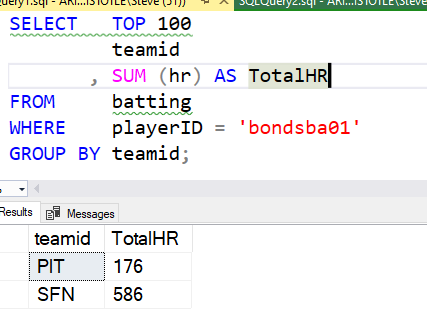
    If I want to sum something like home runs, I can do that with the team easily like this:

    2021-07-06 13_00_35-SQLQuery1.sql - ARISTOTLE.BaseballData (ARISTOTLE_Steve (51))_ - Microsoft SQL S

    I have a sum and a team, and a GROUP BY. What if I wanted to add something in there, like the at bats by year. Maybe I want to add some other text fields, which is easy to do, but every time I add a non-aggregate to the column list, I need to also add it to the GROUP BY. That’s a pain, and it’s cumbersome. Not only that, I’m limited to looking at the data in the same way. I might want an overall average number of at-bats, or maybe an average by team.

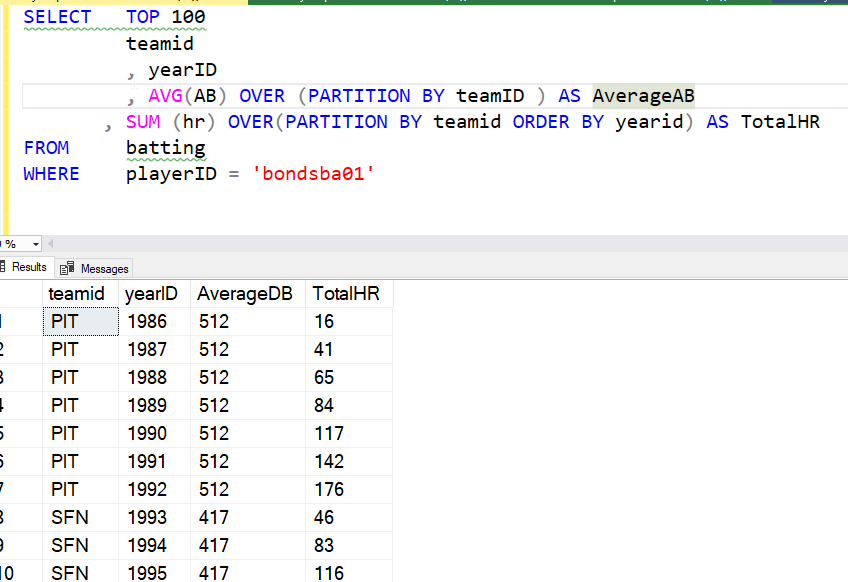
    With the OVER clause, I can have different views of the rowset as applied to the function. In this query below, I order one rowset, but not the other. I could have partitioned by different values if I wanted, but that doesn’t help here.

    2021-07-06 13_07_16-SQLQuery1.sql - ARISTOTLE.BaseballData (ARISTOTLE_Steve (51))_ - Microsoft SQL S

    Here the average is calculated on the partition, not on the entire group, which is what I’d have before the OVER() clause. I could even add other detail data, like the league, and I wouldn’t have to alter multiple clauses.

    There are two key concepts here for the basic OVER clause that I want to discuss, and more details will come in other posts.

    Partition BY

    The partition by separates the rowset into groups, much like the GROUP BY does. In this case, we note that we want to break our data into groups based on the value of a column (or columns).

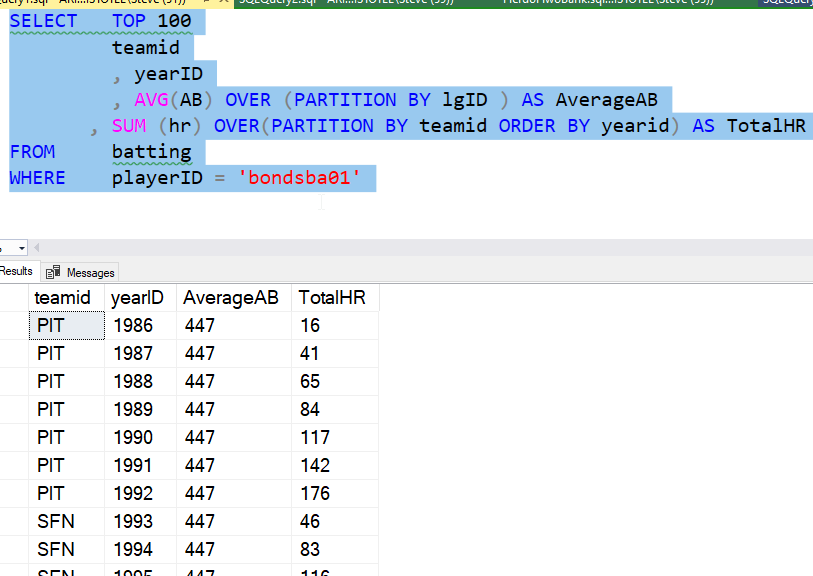
    This can be different for each OVER() clause, as you can see below. Now the average is teh same for all rows, as Mr. Bonds only played in one league.

    2021-07-06 13_12_26-SQLQuery1.sql - ARISTOTLE.BaseballData (ARISTOTLE_Steve (51))_ - Microsoft SQL S

    More details in a future post.

    Order By (Inside OVER)

    The ORDER BY is the ordering of the rows inside of the partition. In this case, the order doesn’t matter, but in some cases it might. With some functions it matters, so this can change the way your query works.

    This works just like the ORDER BY clause at the end of a SELECT query, but when inside the parenthesis, this applies only to the partitions.

    Summary

    This is a very basic look at Window functions. This is the basic view of what these are, and how they might be used in queries. There are more options, and more to know, but this is a basic look at how you might think about building aggregate queries without a GROUP BY, better performance, and in my mind, easier to read.

    SQLNewBlogger

    I had to write a query recently and chose an window function because it simplified the code. It also performed very well. This is a start of a few posts based on that work, showing that I have some knowledge on how to use these features in SQL.

    This post took about 10 minutes to write, mostly me structuring the example from a dataset I have, and then about 5 minutes to pull some things out of this post to focus on the basic part of building a query. I can expand on this in other posts.

    This is a pattern you can easily follow in your own blog to show that you understand some concept in T-SQL, in Azure, or really any topic. Enough of these and they’ll help drive your interview to subjects you know something about.

  • Setting DebugPreference for Testing–#SQLNewBlogger

    Another post for me that is simple and hopefully serves as an example for people trying to get blogging as #SQLNewBloggers.

    I was working on a PoSh script recently and needed to debug some things. Rather than have Write-Host throughout it, I wanted to log some stuff when I had issues, but not all the time. This post talks about how to do this.

    A Simple Script

    Here’s a simple script that I wrote to investigate this:

    write-host("test")
    Write-Debug("This is a debug message")
    $i = 10
    Write-Debug("I: $i")
    $i += 1
    Write-Debug("I: $i")
    $i += 1
    Write-Host($i)

    In this script, I have a few messages. If I just run this, I get this result:

    ❯ .\debugscript.ps1
    test
    12

    That’s pretty easy to see. However, what if I want my debug messages to print? I can add a –Debug parameter, but that doesn’t affect the script.

    ❯ .\debugscript.ps1 -Debug
    test
    12

    Set $DebugPreference

    Instead, what I need to to is change the debug preference, which is in the $DebugPreference variable. This is in the Preference Variable list, and defaults to SilentlyContinue.

    However, if I set this to Continue, I get the behavior I want.

    ❯ $DebugPreference="Continue"
    ❯ .\debugscript.ps1
    test
    DEBUG: This is a debug message
    DEBUG: I: 10
    DEBUG: I: 11
    12

    If I don’t want to see these, I can set the variable back.

    $DebugPreference="SilentlyContinue"

    Using the variable with write-debug is a quick way to turn debugging on and off in your console.

    SQLNewBlogger

    I had used this before, but had to think about it for a few minutes as I hadn’t done any PowerShell lately. So I decided to add 15 minutes to my work and document this for myself.

    And for the next person that wants to interview me on how I write PoSh. You could do the same thing.

  • Creating a Symmetric Key–#SQLNewBlogger

    Another post for me that is simple and hopefully serves as an example for people trying to get blogging as #SQLNewBloggers.

    This is a series on working with the various encryption technologies in SQL Server.

    One of the encryption technologies in SQL Server is using keys to encrypt or decrypt data. This post looks at the symmetric key, which is part of the way that you can do the actual encryption of your data in SQL Server. I have a post the discusses how this works, but this post just looks at the use of creating the key.

    Note: You may need to create a database master key first, and you can follow the link to do that. If you need an overview of encryption, read A Basic Encryption Primer for SQL Server.

    The CREATE Statement

    There is DDL For symmetric keys in the form of:

    There are also the OPEN and CLOSE commands. For this post, we will look only at the CREATE statement.

    The basic statement requires a name, an algorithm, and an encryption mechanism. You cannot create a key that is unprotected in some way. Each of these has different possible values.

    You also can optionally add a KEY_SOURCE and an IDENITY_VALUE, which are used to recreate this key if it is removed (or in another database). You can also use a provider, if you have an EKM provider configured. Your CREATE would use the EKM provider and the name of the key from the provider to use in operations. If I want someone else to own this key, I can provide a user name or an application role.

    Here is the minimum key create (and the select and drop to check it).

    CREATE SYMMETRIC KEY SteveKey
      WITH ALGORITHM = AES_128
      ENCRYPTION BY PASSWORD = 'sdfs'
    GO  
    SELECT * FROM sys.symmetric_keys AS sk
    GO
    DROP SYMMETRIC KEY SteveKey
    GO

    This uses a specific algorithm, which I must provide. There are a number of choices, but in terms of practical choices in 2021, likely really only the AES ones make sense. For the encryption scheme, that depends on what you’ve set up in your system, but you can choose from

    • password
    • symmetric key
    • asymmetric key
    • certificate

    You choose the type and enter it, with the name of the object or the = with a password.

    That’s really the extent of creating a symmetric key. Any details with an EKM provider really come from the name used in the CREATE PROVIDER command.

    SQLNewBlogger

    This is something I’ve done a few times to learn how it works and practice implementing encryption. Ultimately, the key management makes most of the column level encryption seem silly, and really I’d do this in the application layer to ensure communications are protected.

    I took 20 minutes to write this up, copy some links, and showcase this. If you want to work in this area, do this as well. Practice this and write about what you’ve learned, the good, the bad, and the problems.