Tag: SQLNewBlogger

  • Getting a New Remote Git Branch–#SQLNewBlogger

    Another post for me that is simple and hopefully serves as an example for people trying to get blogging as #SQLNewBloggers.

    I was notified of a new PR at DataSaturdays, and I went to look at the changes. In this case, a lot of styling items in the code, which I can’t quite picture. I also wanted to check the behavior of some sorting changes. How could I do this?

    I saw the branch, but I wasn’t sure how to get it locally. For me, I started with Google, which too me to StackOverflow. Here I found an answer.

    I have git v2.29, so I could probably have used just the checkout command, but I ended up doing this command:

    git fetch

    which got me the new branch.

    2021-01-05 10_27_18-cmd

    From here, I did a checkout of this branch, tested the code, and then could approve the PR.

    I know I’ve likely had to get a branch before, but I am hoping that writing this post will help me remember.

    SQLNewBlogger

    This is a skill that is handy for working with code, and these days, even infrastructure and management. Git is an important skill, so showcase some things you learned, how, and why, on your blog.

    This post took me about 6 minutes to write.

  • Changing Values in T-SQL–#SQLNewBlogger

    Another post for me that is simple and hopefully serves as an example for people trying to get blogging as #SQLNewBloggers.

    Recently I ran across a question posted by a beginner on the Internet and thought this would be a good, basic topic to cover. The question was: how can I replace a value in a comma separated string in a table?

    This post covers the basics of this task.

    Scenario

    Suppose you have some strings in a table, and they contain multiple values. I see this often when application developers serialize some data. For example, I might create a table like this:

    CREATE TABLE mytable
    (   mykey INT NOT NULL CONSTRAINT mytablepk PRIMARY KEY
       , myval VARCHAR(100));
    GO
    
    INSERT dbo.mytable
         (mykey, myval)
    VALUES
         (1, 'apple,pear,banana')
       , (2, 'pear,peach,melon');
    GO
    
    SELECT * FROM dbo.mytable AS m;

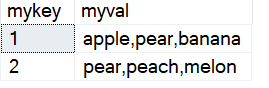
    This has a few rows of multiple values in a field.

    2021-01-04 12_09_31-SQLQuery17.sql - ARISTOTLE.sandbox (ARISTOTLE_Steve (84))_ - Microsoft SQL Serve

    Imagine now I need to change pear to grape in all rows. I want a simple solution to do this.

    Solution

    I have seen some people try to use complex substring calls paired with other functions to do this, but T-SQL gives you a really simple solution. We have a REPLACE() function that allows us to change a string without parsing it.

    The simple way to do this is like this:

    SELECT
          m.mykey
        , m.myval
        , REPLACE(m.myval, 'pear', 'grape') AS newstring
    FROM dbo.mytable AS m;

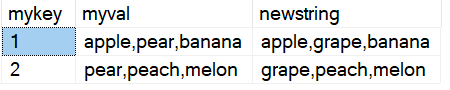
    Always run a SELECT before an UPDATE, but in this case, I can see that pear has been removed and grape is in its place.

    2021-01-04 12_17_05-SQLQuery17.sql - ARISTOTLE.sandbox (ARISTOTLE_Steve (84))_ - Microsoft SQL Serve

    REPLACE() works by passing in a string as the first parameter, then a second string to search for, pear in this case, and finally a replacement. I could then put together an UPDATE statement to change my table.

    UPDATE dbo.mytable
      SET myval = REPLACE(myval, 'pear', 'grape')
    FROM dbo.mytable AS m;

    If I run this, the results shown above for newstring will replace the myval string for all rows.

    SQLNewBlogger

    This is an example of a basic type of T-SQL solution that is simple, with a quick explanation. I answered this for someone and then spent 10 minutes writing this up.

    A good story to have ready for an interview.

  • Basic Cursors in T-SQL–#SQLNewBlogger

    Another post for me that is simple and hopefully serves as an example for people trying to get blogging as #SQLNewBloggers.

    Cursors are not efficient, and not recommended for use in SQL Server/T-SQL. This is different from other platforms, so be sure you know how things work.

    There are places where cursors are useful, especially in one-off type situations. I recently had a situation, and typed “CREATE CURSOR”, which resulted in an error. This isn’t valid syntax, so I decided to write a quick post to remind myself what is valid.

    The Basic Syntax

    Instead of CREATE, a cursor uses DECLARE. The structure is unlike other DDL statements, which are action type name, as CREATE TABLE dbo.MyTable. Instead we have this:

    DECLARE cursorname CURSOR

    as in

    DECLARE myCursor CURSOR

    There is more that is needed here. This is just the opening. The rest of the structure is

    DECLARE cursorname CURSOR [options] FOR select_statement

    You can see this in the docs, but essentially what we are doing is loading the result of a select statement into an object that we can then process row by row. We give the object a name and structure this with the DECLARE CURSOR FOR.

    I was recently working on the Advent of Code and Day 4 asks for some processing across  rows. As a result, I decided to try a cursor like this:

    DECLARE pcurs CURSOR FOR SELECT lineval FROM day4 ORDER BY linekey;

    The next steps are to now process the data in the cursor. We do this by fetching data from the cursor as required. I’ll build up the structure here starting with some housekeeping.

    In order to use the cursor, we need to open it. It’s good practice to then deallocate the objet at the end, so let’s set up this code:

    DECLARE pcurs CURSOR FOR SELECT lineval FROM day4 ORDER BY linekey;
    OPEN pcurs
    ...
    DEALLOCATE pcurs

    This gets us a clean structure if the code is re-run multiple times. Now, after the cursor is open, we fetch data from the cursor. Each column in the SELECT statement can be fetched from the cursor into a variable. Therefore, we also need to declare a variable.

    DECLARE pcurs CURSOR FOR SELECT lineval FROM day4 ORDER BY linekey;
    OPEN pcurs
    DECLARE @val varchar(1000);
    FETCH NEXT FROM pcurs into @val
    ...
    DEALLOCATE pcurs

    Usually we want to process all rows, so we loop through them. I’ll add a WHILE loop, and use the @@FETCH_STATUS variable. If this is 0, there are still rows in the cursor. If I hit the end of the cursor, a –1 is returned.

    DECLARE pcurs CURSOR FOR SELECT lineval FROM day4 ORDER BY linekey;
    OPEN pcurs
    DECLARE @val varchar(1000);
    FETCH NEXT FROM pcurs into @val
    WHILE @@FETCH_STATUS = 0
    BEGIN
    ...
    FETCH NEXT FROM pcurs into @val
    END
    DEALLOCATE pcurs

    Where the ellipsis is is where I can do other work, process the value, change it, anything I want to do in T-SQL. I do need to remember to get the next row in the loop.

    As I mentioned, cursors aren’t efficient and you should avoid them, but there are times when row processing is needed, and a cursor is a good solution to understand.

    SQLNewBlogger

    As soon as I realized my mistake in setting up the cursor, I knew some of my knowledge had deteriorated. I decided to take a few minutes and describe cursors and document syntax, mostly for myself.

    However, this is a way to show why you know something might not be used. You could write a post on replacing a cursor with a set based solution, or even show where performance is poor from a cursor.

  • No Scalars with JSON_QUERY–#SQLNewBlogger

    Another post for me that is simple and hopefully serves as an example for people trying to get blogging as #SQLNewBloggers.

    I started to dig into JSON queries recently, and as I continued to experiment with JSON, this struck me as strange. Why is there a NULL in the result?

    2020-12-04 14_43_02-SQLQuery3.sql - ARISTOTLE_SQL2017.Compare2 (ARISTOTLE_Steve (58))_ - Microsoft S

    The path looks right. This appears to be somewhere I ought to get a result back. As I looked up the JSON_QUERY documentation, and it says I get an object or array back. I’d somewhat expect that position, while containing a single value, could be seen as an object of

    {“setter”}

    The fact that I need to know I have a single value here seems like poor design. If the document changes, perhaps someone might enter this:

    DECLARE @json NVARCHAR(1000)
         = N'
      {  "player": {
                  "name" : "Sarah",
                  "position" : "setter, DS"
                 },
        "team":"varsity"
      }
    ';

    In this case, a JSON_VALUE would fail, while a JSON_QUERY wouldn’t work in the first example above. This means that I need to modify my code based on documents.

    I don’t like this, but I need to know this, so if you work with JSON, make sure you know how the functions work.

    SQLNewBlogger

    While writing the previous post, I changed one of the function calls and got the NULL. I had to fix things for the other post, but I kept the query and then spent about 10 minutes writing this one to show a little thought into the language.

    You can easily take something you are confused about, made a mistake doing, or wonder about and write your own post.