Tag: SQLNewBlogger

  • Rename a Primary Key–#SQLNewBlogger

    Another post for me that is simple and hopefully serves as an example for people trying to get blogging as #SQLNewBloggers.

    Having system named objects is one of those things that people may debate, but as you move to more automated and scripted processes can cause you issues. In the case of a Primary Key (PK), if you do something like this:

    CREATE TABLE OrderDetail
        (
          OrderID INT IDENTITY(1, 1)
                      PRIMARY KEY ,
          OrderDate DATETIME
        );

    What you get is something like this:

    2016-06-27 13_58_47-SQLQuery4.sql - (local)_SQL2016.EncryptionDemo (PLATO_Steve (60))_ - Microsoft S

    When you compare that with the same table in another database, what’s the likelihood that you’ll have the PK named PK__OrderDet__D3B9D30C7D677BB4? Probably pretty low.

    This means that if you are looking to deploy changes, and perhaps compare the deployment from one database to the next, you’ll think you have different indexes. Most comparison tools will then want to change the index on your target server, which might be using this technique. Or the choice might be something that performs much worse.

    What we want to do is get this named the same on all databases. In this case, the easiest thing to do with rename the constraint on all systems. This is easy to do with sp_rename, which is better than dropping and rebuilding the index.

    I can issue an easy query to do this:

    exec sp_rename ‘PK__OrderDet__D3B9D30C7D677BB4’, ‘OrderDetail_PK’

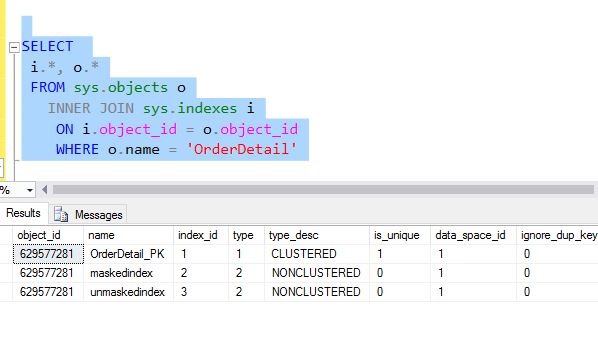
    When do this, I see the object is renamed.

    2016-06-27 13_59_20-SQLQuery4.sql - (local)_SQL2016.EncryptionDemo (PLATO_Steve (60))_ - Microsoft S

    This table has over a million rows, and while that’s not large, it does take time time to rebuild the index. With a rename, the change is to the metadata and takes a split second.

    SQLNewBlogger

    These quick, easy, administrator items are great to blog about. As an exercise, if this table has millions of rows, how much longer does the index rebuild take?

    This is a great topic for you to write about (or learn about) and show how you can better administer your SQL Server databases.

  • Getting Table Change Scripts–#SQLNewBlogger

    Another post for me that is simple and hopefully serves as an example for people trying to get blogging as #SQLNewBloggers.

    One of the really basic things I think everyone should understand is how to get scripts from Management Studio (SSMS) and saving them. In fact, I’ve written that everyone should use this button and really not ever execute their GUI changes. Capture the script, save that, and automate things.

    However, that’s not what this post is about. This post is about how you get a script to look at changes, or better understand how SSMS might implement your changes.

    Editing a Table

    Let’s say that you want to redesign a table, so you Edit it in the SSMS Table Designer. Here, you can see I have small table with a few fields.

    2016-06-27 09_33_55-PLATO_SQL2016.EncryptionDemo - dbo.OrderDetail - Microsoft SQL Server Management

    I want to rename the field with incorrect casing as well as insert an OrderDate column in the middle. I have made those changes below.

    2016-06-27 09_34_31-PLATO_SQL2016.EncryptionDemo - dbo.OrderDetail_ - Microsoft SQL Server Managemen

    Now, I’m not sure how these changes will be made in SSMS, and I certainly want to be careful in production. We want a script we can examine and approve.

    Certainly, I could use something like SQL Compare to generate a script between two databases. That would include transactions and error handling and more. That’s my preferred method. However, since not everyone has SQL Compare (a mistake! Winking smile ), let’s just use SSMS.

    Instead of saving, I’ll click this button.

    2016-06-27 09_37_09-PLATO_SQL2016.EncryptionDemo - dbo.OrderDetail_ - Microsoft SQL Server Managemen

    Or I’ll go to this menu item.

    2016-06-27 09_37_52-PLATO_SQL2016.EncryptionDemo - dbo.OrderDetail_ - Microsoft SQL Server Managemen

    Once I do that, after a warning, I get a script dialog.

    2016-06-27 09_39_28-PLATO_SQL2016.EncryptionDemo - dbo.OrderDetail_ - Microsoft SQL Server Managemen

    I can now save the script and then open it back  up in SSMS. I can see all the changes that the scripting engine thinks we should make.

    2016-06-27 09_41_29-OrderDetail.sql - (local)_SQL2016.master (PLATO_Steve (57)) - Microsoft SQL Serv

    This allows me to learn about one way to make these changes, as well as see things that might concern me, such as poorly named constraints and indexes.

    SQLNewBlogger

    This is a great productivity and learning technique, but also a core thing I’d hope most DBAs knew. You could certainly write about how you use this, or how this might have been helpful in a situation. Showcase your knowledge on this topic with the #SQLNewBlogger hashtag.

  • Using sp_executesql Parameters –#SQLNewBlogger

    Another post for me that is simple and hopefully serves as an example for people trying to get blogging as #SQLNewBloggers.

    I haven’t used sp_executesql much. Instead, my habitually way of executing dynamic SQL has been with EXEC(). There are a few differences between these commands, but I had to look at sp_executesql recently and realized I didn’t know much about it.

    One of the neat things with sp_executesql is that you can pass in parameters.  That’s pretty cool. I hadn’t ever bothered, but if you read the docs, you’ll see that if you execute the same code over and over, with different parameters, you might get the same execution plan. This can be a performance boost.

    NOTE: THIS IS NOT ALWAYS BETTER. It can be.

    I’m not going to delve into deep details, but Kimberly Tripp does so read her post (and then write your own thoughts).

    The Code

    Here’s some code to demonstrate. I have a simple table with 3 columns to insert. In this case, here’s my insert:

    INSERT EventLogger VALUES (@m, @d, @u)

    Now, I went to use this over and over, but with different values for the parameters. Obviously I can just do this:

    SET @m = ‘Error Message’

    INSERT EventLogger VALUES (@m, @d, @u)

    SET @m = ‘New Error Message’

    INSERT EventLogger VALUES (@m, @d, @u)

    However, imagine that I’m building this INSERT string dynamically because it’s more complex. How do I execute this over and over with new values? With EXEC(), I rebuild the string. With sp_executesql, I do this:

    DECLARE @cmd NVARCHAR(MAX)
    DECLARE @dt DATETIME = GETDATE();
    DECLARE @msg VARCHAR(200) = ‘An error occured’;
    DECLARE @usr VARCHAR(10) = ‘Steve’;
    DECLARE @p NVARCHAR(500);

    SELECT @cmd = N’INSERT EventLogger VALUES (@m, @d, @u)’

    SELECT @p = N’@m varchar(200), @d datetime, @u varchar(10)’

    EXEC sp_executesql @cmd, @p, @m = @msg, @d = @dt, @u = @usr;

    SELECT @dt = GETDATE()
         , @msg = ‘A new error occured’
         , @usr = ‘Bob’;

    EXEC sp_executesql @cmd, @p, @m = @msg, @d = @dt, @u = @usr;
    GO
    SELECT top 10
      *
    FROM dbo.EventLogger AS el

    Now, I check the table:
    2016-06-22 15_00_08-Settings

    I thought that was cool.

    SQLNewBlogger

    This isn’t a deep post. It’s a light look, with a little explanation. I’ll do more later. However, I’m hoping this serves as a way to show you how to start investigating a topic. I’ve spent a bit of time experimenting and learning. I’m fairly confident I could play and use sp_executesql more.

    You could do this as well, start digging into a topic and then show how you’re learning.

  • Basic XML Node Query–#SQLNewBlogger


    Another post for me that is simple and hopefully serves as an example for people trying to get blogging as #SQLNewBloggers.

    I saw a question recently about querying an XML document. Certainly avoid this in the database if you can, but there are times you need to. Rather than link to the post, I wanted to show the basics of how you query a node.

    Let’s suppose I have an XML document like this:

    <Order>
      <OrderID>4FB9</OrderID>
      <ORderDate>2019-07-20-00.31.23.000000</ORderDate>
      <Status>Open</Status>
      <Customer>
        <CustomerName Type=”Individual”>
          <FirstName>Jon</FirstName>
          <LastName>Doe</LastName>
        </CustomerName>
      </Customer>
      <Customer Type = “Company”>
        <CustomerName>
          <CompanyName>Acme</CompanyName>
          <Account>12345</Account>
        </CustomerName>
      </Customer>
      </Order>

    Now, I saw someone query this with code like this to get the OrderID.

    DECLARE @xml XML;
    SET @xml = N’
    <Order>
      <OrderID>4FB9</OrderID>
      <ORderDate>2019-07-20-00.31.23.000000</ORderDate>
      <Status>Open</Status>
      <Customer>
        <CustomerName Type=”Individual”>
          <FirstName>Jon</FirstName>
          <LastName>Doe</LastName>
        </CustomerName>
      </Customer>
      <Customer Type = “Company”>
        <CustomerName>
          <CompanyName>Acme</CompanyName>
          <Account>12345</Account>
        </CustomerName>
      </Customer>
      </Order>
    ‘;

    SELECT
          t.b.value(‘(ORDERID)[1]’, ‘NVARCHAR(100)’) AS MSGID
      FROM
        @xml.nodes(‘/Order’) t(b);

    This doesn’t work.

    2016-06-15 13_09_07-Photos

    The reason this doesn’t work is that XML is case sensitive. Meaning ORDERID != OrderID. The former is in the query, the latter in the XML document. If I change the query, this works (note I have OrderID below).

    2016-06-15 13_11_23-Photos

    This would also apply to the .Nodes call. If I had .ORDER, this also wouldn’t work.

    2016-06-15 13_11_54-Photos

    The @xml.nodes() call determines the root at which I’ve essentially set the document. I could have this as /Order/Customer if I wanted. In that case, I couldn’t access the OrderID. The OrderID isn’t below the Customer node.

    2016-06-15 13_13_21-Photos

    However, from below Customer, I can get to the names.

    2016-06-15 13_14_05-Photos

    There is a lot more to know about XML, but you can experiment with the various nesting levels by including different paths. I’ll show a few more things in another post.

    SQLNewBlogger

    Querying XML is hard, and can be frustrating as the document size grows and complexity grows. However, this is a good way to showcase your skills (or build them), but tackling different query questions or challenges and writing about them.

    Hint: this will also help solidify your XML skills.