Tag: SQLNewBlogger

  • Output into a Table–#SQLNewBlogger

    Another post for me that is simple and hopefully serves as an example for people trying to get blogging as #SQLNewBloggers.

    I often see people struggling to use triggers for auditing, or having issues with building them to handle multi row updates. However, there’s another choice: the OUTPUT clause.

    Not many people use this clause, but it’s a great way to access the virtual inserted and deleted tables in your code.

    Suppose I have a simple insert statement like this one:

    2016-08-22 11_11_01-SQLQuery7.sql - (local)_SQL2014.Sandbox (PLATO_Steve (57))_ - Microsoft SQL Serv

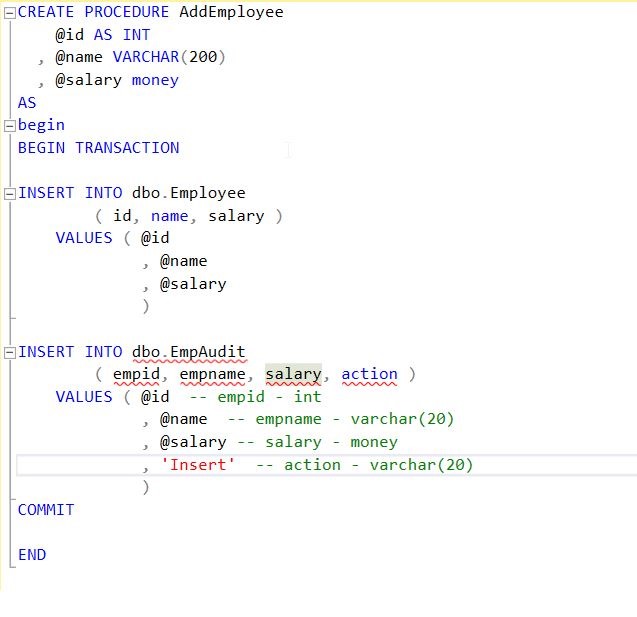
    I want to ensure that I get the data inserted into an audit table. Certainly I could have code that does the insert into two places, like this:

    2016-08-22 11_13_40-SQLQuery7.sql - (local)_SQL2014.Sandbox (PLATO_Steve (57))_ - Microsoft SQL Serv

    But it can be hard to get developers to use procs like this, they might forget or need to build dynamic SQL. There are the other issues of maintenance where I might update the first INSERT, but forget the second.

    OUTPUT allows me to add a clause in my DML statement. I put this before the FROM clause, or in this case, before the Values clause. Then I include values from inserted or deleted along with any scalar values. That looks like this:

    2016-08-22 11_16_09-SQLQuery7.sql - (local)_SQL2014.Sandbox (PLATO_Steve (57))_ - Microsoft SQL Serv

    However, this returns the data to the console. What I’d really like is to put this into a table. For that reason, I then add an INTO clause, with my table name. Now when I execute this, I get the data from the inserted table added to my EmpAudit table.

    2016-08-22 11_18_32-SQLQuery7.sql - (local)_SQL2014.Sandbox (PLATO_Steve (57))_ - Microsoft SQL Serv

    A basic, quick look at the OUTPUT clause.

    SQLNewBlogger

    I ran into an issue with OUTPUT and realized that I hadn’t ever covered this basic concept for myself. As I learned a few things, I decided to write about OUTPUT. This took me about 10 minutes to cover the basics, and was part of a 30 minute session writing a few more pieces on OUTPUT.

  • Rounding Challenges–#SQLNewBlogger

    Another post for me that is simple and hopefully serves as an example for people trying to get blogging as #SQLNewBloggers.

    Rounding is an interesting activity, and one that I think people sometimes don’t pay enough attention to. Recently I saw a problem that intrigued me and I spent a few minutes looking at the issues.

    Let’s suppose you have data like this for pricing.

    0.3

    0.7

    1.2

    1.6

    How would you round this data? If you use a simple ROUND(n,0) function, you get this:

    0.0

    1.0

    1.2

    2.0

    Now, that’s fine, but what if you want this:

    0.3

    1.0

    1.2

    2.0

    That’s a bit more challenging. I’ll leave the solution out, but note that if I ROUND(n, 1), I get this.

    0.3

    0.7

    1.2

    1.6

    That’s not quite right either. ROUND() is using the number of decimals I’ve given it, but in some cases, I might want to round up. In this case, I only round up when we’re at .5 or higher, but don’t round down. In those cases, I need to limit rounding. This could be done in a WHERE clause, or with a function (be really careful of scalar functions).

    The important part is knowing that I really want this:

    ROUND(0.3, 1)

    ROUND(0.7, 0)

    ROUND(1.2, 1)

    ROUND(1.6, 0)

    How I get these is up to me, and there are a few ways, but really I want to be sure that I understand how ROUND() works and then apply it appropriately for my situation.

    SQLNewBlogger

    This is a quick one, literally about 6 minutes to write. About a minute of that was playing with formatting. Understanding functions, and knowing how they affect data is important to show your knowledge.

    Also, make sure that you know how to solve something like this if you write about it. I’d encourage you to write the solution as well as remember it. Someone might ask you in an interview Winking smile

  • Opening .SQL Files in SSMS 2016 by Default #SQLNewBlogger

    Another post for me that is simple and hopefully serves as an example for people trying to get blogging as #SQLNewBloggers.

    This is an easy one, but you’ll want to try this yourself.

    As I’ve been trying to move off the various SSMS versions I have installed to the new, free, updated SSMS 2016, I’ve found that on every system (4 so far) that the default action for .SQL files is to open SSMS 2012 or SSMS 2014. That used to be OK, but it’s annoying. I have SSMS 2016 open (maybe just SSMS?) and waiting on the long load times for 2012/2014 SSMS, especially in demos, is annoying.

    If I right click a .SQL file, I get the chance to choose, but what do I choose?

    2016-08-04 16_34_37-2-sqlserver-replacing-profiler-extended-events-m2-exercise-files

    A little experimentation shows that I want SSMS, not SQL Server Management Studio. So let’s change that.

    First, open the Control Panel. On Windows 10, this is the Win+I key combination. I find it hard to know where some things are located, but I like the Search in the upper right.

    2016-08-04 16_36_28-Settings

    When I type “default,” I get a list of things. The fourth one down is the one I want to click.

    2016-08-04 16_36_38-Settings

    This brings me a list of each file type and the app. Boy, there are a lot of types to go through. You’ll want to scroll down about two thirds of the way to find .SQL.

    2016-08-04 16_37_09-Settings

    Once I find the file, I click the icon on the right, where it says SQL Server Management Studio. This brings up a “Choose an app” dialog as shown below. I click the SSMS choice.

    2016-08-04 16_37_14-Settings

    Now when I double click a file, it just opens in SSMS (2016). Quickly.

    SQLNewBlogger

    A handy tip. This shows I saw a problem and fixed it. I’m sure some of you could write this in 10 minutes. Some might even built a .reg file or some other automation to show off skills that would help you fix this.

  • Dropping Masking from a Column–#SQLNewBlogger

    Another post for me that is simple and hopefully serves as an example for people trying to get blogging as #SQLNewBloggers.

    This is a quick one. As I experimented with Dynamic Data Masking for the Stairway to Dynamic Data Masking, and writing my Using SQL Compare with Dynamic Data Masking, I needed to remove masking from a column. I didn’t want to rebuild tables, and hoped there was an easy way to ALTER a column.

    There is.

    Here’s my table. I added masking to this table, but this is the scripted DDL.

    CREATE TABLE [dbo].[OrderHeader](
        [OrderID] [INT] IDENTITY(1,1) NOT NULL,
        [Orderdate] [DATETIME2](3) NULL,
        [CustomerID] [INT] NULL,
        [OrderTotal] [NUMERIC](12, 4) MASKED WITH (FUNCTION = 'default()') NULL,
        [OrderComplete] [TINYINT] NULL,
        [SalesPersonID] [INT] NULL,
    PRIMARY KEY CLUSTERED 
    (
        [OrderID] ASC
    )WITH (PAD_INDEX = OFF, STATISTICS_NORECOMPUTE = OFF, IGNORE_DUP_KEY = OFF, ALLOW_ROW_LOCKS = ON, ALLOW_PAGE_LOCKS = ON) ON [PRIMARY]
    ) ON [PRIMARY]
    
    GO

    Note, I have masking enabled on the OrderTotal column. If I want to turn this off, I merely run this:

    ALTER TABLE dbo.OrderHeader
    ALTER COLUMN OrderTotal ADD MASKED WITH (FUNCTION='default()');

    This removes masking, and if I script the table again, I get this:

    CREATE TABLE [dbo].[OrderHeader](
        [OrderID] [INT] IDENTITY(1,1) NOT NULL,
        [Orderdate] [DATETIME2](3) NULL,
        [CustomerID] [INT] NULL,
        [OrderTotal] [NUMERIC](12, 4) MASKED WITH (FUNCTION = 'default()') NULL,
        [OrderComplete] [TINYINT] NULL,
        [SalesPersonID] [INT] NULL,
    PRIMARY KEY CLUSTERED 
    (
        [OrderID] ASC
    )WITH (PAD_INDEX = OFF, STATISTICS_NORECOMPUTE = OFF, IGNORE_DUP_KEY = OFF, ALLOW_ROW_LOCKS = ON, ALLOW_PAGE_LOCKS = ON) ON [PRIMARY]
    ) ON [PRIMARY]
    
    GO

    Easy to turn off if you need to. No application changes, and no security changes.

    SQLNewBlogger

    A quick, handy piece. Give a why you need this, and show how to do it. Any of you could write this in 5 minutes.