Tag: syndicated

  • Select All in a Power BI Slicer–#SQLNewBlogger

    One of the things I’ve been working on this year is a Power BI report for the kids I coaco in volleyball. As a part of this, I want to be able to show all kids, or a few kids, in relation to each other.

    This post covers enabling this for a Slicer on a report.

    Another post for me that is simple and hopefully serves as an example for people trying to get blogging as #SQLNewBloggers. Here are some hints to get started.

    Adding the Slider

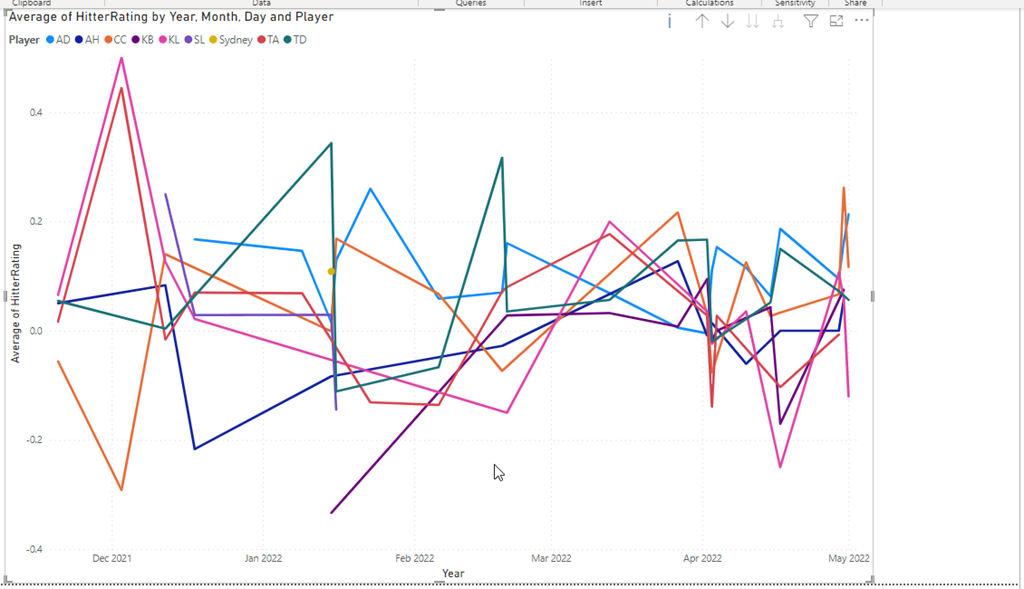
    I have a basic report with a line graph. It looks like this once I’ve added in the value to capture at the Y, the date as the X, and the player as the legend.
    2022-11-06 10_16_41-2022_16Select_Online - Power BI Desktop

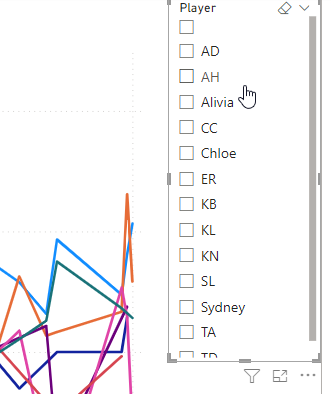
    I’ll add a slicer to the report and drop the players in there. I see the players, but I don’t have an easy way to select all of them.
    2022-11-06 10_17_00-2022_16Select_Online - Power BI Desktop

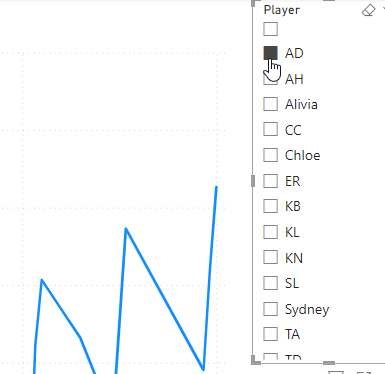
    I can select 1, but if I select another, the report changes. I can CTRL+select to get multiple players, but I want to easily get everyone.
    2022-11-06 10_17_14-2022_16Select_Online - Power BI Desktop

    I knew this was possible because I’d seen other reports show this. I didn’t see anything obvious, so I actually had to search the docs and found a note that explained how to enable this.

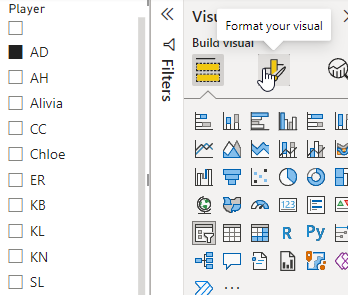
    If I click the slicer, I can then select the  Format option on the right, which is the center icon at the top of the visuals pane. You can see the tool tip below.
    2022-11-06 10_17_22-2022_16Select_Online - Power BI Desktop

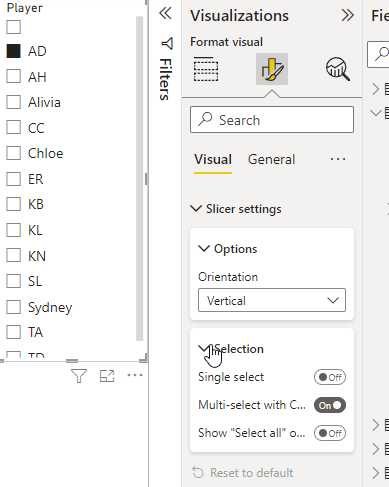
    Once I do this, I need to expand the Slicer Settings and then the Selection area, as shown here.
    2022-11-06 10_17_30-2022_16Select_Online - Power BI Desktop

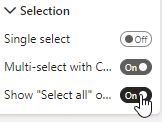
    Now I want to click the “Show Select All” button.
    2022-11-06 10_17_35-2022_16Select_Online - Power BI Desktop

    Now my slicer show a Select All at the top.

    2022-11-06 10_17_45-2022_16Select_Online - Power BI Desktop

    Easy.

    I found that when I have a few slicers, which I wanted for this report, it was easy to add them all, then do the formatting for one. If I clicked another slicer, I was in the same format spot and could enable SELECT ALL for the next one. For me, I actually had 3 slicers, so it was nice to format them all very quickly to add this option.

    SQL New Blogger

    This is a really basic post, but it was also something that I didn’t intuitively figure out. I had to research a bit and look around. That’s the skill that many employers need and want.

    This also might trigger someone to ask me about Power BI and what I know, which gives me the chance to talk about the learning and experimenting I’ve done.

    You could do this as well. It took me about 15-20 minutes to grab screen shots and write this.

  • Daily Coping 9 Nov 2022

    Today’s coping tip is to make time for a friend and have a coffee, meal, or just spend time.

    It’s been a busy few months for me. Since Sept 1, I’ve been away from home for 5 trips and 30 days. I leave in a couple days for another one. This has made life a little hectic and frantic, as I’m trying to juggle many tasks with limited time.

    I made lunch plans with a friend a couple times and we ended up cancelling, each of us getting busy once. We lined up a third date between my trips, and even though I was busy, I decided to keep the plans. I’ve neglected some Denver friends, and I needed to stop that.

    My wife questioned whether I had the time, which was fair. I was busy, and this lunch meant I’d be working late that night, but getting some time with a good friend, recharging my mental state, and taking a break were important.

    I’m glad I did it.

    I started to add a daily coping tip to the SQL Server Central newsletter and to the Community Circle, which is helping me deal with the issues in the world. I’m adding my responses for each day here. All my coping tips are under this tag.

  • T-SQL Tuesday #156–Ready for Production

    tsqltuesdayIt’s a busy time for me, but it’s also T-SQL Tuesday blog party day. I’m rushing a bit as I forgot about this (thanks for the reminder, Deb) and had to help on the ranch this morning.

    In any case, a moment of Zen.

    20221108_082454

    Now, for the T-SQL Tuesday post to answer Tom’s invitation.

    The Quality Bar

    Lots of code gets through to production. I suspect many of us agree that not all of this is production quality. Often we find issues with code that doesn’t perform well or even meet the specs of what we required.

    I haven’t had to put much code in production in the last decade, but I do remember doing so, and I remember supporting code. To me, the code quality that defines production is this:

    Does it make my phone ring?

    If the answer is no, it’s production quality. If it does, then it’s not. That’s how I’ve worked on things in the past, and it’s served me well.

    You might argue, Steve, that doesn’t help. How do I know what code will meet that metric? There’s no easy answer there. You need to know the system, the requirements, the clients, and the workload. There is a lot that goes into deciding how to build code and what commands, structures, architecture, etc. is suitable.

    A few examples. In SQL Server, we avoid cursors because they are not efficient. However, if I have very rare processes, or sometimes on-offs, a cursor might work fine. If it doesn’t overload the server, runs fast enough, and gets the job done, why not?

    Another example is using CTEs to pre-aggregate some totals so that I can write a simpler query for a report with related data that isn’t aggregated. This might not be very efficient, and might create a lot of logical reads. However, if the report isn’t a problem with the server workload, is it production quality? I think it is.

    The caveat to this is you also need to know data growth. What is production quality today might not be in a year. Potentially we need to refactor code later. That’s fine for me if the situation changes, but it’s not fine if I can forecast this being a problem and I have a better technique, perhaps with some WINDOW functions and less CTEs. I don’t want to defer work unless I don’t have a choice. If I can write better code today, I should.

    This also means I ought to be learning more about how to produce better code from others on a regular basis.

  • Deciding to Submit to Conferences–#NewStarNovember

    I wrote about getting started last week, with invitations from others. I think the first time I actually made my own submission was to the Indy Tech Fest in 2007. At the time, Andy Warren and I were in SQL Saturday discussions about how things had gone the year before and we wanted to get some info on other events. John Magnabosco invited us to submit something to their event, so both Andy and I did.

    It wasn’t much of a submission, and I think John just accepted what I sent without thinking about it. However, at the same time, SQL Saturday #7 – Orlando was coming up and Andy wanted me to come down. This was their second event, so I also prepared a career based submission based my life and sent that in.

    That first talk in Indy was OK, but nothing special. The one in Orlando, however, was very exciting for me. I was nervous, especially as the room filled up. Eventually there was standing room only, with some people sitting down around the sides of the classroom. The session was OK from my perspective, but people really enjoyed it, I had a lot of questions, and some good reviews.

    That was in 2008 and it got me a little excited. I gained confidence and I submitted that session to two events in 2009 and got accepted. Then in 2010, I expanded my reach, submitting to more events and getting in 10 talks at 7 events.

    Since then, I’ve worked on my abstracts and submissions, getting advice from others and trying different things. I’ve also spent time recording and watching myself, taking feedback, and practicing more to become a better public speaker.

    I still get nervous at times, but delivering a good talk and having people give me positive feedback is exciting each time it happens.

    Part of a Series of #NewStarNovember posts. If you want to help promote new speakers, consider writing a post as well. Some ideas at the New Stars of Data.