Tag: syndicated

  • Powershell Practice with a War Game

    I attended part of the recent PowerShell + DevOps summit, and one of the sessions was from Fernando Tomlinson (@wired_pulse and @underthewire_ps) on incident response. He talked about a number of things, but one was his work at UnderTheWire.tech, where there are PowerShell training items.

    One section here is on War Games. These are challenges, where you need to use PowerShell to progress through the levels of the game. It’s a chance to practice some knowledge, or maybe look things up and learn. I decided to try one of these.

    Century

    The first war game is Century. Here you join a Slack server to get credentials, and it’s also where you can ask for help. Once you join, you have an initial set of credentials to connect to a host through SSH. If you’ve never done this, it’s a chance to learn.

    For me, I knew Win10 had added this, and I hadn’t actually installed PuTTy on this machine, so I tried this:

    ssh century1@century.underthewire.tech

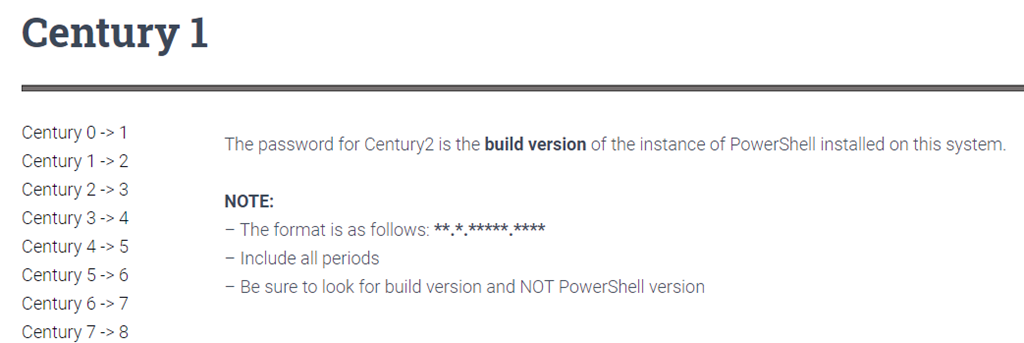
    This prompted me for a password, which I had from Slack. From here, I needed to go through the next step in the wargame. In this case, the 1st level looked like this:
    2021-04-27 16_06_17-Century 1 – UTW

    Easy enough, I need information on PowerShell that is installed. If you know how to do this (I did), it’s easy. I copied the build number, and then used “exit” to disconnect. I opened a new SSH connection, with the century2 user and the build number as the password.

    It worked, and I continued through the challenge.

    Thoughts

    This was an interesting test of how to use PowerShell. I don’t do a lot of desktop admin type stuff, so I had to look up some items. I had to type carefully (or copy/paste carefully) and read. For example, one item said to look in a folder for a file, but I was looking at the list of items in the root, not as folders. Slightly embarrassed myself in asking for help on this one.

    Overall, these weren’t too hard, but I enjoyed the process of working through the game and learning something new. Not a bad way to play with some PoSh.
  • Daily Coping 5 May 2021

    I started to add a daily coping tip to the SQLServerCentral newsletter and to the Community Circle, which is helping me deal with the issues in the world. I’m adding my responses for each day here. All my coping tips are under this tag. 

    Today’s tip is to walk a different path outside today.

    You could take this literally or figuratively today. Maybe you want to change the way your life goes today, but for me, this was a literal new path.

    When I walk, it’s usually a specific path like to the mailbox or using a trail near the house. Today I decided to try something different. I don’t walk the property enough, but I took the dogs and made a loop around, checking on fence, and just enjoying a different environment in life today.

    I do try this figuratively as well, thinking about our outside life here from my wife’s perspective. How she looks at horses and our property, the things she’s concerned about. I try to put myself in her place, to better understand why she does some things and what’s important.

    It helps me cope by not focusing on my issues.

  • Daily Coping 4 May 2021

    I started to add a daily coping tip to the SQLServerCentral newsletter and to the Community Circle, which is helping me deal with the issues in the world. I’m adding my responses for each day here. All my coping tips are under this tag. 

    Today’s tip is to laugh at something today or make someone laugh.

    I love comedy, and going to see a show is something I’ve missed during the pandemic. However, comedians are still making recordings and telling jokes, and I’ve enjoyed some of their efforts this past year.

    I also like hearing or saying something humorous in the family. We all mis-speak at times, or we make a comment at the right time that gets everyone laughing. I’m not good enough to do it on demand, or consciously, but it does happen regularly with some of us.

    Verbal, text, the right gif at the right time, I’ve had a few good ones lately that get my wife or kids to laugh, and after seeing this tip, I stopped to appreciate the humor in my world a few times and be thankful we can still laugh at things.

  • Static Code Analysis Feedback for Operations with SQL Monitor

    One of the challenges with managing a production database is that the code that gets deployed sometimes causes lots of problems. Often a production DBA or sysadmin gets called about problems that they didn’t cause, and can’t necessarily fix.

    Helping developers learn what the impact of their code is, and if it is following good practices, is something many of us would like to do, but often don’t have the time, or a good report that we can easily pass on.

    I saw recently that the SQL Monitor team had deployed a new feature to the product that makes this a bit easier. They have incorporated the code analysis from SQL Prompt into SQL Monitor, which you can see at  https://monitor.red-gate.com/overviews/sqlmon-vmw-bm.red-gate.com/cluster/workload01.smdemo.local/sql/demo#?Zoom=1619213137440%2C1619220337440&MaxTime=1619220337440&Present=true

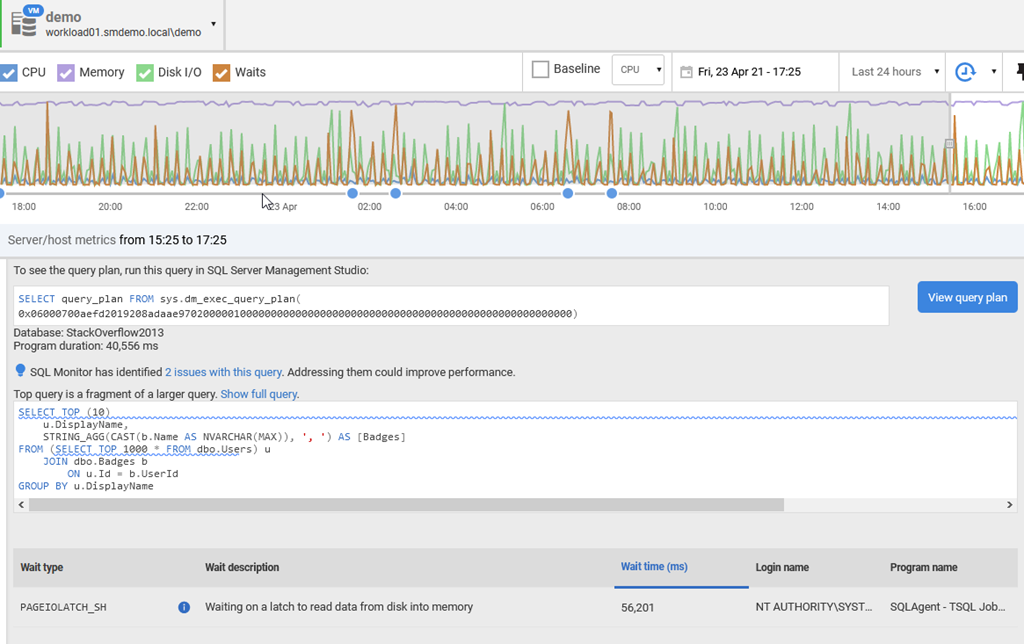
    I’ve linked to one of the workload demo systems being monitored. If you look at the top 10 queries, and pick one, you’ll see something like this:

    2021-04-23 17_26_30-demo - Server Overview — Mozilla Firefox

    Just below the query text, there is a blue lightbulb (for a new feature) and the text: SQL Monitor has identified 2 issues with this query. Addressing them could improve performance.

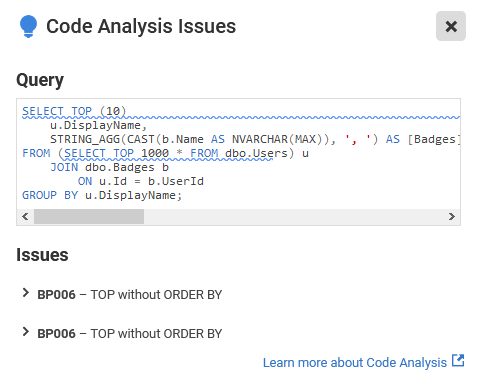
    Clicking the link gives you the issues. In this case, these are code smells that I’d want a developer to address. Having a TOP without any ordering could confuse clients, but it also might mean we are gathering the wrong data, since there isn’t a guarantee on which 10 rows come back.

    2021-04-23 17_26_41-demo - Server Overview — Mozilla Firefox 

    You can screen shot this, or send this link to developers, and ask them to fix this code for the next deployment.

    SQL Monitor has become an impressive product over the years, and with multiple teams adding to it now, it is constantly evolving to meet the needs of our customers. If you haven’t tried it, consider an evaluation before you purchase a monitoring tool (or before you build one).